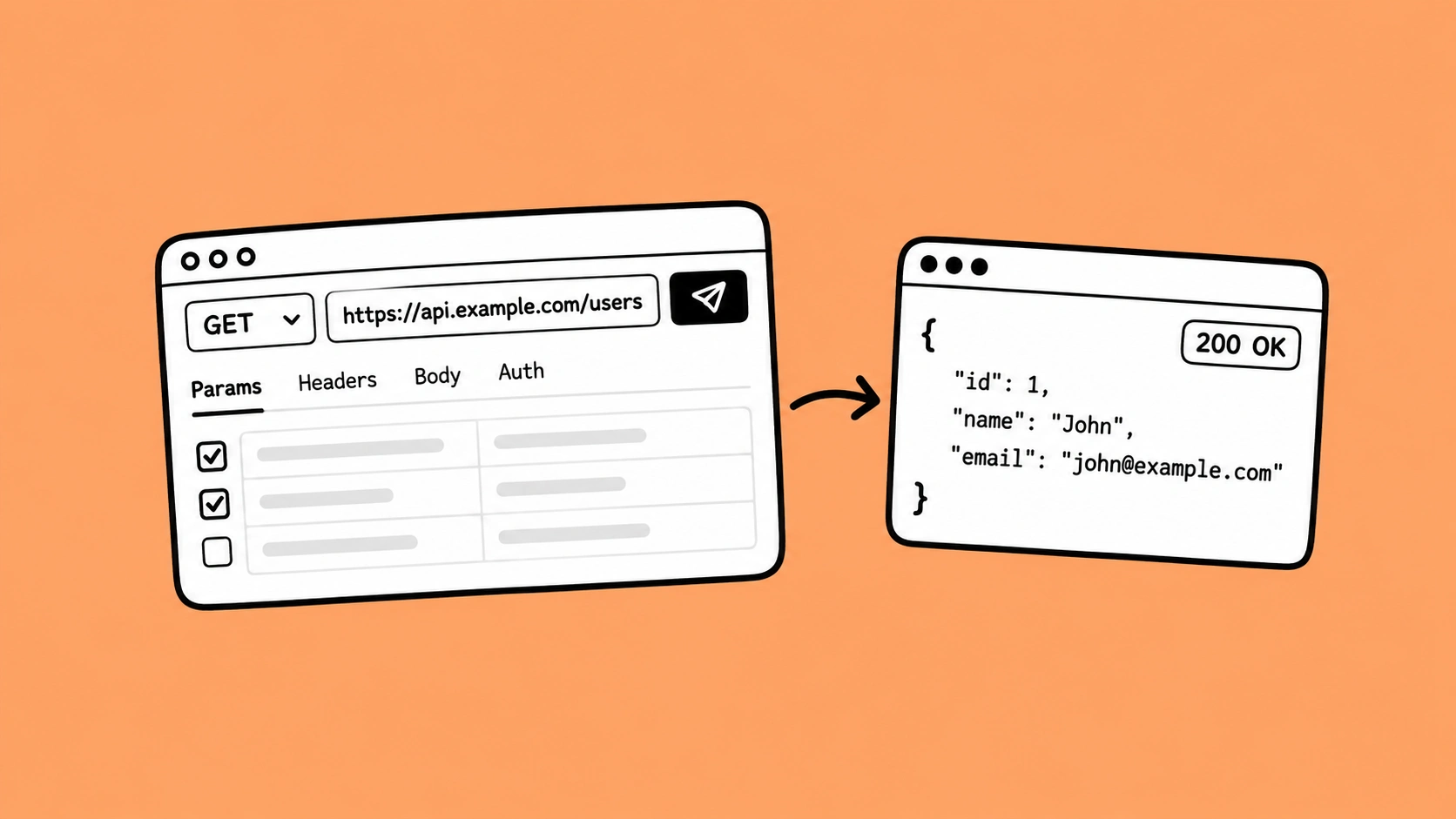
Playwright is an open-source automation framework that supports both API and UI testing in a single tool. It allows teams to send HTTP requests, validate responses, and automate workflows without relying on separate API testing tools. It also integrates easily with CI/CD pipelines for continuous testing.
APIs are everywhere now, but testing them still creates headaches for many teams. Slow runs, unstable tests, and disconnected tools are common issues.
As automation grows, teams need solutions that scale without adding more cost or complexity. AI testing is one area getting attention, but many teams also look for practical tools they can adopt quickly.
That is where Playwright stands out. It started as a browser automation tool, but now supports both API and UI testing in one place. The right choice here can save teams time and reduce maintenance later.
By the time you finish reading this blog, you will have a clear understanding of:
- Why API testing is essential in modern applications and the common challenges teams face with traditional tools
- Why Playwright is emerging as a strong choice for API test automation and how it combines UI and API testing in one framework
- How Playwright simplifies API testing through built-in features like request handling, authentication, and response validation
- How Playwright compares with paid API testing tools in terms of cost, setup, flexibility, and scalability
- Best practices, getting-started steps, and key takeaways for teams looking to improve modern API testing workflows
Understanding API Testing in Modern Applications
As applications become more service-oriented and distributed, ensuring reliable communication between distributed services is more critical than ever. API testing is very important at this point because it helps teams check how different services work together and makes sure that the whole application is reliable.
What is API Testing in Today’s Software Development Lifecycle (SDLC)
Modern applications rely on interconnected services that communicate through APIs. Because of this, API testing has become a key part of the SDLC to ensure systems interact correctly and reliably. Functional and automation testing services help maintain overall application quality.
API testing checks how well the system handles HTTP requests and gives back correct API responses, rather than looking at the user interface. It helps make sure that the backend functionality works as it should.
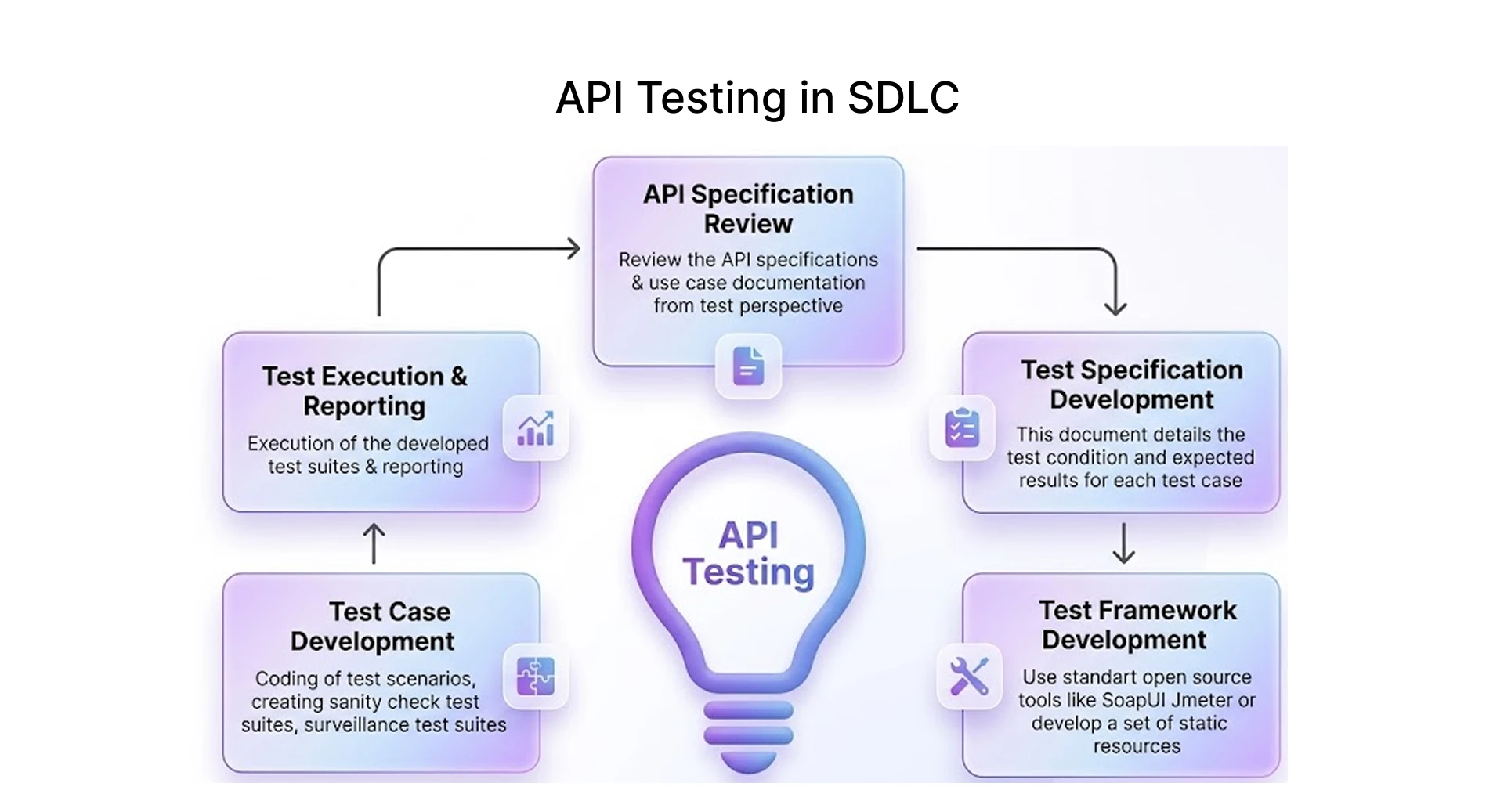
API testing is closely related to test automation in today's development workflows. In modern development workflows, teams often:
- Make test scripts that can be used again to check different situations.
- Put them in structured test suites.
- Use test data that is as close to real life as possible to mimic real-life situations.
- Run tests often to make sure you cover all the bases.
Because API tests run at the service layer rather than the interface layer, they can catch integration issues earlier and execute faster than UI tests. This makes them an efficient first layer of automated validation.
Common Challenges Teams Face When Using Traditional API Testing Tools
While most companies perform API testing, they often face challenges such as outdated tools and a lack of integrated automation frameworks. Flaky tests remain a common issue in automated testing and can impact overall test reliability if not properly managed.
These challenges create barriers when scaling automation efforts. As a result, many teams start with basic online API testing tools but eventually move toward more scalable approaches like Playwright. The most common challenges are:
- Tool fragmentation :- Various tools are used by teams in API validation, browser automation, and End-to-End Testing. This makes it difficult for teams to understand what is being done, as well as making their processes disjointed.
- Flaky tests and unreliable results :- The results from testing can vary widely if proper management of test data, unstable test environment, and poor error handling are evident.
- Scalability challenges :- It becomes hard to keep track of big groups of test scripts as the number of test cases grows without a good structure and reuse.
- Limited integration with modern workflows :- Many tools have trouble working well with CI/CD pipelines and popular CI/CD tools, which makes feedback cycles take longer.
- Higher maintenance effort :- Managing more than one tool or framework makes it harder to keep automation going over time.
Why Playwright Is Emerging as a Strong Choice for Modern API Test Automation
Playwright API testing uses the Playwright framework to automate API requests, validate responses, and run backend tests alongside UI automation. Developed by Microsoft, Playwright supports both API and UI testing in a single framework, allowing teams to manage browser automation and API validation without relying on separate tools.
Compared with tools like Postman and Rest Assured, Playwright offers a more unified workflow for teams that want to combine frontend and backend testing. Many teams value this approach because it can reduce tool switching, simplify maintenance, and improve automation efficiency.
How Playwright Supports Both API and UI Testing in One Framework
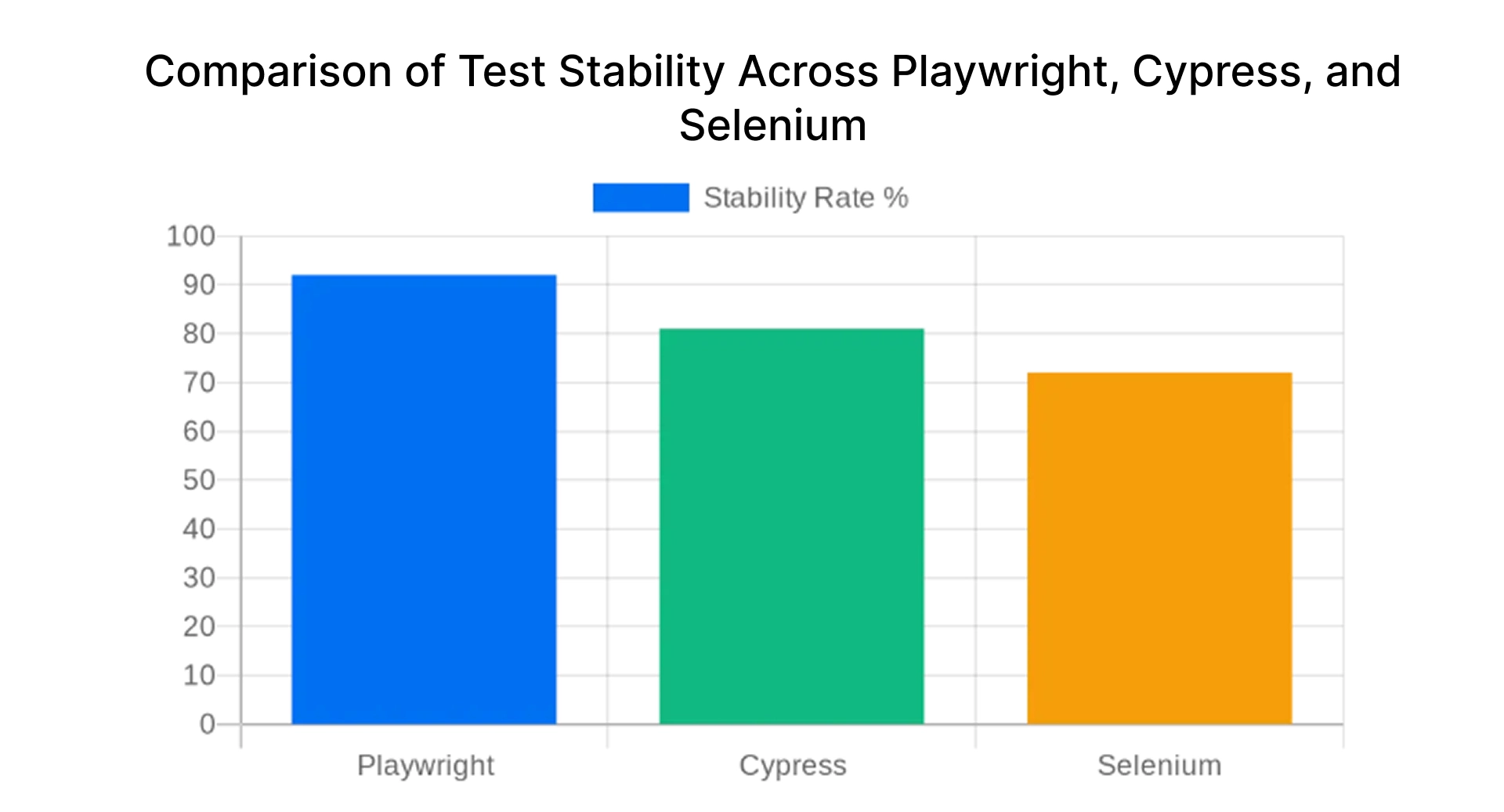
One of the greatest advantages of using Playwright lies in its capacity to conduct tests not only of the UI but also of the API. The latter will guarantee consistency in the testing procedure and also negate the need to use different tools for different tests.
Playwright allows teams to:
- Automate your browser to verify user activities instantly.
- Without using third-party technologies, send straight API calls and confirm API answers.
- Integrate UI flows with API calls to provide true end-to-end testing.
- To handle both UI and API test scripts, use a single test runner.
Key Playwright Capabilities That Enable Scalable and Maintainable API Automation
With the increasing complexity of modern applications, Playwright provides built-in capabilities that simplify automation, improve reliability, and support scalable test execution within a single framework. These capabilities help teams reduce maintenance effort while ensuring consistent and efficient test execution across environments.
Playwright’s strengths can be understood across a few key areas:
- Execution efficiency: Supports fast test runs with parallel and headless execution, making it well-suited for CI/CD pipelines where quick feedback is important.
- Debugging and stability: Provides detailed logs, traces, and execution reports that help teams quickly identify, analyze, and fix failures.
- Integration and flexibility: Works seamlessly with CI/CD tools and supports cross-browser testing without additional setup complexity. It also supports structured test design patterns like the Page Object Model, which improves maintainability, scalability, and code reusability in larger automation frameworks.
- Unified automation approach: Combines API and UI testing within a single framework, reducing the need for multiple tools and simplifying overall test architecture.
Is Playwright Good for API Testing?
Yes, Playwright is a strong choice for API testing because it supports HTTP requests, response validation, authentication handling, and CI/CD execution within a single framework. It is especially useful for teams that want to manage both API and UI automation without maintaining separate tools.
Playwright is often preferred for modern automation workflows because it combines flexibility, scalability, and lower tooling overhead compared with many paid alternatives. In real-world engineering teams, common use cases include:
- Microservices validation to verify communication and data flow between connected services.
- Payment API regression testing to confirm transaction flows continue working after releases or updates.
- CI/CD smoke tests to quickly validate critical endpoints during deployments.
- Contract validation to ensure response formats and schemas remain consistent for consuming systems.
- Backend checks triggered by UI workflows such as login, checkout, registration, or account creation.
How Playwright Simplifies API Testing Without the Need for Expensive Tools
Many teams believe that purchasing specialized, frequently costly tools is necessary for efficient API testing. In actuality, most testing requirements can be met by the built-in features of contemporary playwright frameworks without incurring additional costs or complexity.
With Playwright, there is less dependence on tools because all the processes for test automation are consolidated into one area using both API and UI testing. It has become easier to create, execute, and manage tests.
Yes, Playwright is a strong choice for API testing because it includes built-in request handling, assertions, authentication support, and CI/CD integration within a single framework. This allows teams to handle most API testing requirements without investing in separate paid tools.
By combining API and UI automation in one place, Playwright reduces tool sprawl and makes tests easier to create, execute, and maintain over time.
Built-in API Testing Capabilities Available in Playwright
Playwright includes built-in request handling that allows teams to send API calls, validate responses, and manage backend checks inside the same framework used for UI automation. This removes the need for separate API testing tools.
This is especially useful when frontend actions trigger backend processes, such as creating records, updating user data, or verifying order status. Teams can validate the full workflow without switching between multiple tools.
Teams can use its built-in capabilities to:
- Create unified test scripts: Create tests that integrate UI stages and API requests to improve End-to-End Testing without changing tools.
- Work with reusable test data: Get rid of unnecessary redundancy in your test data and make them consistent by generating or reusing them dynamically in all use cases.
- Organize tests into scalable suites: Design your tests in such a way that it becomes easy to handle an ever-growing number of test cases through test suites.
- Use a common test runner: Use a common test runner to manage both API and UI tests in a single unified workflow.
- Leverage built-in debugging support: Use logs, request/response tracking, and other debugging tools to find problems fast.
- Integrate with modern workflows: Run as part of CI/CD pipelines for continuous validation and simply integrate with pre-existing test automation frameworks.
Sending API Requests Using Different HTTP Methods
Checking how the application behaves when responding to various requests sent to its endpoints is an integral part of API testing. You can do so easily by using different HTTP methods to send requests with Playwright.
APIs are not restricted to a particular function in real-world situations. Rather, they provide a variety of operations, including data retrieval, record creation, information upgrading, and resource deletion. You can test all of these processes with Playwright by using your test scripts to send various kinds of API queries.
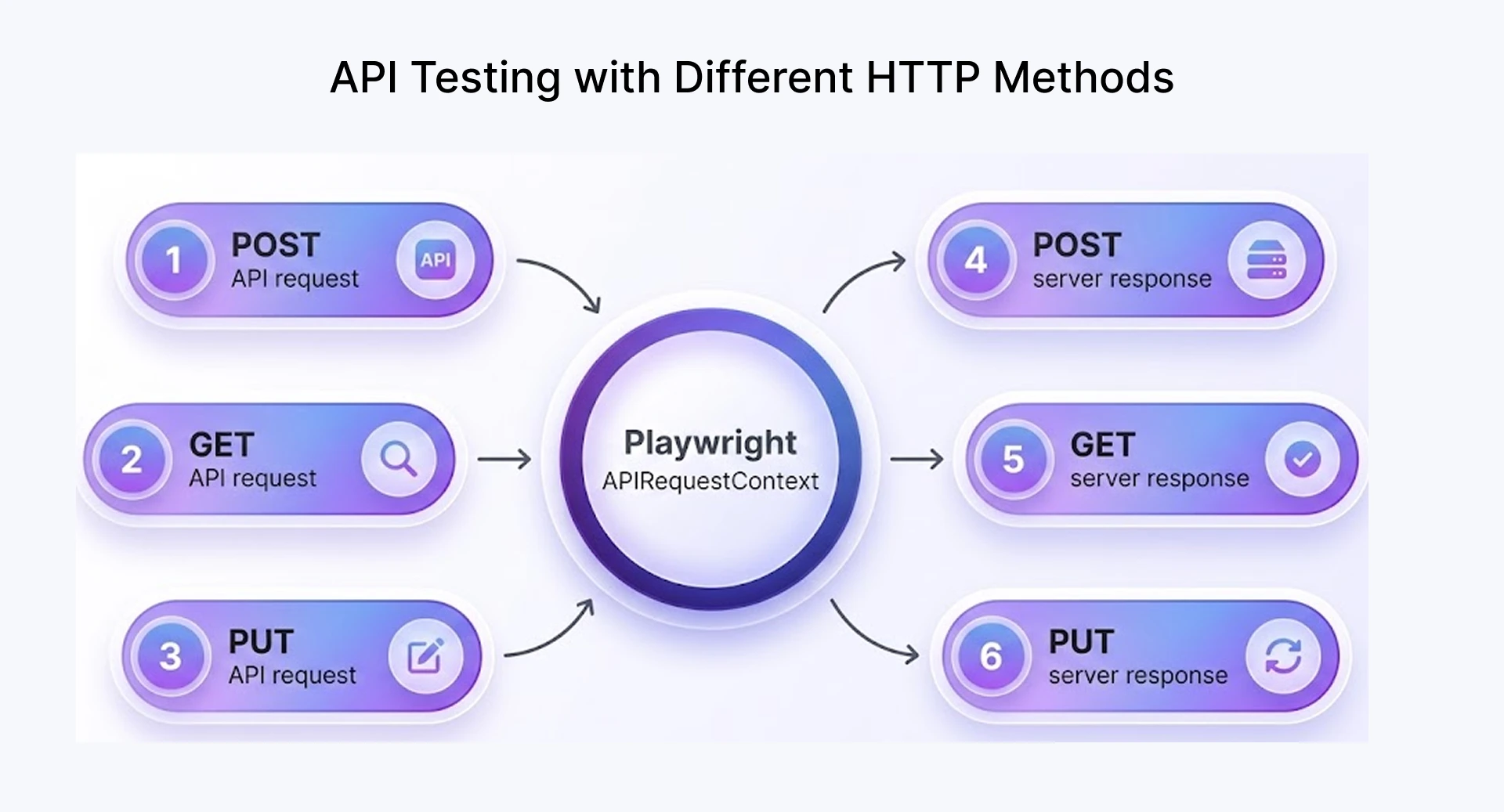
Commonly used HTTP methods include:
- GET - Retrieve data from the server and validate the returned API responses.
- POST - Send data to create new resources and verify successful creation.
- PUT / PATCH - Update existing records and confirm the changes are reflected correctly.
- DELETE - Remove resources and ensure the system handles deletion properly.
What makes this powerful is the ability to chain these requests together within a single test flow. For example, as a playwright testing tool, it allows you to:
- Create data using a POST request.
- Fetch it using a GET request.
- Update it using PUT or PATCH.
- Finally, delete it and validate the cleanup.
Additionally, Playwright allows you to:
- Pass request payloads in JSON format.
- Capture and validate response data dynamically.
- Reuse values from one request in another.
- Handle both positive and negative test scenarios effectively.
Handling Authentication, Headers, and Request Configuration Easily
Most production APIs require authentication and use headers and parameters to control access and request behavior.
Conducting reliable API tests requires proper management of request configurations, which Playwright simplifies within a single framework.
Authentication is handled using tokens such as Bearer tokens, which are passed through request headers in Playwright:
- Add an Authorization header with a token to access secured endpoints.
- Set common headers like Content-Type: application/json.
- Reuse the same configuration across multiple test cases for consistency.
For request configuration, Playwright supports:
- Passing JSON payloads for POST, PUT, or PATCH requests.
- Including query parameters directly in the request.
- Customizing headers based on environments such as dev and staging.
For example, a typical flow would be:
- Configure headers with authentication details, send the request with required payloads or parameters, and validate the response against expected results.
Validating API Responses with Powerful Assertions
Verification of the output is a very important process to follow once the API call is made. It ensures that the back end functions are working as expected, in all scenarios.
With Playwright assertions, teams can validate both the structure and content of API responses instead of checking only whether the request succeeded.
At a basic level, you should always validate:
- Status codes :- Check whether the status code is as expected (e.g., 200 for success, 201 for creation, or other error codes)
- Response body :- Verify that the returned data matches expected values or structure.
- Headers :- Check response headers when required (e.g., content type, caching rules).
Comparing Playwright with Paid API Testing Tools: Cost, Features, and Flexibility
The selection of a proper approach to test APIs will depend on some factors such as cost, flexibility, and compatibility. While using paid tools could be relatively simple, it may become more expensive and complicated later on.
In the last few years, a lot of software testing companies have switched to automation solutions like Playwright in order to optimize their processes and ensure better scalability. At the same time, Playwright is a versatile platform for automation testing, which makes it scalable.
Cost Comparison: Playwright vs Paid API Testing Tools
While doing a cost comparison, it becomes crucial to analyze the most frequently used software in the ecosystem. The API tests are normally done using software applications like Postman, Rest Assured, and Apidog, which have different costs. The table below compares Playwright against tools like Postman, Rest Assured, and Apidog across key cost, flexibility, and scalability dimensions.
Setup and Learning Curve for Testing Teams
Even though the Playwright tool makes life much easier in certain respects, it still utilizes a code-first strategy that might not be appropriate for projects where people rely extensively on graphical user interface solutions.
For teams that are new to testing code:
- Needs a basic understanding of JavaScript or TypeScript.
- Includes writing and keeping test scripts up to date.
- Setting up the first time includes installing and configuring the environment.
Once the basics are set up, though, teams can benefit from:
- Test cases that can be used again and again and are modular.
- Better organization of test suites.
- More control than tools that use a UI.
On the other hand, many paid tools are easier to use at first because they have visual interfaces. However, they may become limiting when you want to automate a lot of tests.
Step-by-Step Guide to Getting Started with API Testing Using Playwright
Even if you're new to free API automation tools, it's easy to get started with Playwright testing. Playwright is different from a lot of other test automation software because it keeps things simple while still giving you a lot of options. A good playwright tutorial helps beginners understand how to set up and start building reliable API automation quickly without depending on multiple external tools.
Installing Playwright and Preparing the Test Environment
To begin with, it is necessary to install Playwright to your system. It is a one-time installation that will act as the base for your playwright automation workflow process. It supports JavaScript, TypeScript, and Python, allowing teams to choose the language that best fits their automation setup.
Steps to get started:
- Install Node.js if it is not already available in the pipeline environment.
- To set up the browsers you need, run the playwright install command.
- Set up your project and add Playwright as a dependency.
After you install Playwright, it automatically sets up the necessary browser engines, which makes it easier to run tests without having to do anything else.
In order to get your test environment ready, you can:
- Define base URLs for APIs (dev, staging, etc.).
- Store authentication tokens securely.
- Organize folders for test files and utilities.
Creating and Executing Your First API Test
Once the setup is ready, you can start writing your first API test using Playwright. This is where things become more hands-on, and you begin to see how Playwright simplifies API automation compared to many traditional approaches. As you gain confidence, exploring more advanced Playwright examples can help you understand how to handle real-world API scenarios more effectively.
A typical API test in Playwright follows a simple flow:
- Send an API request using Playwright’s built-in request context.
- Capture the response returned by the server.
- Validate the result using assertions.
What makes this easier in Playwright is that you don’t need separate api tools; everything is handled within the same framework used for Playwright testing.
Basic example (conceptual using Playwright):
- Use Playwright to send a GET request to an endpoint.
- Check the response status (e.g., 200 OK).
- Validate important fields in the response body.
Understanding Test Execution Results and Reports
Once your tests are executed, understanding the results is key to identifying issues quickly and improving overall test reliability. One of the advantages of Playwright testing is the clarity and detail it provides in test outputs.
When you run your tests, Playwright gives immediate feedback through:
- Console output
Shows which tests passed or failed, along with clear error messages. - Step-level logs
Helps track what happened during each step of the test. - Detailed failure insights
Pinpoints exactly where and why a test failed.
Playwright also includes built-in reporting features that make analysis much easier compared to many traditional api tools.
You can use:
- HTML report :- A structured test report that shows results, execution time, and failure details.
- Video recordings :- Capture test execution to visually understand failures.
- DOM snapshots :- Useful for UI-related debugging when tests involve both API and frontend flows.
- Trace viewer (advanced debugging) :- Allows you to replay test execution step-by-step.
Integrating Playwright Tests into CI/CD Pipelines
The purpose of integrating Playwright into your CI/CD workflow is to make sure that tests are executed automatically whenever changes are made to the code. This guarantees that your API and UI validations are always current and helps to maintain consistency. Below is the process for integrating Playwright tests into CI/CD pipelines.
1. Install dependencies in the pipeline
- Install Node.js. (if not already available)
- Install project dependencies.
- Run playwright install to set up required browsers.
2. Add test execution command
- Configure your pipeline to run tests using:
npx playwright test - Run tests in headless mode for faster execution.
- Trigger execution on commits or pull requests.
3. Configure environment variables
- Set API base URLs, authentication tokens, and configs.
- Manage separate configurations for dev, staging, and production environments.
4. Enable reporting
- Generate HTML reports after execution.
- Store reports as pipeline artifacts.
5. Handle failures
- Fail the pipeline if critical tests fail.
- Use logs and reports for debugging.
Best Practices to Follow When Performing API Testing with Playwright
In order to take full advantage of Playwright, there are some best practices that should be kept in mind. They are instrumental in making tests more reliable, easier to maintain, and scalable as your application becomes larger. Nevertheless, even badly written tests have the potential to become difficult to maintain.
- Structure your tests clearly: Organize related test cases into logical test suites and keep your test scripts small and focused.
- Manage test data efficiently: Use reusable test data, avoid hardcoding values, and maintain separate configurations for different test environments.
- Write strong and reliable assertions: Validate status codes, key fields in API responses, and include edge cases like invalid or malformed data.
- Reuse common logic: Centralize authentication, headers, and request configurations to reduce duplication across tests.
Key Takeaways: How Playwright Transforms Modern API Testing
Playwright helps teams avoid maintaining separate tools for API and UI testing by bringing both workflows into one framework. For organizations paying per-user licensing fees on tools such as Postman or similar platforms, this can reduce software costs over time. The trade-off is that Playwright follows a code-first approach, so teams need basic JavaScript or TypeScript skills to use it effectively.
Accelerate Cost-Effective API Testing with Frugal Testing
Frugal Testing helps engineering teams move away from expensive enterprise testing tools by adopting open-source automation frameworks like Playwright, while still maintaining coverage across API, UI, and CI/CD pipelines.
When applied in real-world automation engagements, a common pattern observed is the shift from fragmented API testing tools to unified frameworks like Playwright. This helps teams reduce maintenance effort, simplify CI/CD integration, and manage both API and UI testing within a single framework.
Based on Frugal Testing’s automation testing engagements, many engineering teams moving from fragmented Postman-based workflows to unified frameworks like Playwright aim to reduce recurring tooling overhead, simplify CI/CD execution, and lower long-term test maintenance effort by managing API and UI automation in one place.
By using Playwright, teams can focus on building effective test coverage without relying heavily on multiple paid tools.
FAQs (People Also Ask)
Q1.Which API types and protocols are best suited for Playwright-based testing?
Ans: Playwright is best suited for testing REST APIs using standard HTTP methods like GET, POST, PUT, and DELETE. It is commonly used for validating JSON-based services and backend endpoints that follow typical web communication patterns.
Q2.How can testers manage environment variables and configurations in Playwright API tests?
Ans: Testers can manage environment variables in Playwright to store base URLs, authentication tokens, and credentials, enabling separate test environments without changing core test code.
Q3.What is the best way to handle authentication tokens and session management in Playwright API tests?
Ans: Authentication tokens in Playwright can be handled by passing them through request headers and reusing them across multiple test scripts. Storing tokens securely and centralizing authentication logic also helps manage sessions efficiently while maintaining consistency and reducing duplication.
Q4.How does Playwright support API mocking and request interception during test execution?
Ans: Playwright supports API mocking through network interception, allowing testers to capture, modify, or simulate API calls during execution. This helps isolate dependencies and test scenarios without relying on external services.
Q5.What debugging options are available when API tests fail in Playwright?
Ans: When API tests fail in Playwright, the primary debugging options are detailed logs, HTML reports, and trace viewers. These tools help identify issues in API responses and pinpoint exactly where the test execution failed.

.webp)