


CI/CD pipelines combined with QA automation services allow software teams to catch bugs earlier, deploy more frequently, and reduce release failures by automating builds, testing, and deployment across every stage of the software delivery cycle.
Software teams are under constant pressure to ship faster without breaking things. CI/CD pipelines and QA automation services make that possible by removing the manual bottlenecks that slow down every release cycle.
Understanding CI/CD and Why It Matters in Modern Software Development
Software teams today ship code faster than ever before but speed without structure leads to broken releases and frustrated users. That is exactly the problem CI/CD was designed to solve.
What CI/CD Means and Why Businesses Rely on It Today
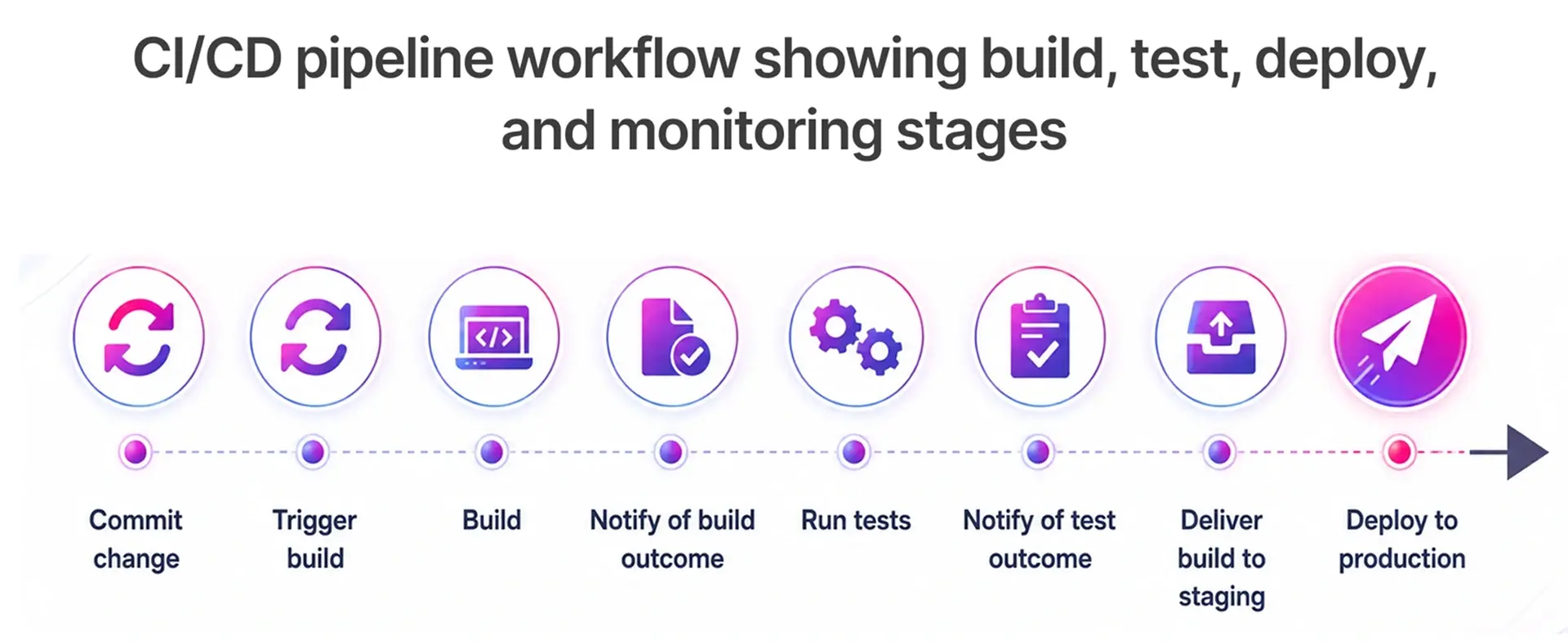
CI/CD stands for continuous integration and continuous deployment. It is a set of practices that automate the process of building, testing, and releasing software so teams can deliver updates reliably and frequently. Rather than waiting weeks for a big release, teams merge code daily and let the pipeline handle validation automatically.
According to DORA research published by Google Cloud, elite engineering teams deploy code significantly more frequently and recover from failures much faster than low-performing teams. That gap exists largely because of how effectively those teams integrate CI/CD and automation into their engineering culture.
How Continuous Integration and Continuous Deployment Work Differently
Continuous integration focuses on the development side. Developers push code changes to a shared code repository multiple times a day, and automated builds and tests run immediately to catch conflicts or failures early. The goal is to keep the main branch in an always-deployable state.
Continuous deployment takes things further. Once code passes all tests in the CI stage, it automatically moves through staging and into production without manual intervention. Some teams use continuous delivery instead, where the pipeline stops just before production and requires a human approval step. Both approaches dramatically reduce the time between writing code and delivering value to users.
Key Business Benefits: Faster Releases, Lower Costs, and Higher Software Quality
The business case for CI/CD pipelines is straightforward. Faster feedback loops mean bugs are caught within minutes rather than days. Smaller, incremental releases reduce the risk of large-scale failures. And because automation handles repetitive tasks like building, testing, and deploying, engineering teams spend more time building features and less time firefighting.
Organizations adopting mature CI/CD practices consistently report faster deployment lead times and fewer release failures, according to Puppet's State of DevOps research. For growing businesses, this kind of efficiency has a direct impact on both product quality and revenue.
How DevOps, CI/CD, and QA Automation Work Together as One System
DevOps is the culture and philosophy. CI/CD is the technical implementation. QA automation is the quality engine running inside the pipeline. None of these three works at full potential without the others.
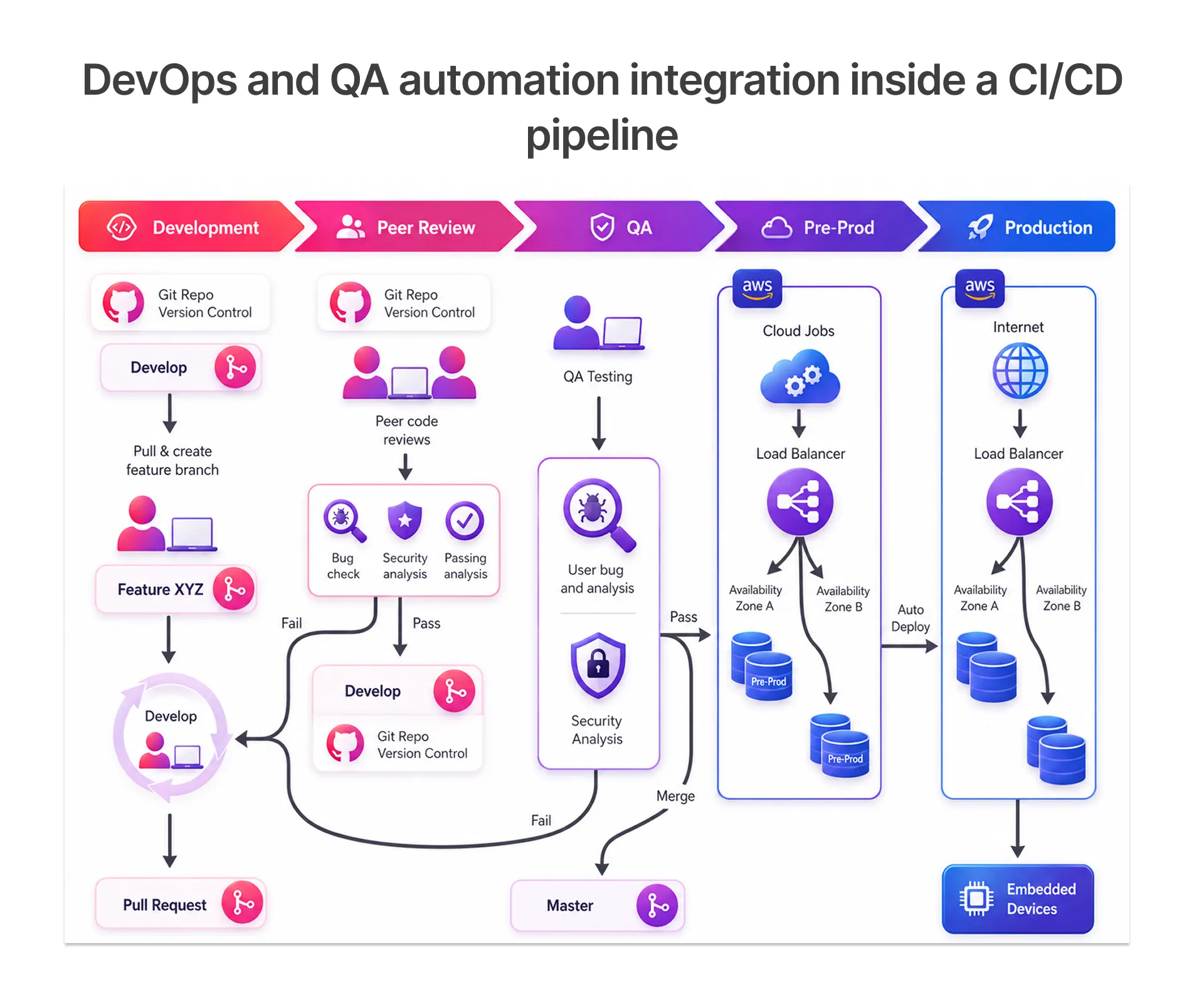
When DevOps teams embed automated tests into every stage of the CI/CD pipeline, they create a continuous testing loop that catches bugs early, provides fast feedback to developers, and builds confidence in every release. This is why leading companies treat DevOps automation and test automation not as separate initiatives but as one integrated system.
Breaking Down the CI/CD Pipeline: From Code Commit to Production
Understanding what actually happens inside a CI/CD pipeline helps teams identify where things slow down and where quality can be improved.
CI vs CD: Clearing Up the Confusion with a Real-World Workflow Example
Imagine a developer on a SaaS product team pushes a bug fix to GitHub. The moment that code hits the repository, the CI stage kicks off. The pipeline pulls the latest code, compiles it, runs unit tests and integration tests, and reports back within minutes. If everything passes, the CD stage takes over, packaging the application, running system tests, and deploying to a staging environment. With continuous deployment, the code goes live automatically. With continuous delivery, a team lead reviews and approves the push to production.
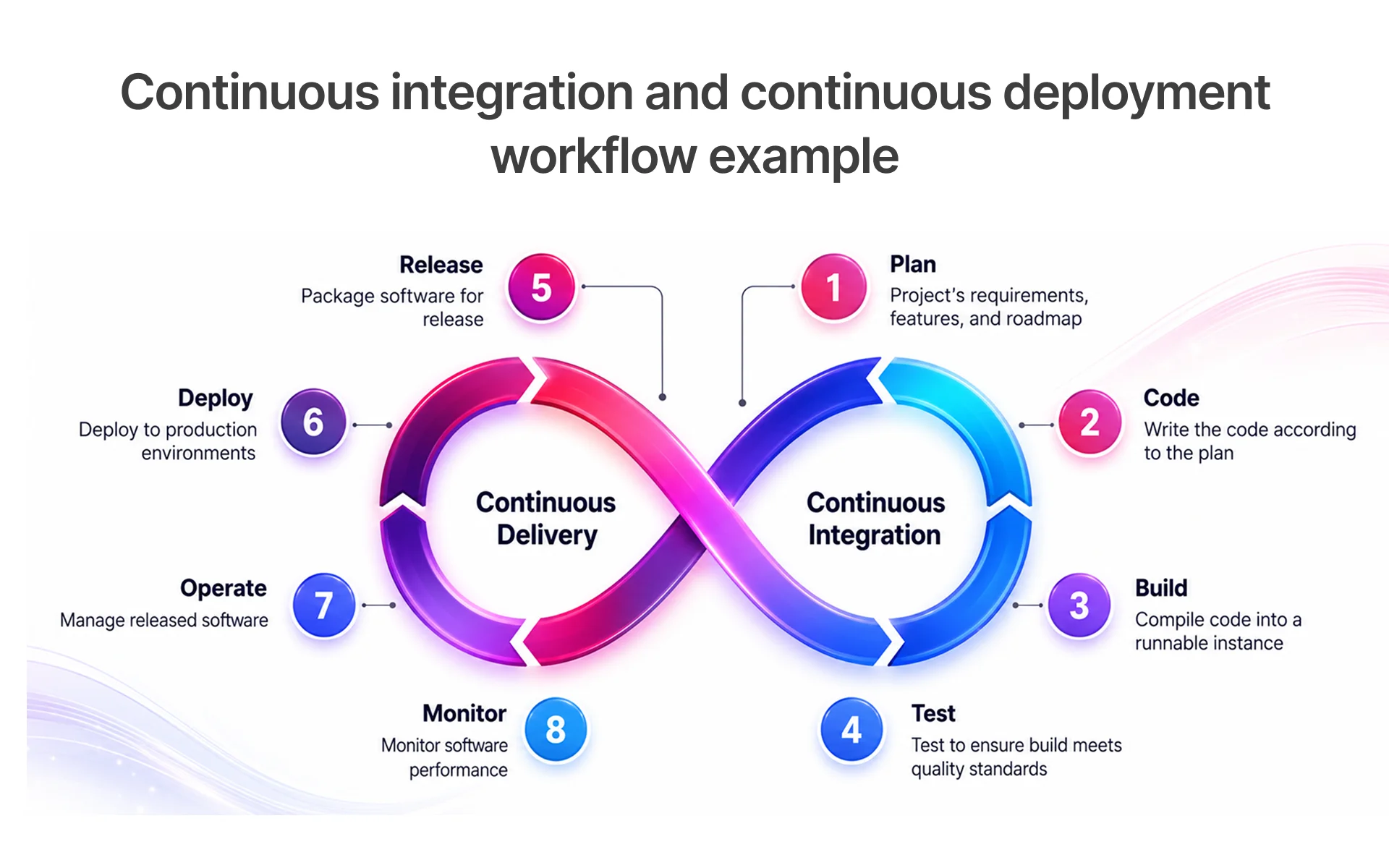
This workflow keeps the entire team aligned, reduces merge conflicts, and ensures that broken code never reaches real users.
Why Automation Is Essential for Scalable and Reliable DevOps Pipelines
Manual testing and deployment simply do not scale. As a codebase grows and teams expand, the number of test cases needed to validate each release increases exponentially. Running those tests by hand introduces delays, inconsistencies, and human error. DevOps automation removes that bottleneck entirely by executing thousands of tests in parallel, often in minutes.
Tools like Jenkins, GitHub Actions, and GitLab CI have become the backbone of modern DevOps pipelines precisely because they make this kind of automation accessible and configurable for teams of all sizes.
Common Pipeline Bottlenecks and What Causes Them
Even well-designed pipelines run into problems. The most common bottlenecks include slow test suites that add too much wait time between code commits and feedback, poorly configured build environments that create inconsistent results, and insufficient test data management that causes tests to fail unpredictably. Flaky tests, in particular, erode trust in the entire automation strategy. When developers start ignoring test failures because they assume the test is the problem rather than the code, the entire quality assurance layer loses its value.
Popular CI/CD Tools and DevOps Technologies Used by Modern Teams
Choosing the right tools is one of the most important decisions a DevOps team makes. The ecosystem is large, and each tool has specific strengths.
Jenkins, GitHub Actions, and GitLab CI: Key Differences and Use Cases
Jenkins is one of the most widely deployed CI/CD tools in the world. Its open-source plugin ecosystem makes it adaptable to almost any stack, and teams running Java-heavy or enterprise architectures tend to prefer Jenkins pipelines for their flexibility. The trade-off is that Jenkins requires a dedicated Jenkins server and ongoing maintenance.
GitHub Actions is built directly into GitHub, making setup fast for teams already on that platform. A GitHub workflow can be configured in minutes, runners are managed by GitHub itself, and GitHub actions pricing scales by usage. GitHub Actions tutorial resources are widely available, which flattens the learning curve for new adopters.
GitLab CI is the CI/CD engine embedded inside GitLab's platform. It suits teams that want their source control management, issue tracking, and CI/CD pipelines in one place, without stitching together separate tools.
Each CI/CD tool offers different strengths depending on your team's workflow, scalability needs, and existing DevOps ecosystem.
Essential DevOps Technologies That Support Automation and Scalability
Beyond CI/CD tools, modern DevOps stacks rely on Docker for packaging applications into consistent, portable images. Kubernetes handles orchestration at scale. Terraform brings infrastructure as code into the picture. Monitoring platforms like Datadog CI Visibility give teams visibility into pipeline health, test results, and deployment performance in real time. Together, these DevOps technologies form the foundation of a scalable and observable delivery system.
How Frugal Testing Supports CI/CD and DevOps Transformation
Frugal Testing brings specialized expertise to teams navigating CI/CD adoption and DevOps transformation. Rather than offering generic automation scripts, Frugal Testing works alongside engineering teams to design pipelines that fit their specific architecture, whether that is a monolith moving to microservices or a greenfield SaaS product. In Frugal Testing's CI/CD integration engagements, teams moving from manual regression testing to automated CI-stage validation consistently reduced deployment lead times by 40–60% within the first two sprint cycles. Teams also reduced environment-related test failures by more than 60% through improved test data isolation and environment standardization practices.
How QA Automation Services Integrate with the CI/CD Pipeline
QA automation is not something that sits beside the CI/CD pipeline. Done right, it lives inside it.
Why Automation Testing Is Critical in Continuous Integration Workflows
Every time a developer commits code, the pipeline needs to verify that nothing broke. Manual testing at that frequency is impossible. Automation testing fills that role by running a curated set of tests on every push, giving developers near-instant feedback. This continuous integration testing loop is what allows teams to move fast without accumulating technical debt or shipping defects.
Types of Automated Testing in CI/CD: Unit, Integration, System, and Regression
A mature CI/CD pipeline incorporates multiple layers of testing. Unit tests validate individual functions and classes, running first because they are fast and cheap to execute. Integration tests verify that components communicate correctly with each other and with external services like databases or APIs. System tests run against a fully assembled environment to catch end-to-end failures. Regression tests check that new changes have not broken existing functionality. Each layer catches a different class of defect, and together they form comprehensive test suites that protect software quality at every stage.
Popular QA Automation Tools: Selenium, TestNG, JUnit, and More
Selenium remains one of the most popular tools for GUI testing and browser-based automation. TestNG and JUnit are widely used for unit and integration testing in Java applications. For API testing services, tools like Postman and RestAssured are common. Newer platforms like Provar Automation serve Salesforce environments specifically, while CloudBees CI extends Jenkins capabilities for enterprise teams. Frugal Testing's engineering team has hands-on experience across this entire ecosystem, helping clients select and configure the right stack for their context.
Best Practices for Building an Efficient CI/CD and QA Automation Strategy
Having the right tools is only half the equation. The other half is how you use them.
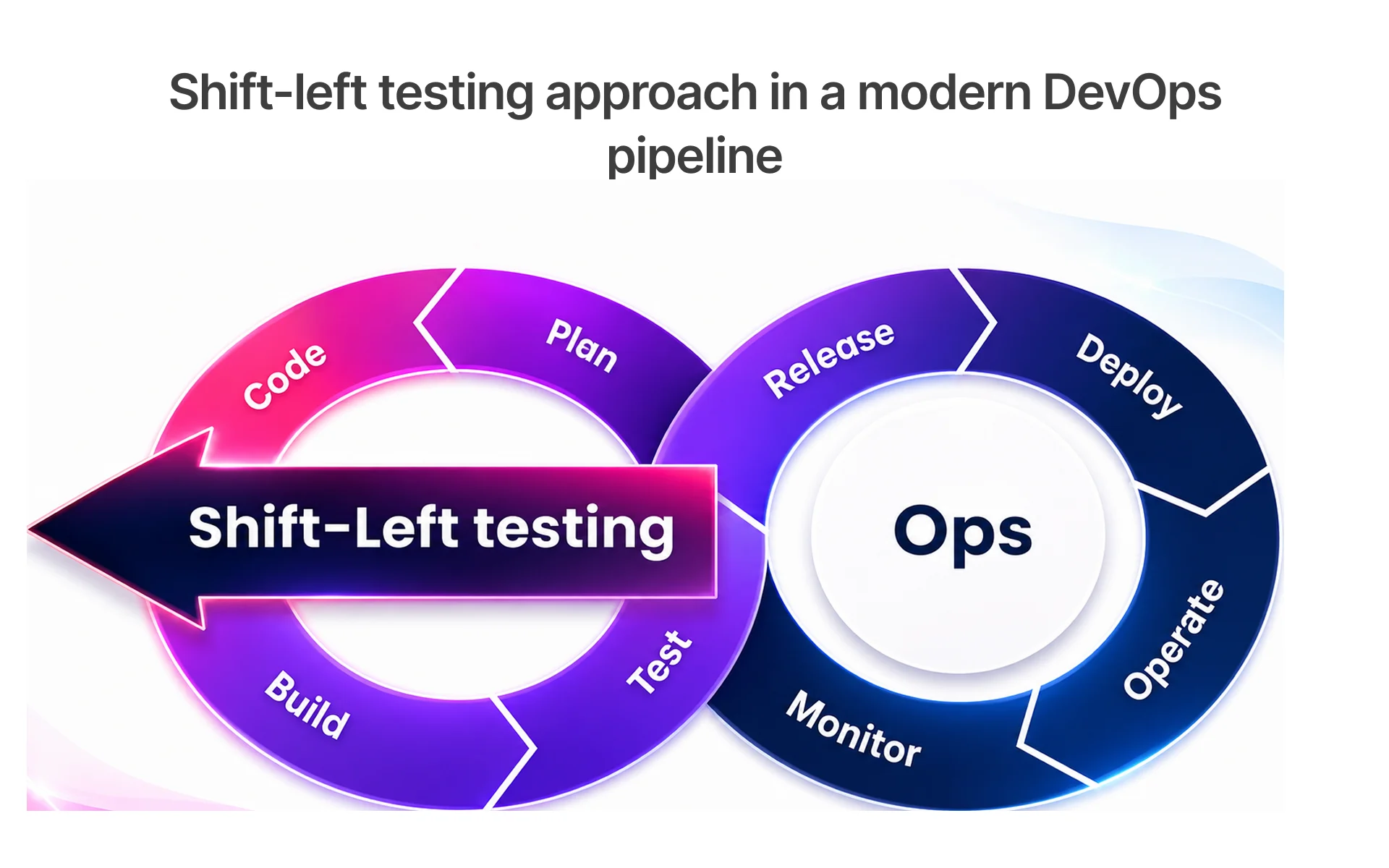
Shift-Left Testing: Catching Defects Earlier in the Pipeline
Shift-left testing means moving quality checks as early in the development process as possible. Instead of running regression tests only at the end of a sprint, developers run automated tests locally and in the CI stage before code is even reviewed. Static code analyzers catch formatting issues and potential bugs at the point of commit. This approach dramatically reduces the cost of fixing defects, since a bug caught in development costs far less to fix than one caught in production.
Implementing DevSecOps for Secure and Compliant Software Delivery
Security cannot be an afterthought in modern software delivery. DevSecOps integrates security scanning directly into the CI/CD pipeline using DevSecOps tools that check for vulnerabilities in dependencies, container images, and configurations. Teams that adopt this approach catch security issues at the same velocity they catch functional bugs. For industries like banking and finance, this level of continuous compliance is not optional.
Continuous Monitoring and Feedback Loops for Ongoing Improvement
Even after code reaches production, the work is not done. Continuous monitoring through platforms like Datadog CI Visibility ensures teams can detect performance regressions, failed deployments, or anomalous behavior immediately. Feedback loops that flow back into the development process, whether through automated alerts, dashboards, or sprint retrospectives, create a culture of ongoing improvement that separates high-performing DevOps teams from the rest.
Common Challenges in CI/CD and QA Automation and How to Solve Them
Most teams hit the same set of obstacles when building out their automation strategy. Knowing them in advance makes them much easier to navigate.
Frequent CI/CD Implementation Mistakes and How to Avoid Them
One of the most common mistakes is treating CI/CD as a one-time setup rather than an evolving system. Pipelines that are configured once and never revisited accumulate outdated steps, redundant tests, and configuration drift. Another common mistake is skipping environment parity, where the staging environment does not match production closely enough to catch real-world failures. Teams that invest early in standardizing build environments, often using Docker images, avoid a significant class of "works on my machine" failures.
Managing Flaky Tests and Improving Automation Reliability
Flaky tests are tests that pass sometimes and fail other times without any code change. They are one of the most corrosive problems in automated testing because they erode confidence in the entire test suite. The solution is a combination of better test isolation, improved test data management, and tooling like AI-driven self-healing scripts that can automatically detect and adapt to minor UI or environment changes. Frugal Testing's automation engineers actively help clients identify and remediate flaky tests as part of ongoing QA automation services engagements.
Managing Test Data and Environments Across CI/CD Workflows
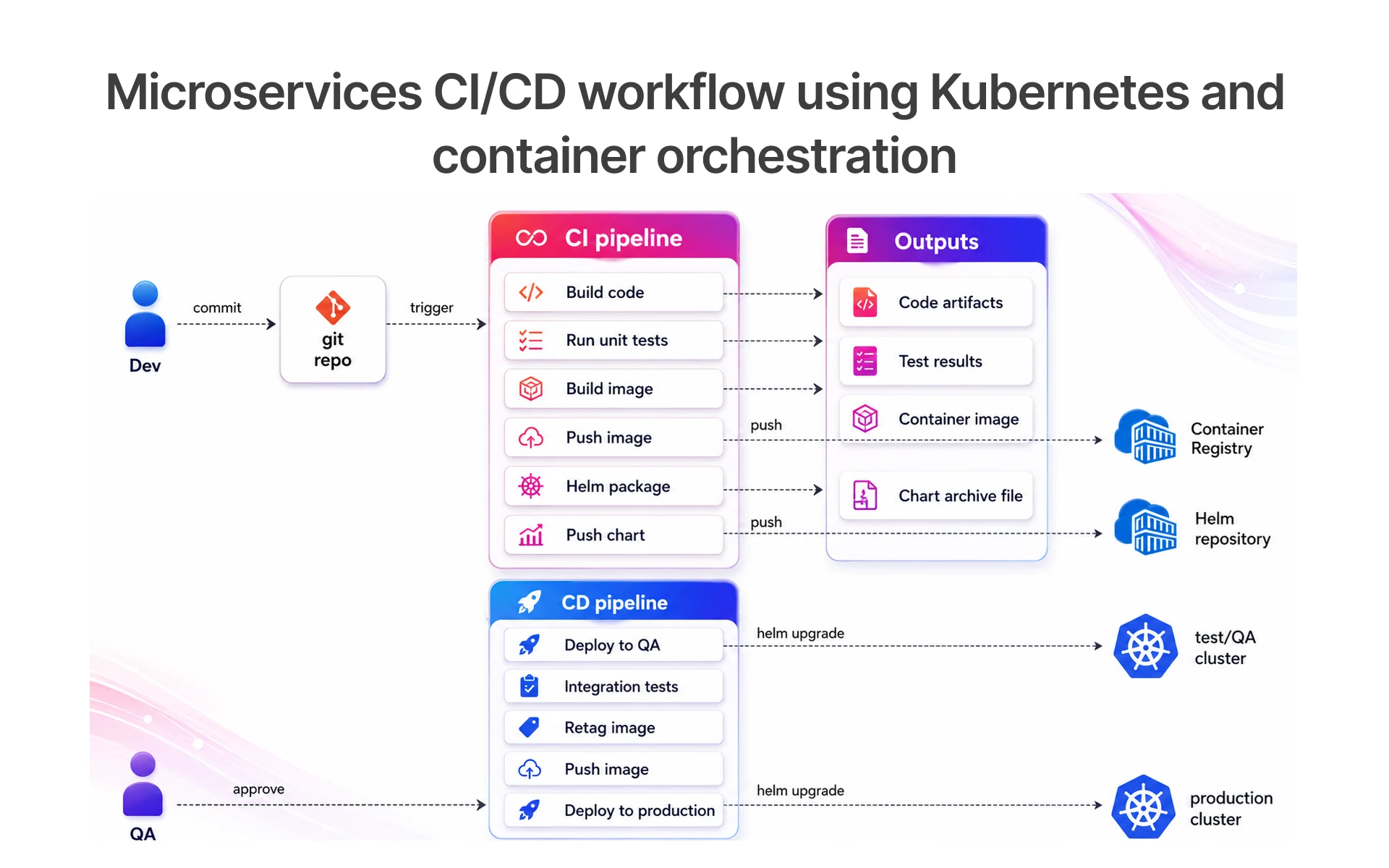
Test data management is often overlooked until it becomes a serious bottleneck. Tests that depend on shared databases or static fixtures break when that data changes or gets corrupted. Modern teams address this by provisioning test environments on demand using infrastructure-as-code tooling, ensuring each test run starts from a clean, consistent state. This is especially important in microservices architectures where multiple services need to be tested together.
Scaling CI/CD Automation Across Microservices and Distributed Systems
As applications grow from monoliths into distributed systems, the CI/CD pipeline needs to grow with them. Parallel testing becomes essential for keeping pipeline run times manageable. Orchestration platforms like Kubernetes help manage the complexity of spinning up test environments for multiple services simultaneously. Teams that plan for this scaling early, rather than retrofitting it later, avoid a painful period of instability as their architecture evolves.
Emerging Trends Shaping the Future of CI/CD and QA Automation
The CI/CD and QA automation landscape is changing rapidly, driven by advances in artificial intelligence and shifts in how teams approach development.
AI-Powered Test Generation and Self-Healing Automation in Modern Pipelines
AI is beginning to change how teams write and maintain tests. Platforms like BaseRock AI and tools using ML engine technology can analyze application code and automatically generate test cases, dramatically reducing the manual effort required to achieve high coverage. Self-healing tests use machine learning algorithms to detect when a UI element or API endpoint has changed and automatically update the test to match, reducing the maintenance burden that has historically made large automation suites expensive to maintain.
Predictive Analytics and Intelligent Monitoring in CI/CD Pipelines
Predictive testing uses historical pipeline data to identify which tests are most likely to fail given a specific set of code changes. Rather than running the entire test suite on every commit, intelligent monitoring systems prioritize the tests most relevant to what changed. This reduces pipeline execution time and provides faster feedback to developers. Tools incorporating Datadog CI Visibility and similar observability platforms are beginning to offer this kind of intelligence as a built-in feature.
Low-Code and No-Code Automation Platforms: Benefits and Limitations
Low-code and no-code automation platforms like UiPath and Provar Manager are making test automation accessible to team members who are not professional developers. Business analysts and QA engineers without deep programming backgrounds can build and maintain automation scripts through visual interfaces. The trade-off is flexibility: low-code tools work well for structured, repeatable workflows but often struggle with complex edge cases or highly custom application behavior that requires full programming capability.
Conclusion: Building Faster, Smarter, and More Reliable Software Delivery Pipelines
CI/CD and QA automation are no longer optional for teams that want to compete on software quality and delivery speed. They are the foundation of modern software engineering.
Key Takeaways: What Great CI/CD and QA Automation Look Like in Practice
Great CI/CD pipelines are fast, reliable, and observable. They run automated tests at every stage, from unit tests on commit to regression testing before production. They integrate security scanning through DevSecOps practices. They use continuous monitoring to catch issues the moment they appear. And they are treated as living systems that evolve alongside the codebase they serve.
How Frugal Testing Helps Businesses Streamline CI/CD and QA Automation
Frugal Testing combines deep expertise in automation testing, CI/CD pipeline design, and DevOps best practices to help engineering teams build delivery systems that actually work at scale. Whether you are setting up your first Jenkins pipeline, migrating to GitHub Actions, or scaling QA automation across a microservices architecture, Frugal Testing's team provides the hands-on guidance and automation testing services to get there faster. For teams ready to move beyond fragile, manual processes and build software delivery pipelines they can trust, Teams building or modernizing their CI/CD and QA automation pipelines can work with Frugal Testing to accelerate delivery, reduce pipeline instability, and ship software with greater confidence from day one.
People Also Ask (FAQs)
Q1. How much does it cost to set up a CI/CD pipeline?
Ans: The cost depends on the tools and infrastructure used. Small and mid-sized teams typically spend between $200 and $1,000 per month, including cloud hosting and CI/CD tools like Jenkins, GitHub Actions, or GitLab CI.
Q2. Can CI/CD pipelines work with legacy applications?
Ans: Yes. Teams usually start by automating builds and gradually add testing and deployment automation. Using Docker and phased modernization helps legacy systems adapt to CI/CD workflows more effectively.
Q3. How do teams measure the success of a CI/CD implementation?
Ans: Teams measure the success of a CI/CD implementation using DORA metrics such as deployment frequency, lead time for changes, change failure rate, and recovery time.
Q4. What skills are important for working in a CI/CD environment?
Ans: Working in a CI/CD environment requires skills in Git, automated testing, pipeline configuration, Docker, and tools like Selenium, Cypress, Jenkins, or GitHub Actions.
Q5. How does CI/CD differ for web, backend, and mobile applications?
Ans: Backend pipelines mainly focus on builds and deployments, while web applications include frontend and browser testing. Mobile CI/CD is more complex because it requires app signing, device testing, and app store distribution workflows.

.webp)


.webp)
