



The Unity Engine developed by Unity Technologies enables thousands of high-performance applications which range from indie mobile games to AAA console games. Real-time application development requires reliable performance testing because developers create applications that they expect to function under extremely heavy usage conditions. Reliability testing through stress testing and performance testing and unity performance testing establishes dependable system performance for worldwide implementations.
Key Topics Covered in This Blog:
- Unity stress testing methodologies and performance validation strategies
- CPU stress test and GPU stress test processes
- Distributed load simulation infrastructure
- Engine subsystem performance isolation using Unity Profiler
- High-concurrency environment replication for multiplayer games
Unity achieves dependable game engine operation through its combination of advanced unity stress test methods and automated telemetry and scalable cloud environments. Frugal Testing provides assistance to companies by developing enterprise-grade testing methods which improve their testing capabilities and operational stability and user satisfaction in contemporary game development environments.
Core Architecture Behind Unity’s Stress Testing Framework
Unity’s stress testing architecture ensures performance stability across distributed environments. The game engine Unity must handle diverse workloads including physics simulation, rendering, AI logic, and networking simultaneously.
Key Architectural Components:
- NUnit Integration: The foundation for organizing, running, and asserting test results, extended for Unity's specific environment.
- Edit Mode Tests: Run in the editor to validate editor extensions or pre-play mode configurations, acting on the EditorApplication.
- Play Mode Tests: Run at runtime, allowing simulation of gameplay, AI, or rendering load. These tests can yield null to wait for a frame, or new WaitForSeconds() to stress-test specific time durations.
- Test Runner Window: The graphical user interface tool provides functionalities for test management and execution and test result examination.
This architecture allows Unity developers to optimize performance early in the development lifecycle. By implementing structured unity scalability validation, Unity ensures reliable performance even under extreme concurrency scenarios.
Distributed Load Simulation Infrastructure
Distributed load simulation is essential for validating the performance of the unity development engine across global environments. Unity uses scalable infrastructure that simulates thousands of developers and users simultaneously interacting with the engine.
- Cloud-based nodes simulate concurrent workloads across regions
- Apache JMeter supports large-scale performance testing scenarios
- JMeter performance testing replicates multiplayer and rendering workloads
- Pingdom speed test validates response times and availability
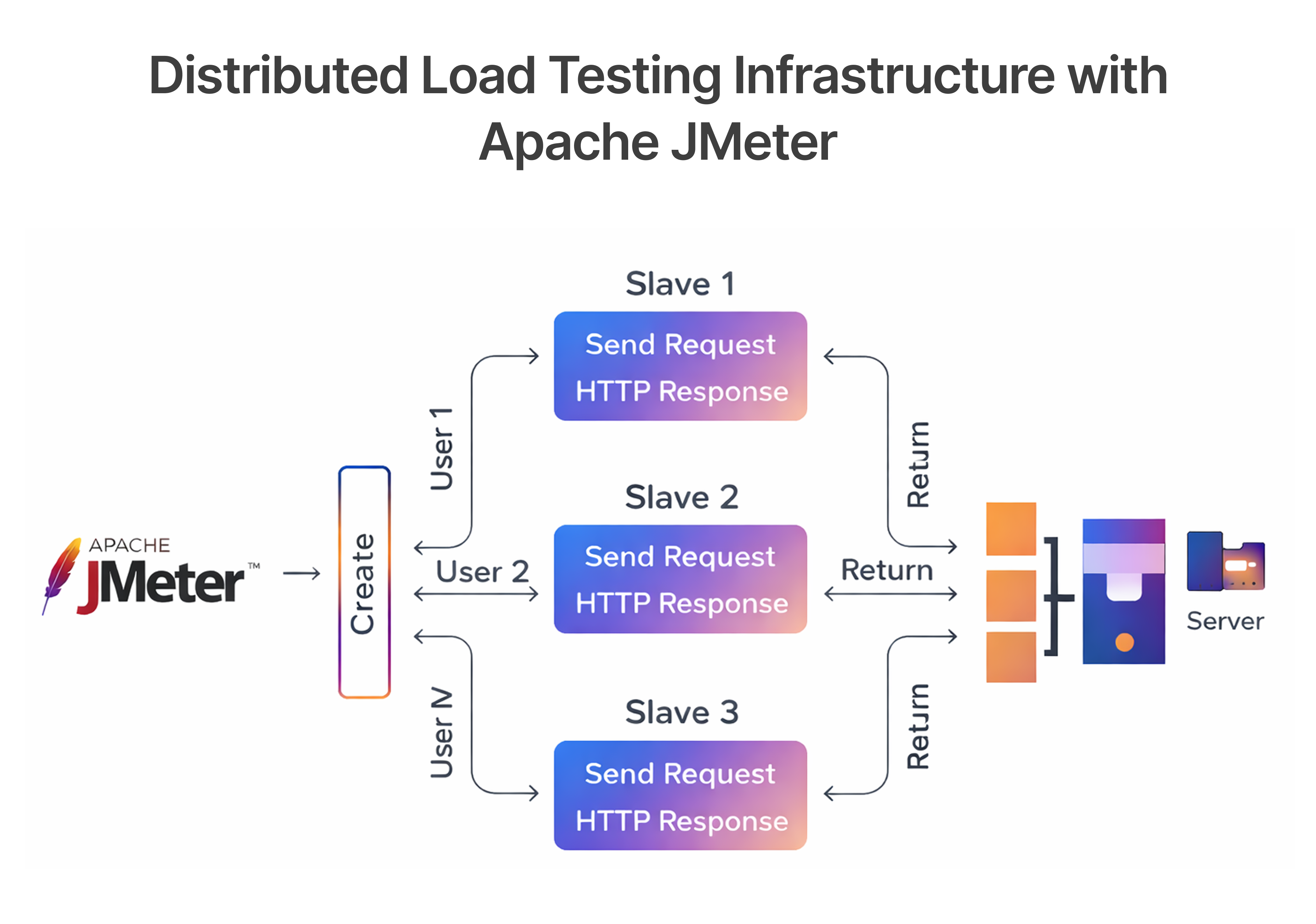
This infrastructure ensures accurate scalability validation for cross-platform game development. It allows Unity developers to identify bottlenecks early and optimize system performance for global deployments.
Engine Subsystem Performance Isolation
Subsystem isolation enables developers to test individual components of the Unity 3D, Unity 2D, and rendering pipelines independently. This approach improves accuracy in identifying performance bottlenecks.
- Unity Profiler tracks CPU usage, memory allocation, and rendering performance
- Frame Debugger analyzes GPU Occlusion Culling and rendering pipeline behavior
- GPU stress test identifies rendering performance issues
- CPU stress test validates physics and scripting performance
By isolating subsystems, Unity ensures performance stability across rendering, physics, and scripting environments. This improves unity optimization and enhances overall engine reliability.
High-Concurrency Environment Replication
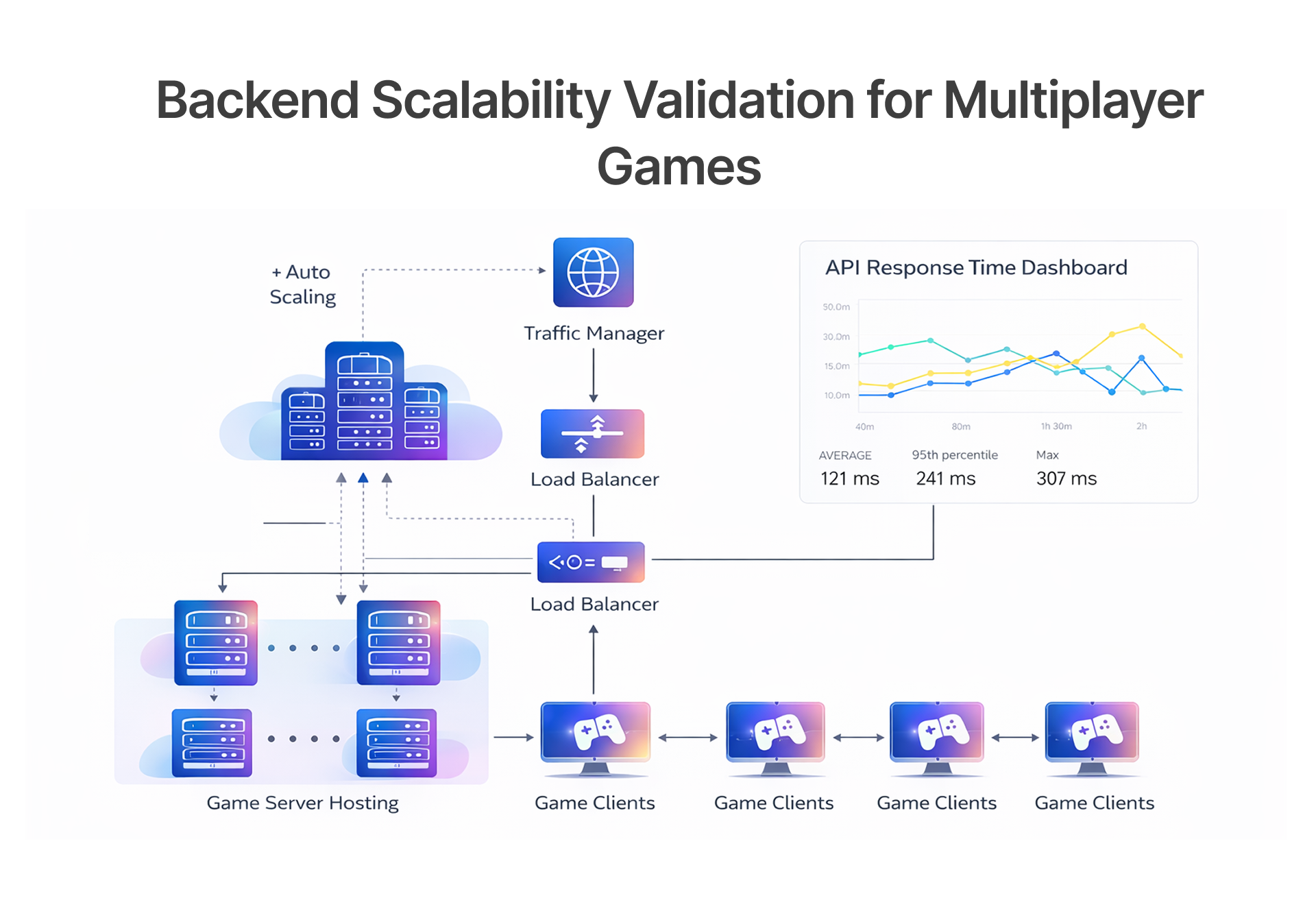
High concurrency simulation ensures Unity can handle millions of simultaneous operations without degradation. This is especially important for multiplayer games and live service environments.
- Simulates thousands of concurrent players and developer workflows
- Validates Unity Netcode and Game Server Hosting scalability
- Tests real-time synchronization across distributed servers
- Measures throughput and response latency
This approach ensures consistent performance across global deployments. It supports scalable multiplayer experiences and improves overall unity scalability.
Advanced Load Modeling and Scalability Validation
Advanced load modeling replicates real-world usage scenarios, enabling accurate validation of system scalability. This ensures the unity game engine performs reliably across diverse environments and workloads.
Advanced Load Modeling Techniques:
- Measurement-Based Modeling: The system creates accurate power grid models through real-time data collection from smart meters and sensors together with load characteristic recorders.
- Component-Based (Bottom-Up) Modeling: The method creates total load behavior through the combination of individual component models which represent specific appliances and data center server components.
- Data-Driven/ML Models: The system uses Machine Learning methods which include LSTM-attention and XGBoost to forecast demand while processing load data, leading to decreased errors when handling high-frequency intelligence data that originates from smart grids.
This approach ensures Unity maintains optimal performance under all conditions, supporting reliable game development workflows.
Concurrent User Workload Emulation
Concurrent workload emulation replicates real-world usage patterns. This allows developers to validate performance across large-scale environments.
- Simulates concurrent rendering, scripting, and physics operations
- Tests multiplayer game scalability
- Validates Unity Analytics performance tracking
- Ensures efficient resource utilization
This ensures Unity can handle high concurrency workloads without performance degradation.
Resource Utilization and Throughput Benchmarking
Resource benchmarking ensures optimal utilization of system resources. This helps developers optimize performance across CPU, GPU, and memory.
- Measures CPU and GPU utilization
- Tracks memory allocation and garbage collection
- Identifies performance bottlenecks
- Validates rendering efficiency
This enables developers to implement effective unity optimization strategies.
Backend Service Scalability Assessment
Backend services must scale efficiently to support millions of users. Unity stress testing validates backend performance under extreme workloads.
- Tests Game Server Hosting scalability
- Validates network communication performance
- Measures service response times
- Ensures system reliability
This ensures seamless multiplayer experiences across global deployments.
Performance Monitoring and Failure Detection Mechanisms
Performance monitoring ensures real-time visibility into system behavior. This enables developers to identify and resolve performance issues quickly.
Key Performance Monitoring Mechanisms:
- Log Aggregation & Analysis: Using tools like the ELK stack (Elasticsearch, Logstash, Kibana) to centralize, monitor, and analyze system logs for error messages and anomalies.
- Threshold Alerts:The system uses preset metric thresholds to create alerts which activate when metrics reach beyond their established limits so technicians can resolve issues before system downtime occurs.
- Condition Monitoring:The system needs to keep monitoring equipment health because performance problems can occur without warning.
Key Failure Detection Mechanisms:
- Heartbeating: Nodes periodically send messages to confirm they are "alive." The system considers a node to be dead when it fails to send heartbeats during the designated time period.
- Timeouts: The system establishes network communication time limits which will classify a connection as broken when it fails to deliver a reply within the designated time frame.
- Health Checks: Scheduled procedures that verify the state of a component, such as checking if a database or API is responding.
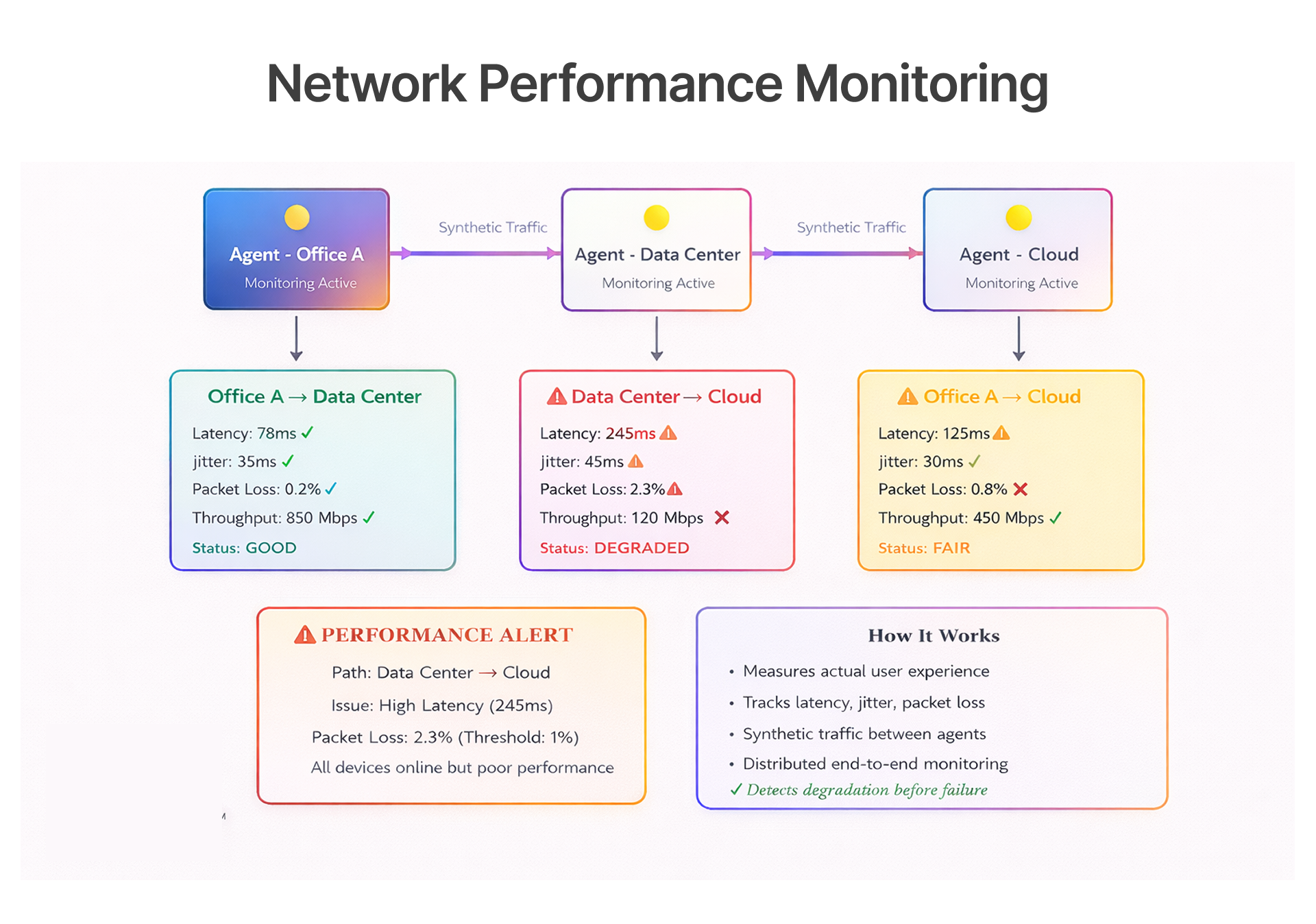
This ensures proactive performance optimization and improved reliability.
Real-Time Telemetry and Metrics Collection
Telemetry systems gather performance data throughout all operational periods, which enables precise system performance assessment during different workload conditions.
- Tracks CPU usage, GPU performance, and memory allocation
- Monitors network latency and throughput
- Collects Unity Analytics data
- Provides real-time performance insights
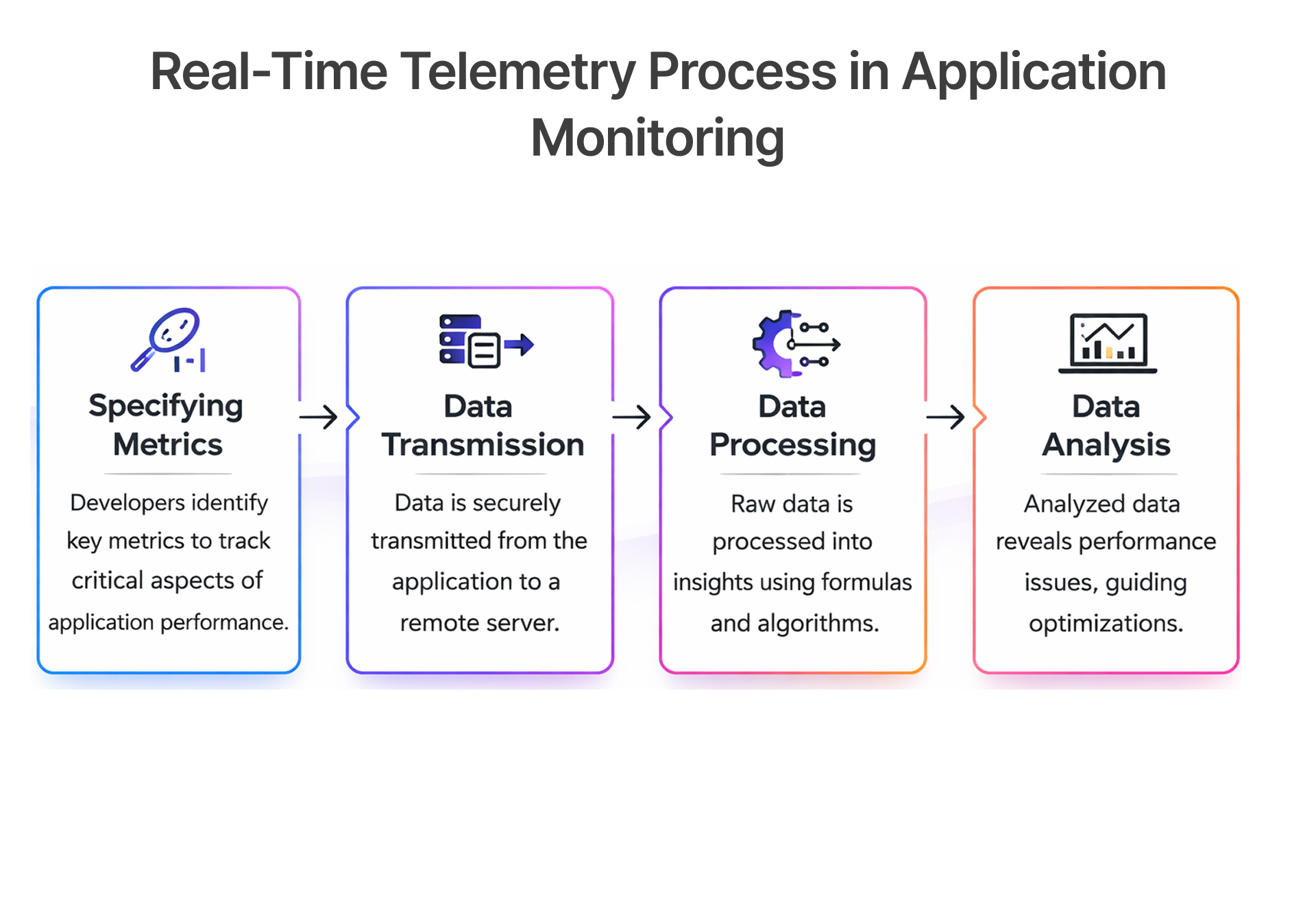
By bringing in the right details right away, we'll keep everything on an even keel and pick up a lot of ground on differences between platforms in terms of conceivable future direction.
Automated Fault Injection and Recovery Validation
Fault injection testing evaluates system performance when it experiences simulated system failures which include server crashes and memory spikes and network interruptions.
- Simulates hardware and software failures
- Validates system recovery mechanisms
- Ensures stability under extreme conditions
- Improves engine reliability
Unity applications remain stable, tolerant to faults, and viable in a live production environment.
Bottleneck Identification and Root Cause Analysis
Root cause analysis helps identify performance bottlenecks through its ability to analyze telemetry data and logs and system metrics. The advanced profiling tools enable developers to identify rendering calls that cause performance issues together with memory leaks and CPU-intensive scripts.
- Analyzes performance logs and telemetry data
- Identifies inefficient processes
- Provides actionable optimization insights
- Improves system performance
It is much better coordinated to ensure that it tunes performance accurately and scales availability over time.
Continuous Integration and Automated Stress Validation
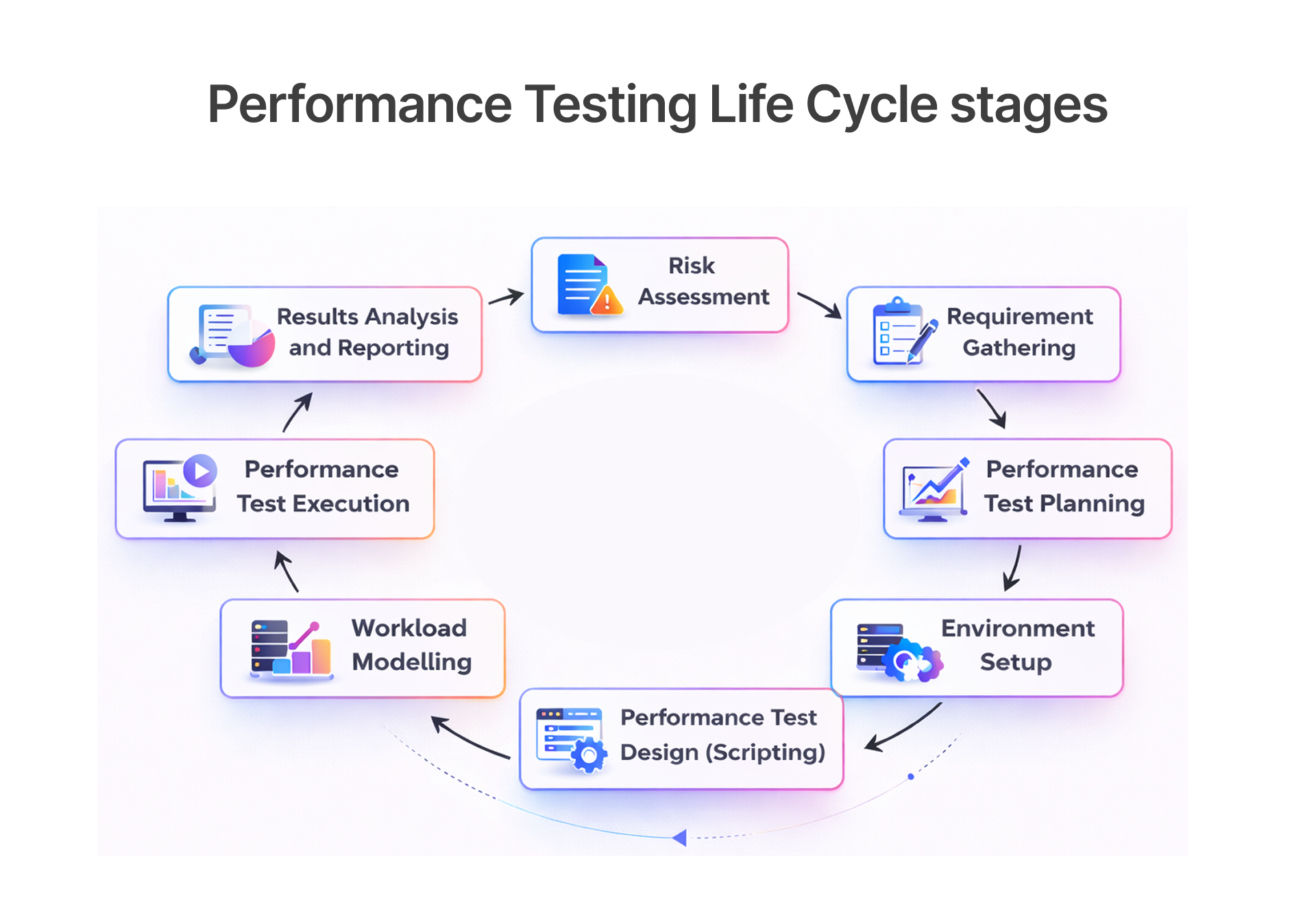
Continuous Integration (CI) combined with automated stress validation ensures that performance issues are detected early and resolved before they impact developers or players. In modern game development, especially with platforms like the Unity Engine, frequent updates, patches, and feature additions can unintentionally affect performance..
- Integrates performance testing into CI/CD pipelines
- Automates stress testing workflows
- Ensures performance consistency across builds
- Improves development efficiency
This automated approach ensures that performance remains consistent throughout the development lifecycle. Companies like Frugal Testing help organizations implement scalable CI-integrated unity stress test frameworks, allowing teams to deliver high-quality, reliable applications while reducing manual testing effort and improving overall engine reliability.
Integration with Continuous Testing Pipelines
The CI/CD system performs automatic execution of performance testing for every build and feature update and patch release. The development pipeline requires teams to implement stress tests which help them identify performance problems during the development process and maintain product quality throughout all their software releases.
- Automates performance validation
- Detects performance regressions early
- Improves development efficiency
- Ensures consistent performance
Automated Performance Regression Detection
The system uses continuous regression detection to monitor performance metrics between different builds for the purpose of detecting both unplanned performance drops and unanticipated resource increases.
- Monitors performance metrics across builds
- Detects performance degradation
- Enables rapid issue resolution
- Improves system stability
Scalable Cloud-Based Test Execution Environments
Organizations can perform large-scale stress tests through cloud-based environments because these systems do not restrict testing capabilities to their local infrastructure.
- Supports distributed performance testing
- Enables large-scale load simulation
- Improves testing efficiency
- Ensures scalability validation
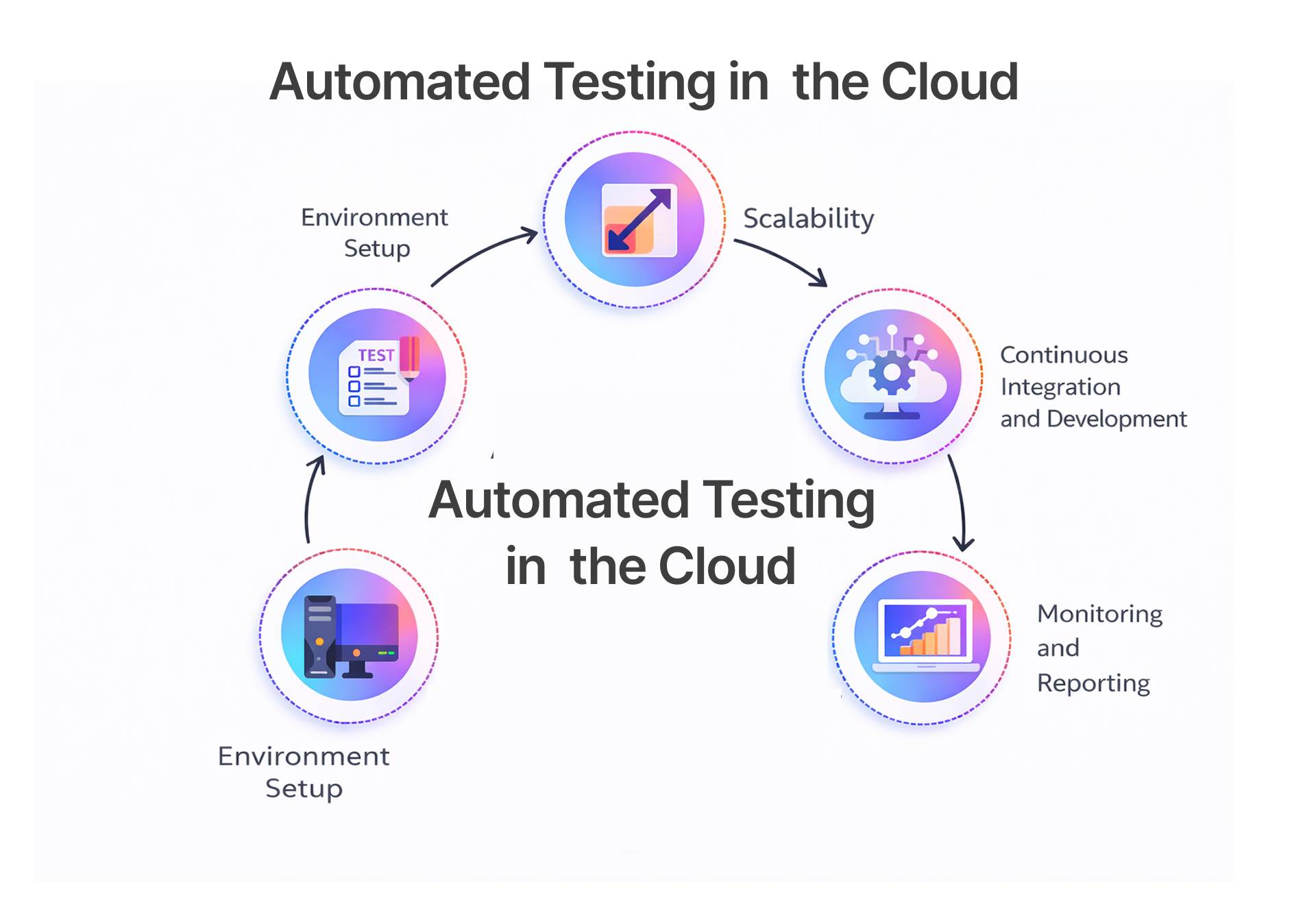
This improves system reliability.
Optimization Strategies Derived from Stress Testing Insights
Stress testing insights enable developers to implement effective optimization strategies.
Key optimization strategies derived from stress testing include:
1. Infrastructure and Resource Optimization
- Dynamic Scaling and Resource Allocation: Organizations can use performance degradation patterns to create automatic scaling rules which will manage their traffic peak times.
- Database Tuning: Stress tests identify three types of database performance issues which need to be fixed through improved indexing and caching methods and database partitioning techniques.
2. Architectural and Application Improvements
- Microservices Decoupling: The application maintains operational integrity because system components can be refactored into independent services which prevent one component failure from affecting the entire system.
3. Operational Resilience and Recovery
- Automated Recovery and Self-Healing:Improvise systems for mechanisms that can automatically sense, reboot, or redirect the trafficking stream in the event of a service disruption, essentially reducing the time-to-recovery (TTR).
Rendering Pipeline and Graphics Optimization
Rendering optimization includes the control of the frame rate and diminishing the call being made to draw, this is important to ensure smooth display across devices.
- Optimizes GPU Occlusion Culling and Sky Occlusion
- Improves rendering efficiency
- Enhances visual performance
- Reduces resource consumption
This has a dual effect: Improving the fluidity of the gameplay experience itself and rendering the graphics with more autonomy on any platform.
Memory Management and Resource Allocation Improvements
Memory management needs to function correctly because its failures will produce crashes together with frame rate drops and unplanned performance slowdowns that happen when system resources become improperly allocated or when garbage collection processes reach their highest activity levels.
- Reduces memory leaks
- Improves resource allocation
- Enhances performance
- Improves system stability
Engine Stability and Reliability Enhancements
Engine stability improvements focus on minimizing runtime errors, handling edge cases gracefully, and maintaining consistent performance under load.
- Improves system resilience
- Enhances performance consistency
- Reduces system crashes
- Improves reliability
This ensures stable performance.
Case Study: How Unity Stress Tested Large-Scale Multiplayer Games Like Escape from Tarkov and Genshin Impact
Large-scale multiplayer games like Escape from Tarkov and Genshin Impact require extensive stress testing to ensure performance stability.
Stress Testing Escape from Tarkov (Battlestate Games)
- Manual Occlusion Culling:The developers at Battlestate created custom "manual occlusion culling" scripts which enable them to operate their extensive detailed game environments while minimizing CPU processing needs through tracking elements that exist outside of player visibility.
- Asset & Memory Management: The team used the Unity Memory Profiler extensively to optimize RAM usage because they needed to prevent server or client crashes that would occur from large-scale environmental assets.
- Animation Optimization:The team used Unity's Mecanim system for character movement management because they developed custom Events systems to optimize their performance according to developer insights.
This demonstrates Unity’s ability to handle large-scale deployments.
Conclusion: How Frugal Testing Helps Improve Unity’s Large-Scale Stress Testing
Frugal Testing helps organizations move beyond basic performance checks and adopt a comprehensive Unity stress testing strategy that integrates automated validation, AI-driven performance analytics, distributed load simulation, and CI/CD performance governance. By embedding stress testing into the development lifecycle, teams can detect bottlenecks early, prevent regressions, and maintain stability even under extreme concurrency conditions.
Key Takeaways from This Blog:
- Performance at scale requires strategy, not isolated testing.
- Scalability must be engineered early, not fixed later.
- Observability drives intelligent optimization.
- Automation is the backbone of sustainable performance.
- Future-ready architectures demand resilience.
As Unity-based applications continue to scale across multiplayer ecosystems, live services, and global infrastructures, performance reliability becomes a strategic differentiator. Frugal Testing enables organizations to build resilient, future-ready Unity environments that sustain millions of users without compromising speed, stability, or user experience.
People Also Ask (FAQs)
Q1.What is stress testing in Unity engine development?
Ans: Stress testing in software testing evaluates how the Unity engine performs under extreme workloads using performance testing tools.
Q2.How does Unity simulate large-scale developer workloads?
Ans: Unity uses distributed load simulation and tools like Apache JMeter to replicate concurrent workloads.
Q3.Why is scalability validation essential for game engines?
Ans: It ensures reliable performance under high concurrency conditions.
Q4.What metrics are critical in Unity performance stress testing?
Ans: CPU usage, GPU performance, memory allocation, and network latency are critical metrics.
Q5.How does automated stress testing improve engine reliability?
Ans: Automation testing enables continuous performance validation and faster issue detection.

.webp)



.webp)
