
JMeter - Proxy for Recording HTTPS Mobile App Traffic

Rupesh Garg

November 12, 2017

After setting the proxy configuration in mobile for recording, if the mobile traffic doesn't show up in JMeter while recording, just install JMeter Root CA certificate - in mobile device. It can be taken either from JMeter's bin folder present as Security Certificate or download it - click to download
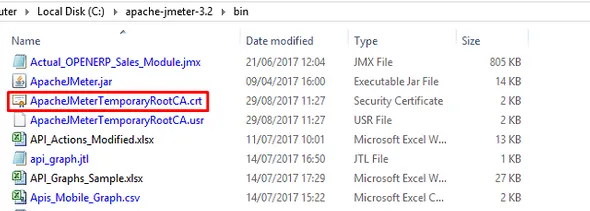
https traffic recorder for mobile through proxy

After installing the certificate in the device, just start the HTTP(S) Test Script Recorder in JMeter. Now you will be able to see the traffic being recording.

Rupesh Garg

✨ Founder and principal architect at Frugal Testing, a SaaS startup in the field of performance testing and scalability. Possess almost 2 decades of diverse technical and management experience with top Consulting Companies (in the US, UK, and India) in Test Tools implementation, Advisory services, and Delivery. I have end-to-end experience in owning and building a business, from setting up an office to hiring the best talent and ensuring the growth of employees and business.

Rupesh Garg

Founder and principal architect at Frugal Testing, a SaaS startup in the field of performance testing and scalability. Possess almost 2 decades of diverse technical and management experience with top Consulting Companies (in the US, UK, and India) in Test Tools implementation, Advisory services, and Delivery. I have end-to-end experience in owning and building a business, from setting up an office to hiring the best talent and ensuring the growth of employees and business.

Our blog

Latest blog posts

Discover the latest in software testing: expert analysis, innovative strategies, and industry forecasts
Performance Testing

How to Stress Test a Multiplayer Game Like Meccha Chameleon

Yeshwanth Varma
June 26, 2026
5 min read
Software Testing

TestRail vs Zephyr: Which Test Management Tool Fits Agile QA Teams?

Nethala Nikhil
June 26, 2026
5 min read
Software Architecture

Architecting Custom MCP Servers for Enterprise SSO from Day One

Shrihanshu Mishra
June 25, 2026
5 min read