Mobile app testing is the process of verifying that an app works correctly across the devices, OS versions, networks, and interruption conditions your real users have. Six areas need coverage: functional behaviour, performance, usability, security, compatibility, and accessibility. The industry bar for stability is a 99.95% crash-free session rate, which Luciq's Mobile App Stability Outlook 2025 identifies as the median across all apps. Below that, retention and store ratings start moving against you. This guide covers the six test types, a three-tier device matrix you can defend to a stakeholder, a manual-versus-automation split table, and a ten-point pre-release checklist.
Why mobile is harder than web
Web QA is a bounded problem. A few browsers, a few viewport sizes, a network that mostly behaves. For teams moving an existing website into a mobile experience, a website to app converter can provide a practical starting point before the resulting app goes through the same rigorous device, OS, performance, and usability testing.
Mobile gives you none of that. You are testing on hardware you do not control, running an OS version the user may never update, on a connection that drops from 5G to a hotel captive portal mid-request, with battery saver throttling your background sync, and with an operating system free to kill your process whenever it wants memory back. Business of Apps data for 2026 shows Android averaging a 12.94% low-memory warning rate against 5.49% on iOS. Same code, very different runtime.
The other difference is that there is no reload button. A web user who hits a broken page refreshes it. A mobile user who hits a broken screen uninstalls, and the one-star review stays up permanently. This is the practical case for treating mobile testing as a first-class discipline rather than a smaller version of web QA.
The six types of mobile app testing
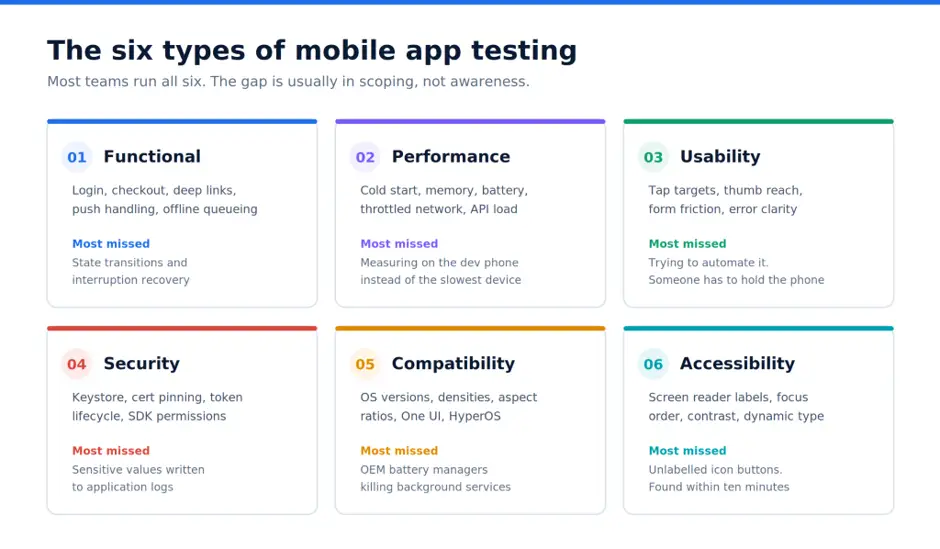
Most teams run some version of all six. The gap is almost always in scoping rather than in awareness. If you want the wider taxonomy, we catalogue 100 types of software testing separately; the six below are the ones that decide a mobile release.
Functional testing
Confirms the app does what the specification says: login, search, checkout, push handling, deep links, offline queueing, in-app purchases.
The under-tested part is state transitions rather than happy paths. What happens when a user backgrounds the app halfway through a payment and comes back four hours later on an expired session? What happens if the OS kills the process during a file upload? Build your functional cases around interruption and resumption, not just around workflows that run start to finish.
Performance testing
Cold start time, screen transition latency, memory footprint, battery drain, behaviour on a throttled connection, and API handling under concurrent load.
Cold start deserves disproportionate attention because it is the first thing every user experiences and the easiest thing to regress silently. Google publishes launch-time thresholds in Android vitals that are worth adopting as your internal budget. Measure against them on your slowest supported device, not the phone in your pocket. A current flagship will hide a startup problem that a three-year-old budget Android surfaces in a second.
Usability testing
Whether people can actually operate the app. Tap target sizes, thumb reach on a 6.7-inch screen, form friction, error message clarity, whether the system back gesture does what the user expects.
This is one of the few areas where automation returns nothing useful. Someone has to hold the phone. Our walkthrough on how to perform usability testing for mobile apps covers session structure, and the step-by-step UX testing checklist covers what to look for once you are in the session.
Security testing
Local storage, keychain and keystore usage, certificate pinning, session and token lifecycle, API authorisation, third-party SDK permissions, and whether anything sensitive is landing in logs.
If the app touches payments, health records, or identity documents, security testing runs alongside development rather than as a gate at the end, and it needs someone working from the OWASP Mobile Top 10 rather than an inherited checklist.
Compatibility testing
The same build across OS versions, screen densities, aspect ratios, and vendor skins. Samsung One UI, Xiaomi HyperOS, and stock Android will not render your bottom sheet identically, and aggressive OEM battery managers routinely kill background services that behave correctly everywhere else.
Accessibility testing
Screen reader labels, focus order, contrast ratios, dynamic type support, and whether the app survives 200% text size. Run VoiceOver and TalkBack across your three highest-traffic screens, following Android's accessibility testing guidance for the automated portion. Most teams find a break within ten minutes, usually an unlabelled icon button.
There is a commercial argument as well as an ethical one. Enterprise procurement asks for WCAG conformance, and the European Accessibility Act now applies to a large share of consumer apps. Our roundup of accessibility testing tools and techniques covers what automated checkers can and cannot catch.
Building a device matrix you can defend
You cannot test every device, and pretending otherwise leads to teams testing on whatever hardware is in the drawer. Tier it instead.
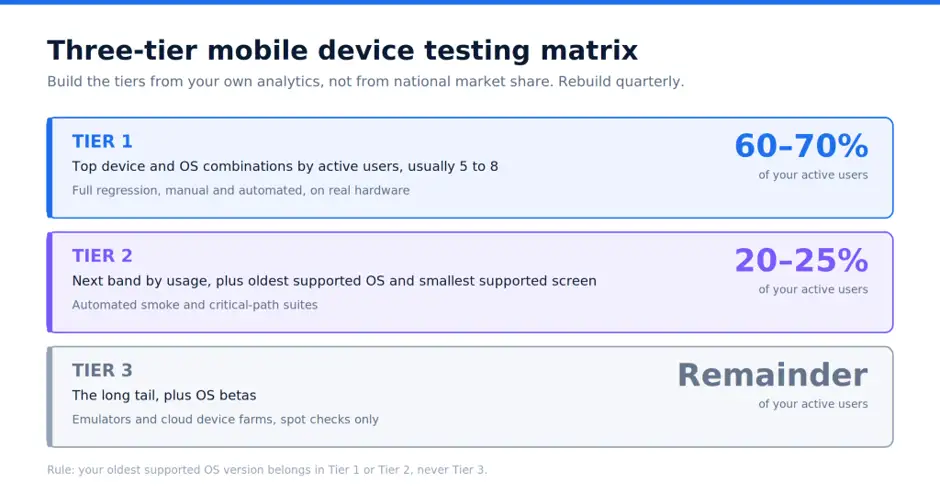
The table below is a starting structure. Populate it from your own analytics, not from national market share reports, because your user base is not the market.
Two rules keep this honest. Your oldest supported OS version belongs in Tier 1 or Tier 2, never Tier 3, because that is exactly where compatibility breaks live. And the matrix gets rebuilt quarterly, since a device list assembled eighteen months ago describes users you no longer have.
Emulators earn their place in early development, layout verification, and parallel automation runs. They will not tell you about thermal throttling, real battery drain, GPS accuracy indoors, camera behaviour, biometric prompts, or what happens when a call arrives mid-transaction. Those need physical hardware or a cloud device farm. Teams without an in-house device lab usually close this gap with mobile app testing services rather than buying and maintaining hardware that ages out in two years.
Splitting manual and automated work
The useful question is not which is better. It is which work belongs where. We have covered the general tradeoffs between manual and automated testing elsewhere; the split below is the mobile-specific version.
A reasonable target: every critical user path has an automated regression test running in CI against at least two Tier 1 devices, and manual effort goes almost entirely into exploratory testing and new features.
The common failure here is automating the UI first. UI tests are the slowest and most brittle layer of the pyramid. Get unit and API coverage solid before writing a single Appium script, or the team will spend more time repairing flaky selectors than finding defects. For organizations planning to create reliable mobile applications, mobile application development can provide the foundation for building scalable apps with testing and performance requirements in mind.
Tooling
Four categories need filling. The specific vendor matters less than not leaving a slot empty. Our fuller comparison of mobile testing tools for automation goes deeper on each.
Automation frameworks: Appium is the cross-platform default, and if your team is interviewing for it, the common Appium questions are a decent proxy for what matters in practice. Espresso and XCUITest are faster and less flaky if you accept maintaining two suites. Maestro has gained ground with teams that want readable tests and minimal setup.
Device access: BrowserStack, Sauce Labs, and LambdaTest rent real devices in the cloud. If the app has meaningful hardware dependencies, keep a small physical rack in-house too.
Crash and performance monitoring: Firebase Crashlytics is free and near-universal on Android. Sentry adds non-fatal error coverage. Production monitoring is part of your test strategy, not adjacent to it, because it tells you which devices are actually breaking.
Test management: your cases, runs, and results need a home so that "did we test this on Android 12?" has an answer. We compare the options in test case management tools for QA teams.
If you are standing this up from nothing, our mobile app testing framework ebook walks through the setup end to end.
Pre-release checklist
Run this before every store submission:
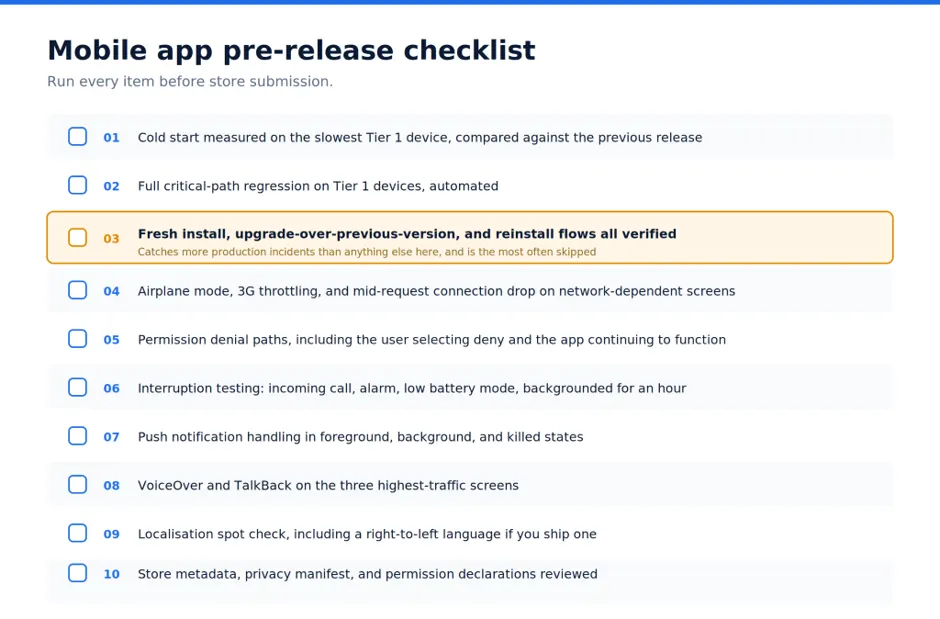
Item three catches more production incidents than anything else on the list, and it is the one most often skipped, because testers install a clean build every time and never exercise the migration path a real user takes.
Recurring mistakes
Testing only on flagship hardware. The QA team has good phones. A large share of users do not.
Treating the debug build as equivalent to the release build. Code shrinking and obfuscation break reflection-based code, and that surfaces after signing.
Watching only crash-free rate. Stability can look excellent while a payment API fails silently for a subset of users. Track handled exceptions alongside crashes.
Running full regression manually because the automation "keeps breaking". If the suite is flaky, fix the suite. Manual regression does not scale past a few releases, and it burns testers out.
People Also Ask (FAQs)
Q1. What is mobile app testing?
Ans: Mobile app testing is the process of verifying an app's functionality, performance, usability, security, compatibility, and accessibility across the real devices, OS versions, and network conditions its users have. It spans pre-release verification and production monitoring.
Q2. How many devices should I test a mobile app on?
Ans: Test on enough devices to cover 85 to 90% of your active user base, which for most apps means 8 to 15 device and OS combinations arranged in tiers. Build the list from your own analytics rather than market share data, and refresh it every quarter.
Q3. What is a good crash-free rate for a mobile app?
Ans: A good crash-free session rate is 99.95% or above, the median identified in Luciq's Mobile App Stability Outlook 2025. Top-quartile teams run at 99.99%, and anything below 99.9% will show up in retention numbers and store ratings.
Q4. Should mobile app testing be manual or automated?
Ans: Both, split by task type. Automate regression, cross-device smoke tests, and API checks, since they are repetitive and run on every build. Keep exploratory testing, usability, and visual polish manual, because they need judgement that automation cannot replicate.
Q5. Are emulators good enough for mobile app testing?
Ans: Emulators are good enough for early development, layout checks, and parallel automation runs, but not for release sign-off. They cannot reproduce thermal throttling, real battery drain, camera and biometric behaviour, GPS accuracy indoors, or OEM-specific background process management.

.webp)

.webp)