Regression Testing Strategy: How to Prioritise, Automate, and Maintain Test Suites in 2026
Regression Testing Strategy: How to Prioritise, Automate, and Maintain Test Suites in 2026
Prince Singh
July 28, 2026
•
9 Mins
TL;DR: Most teams have a regression suite but no regression testing strategy. This guide covers three decisions that fix that: how to prioritise test cases using risk-based prioritization, how to tier test execution across your CI/CD pipeline, and how to stop your regression suite from growing into a maintenance liability.
A regression testing strategy is a defined set of test strategies and decisions governing which test cases to run, when to execute them across the CI/CD pipeline, and when to retire them. It is the governance layer that keeps software regression testing fast, reliable, and aligned with actual business risk.
Most QA teams skip this entirely. Test cases get added after every production defect, but nothing gets retired. Twelve months in, the regression suite takes two hours to run, flaky tests fire on every PR, and software updates still reach production with undetected regressions. The issue is not the test automation framework. It is that no one decided which tests matter and which do not.
Is Your Regression Suite Slowing Down Releases?
We help engineering teams prioritise, tier, and maintain test strategies that actually fit their pipeline and team.
What Is a Regression Testing Strategy (and Why Most Teams Skip It)
Regression testing in software testing means verifying that existing functionality still works correctly after a code change. Every software update (new feature, bug fix, or refactor) introduces risk that something previously working might break. Regression testing is the safety net that catches that before it reaches users.
A regression testing strategy defines which test cases belong in your regression suite, when they run across the software development lifecycle, and how often the suite gets reviewed. Without it, even a well-built automated regression testing setup degrades into noise.
Two warning signs signal a missing strategy:
The regression suite runtime keeps climbing, and teams start skipping it before releases.
Flaky tests fire on every PR, and developers stop trusting automated testing results.
When either of those is true, the regression suite is no longer protecting software quality. It is getting in the way of it.
How to Prioritise Regression Tests Using Risk-Based Testing
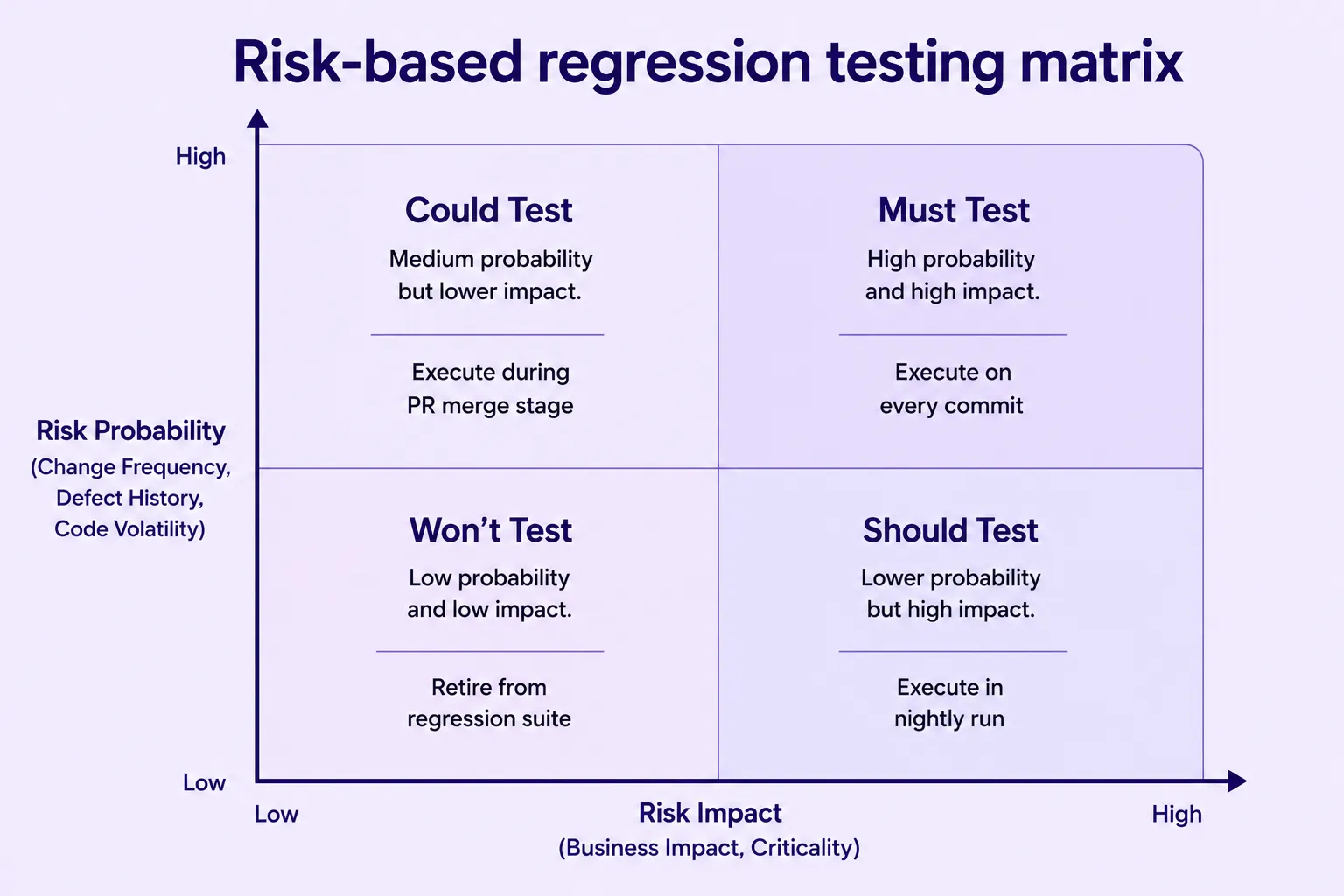
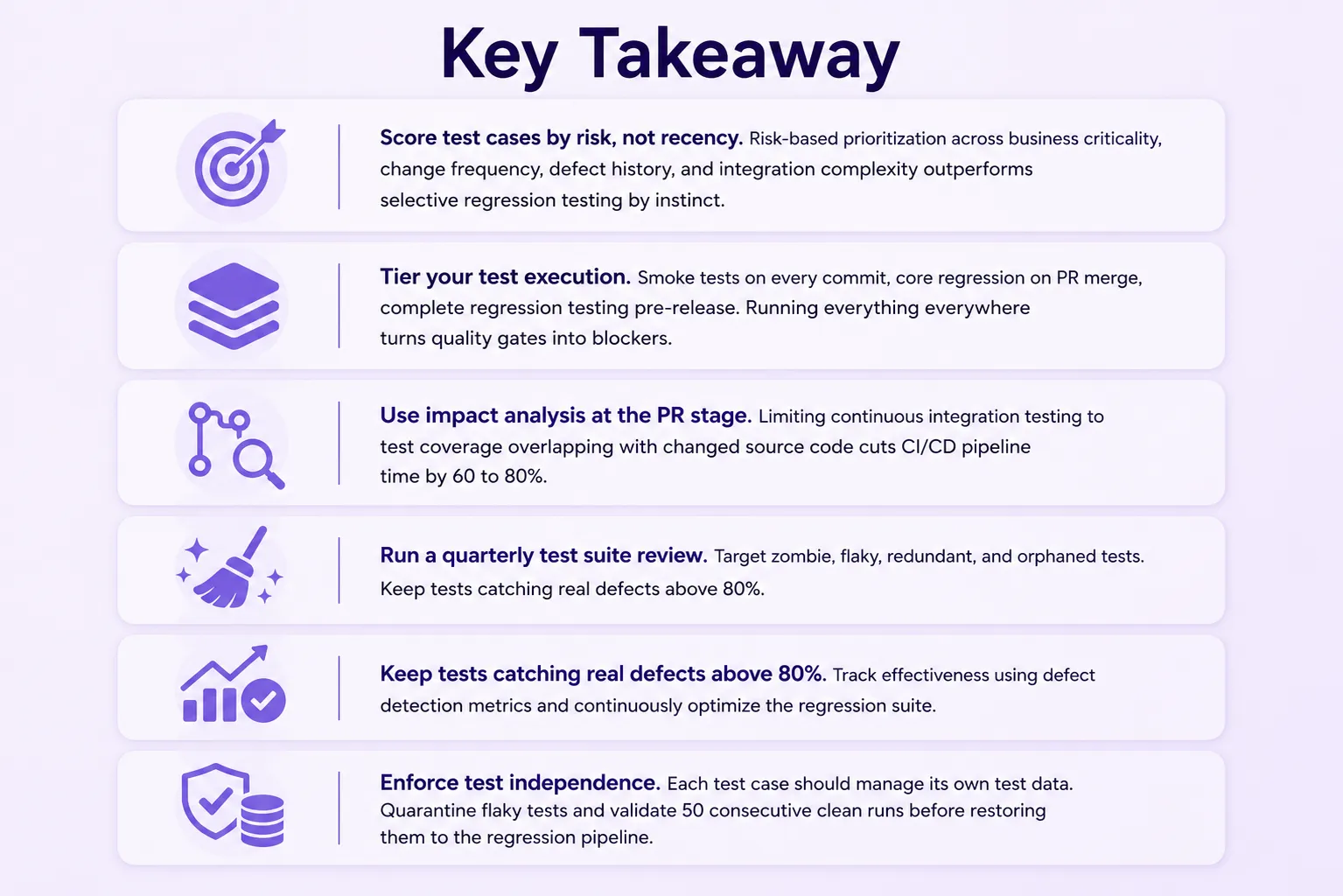
Not all test cases carry the same weight. Risk-based testing replaces the retest-all regression testing instinct with a scoring model grounded in defect history and business impact.
Score each test case across four dimensions:
Does it cover a revenue-critical path such as payment flow, login, or checkout?
Does the underlying source code change frequently, at least weekly?
Has this area produced a production defect in the past 12 months?
Does it touch multiple services or shared test environment infrastructure?
Tests scoring high on all four run on every commit. Tests scoring zero are retirement candidates. The middle range belongs in nightly or pre-release tiers. This model combines risk-based prioritisation with history-based prioritisation, using past defect data to weight test case prioritisation more accurately over time. Teams that need to balance speed with coverage often layer in partial regression testing, running a focused subset of high-risk test cases between full suite runs.
Execution Frequency
What Goes Here
Every commit
Core user journeys, payment flow, authentication, and previously
broken paths
PR merge
Integration tests, data transformations, and recently changed
modules
Nightly
Broader workflows, cross-browser regression, and mobile testing
Retire
Deprecated features, duplicate coverage, and tests with no defect
catch in 12-plus months
Test impact analysis sharpens this further. By limiting continuous integration testing at PR stage to tests whose test coverage overlaps with changed source code files, teams routinely cut CI/CD pipeline time by 60 to 80%.
What to Automate vs. What to Keep Manual
The practical rule in any test automation framework: If a test script changes more often than it catches a defect, it costs more to maintain than it is worth to automate.
Automate these:
Stable, repeatable flows: core user journeys, API testing for service contracts, functional testing of high-risk modules, performance testing of critical paths, and security testing of authentication and payment flows.
Smoke tests and sanity tests that gate every build in the CI/CD pipeline.
Cross-browser regression and mobile responsiveness checks against real devices.
UI change reviews where element locators break frequently on web applications.
Features still changing week to week. Good test design patterns such as Page Object Model improve maintainability, but they do not fix the instability of automating moving targets.
When to Run Regression Tests in Your CI/CD Pipeline
Continuous testing in DevOps means different test subsets run at different pipeline stages. Running everything on every trigger is how teams end up with four-hour PR pipelines that developers route around.
Trigger
Scope
Time Target
Gates Build?
Every commit
Smoke tests only
Under 5 min
Yes
PR merge
Core regression
Under 30 min
Yes
Nightly
Extended suite
Under 2 hrs
Alert only
Release candidate
Complete regression testing
Under 6 hrs
Yes
Smoke tests on every commit exist for one reason: If the application is broken at a fundamental level, you want to know in five minutes, not after a two-hour full run. They are a curated set of 30 to 50 test cases that verify the build is stable enough for further test execution, not simply the fastest tests in the suite.
For teams running cloud-based testing, parallel test execution compresses nightly runtimes significantly, especially for cross-browser regression and mobile testing at scale.
CI/CD Test Execution Layers
commit/*01
sha: a83f2c
Every Commit
smoke-tests
Validate critical business flows immediately.
Trigger
git push
Target
< 5 min
Rule
block fail
Running
pull-request
02
sha: b15e71
PR Merge
core-regression
Check core functionality before merging.
Trigger
pull_request
Target
< 30 min
Rule
merge gate
Queued
schedule/nightly
03
sha: c92a48
Nightly
nightly-regression
Run extended application coverage overnight.
Trigger
cron: nightly
Target
< 2 hrs
Rule
alert only
Pending
tag/rc-*
04
sha: d41f09
Release Candidate
full-regression
Complete validation before production approval.
Trigger
tag: rc-*
Target
< 6 hrs
Rule
release gate
Waiting
production
05
tag: v2.6.0
Production Release
deploy
Release the approved build to users.
Trigger
manual
Source
approved tag
Rule
deploy
Release
Smoke Testing vs Regression Testing: Key Differences
These test types serve distinct purposes in the software testing process:
Smoke tests: 30 to 50 test cases, under five minutes, every commit. Verifies the build is stable enough to test further.
Sanity tests: Narrower than a full regression run. Run after a targeted fix to confirm nothing adjacent broke.
Complete regression testing: The full active test suite, run against a release candidate with a hard quality gate before shipping.
Mixing these up is how smoke test suites balloon to 400 test cases and stop functioning as a meaningful early gate.
Struggling with Flaky Tests Holding Up Your CI/CD Pipeline?
Our QA engineers diagnose root causes, fix test execution issues, and get your builds moving again.
How to Stop Your Regression Suite From Becoming a Liability
Left unmanaged, regression suites grow in one direction. Test cases accumulate, nothing gets retired, and maintenance overhead quietly outpaces the value the suite delivers.
A structured test suite review, run quarterly, should target four categories:
Zombie tests: Test cases that have passed every run for 12-plus months with no meaningful code change. They are either covering something too stable for this layer, or written too broadly to detect real regressions.
Flaky tests: Test scripts that fail intermittently with no real defect behind the failure. Flaky test management starts with the three most common root causes: Unstable test environment, shared test data mutated between runs, and element locators that break on minor UI changes. Retries hide them; they do not fix them.
Redundant tests: Multiple test cases covering the identical code path at the same layer. Keep the strongest one. Redundancy compounds test execution time without improving regression coverage or data integrity.
Orphaned tests: Test scripts for features orAPI endpointsthat no longer exist. They still pass, which is why they are hard to find without a deliberate test suite review.
Track one metric for regression suite health: The percentage of active test cases that caught at least one real defect in the past six months. A well-maintained suite stays above 80%.
How to Handle Flaky Tests Without Blocking the Build
Flaky test management requires a quarantine protocol, not retry wrappers:
Move the flaky test to a non-blocking parallel suite immediately.
Diagnose the root cause: Test environment instability, shared test data, or element locator drift.
Fix the root cause directly; do not add retry logic.
Validate 50 or more clean consecutive runs in the test environment.
Restore to the main regression pipeline only after meeting that threshold.
A key principle behind flaky test prevention is test independence: Each test case should set up and clean up its own test data, with no dependency on the state left by another test. Leaving flaky tests in the gate with a "known flaky" label trains teams to treat red results as background noise. When a real regression appears, the signal is gone.
How Frugal Testing Helps You Build a Reliable Regression Suite
We provide QA automation services and regression testing services for engineering teams who need reliable regression coverage without a dedicated full-time SDET headcount. Our software QA automation services cover the full cycle: Audit, restructure, clean up, and hand off.
Our Take: Most regression suites we audit have a flaky test rate between 18 and 25% and a zombie test population above 30%. The issue is never the test automation tools. It is that no one owns test design decisions or runs a regular test suite review.
AI regression testing tools are starting to support this automatically, using AI in test automation to surface high-risk test cases and flag low-value ones based on code change patterns.
Audit: We inventory every test case, score by business criticality and defect history, and measure flaky rate and regression defect escape rate.
Restructure: We assign test cases to execution tiers, configure CI/CD quality gates, and implement impact analysis using appropriate test automation frameworks.
Clean up: We retire zombie and orphaned tests, quarantine flaky test scripts, and document the reasoning so the QA team can maintain it independently.
Fill gaps: We handle test creation for high-value scenarios the suite was missing: payment flow, integration tests, performance testing benchmarks, and cross-browser regression for web applications.
Hand off: A maintenance playbook so the team runs the quarterly test suite review without us. Automation ROI only holds if the suite stays healthy over time.
Conclusion
A regression testing strategy in software testing comes down to three decisions: which test cases to run, when they execute across your CI/CD pipelines, and which ones to retire. Regression testing best practices are not about adding more tests. They are about maintaining the right suite, at the right execution tier, with the right governance behind it. That is what keeps a regression pipeline fast enough to be useful and reliable enough to be trusted.
Ready to Stop Guessing Which Tests Actually Matter?
We audit your regression suite, retire dead weight, and hand it back lean and release-ready. Let's talk.
Q1. How does AI in test automation affect regression testing strategy?
Ans: AI regression testing tools can automatically flag high-risk test cases, detect flaky patterns, and recommend test selection based on code change history, reducing manual test prioritisation effort significantly for QA teams.
Q2. What is the difference between regression testing and integration testing?
Ans: Regression testing checks that the full application works after any change. Integration testing verifies that two specific components work correctly at a defined interface. Both serve different roles within a broader test automation framework.
Q3. How do continuous testing tools support regression testing in DevOps?
Ans: Continuous testing tools in DevOps integrate test execution directly into CI/CD pipelines, triggering the right test subset automatically at each stage from commit through to release candidate, supporting continuous automated testing.
Q4. What is the role of test coverage metrics in maintaining a regression suite?
Ans: Test coverage metrics help identify which areas of source code are undertested and which test cases overlap. Reviewing these quarterly guides informs decisions on retiring redundant tests and filling regression coverage gaps.
Q5. How does manual regression testing compare to automated regression testing?
Ans: Manual regression testing is slower and harder to scale but valuable for UI change validation and exploratory testing. Automated regression testing handles stable, repeatable flows that run on every release, improving software quality at speed.
Prince Singh
Rupesh Garg
Founder and principal architect at Frugal Testing, a SaaS startup in the field of performance testing and scalability. Possess almost 2 decades of diverse technical and management experience with top Consulting Companies (in the US, UK, and India) in Test Tools implementation, Advisory services, and Delivery. I have end-to-end experience in owning and building a business, from setting up an office to hiring the best talent and ensuring the growth of employees and business.
Our blog
Latest blog posts
Discover the latest in software testing: expert analysis, innovative strategies, and industry forecasts




.webp)