


For QA teams in 2026, ClickUp is the better choice for manual testing, flexible workflows, and smaller teams, while Jira is the stronger option for automation-heavy, enterprise-grade QA with deep CI/CD integration.
If your team prefers an all-in-one project management software that combines task management, documentation, and flexible test case tracking, ClickUp offers a more adaptable and user-friendly approach for modern QA teams.
On the other hand, Jira continues to be the go-to test management system for large software development teams that require structured workflows, advanced bug tracking, and strict adherence to agile methodology and agile scrum practices.
- ClickUp is ideal for teams looking for a flexible, “ready-to-use” solution with minimal setup.
- Jira is better suited for organizations needing deep integrations and formal agile frameworks.
- ClickUp combines tasks, docs, and QA workflows into a single productivity platform.
- Jira excels in complex environments with strong issue tracking and DevOps alignment.
- Smaller teams and non-technical users often prefer ClickUp’s simplicity and faster onboarding.
For organizations managing complex engineering workflows and enterprise-scale QA, Jira continues to be the preferred choice, while ClickUp appeals more to teams prioritizing flexibility and ease of adoption.
ClickUp vs Jira: Key Differences in Test Case Management for QA Teams
Understanding the differences between ClickUp and Jira starts with how each tool approaches project management, task management, and QA workflows.
- ClickUp manages TCM natively using tasks, statuses, and checklists—ideal for quick setup and flexible workflows.
- Jira depends on add-ons for full TCM but offers strong traceability from requirements to bugs and releases.
- ClickUp supports lightweight automation and AI via ClickUp Brain, while Jira excels in CI/CD and DevOps automation.
ClickUp vs Jira for Manual Testing vs Automation-Driven QA
When comparing Jira and ClickUp for QA in 2026, the choice depends on whether your team focuses more on automation or flexibility.
Jira for Automation-Driven QA
Best for teams deeply integrated with CI/CD and DevOps pipelines. It offers strong bug tracking, advanced reporting, and structured workflows, but comes with a steeper learning curve and setup effort.
ClickUp for Manual Testing
Best for smaller or cross-functional teams needing flexibility and quick onboarding. It provides an intuitive UI, strong collaboration, and built-in AI like ClickUp Brain, but its bug tracking is less advanced than Jira.
Key Takeaways
- Choose Jira: For automation-heavy, engineering-driven QA.
- Choose ClickUp: For flexible, manual, and collaborative testing.
- Hybrid approach: Use Jira for development and automation, and ClickUp for managing manual testing.
Teams with automation-heavy QA pipelines generally benefit more from Jira’s structured workflow and CI/CD integrations.
Key Differences Between ClickUp vs Jira for QA Workflows
When comparing ClickUp and Jira for quality assurance (QA) workflows, the decision usually comes down to structure vs flexibility.
ClickUp vs Jira for Startups, Enterprises, and Scaling Teams
Choosing between ClickUp and Jira depends largely on your team size, growth stage, and how complex your software development and QA workflows are. While both tools support test case management, they cater to very different types of teams.
- Startups: ClickUp is often the better fit due to its flexibility, lower cost, and all-in-one task management and collaboration features. It allows small teams to move fast without heavy setup or admin overhead.
- Scaling Teams: As teams grow, ClickUp continues to support cross-functional collaboration, but some teams start adopting Jira for more structured test management and engineering workflows.
- Enterprises: Jira is designed to scale across large organizations, offering deep integrations, strict agile frameworks, and advanced governance with features like permissions and audit logs.
Test Case Management Architecture & Workflow Design
Designing a solid test case management architecture is essential for scaling quality assurance across modern software development teams. The way you structure your workflows directly impacts visibility, test case tracking, and overall efficiency.
- Define a clear hierarchy for organizing test cases (projects → modules → test suites).
- Use custom fields to track priority, environment, and execution status.
- Implement custom workflows to move tests from design → execution → closure.
- Enable workflow automation to reduce manual effort and improve consistency.
- Integrate with automation tools and CI/CD pipelines for seamless execution.
ClickUp Task-Based Test Case Modeling & Custom Workflow Configuration
ClickUp offers a highly flexible way to handle test case management by treating each test case as a task. QA teams can organize work using a clear hierarchy—Spaces for QA, Folders for projects, and Lists for test suites like login or checkout flows. Each test case becomes a task with details such as pre-conditions, steps, and expected results, often managed through templates and checklists.
To streamline execution, teams can configure custom workflows using tailored statuses instead of generic ones. For example, active stages like Ready to Test, In Progress, Blocked, or Bug Found help track progress, while outcomes like Passed, Failed, or Approved close the loop.
Jira Issue-Based Test Management with Plugin Ecosystem (Xray, Zephyr)
In Jira, test management is handled through plugins like Xray and Zephyr, which extend its core issue tracking and bug tracking capabilities.
Xray’s fully Jira-native structure offers stronger enterprise traceability and governance, but it generally requires more setup and technical expertise compared to Zephyr’s simpler interface.
Flexibility vs Structured Workflows for Scalable QA Operations
When scaling test case management, the choice between flexibility and structured workflows plays a major role in how efficiently QA teams operate. ClickUp focuses on adaptability, while Jira emphasizes control and governance.
Agile Testing, Execution Pipelines & CI/CD Integration
Modern QA is no longer a standalone phase it’s deeply embedded within agile project management and continuous delivery practices. Teams using Jira and ClickUp integrate testing directly into development cycles, ensuring faster releases and higher product quality.
- Align testing with agile workflows like Scrum and Kanban.
- Integrate QA processes into CI/CD pipelines for continuous validation.
- Enable real-time feedback through automated test execution.
- Use automation tools to reduce manual effort and increase efficiency.
Teams using integrated CI/CD testing workflows can identify defects earlier, improve release stability, and accelerate delivery cycles more efficiently.
Scrum, Kanban & Sprint-Based Testing Implementation
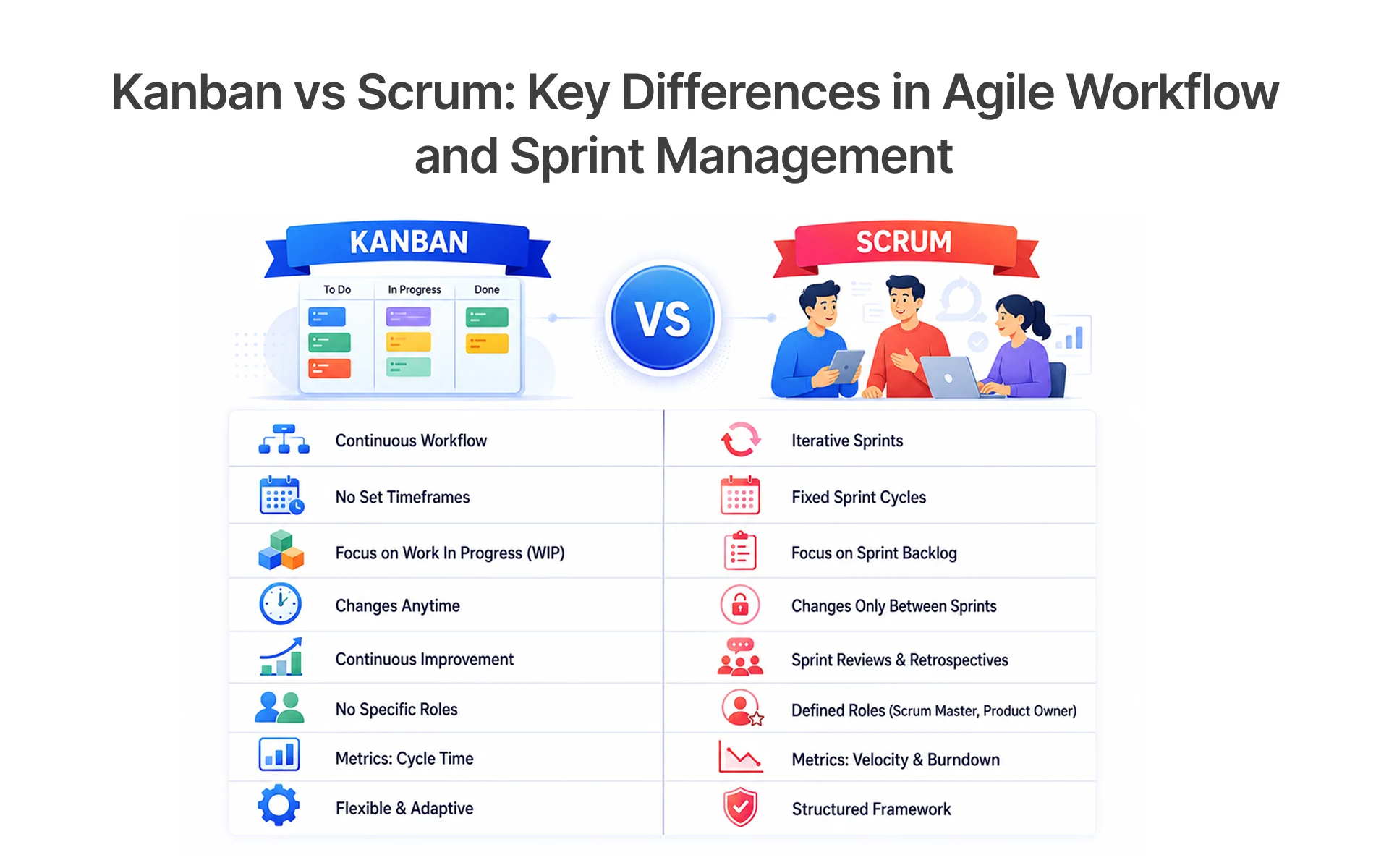
Both Jira and ClickUp support modern agile methodology, but they differ in how strictly they implement it. Jira is built for structured agile scrum environments, offering dedicated Scrum boards, sprint planning tools, burndown trackers, and velocity reports that help teams closely monitor progress during each sprint.
ClickUp, on the other hand, provides more flexibility with Kanban boards, visual task boards, and hybrid agile workflows that can adapt to different team styles. While Jira is ideal for teams following strict Agile frameworks, ClickUp is better suited for teams that want a more flexible and visually driven approach to agile project management.
Continuous Testing Integration within CI/CD Pipelines
Automation is at the core of modern QA pipelines, especially for teams practicing continuous delivery. Jira integrates seamlessly with tools like Jenkins and GitHub, making it a strong choice for teams relying heavily on DevOps tools and test automation. It supports real-time updates during builds, enabling faster feedback loops and tighter alignment between development and QA.
ClickUp, while not as deeply integrated natively, offers flexibility through API access via the clickup api, allowing teams to connect with various automation tools. It still supports continuous testing workflows, but for automation-heavy environments, Jira provides a more robust and ready-to-use ecosystem.
End-to-End Test Lifecycle Management and Execution Strategies
Managing the full QA lifecycle is essential for maintaining consistent quality assurance across modern software development teams. From planning to execution and reporting, a well-defined lifecycle ensures better visibility, faster releases, and fewer defects in production.
- Plan, execute, track, and report test cases efficiently.
- Jira provides strong traceability across all software development stages.
- ClickUp simplifies test workflows and test case tracking.
- Enhances overall quality assurance and team collaboration.
A well-defined QA lifecycle helps teams reduce production defects and improve release stability.
Reporting, Pricing, and QA Performance Optimization
Understanding reporting capabilities and pricing models is essential for optimizing your QA operations and maximizing ROI. Modern teams rely on insights from test case management tools to improve quality assurance, reduce defects, and align testing with business goals.
ClickUp Dashboards, KPI Tracking & Cost Efficiency
ClickUp is designed with affordability and ease of use in mind, making it a strong option for teams that want powerful insights without high costs. Its flexible dashboards help QA teams monitor performance without complex setup.
- Provides customizable reporting dashboards for QA tracking.
- Tracks KPIs like test coverage, execution rates, and team productivity.
- Offers competitive clickup pricing for growing teams.
- Includes AI features like ClickUp Brain for smart insights.
- Supports native time tracking for effort analysis.
Overall, ClickUp is a cost-effective solution that balances usability with performance tracking, especially for startups and mid-sized QA teams.
Jira Advanced Reporting, Pricing Structure & Plugin Cost Impact
Jira delivers deeper analytics and enterprise-grade reporting, making it ideal for complex QA environments. However, this power often comes with additional costs due to plugins and scaling needs.
- Offers advanced agile reporting and detailed analytics.
- Requires plugins for full test management software capabilities, increasing cost.
- Provides enterprise-level pricing plans for scalability.
- Includes governance features like audit logs for compliance.
Jira is best suited for organizations that need detailed reporting, strict governance, and advanced QA analytics despite higher costs.
Current Pricing Snapshot (Verified May 2026)
Pricing verified in May 2026. Please confirm current pricing directly with the vendor before making purchase decisions.
Test Coverage, Defect Density & ROI-Driven QA Metrics
Tracking the right QA metrics is critical for improving outcomes and justifying investments in testing. Both tools support performance measurement, helping teams make smarter decisions.
- Measure test coverage across features and modules.
- Track defect density and resolution time.
- Use dashboards to gain actionable insights.
- Improve overall QA efficiency and release quality.
In the end, data-driven QA strategies lead to faster releases, fewer production issues, and stronger software development outcomes.
.webp)
Pros, Cons & When to Choose ClickUp vs Jira for QA Teams
Choosing between ClickUp and Jira depends on your team’s maturity and needs.
ClickUp for QA Teams
Pros:
- Highly flexible and easy to customize for both technical and non-technical teams.
- Includes built-in docs, native time tracking, and collaboration tools in one platform.
- Supports multiple views like List, Kanban boards, Gantt charts, and Calendar views.
Cons:
- Too many customization options can create cluttered workflows.
- May face performance issues in large-scale or highly complex projects.
- Native bug tracking is less advanced compared to Jira.
When to Choose ClickUp:
- You want to combine QA, project management, and operations in one workspace.
- Your team is small to mid-sized and needs fast onboarding.
Jira for QA Teams
Pros:
- Deep integration with GitHub, GitLab, Bitbucket, and other DevOps tools.
- Advanced agile reporting for sprint tracking and release planning.
- Powerful bug tracking and structured issue tracking workflows.
Cons:
- Steeper learning curve for new or non-technical users.
- Requires plugins like Xray or Zephyr for advanced test management.
- Higher overall cost due to add-ons and Atlassian ecosystem tools.
When to Choose Jira:
- You are a dedicated software development team following strict Agile processes.
- You need advanced reporting, compliance, and QA traceability.
ClickUp Advantages and Limitations Across QA Use Cases
ClickUp helps QA teams manage bug tracking, test case management, and collaboration in one place. Its biggest strengths are flexible custom workflows, custom fields, automation, and multiple views like Kanban boards and Gantt charts. Features like ClickUp Docs, reusable templates, and native time tracking make it a strong option for Agile QA teams.
However, its extensive customization can feel overwhelming for new users, and large projects may experience performance slowdowns if workflows are not optimized properly. While ClickUp handles test case tracking well, it lacks some advanced features found in dedicated test management software.
Jira Strengths and Trade-offs in Enterprise Test Management
Jira is one of the most widely used platforms for enterprise test management because of its strong integration with software development and DevOps workflows. With plugins like Xray and Zephyr, Jira supports advanced bug tracking, end-to-end traceability, customizable workflows, and seamless CI/CD integration for large-scale QA operations.
However, Jira’s flexibility comes with added complexity. Setting up structured test case management often requires third-party add-ons, admin configuration, and higher costs for enterprise usage.Teams looking to simplify their tech stack often explore practical Clickup alternatives like Lark, a unified hub for test tracking, team collaboration and workflow automation. Despite these trade-offs, Jira remains a preferred choice for organizations that need scalable QA processes, strict governance, and detailed reporting across complex engineering environments.
.webp)
Decision Framework Based on QA Maturity, Budget, and Team Structure
Choosing between ClickUp and Jira depends on your QA maturity, team structure, and long-term scalability needs. The right test case management tool should align with your workflow complexity, collaboration style, and budget.
- Early-stage startups → ClickUp for flexibility and faster setup.
- Scaling teams → Hybrid approach using both ClickUp and Jira.
- Enterprise organizations → Jira for structured workflows and governance.
- Budget-focused teams → ClickUp for affordability and ease of use.
- Complex QA workflows → Jira for deep integrations and traceability.
In Frugal Testing’s QA implementation engagements, teams migrating from Jira-heavy manual testing workflows to ClickUp reported 30–40% faster onboarding and a 20–30% reduction in administrative overhead the primary driver being ClickUp’s unified workspace reducing context switching across tools.
A thoughtful tool selection helps improve collaboration, streamline quality assurance, and ensure long-term success in modern QA operations.
Conclusion: Choosing the Right Test Case Management Tool for QA Teams in 2026
In 2026, choosing between ClickUp and Jira depends on your team’s structure, QA maturity, workflow complexity, and budget. ClickUp stands out for its flexibility, affordability, and ease of use, making it a strong fit for startups and fast-growing teams. Jira, on the other hand, delivers deeper automation, advanced bug tracking, and enterprise-grade scalability for organizations managing complex software development and QA operations.
- ClickUp is ideal for flexible workflows and cost-efficient collaboration.
- Jira is best for structured QA processes, automation, and large-scale environments.
- Both platforms support modern agile tools, CI/CD workflows, and quality assurance practices.
- AI-driven features like ClickUp AI and Atlassian Intelligence are transforming how teams manage testing and productivity.
At Frugal Testing, we help businesses choose, implement, and optimize the right test case management strategy based on their team size, testing goals, and delivery model. From setting up scalable QA workflows and automation pipelines to improving reporting and defect management, our experts ensure your testing process stays efficient, reliable, and future-ready.
People Also Ask (FAQs)
Q1. Which tool is better for test case management: ClickUp or Jira in 2026?
Ans: For test case management in 2026, ClickUp is better for flexibility and affordability, while Jira excels in enterprise automation and structured QA workflows.
Q2. Can ClickUp handle automation-heavy QA workflows effectively?
Ans: Yes, using clickup api and integrations, but it may not match Jira’s depth in automation.
Q3. Why does Jira require plugins like Xray or Zephyr for testing?
Ans: Jira is primarily an issue tracker, so plugins extend it into a full test case management system.
Q4. Which is more cost-effective for scaling QA teams: ClickUp or Jira?
Ans: For scaling QA teams, ClickUp is generally more cost-effective because of its simpler pricing structure, while Jira costs increase with plugins like Xray or Zephyr.
Q5. How do ClickUp and Jira integrate with CI/CD pipelines for testing?
Ans: Jira integrates directly with DevOps tools, while ClickUp relies on APIs and third-party integrations.

.webp)


.webp)
