

Oh no! My leave mail didn't reach my HR.
That was the thought of millions of professionals on November 12, 2026, staring at frozen inboxes, spinning loading icons, and failed message deliveries. For almost 24 hours, a routine workday turned into a global productivity standstill as one of the world's largest cloud ecosystems went dark.
While Microsoft confirmed the incident was not a cyberattack, its preliminary post-incident report revealed a sobering truth for engineering teams everywhere: Even the largest tech giants can be brought to their knees by a defect their own testing never caught.
Did You Get My Mail? What Happened During the Outage
Across time zones, employees, businesses, and institutions lost access to critical communication tools. Emails sat stuck in outboxes, calendar invites vanished, and real-time collaboration ground to a halt. For organizations relying entirely on cloud-based workflows, the disruption meant delayed operations, missed deadlines, and flooded IT support desks.
Which Microsoft Services Were Affected?
Because Microsoft's core cloud services share underlying networking infrastructure, the disruption rippled across multiple platforms:
- Exchange Online & Outlook: Most users could not reach their mailboxes through Outlook or other mail clients, and email delivery was delayed. This was the hardest-hit service.
- Microsoft Teams: Affected through the shared gateway, though chats and meetings mostly kept working. Some users reported intermittent connections.
- Microsoft Copilot: Listed among the affected services in Microsoft's report.
- SharePoint & OneDrive: Affected, but they could move off the faulty gateway and were partially restored earlier than Exchange.
- Other services: Microsoft's report also lists Defender, Purview, Fabric, Intune, Planner, Power Apps, To Do, Power BI and Universal Print.
Timeline of the Outage
Times below are UTC, taken from Microsoft's preliminary post-incident report as relayed by news outlets.
What Caused the Outlook Outage?
According to Microsoft's post-incident analysis, the outage was triggered by a combination of a hidden software defect and a routine traffic shift.
The root defect had existed inside the gateway software since July 2026. However, it remained dormant for more than three months because Microsoft's internal lab testing environments ran on weaker, lower-core hardware. Under those lab conditions, the bug never surfaced.
When deployed to newer, higher-core production servers and subjected to a routine traffic shift from Microsoft Teams, the hardware and traffic conditions aligned to trigger a critical lockup condition.
How the Outage Unfolded
Once the latent bug activated, the failure escalated rapidly across Microsoft's global network:
- Gateway Server Lockups: Affected networking gateway servers froze and stopped responding to automated health checks.
- Automated Failover: Load balancers detected the unhealthy servers and automatically rerouted all incoming user traffic to the remaining active servers.
- Cascading Overload: The sudden surge of redirected traffic instantly overwhelmed the healthy servers, triggering the same lockup condition in a chain reaction across the infrastructure.
- Containment Failure: The regional barriers meant to contain the spread did not hold.
Why It Took So Long to Fix: The "Thundering Herd" Effect
Identifying a bug is only half the battle; bringing a massive distributed system back online safely is often much harder. Microsoft Executive VP Charles Lamanna noted that recovery efforts were stalled by "thundering herds" at the network perimeter.
While services were down, millions of email clients, mobile apps, and enterprise servers continuously retried their connections, all while users repeatedly hit refresh. Every time Microsoft engineers restarted a batch of offline servers, that massive backlog of queued requests slammed the freshly booted machines simultaneously. The servers immediately locked up and crashed all over again.
To break this recovery loop, engineers had to override standard load-balancing rules, manually throttle incoming traffic, and bring servers back online in small, isolated waves until the backlog cleared.
What Outages Like This Mean for Server Testing
The November 2026 Microsoft outage offers three critical lessons for DevOps, QA, and infrastructure leaders:
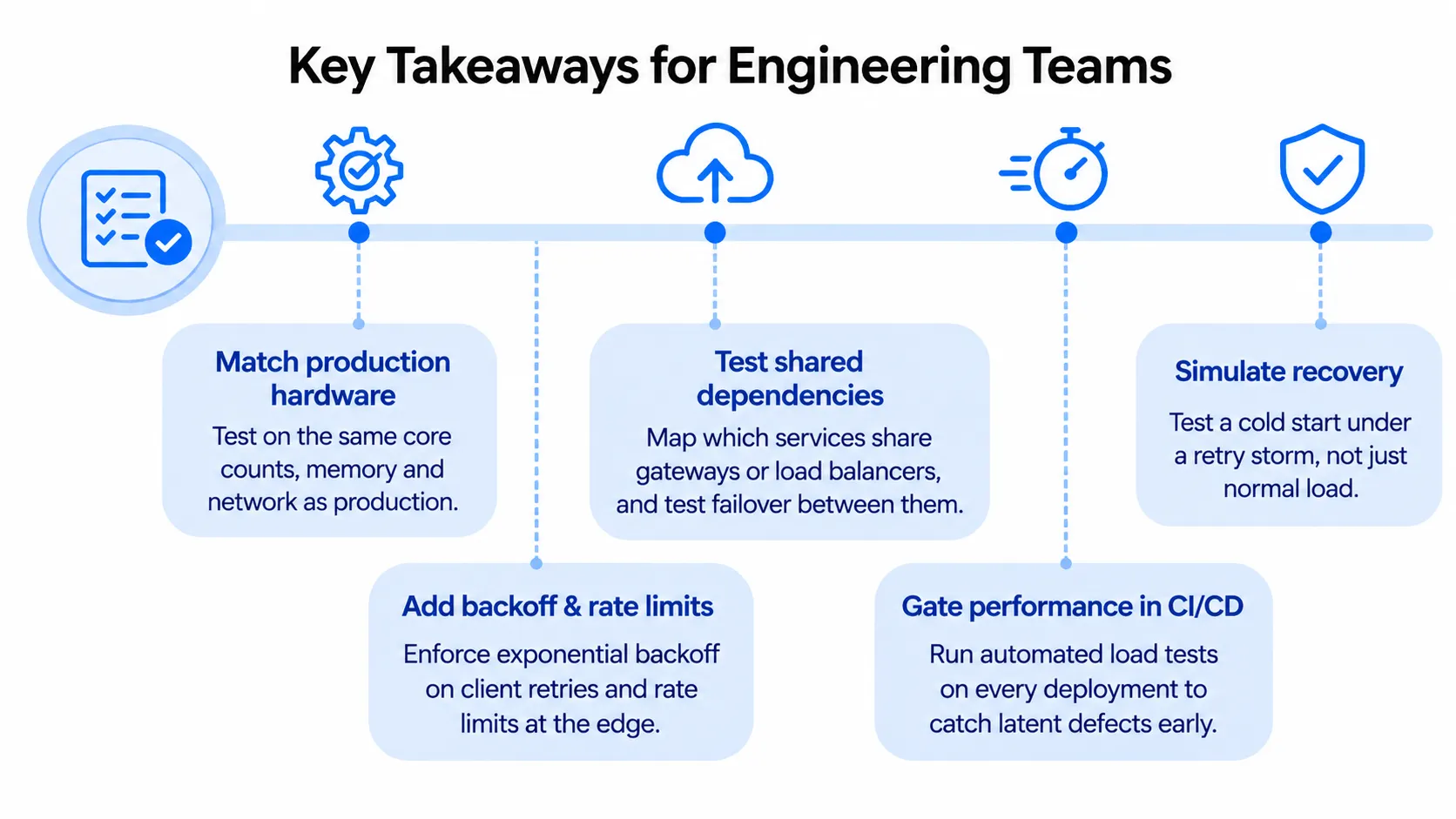
- Test environments must mirror production hardware. Testing on lower-spec or older lab environments creates dangerous blind spots. Concurrency bugs and lock contention often only appear on high-core, high-throughput production machines. The right performance testing tools can replay that production traffic mix.
- Traffic shifts are just as dangerous as traffic spikes. Your system might handle steady peak volume without issue, yet fail when internal failover routines shift traffic patterns across shared gateways.
- Recovery requires stress testing too. Most teams use load testing to check how their servers handle normal load, but very few simulate a "cold start" under a massive retry storm. If your servers cannot survive a thundering herd upon reboot, a minor blip can turn into a day-long outage.
How Frugal Testing Helps With Performance Testing
At Frugal Testing, our performance testing service shows how your servers behave under real production conditions, before real users find out. We measure response times, throughput, and resource use under normal, peak, and failure conditions, so bottlenecks and concurrency defects surface in a test report, where they are far cheaper to fix than in production. That includes load, stress, and scalability testing.
Microsoft's lab tests missed a bug that only appeared under production conditions, and it stayed hidden for more than three months. We close that gap by testing with realistic traffic patterns, then simulating failovers and retry storms the way production would see them. You get findings your team can act on, not a report that sits in a folder.
Our Implementation Approach
Our process has four steps, and your team stays involved throughout.
- Scope: We list the services, queues, and shared dependencies whose performance your business cannot afford to lose.
- Design: We write performance scenarios for peak load, failover, and retry storms, with clear pass thresholds agreed up front.
- Run: We run the tests with production-like traffic volumes and patterns, and record what slows or breaks first.
- Hand over: You get ranked findings with fixes, plus the scripts, so your team can keep running the tests in CI/CD.
Conclusion
The Outlook outage in November 2026 shows how a small defect can hide for months and then take down email worldwide. Microsoft's lab tests ran on weaker hardware, so the bug waited for real traffic and a routine failover to expose it. Recovery was harder still.
Your systems may have the same gaps. Test on production-like hardware, rehearse failovers, and simulate the retry storm that follows an outage. Then you find the problem in a test report, not a headline. The cheapest time to find those gaps is before your users do.
People Also Ask (FAQs)
Q1. Was the November 2026 Outlook outage caused by a cyberattack?
Ans: No. Microsoft said there was no indication of malicious or cyber activity. Its post-incident report blames a latent software defect combined with a routine traffic shift.
Q2. How long did the Microsoft 365 outage last?
Ans: Almost 24 hours. Microsoft's report puts the incident from 4:20 PM UTC on November 12 to 4:10 PM UTC on November 13, 2026, with Exchange Online and Outlook hit hardest. Some outlets round this to about 20 hours.
Q3. What is the "thundering herd" problem in server recovery?
Ans: The thundering herd problem occurs when a large number of waiting clients or queued requests simultaneously hit a server the moment it comes back online, immediately overwhelming its resources and causing it to crash again.
Q4. How can companies prevent cascading server failures?
Ans: Organizations can prevent cascading failures by running load and failover tests on production-equivalent hardware, implementing traffic throttling and circuit breakers, and enforcing exponential backoff rules for client retries.
Q5. Did the outage affect only Outlook?
Ans: No. Teams, SharePoint, OneDrive, and Copilot were also affected, though Exchange Online and Outlook were hit hardest.