TLDR: Load testing checks if your system meets SLAs at expected traffic. Stress testing finds where it breaks under overload. Volume testing exposes data-layer defects that the other two will never catch. They are not interchangeable.
A retail platform sailed through load testing at 600 concurrent users. Two weeks later, at 900 users on Black Friday, it collapsed under a database query that had never been optimised for real data accumulation. The load test passed. The volume test was never run.
That gap is exactly where production incidents happen. According to data from the IBM Systems Sciences Institute, fixing a software defect discovered in production costs up to 15 times more than catching it during the early development and testing phases. Yet most teams still treat load testing, stress testing, and volume testing as the same exercise.
They are not. Each answers a different question about system performance, system stability, and load capacity. Here is the breakdown your team needs before picking a tool or engaging a vendor.
What Each Test Type Actually Measures and Why the Difference Matters
What is software performance testing? It is validating that a software application behaves correctly under defined conditions of user traffic, data volume, and infrastructure load. The three types below each define those conditions differently.
Load Testing: Validating System Behaviour at Expected Traffic
What is load testing? It simulates realistic concurrent users or transactions to confirm your system meets SLA thresholds (response times, error rates, throughput) under normal production conditions.
Two subtypes you will run most:
- Steady-state tests: Hold flat user loads over time.
- Ramp-up tests: Gradually increase to a target ceiling.
Key metrics: p95 latency, error rates, and minimum throughput at peak load. Load testing is how you set the performance benchmarking baseline that every other test type references.
Stress Testing: Finding the Breaking Point Deliberately
Stress testing pushes the system beyond its expected capacity to find where things fail or recover badly. The question is not "can we handle our user traffic?" It is "what happens to system resilience when we cannot?"
Two execution patterns:
- Sustained overload: Reveals memory usage leaks, CPU usage ceilings, and thread exhaustion at high load.
- Spike testing: Sends a sudden traffic burst and drops it fast, mimicking flash sales or viral events.
The defects in stress testing surfaces are invisible in a load test. That is why they must run separately.
Volume Testing: Validating Data Throughput and Storage Behaviour
Volume testing (also called flood testing) pushes large datasets through your system to find data-handling defects: database query degradation, file I/O bottlenecks, and storage threshold limits.
The key distinction:
- Load testing simulates user loads (e.g., 10,000 concurrent users for 30 minutes).
- Volume testing simulates data scale (e.g., 10 million records through a single pipeline run).
Non-negotiable for data pipelines, ETL systems, reporting engines, and applications accumulating audit logs or transactional histories over time.
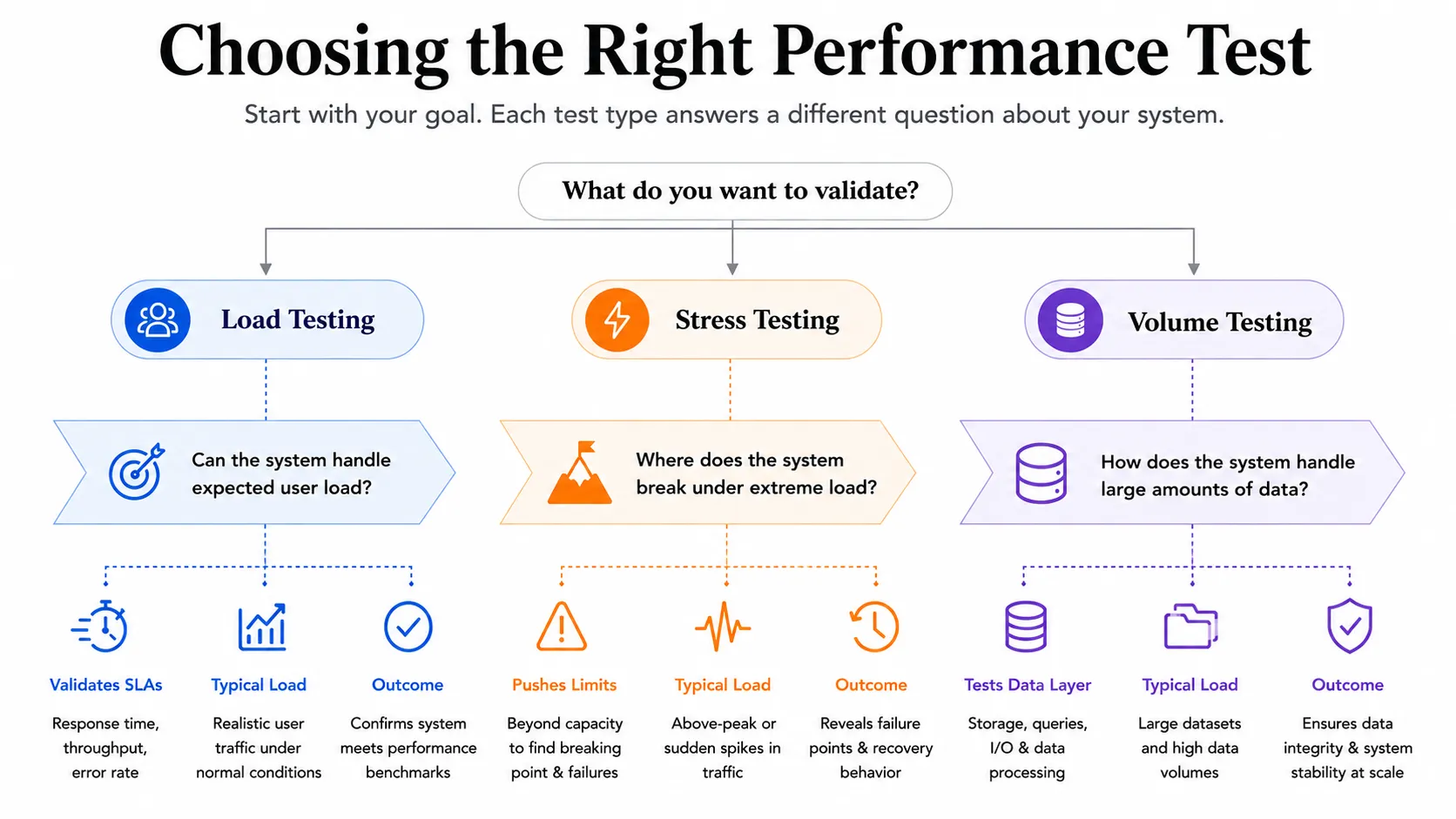
Side-by-Side Comparison: Load Testing vs Stress Testing vs Volume Testing
For PMs: load testing is your standard release gate, stress testing is tied to go-live sign-off, and volume testing gates data-layer releases.
The Performance Testing Types That Sit Between These Three
Two adjacent types frequently get skipped or duplicated because teams are not sure where they fit.
Soak Testing and Endurance Testing: Finding Long-Run Degradation
Soak testing (also called endurance testing) runs the system at expected load for hours or days to catch defects that only appear over time: memory usage growth, connection pool exhaustion, log file bloat, and session accumulation.
It uses the same load profile as a load test but extends the time window. The trigger: if p95 response times rise more than 20% between the one-hour and four-hour marks of a load test, schedule a soak test before releasing.
Scalability Testing: Validating That Horizontal Scale Works as Expected
Scalability testing answers one question: if we add more server instances, does system performance actually improve?
It runs load test iterations at different infrastructure configurations, then compares throughput testing results and latency curves. As part of any capacity testing plan, it confirms that infrastructure investment translates to real gains.
Common failures include database bottlenecks, shared state between nodes, and load balancer misconfiguration.
When to Run Each Test: Mapped to Release Stage and Risk Profile
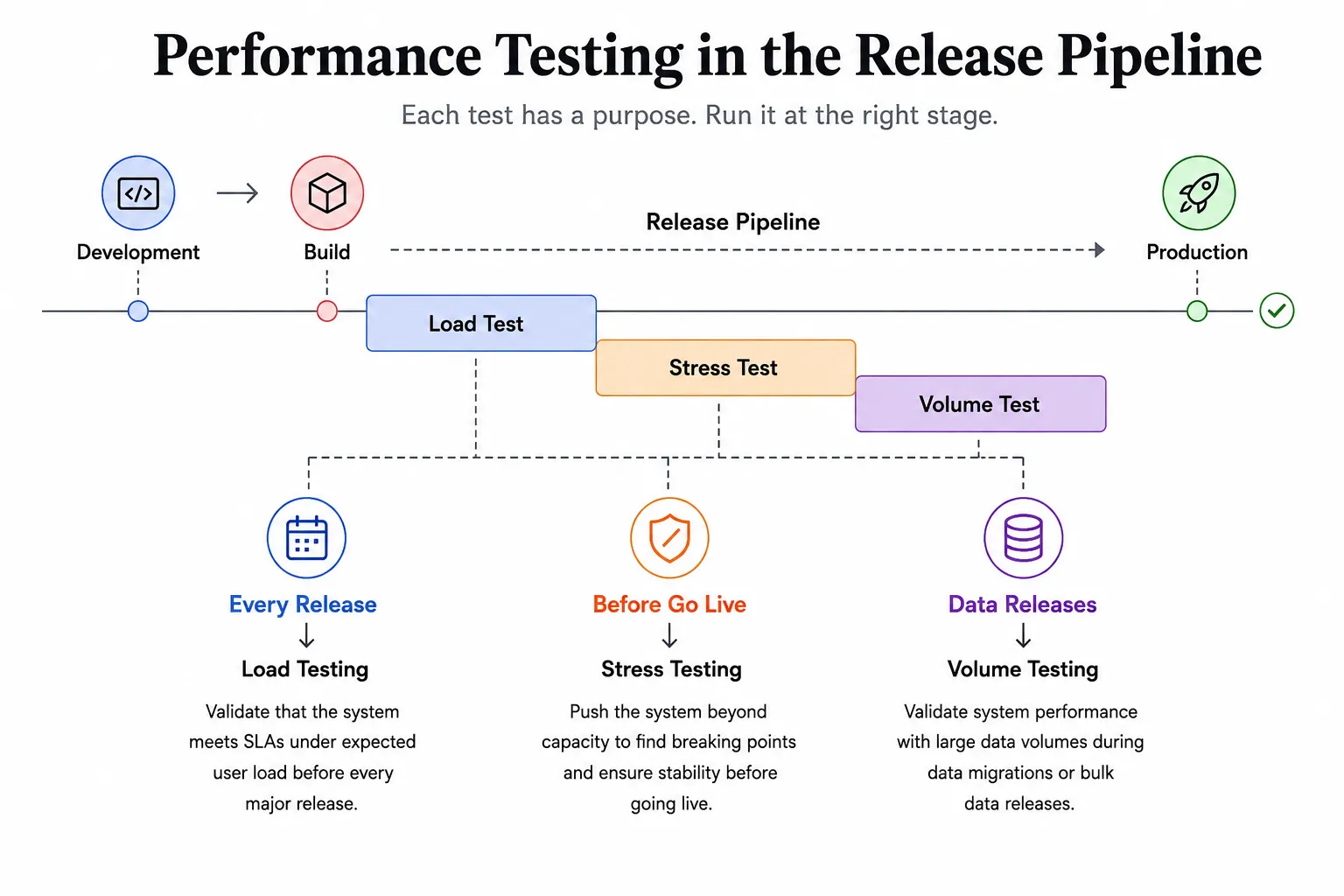
Most teams run the wrong test at the wrong time. Map each type to a decision point:
Pre-release gates
- Load testing runs before every major release candidate.
- Stress testing runs before go-live or after features that change concurrency or resource usage.
- Volume testing gates any release that modifies how data is ingested, stored, or queried at scale.
Post-architecture change validation
- After adding caching layers or migrating database engines, run both load testing and scalability testing before production.
- Stress testing confirms no new failure mode was introduced at overload.
Event-driven triggers
- Planned traffic spikes, data migrations, and infrastructure changes each call for a specific test type based on the risk.
Sequence them: load testing first to set the performance benchmarking baseline, stress testing to find the limits above it, volume testing when the data layer is in scope. The common mistake: substituting stress tests for load tests. A system can pass a stress test and still fail its SLA at normal production load.
How to Choose the Right Performance Testing Tool for Each Test Type
There is no single best option. The right performance testing software depends on your stack, CI/CD setup, and whether cloud-native execution matters.
JMeter: Protocol Versatility for Load and Volume Test Scenarios
Apache JMeter is the most flexible option. It handles HTTP, JDBC, JMS, and FTP, making it the go-to for volume testing scenarios that involve both database load and API throughput.
Best for:
- Teams needing protocol-level visibility (finance, healthcare, government).
- JMeter load testing and JMeter performance testing at high concurrency via distributed execution mode.
Trade-off: Java-based resource utilization and a steep learning curve for distributed setups.
k6: Developer-Native Load and Stress Testing in CI/CD Pipelines
k6 is built for engineering teams that want performance testing baked into their CI/CD pipeline. Scripts are JavaScript-based, version-controlled, and natively integrated with Grafana for real-time performance metrics monitoring.
Best for:
- k6 performance testing and k6 load testing as automated pipeline gates.
- Spike testing within stress test suites.
- Teams use Grafana Cloud k6 for high-concurrency runs without managing their own infrastructure.
Azure Load Testing and Cloud-Native Execution for Enterprise Environments
Azure load testing suits teams already on Azure who want managed execution without running their own load generator fleet. It supports Apache JMeter scripts and integrates with Azure Pipelines. Co-located infrastructure removes network latency as a variable in results.
Trade-off: pay-per-virtual-user-hour pricing suits periodic pre-release testing but gets expensive for continuous application performance testing.
Locust load testing is worth considering for Python-focused teams. It has a simpler distributed model than JMeter and lower setup overhead.
How Frugal Testing Designs and Runs Your Performance Test Suite: End to End
Most teams struggle with performance testing not because they lack load testing software, but because no one defined what "passing" looks like before the test ran. In our work with 40+ US engineering teams, that missing definition is the most common root cause of pre-release failures.
What Our Performance Testing Engagement Looks Like
Our software performance testing services follow four stages:
- Week 1: Architecture review, SLA definition, and load profile derivation from production performance metrics.
- Week 2: Testing environment configuration, baseline load test execution, and threshold calibration.
- Weeks 3 to 4: Stress test suite build with spike testing scenarios, volume test design if needed, and endurance testing if Week 2 flagged latency drift.
- Week 5 onward: CI/CD integration as a release gate, handoff documentation, and a guided run-through with your team.
You get interpreted findings with remediation priorities, not a raw CSV. If a query degrades under volume testing in a way the load test missed, we surface the query, the threshold, and the fix.
Who This Is For
This engagement fits:
- Teams of 10 to 100 shipping monthly or weekly without a dedicated performance engineer.
- Teams sitting on old Apache JMeter scripts that have not been touched in months.
- Anyone facing a production incident related to system crashes or performance bottlenecks in the past six months, an upcoming high-traffic event, or a platform migration.
Building a Performance Testing Strategy That Uses All Three: Without Redundancy
The real question most engineering managers ask is not "what is load testing?" It is "how do I run all three without it taking three weeks before every release?"
The answer: tier them.
The release gate model:
- Load test passes: promote to staging.
- Stress test passes: approve for production.
- Volume test passes: gate data processing releases.
Network throughput testing and mobile app performance testing follow the same tiered logic when those layers are in scope. Share the testing environment across all three types and sequence results so each test builds on the previous baseline.
There is not always a clean answer to how much is enough. What does not change is the cost of getting the sequencing wrong.
Conclusion
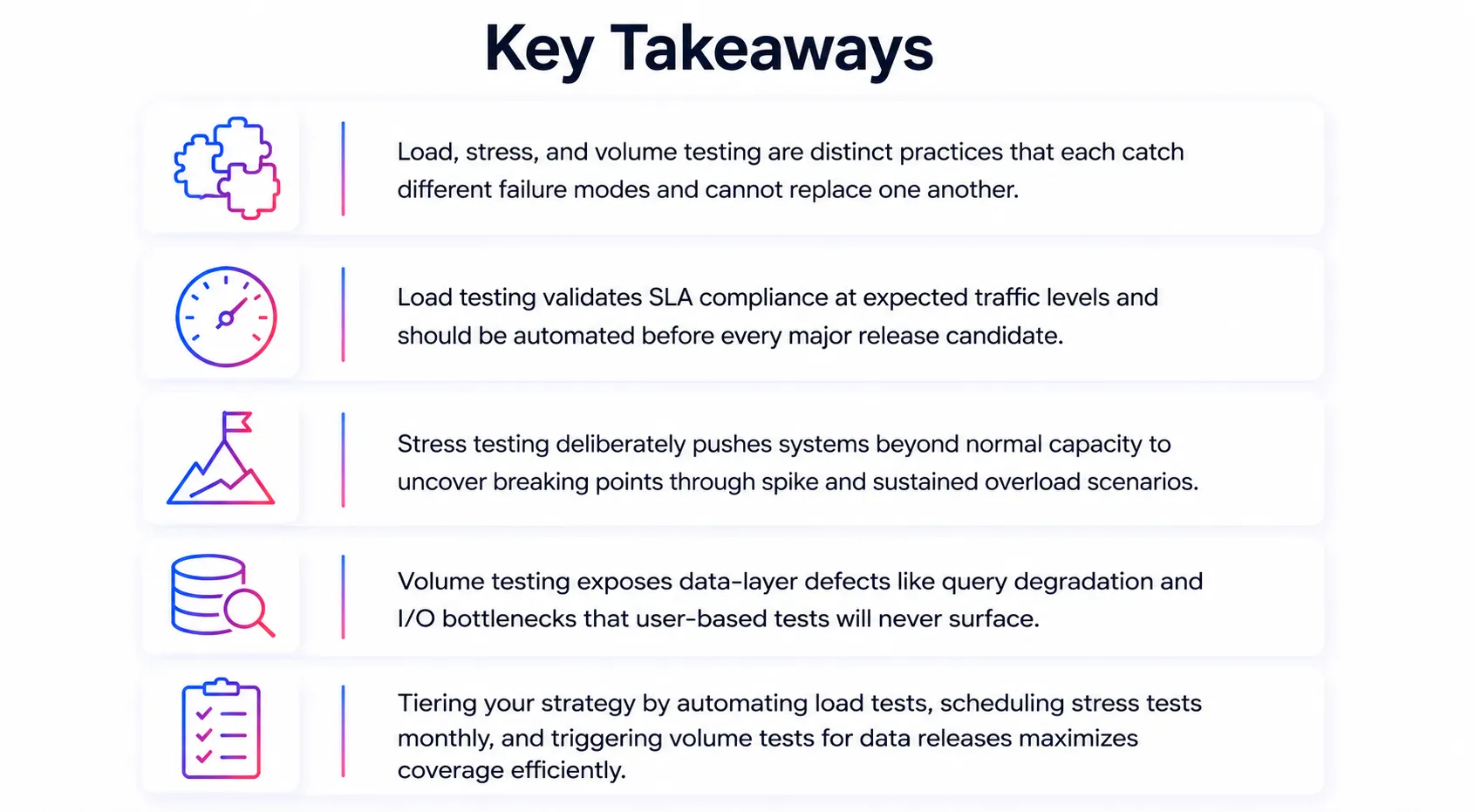
Load testing, stress testing, and volume testing are not three versions of the same thing. Each targets a different failure mode, runs under different conditions, and catches performance bottlenecks the others miss. The taxonomy is straightforward. The harder part is whether your release process actually schedules all three at the right points, with threshold limits tied to real SLA commitments and performance metrics that reflect genuine user behaviour.
Most teams under-invest in this. Building it right means deliberate thinking about performance testing tools, testing environment configuration, and load capacity baselines. The teams that get it right, whether through internal effort or specialist load and performance testing services, ship with system reliability and system resilience that ad hoc testing rarely delivers.
People Also Ask (FAQs)
Q1. What is the practical difference between load testing and stress testing?
Ans: Load testing validates SLA compliance at expected user traffic. Stress testing finds the architectural failure point above that ceiling. They answer different questions about system performance and must not be substituted for each other.
Q2. When should we run volume testing instead of, or in addition to, load testing?
Ans: Run volume testing when a release touches data processing, bulk imports, ETL pipelines, or storage at scale. Load testing simulates user loads; volume testing simulates data quantity. Run both when both layers are affected.
Q3. Can Apache JMeter handle all three types of performance testing?
Ans: Yes. JMeter performance testing covers load, stress, and volume scenarios. Its JDBC sampler handles database load alongside HTTP traffic. The limitation is operational: a distributed setup requires genuine expertise to manage at scale.
Q4. How do we define pass/fail thresholds for a load test before we have production traffic data?
Ans: Derive thresholds from SLA commitments, industry benchmarks, and architectural constraints. For new systems, start 20 to 30% below theoretical capacity and tighten once live traffic data is available.
Q5. What does it cost to run performance testing as a managed service versus building it in-house?
Ans: In-house requires a dedicated performance engineer at $120 to 180K per year, plus infrastructure. Managed load testing services deliver scoped execution and interpreted results at significantly lower cost with no ramp-up period.



.webp)

.webp)