A QA lead at a mid-size fintech company called us three weeks before launch. Load tests had passed in staging, but the app buckled the first Monday the traffic spike hit production, and checkout completion dropped 40% for two hours. JMeter wasn't the problem. The team never modelled realistic user loads or concurrent users, missed the performance bottlenecks that only show up under real traffic, and learned that a passing test isn't real-world application performance.
That gap is why the performance testing tools market keeps growing, worth an estimated $986 million in 2025 and set to nearly double by 2032, per 360iResearch. Teams argue JMeter versus k6 in the abstract when the real question is simpler: Web, mobile, or API, and who is writing the scripts? This guide covers the strongest software performance testing tools by use case, including open source performance testing tools.
What Counts as Performance Testing: What These Tools Actually Measure
Performance testing checks whether web applications and mobile apps hold up under load, and application performance testing tools report the same core performance metrics: Response times, throughput, error rate, HTTP failures, and p95/p99 latency, alongside concurrent users a system can sustain. What varies more is whether a tool measures protocol-level load, raw HTTP or API traffic, or browser-level load, real rendering, user experience, and First Contentful Paint via Google Lighthouse. Get that wrong, and you can pass every test while shipping a slow load time.
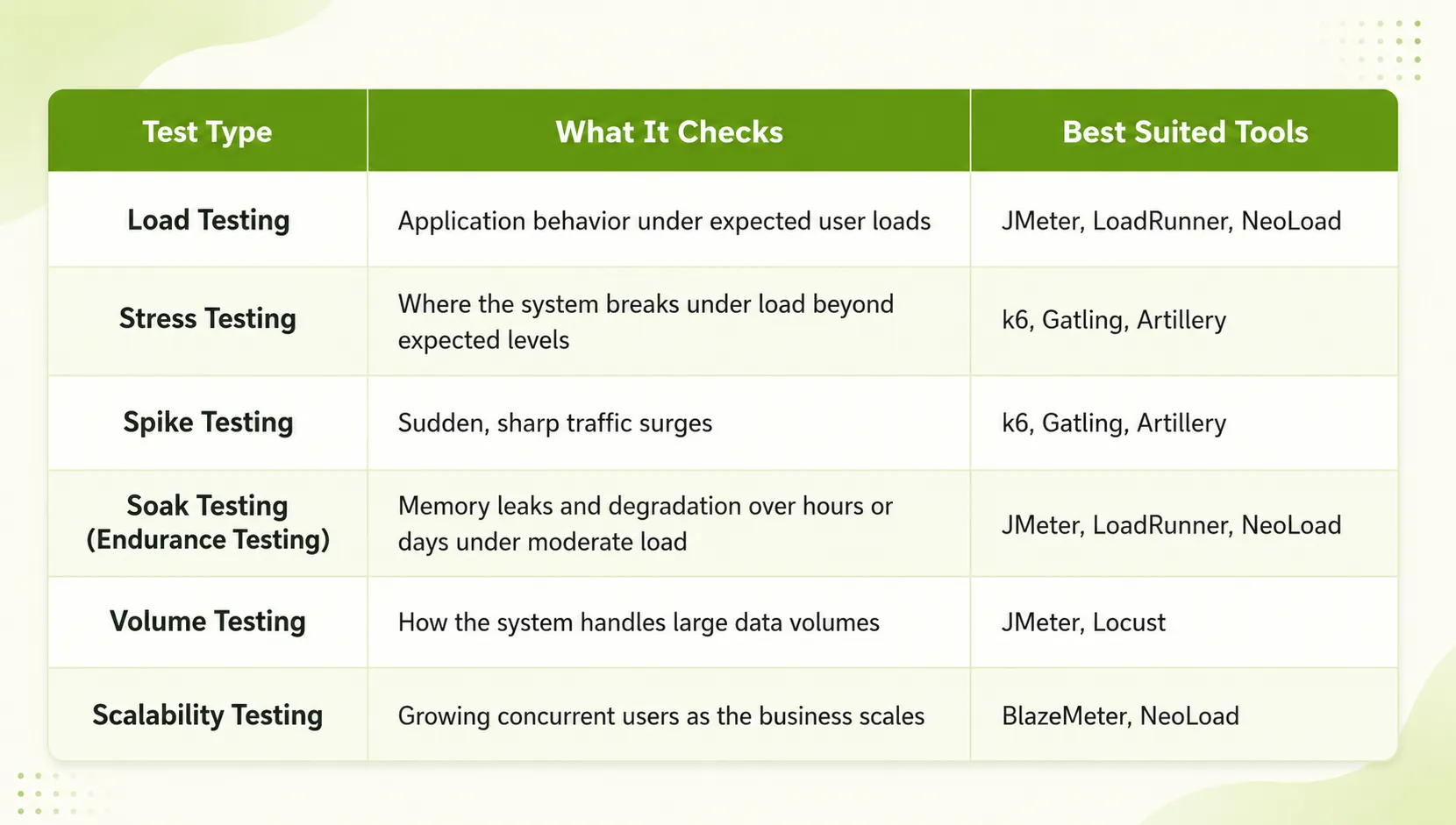
Types of Performance Testing
Performance testing is not one test; it is a family of related test types, and picking the wrong one is often what leads teams to the wrong automated performance testing tools in the first place.
How We Evaluated These Performance Testing Tools
We weighted seven factors, in this order:
- Load simulation realism and user journey modeling.
- CI/CD pipelines integration depth.
- Reporting quality, including a clear performance overview dashboard.
- Distributed execution, including geo-specific location-based testing.
- Ease of setup.
- Protocol coverage.
- Pricing.
This is roughly the weighting discussed at Automation Guild sessions on performance engineering: A tool that scores well in a demo but cannot distribute load across regions fails once traffic gets real, and catching that early in the software development lifecycle saves time later. For teams building authority alongside technical improvements, link building can be more effective when they find vetted publishers that are relevant to their industry and audience. Teams working with an SEO agency in Canada can also use platforms such as Linkdune.com to identify relevant publishing and link-building opportunities.
Best Performance Testing Tools for Web Applications
These performance testing tools for web applications, or web app performance testing tools, simulate concurrent users and HTTP traffic against a live application. What separates them is how well they handle realistic ramp-up patterns instead of hammering an endpoint at full volume immediately.
Apache JMeter: Open-Source, Broadest Protocol Coverage
Best for: Teams that need broad protocol coverage without licensing cost.
Key strengths:
- Open-source with zero licensing cost.
- Broadest protocol range here, covering HTTP, HTTPS (secure connection), JDBC, FTP, JMS, and SOAP.
- Backed by a large plugin ecosystem.
- The tool most JMeter alternatives get compared against.
Limitations:
- GUI test plans get unwieldy at scale.
- Non-GUI runs need JVM tuning for high concurrent users.
Gatling: Code-Driven Load Testing for CI/CD Pipelines
Best for: Teams that want code-first, CI/CD-native load testing.
Key strengths:
- Tests written in Java, JavaScript, TypeScript, Scala, or Kotlin.
- Lightweight engine built specifically for CI/CD pipelines.
- Free Community edition available.
Limitations:
- Assumes coding comfort across the team.
- Collaborative Enterprise dashboards are a separate purchase.
BrowserStack Load Testing: Browser + API Load in One Run
Best for: Mid-size web teams that want browser fidelity without managing infrastructure.
Key strengths:
- Runs real browser-level load alongside API load in one platform, one of the more complete ui performance testing tools available.
- Supports up to 1,000 concurrent users.
- No infrastructure to provision.
- Pairs with Google Lighthouse for First Contentful Paint and load time checks.
Limitations:
- The user ceiling makes it weaker for large, multi-protocol programmes.
Best Performance Testing Tools for Mobile Applications
Mobile App Performance Testing needs signals that protocol-level tools do not capture, including battery consumption, network conditions and throttling, device fragmentation across device types, and compatibility testing across OS versions. JMeter and k6 hit a mobile backend, but neither shows how an app behaves on a three-year-old Android phone on patchy 4G.
TestGrid: Real-Device Mobile Performance at Scale
Best for: Teams that need real application behavior under actual network conditions, not just backend numbers.
Key strengths:
- Real-device testing across 1,000+ Android and iOS devices.
- Device vital monitoring.
- CI/CD integration.
- AI-assisted test generation through CoTester.
Limitations:
- Focused on mobile, so it is not a fit for pure web or API load testing on its own.
LoadNinja: No-Code, Real-Browser Load Testing
Best for: Teams without a dedicated performance engineering hire who still want real-browser fidelity.
Key strengths:
- No-code route using an InstaPlay recorder.
- Captures navigation timing and load time from real browsers.
- No scripting required to build load tests.
Limitations:
- Mobile and web performance testing are not the same discipline, and LoadNinja does not cover mobile-specific, device-level testing.
Best API Performance Testing Tools
Grafana k6: JavaScript-Native, Threshold-Based Pass/Fail
Best for: API-first teams that want CI/CD-native pass/fail gating built in.
Key strengths:
- Scripts tests in JavaScript as an API-first platform.
- Built-in performance thresholds for automated CI/CD pass and fail gates.
- Integrates natively with Grafana dashboards.
- Grafana Cloud k6, the hosted version, adds distributed load generation without managing your infrastructure.
Limitations:
- No GUI test builder.
- Teams without JavaScript comfort face a learning curve.
Locust: Python-Native Load Modeling
Best for: Python-first engineering teams that want scripts living alongside application code.
Key strengths:
- Defines user behaviour in plain Python instead of a proprietary DSL.
- Real-time web UI for watching test progress.
- Pairs well with Robot Framework.
Limitations:
- Best suited to teams already comfortable in Python; less approachable for teams without that skill set.
Cloud-Based and Automated Performance Testing Platforms
Rather than running load generators on your own infrastructure, these cloud performance testing tools scale open-source scripts in the cloud.
BlazeMeter: Scaling JMeter, Gatling, and Locust Scripts in the Cloud
Best for: Teams that want to scale existing open-source scripts without managing their own load-generation infrastructure.
Key strengths:
- Runs existing JMeter, Gatling, Locust, and Taurus scripts at scale.
- Centralised performance overview dashboard.
- Geo-specific location-based testing.
- CI/CD integration built in.
Limitations:
- Cost scales with usage.
- Teams already running open-source performance testing tools locally may not need the managed layer.
Enterprise Performance Testing Tools: LoadRunner vs. NeoLoad
These two tools are built for large, multi-protocol, governed programmes rather than single-application testing.
OpenText LoadRunner: Broadest Enterprise Protocol Coverage
Best for: Large enterprises that need legacy protocol coverage alongside standard web and API load.
Key strengths:
- Supports SAP, Citrix, Oracle, Siebel, and legacy protocols alongside standard web and API load.
- Deep diagnostics covering HTTP failures and secure connection handshakes.
Limitations:
- Licensing is quoted per engagement, well above open-source alternatives.
Tricentis NeoLoad: Codeless and As-Code in One Platform
Best for: Teams that want performance testing owned by QA as well as engineering.
Key strengths:
- Dual approach: guided codeless design plus an as-code path for CI/CD teams.
- APM integrations for Datadog, Dynatrace, AppDynamics, and New Relic.
- The codeless option suits teams that want performance testing owned by QA rather than routed entirely through engineering.
Limitations:
- The full feature set may be more than smaller teams need.
Which one fits your team?
- Legacy protocols like SAP or Citrix? LoadRunner.
- Codeless option for non-engineers? NeoLoad.
- CI/CD-native, as-code testing at scale? NeoLoad.
Our Take: LoadRunner earns its cost when legacy protocol coverage is non-negotiable. Outside that, NeoLoad's codeless-and-as-code model wins for most teams, and the break-even against open-source tooling arrives sooner than most assume.
Comparison Table: Performance Testing Tools at a Glance
What Most Performance Testing Tool Roundups Get Wrong
Most comparisons rank tools generically without asking whether you are testing web, mobile, or API, making a JMeter-versus-k6 debate meaningless without that context. Mobile performance testing tools get folded into generic lists too, though mobile needs real-device signal protocol-level tools that were never built to provide. Tool choice matters less than whether the team defines realistic user loads first. We have watched well-chosen load and performance testing tools produce useless results because the load profile had nothing to do with how real users behave.
Why "Best Tool" Questions Need a Use-Case Answer First
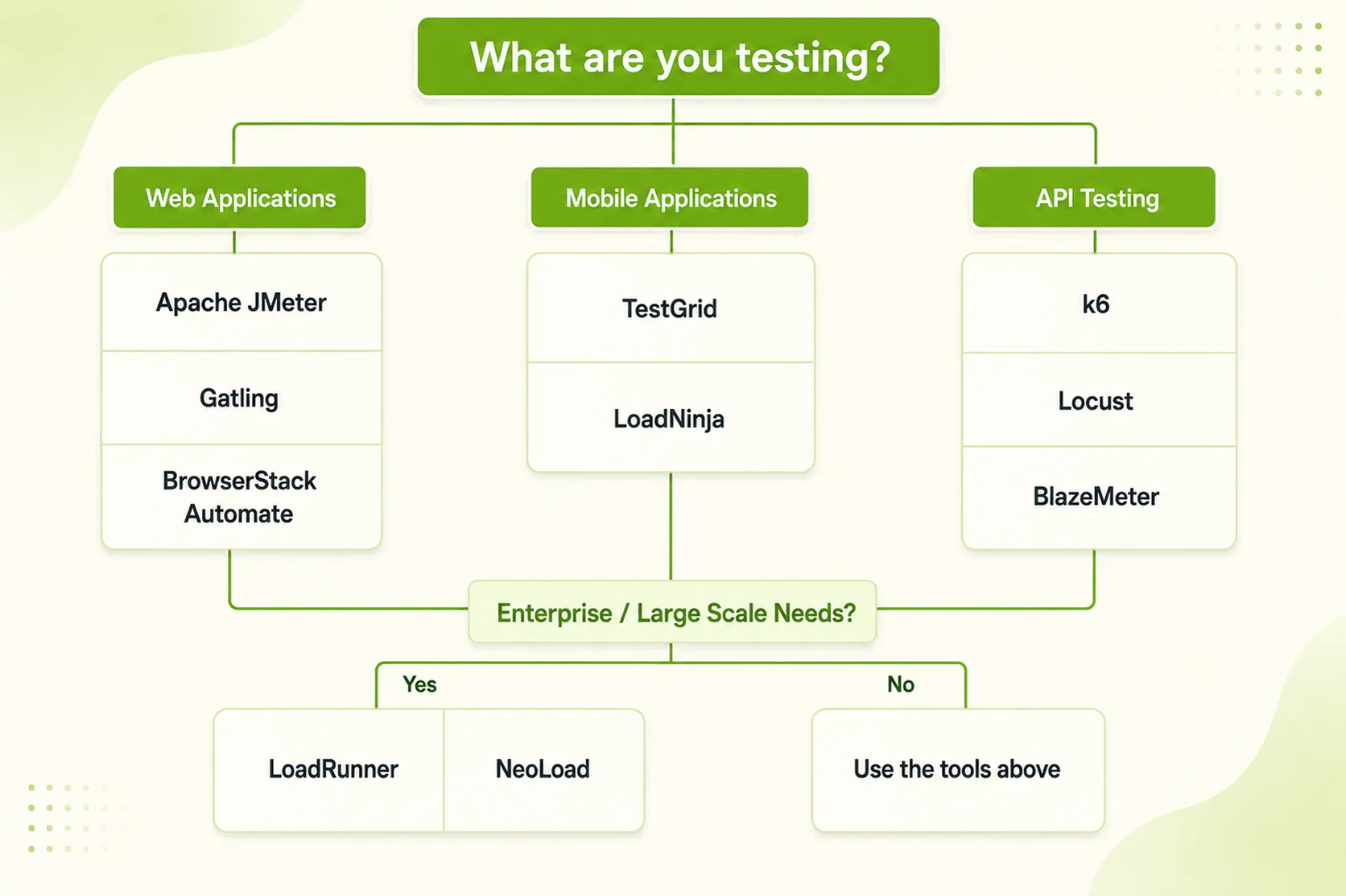
Before we recommend anything, we ask three questions: what are you testing, web, mobile, or API; who is writing the scripts, engineers or QA; and where do results surface, inside a CI/CD pipeline or on a manual dashboard. Skip these, and you will end up with a tool built for someone else.
How Frugal Testing Helps You Pick and Implement the Right Performance Testing Stack: Without the Guesswork
We help teams select, configure, and run load, stress, and soak test suites against tools already covered here, without pushing a proprietary platform. Our validation process starts with a protocol and traffic-pattern audit, then we build or tune load test scripts in whichever tool fits your skillset and CI/CD pipelines, finishing with a human verification step. The failure mode we see most often is not a bad tool choice. It is an enterprise licence never configured with realistic load profiles, sitting unused while the team ships untested.
What Our Performance Testing Engagement Looks Like
Our engagement runs in four stages:
- Traffic pattern audit
- Tool selection or tuning
- Script build
- CI/CD pipelines integration with clearly defined thresholds
At close, you own working test suites, documented thresholds, and a runbook your team can maintain, shortening future load testing cycles.
Who This Is For
This fits engineering and QA teams that have picked a tool, or are deciding between two, without in-house performance depth. Two situations bring people to us most: a launch date with no load-tested baseline, or a tool purchase not producing results in six months.
Key Takeaways
- Match the tool to the use case first: web, mobile, or API; tool reputation second.
- Open source performance testing tools give protocol breadth at the cost of setup and maintenance time.
- Mobile performance testing tools need real-device signal that protocol-level tools cannot provide on their own.
- Enterprise tools like LoadRunner and NeoLoad trade cost for governance and multi-protocol coverage.
- A well-chosen tool with an unrealistic load profile still produces useless results.
Conclusion
Tool choice for performance testing tools should follow use case, not brand reputation. Whether you are testing web applications, mobile apps, or APIs, the right pick depends on protocol coverage and team skill set. Open source performance testing tools give protocol breadth at the cost of setup time, while enterprise tools trade cost for governance and multi-protocol coverage. None of that matters if nobody defines realistic user loads and concurrent users before the first test runs. Get the load profile right.
People Also Ask (FAQs)
Q1. How long does it typically take to set up a performance testing tool for the first time?
Ans: Open-source tools like JMeter or k6 usually take one to two weeks to configure properly. Managed platforms such as BrowserStack or BlazeMeter cut that down to a few days.
Q2. Can one performance testing tool cover both web and mobile applications?
Ans: Not well. Protocol-level tools like JMeter test mobile backends but miss on-device behaviour, so most teams pair a web tool with a dedicated mobile tool like TestGrid.
Q3. Do performance testing tools need dedicated infrastructure to run?
Ans: Open-source tools like JMeter or Locust need you to provision and scale your own load generators. Cloud platforms such as BlazeMeter, Azure Load Testing, and BrowserStack remove that overhead entirely.
Q4. How often should performance tests run once a CI/CD pipeline is in place?
Ans: Lightweight load tests should run on every build. Full-scale stress and endurance testing runs typically happen weekly or before major releases, since they take longer and use more resources.
Q5. What team size or skillset is realistically needed to run performance testing well?
Ans: One engineer with scripting skills can run open-source tools like JMeter or k6 for small applications. Larger, multi-protocol programmes usually need a dedicated performance engineering role or outside support.