
"Just automate more tests" is the advice that quietly wrecks most QA automation efforts. A team writes a script for whatever's easiest to reach, ships it, repeats the pattern sprint after sprint. Eighteen months later, they're sitting on thousands of automated tests that take four hours to run, fail for reasons nobody can explain, and get skipped more than they get trusted.
A test automation strategy is the documented plan covering what gets automated, which automation framework you'll use, how tests integrate into CI/CD, and who owns the suite long-term, not a tool license or a script count. Get that decision layer right, and automation compounds. Get it wrong, and every new test makes the suite harder to maintain.
We work with engineering teams, QA leads, and DevOps groups who automated reactively, script by script, and now carry a suite nobody fully trusts. Automation testing done right cuts manual effort and lifts software quality; done reactively, it just relocates the pain. This post walks through the strategic decisions, grounded in test automation best practices, that separate a strategy that scales from one that collapses: scope and test-case selection, framework choice, page object model architecture, CI/CD pipeline integration, and the monitoring layer most teams skip.
What Is a Test Automation Strategy and Why "More Tests" Isn't the Goal
Too many teams conflate the two: they buy one of the popular testing tools, write scripts against whatever's in front of them, and call that a strategy. It isn't. The same gap shows up with automation tools, and test automation tools generally owning the tool says nothing about which test cases actually deserve coverage.
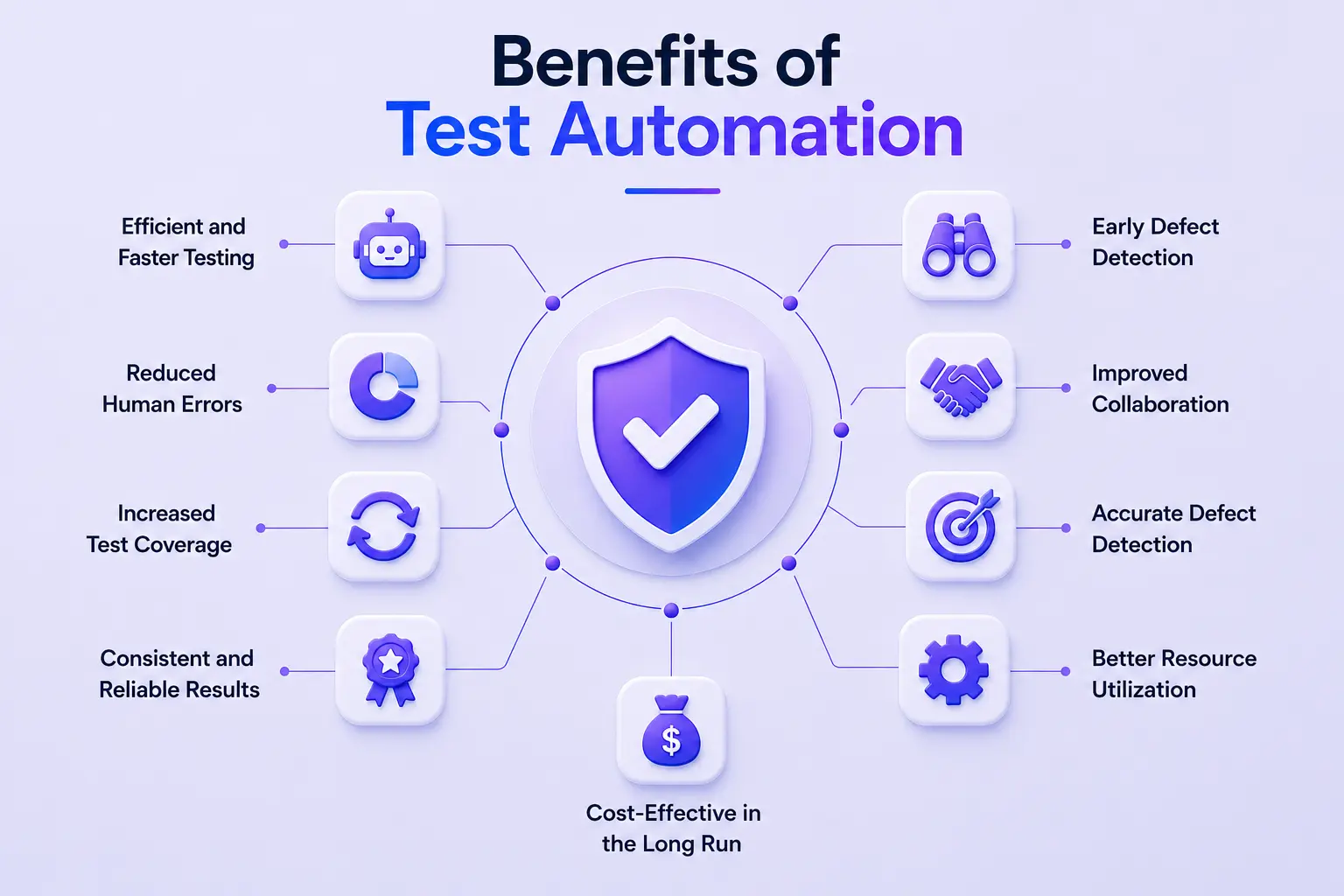
It helps to separate the strategy from the automation framework itself:
- Framework: The technical scaffolding: folder structure, libraries, reporting, CI/CD hooks.
- Strategy: The decision layer above it: what to automate first, which test types deserve coverage, who owns this when the original author leaves.
A team can have an excellent framework and no strategy. That's the failure mode we see most in enterprise engagements: automating easy UI flows first instead of the highest-risk ones, like payments, auth, and data integrity.
What Is a Benefit of Developing an Automation Strategy
A documented automation strategy pays off in two concrete ways, both of which translate directly into business value:
- Less wasted effort. A shared standard for what gets automated, how, and by whom stops two squads from independently building overlapping coverage for the same checkout flow using two different frameworks, a common pattern where both suites end up rotting in parallel.
- Faster onboarding. New engineers inherit a documented framework and decision record instead of reverse-engineering tribal knowledge from whoever wrote the original scripts.
What Is the First Step in Developing an Automation Strategy
The first step is defining scope and test-case selection criteria, deciding what should be automated before how. Teams that skip this end up automating what's easiest to script rather than what reduces the most risk, often discovering it eighteen months in, thin on the regression coverage that would have caught their last incident. Scope decisions should map to a risk analysis: which flows generate revenue, touch compliance-sensitive data, or have broken before. Each candidate should trace back to a real test scenario your team has actually hit, not a hypothetical one.
Choosing a Test Automation Framework That Won't Outgrow Your Team
Framework selection is where most test automation strategy conversations start and where they most often go wrong. We walk clients through four criteria before naming a tool:
- Application type web, mobile, or API
- The team's existing language stack
- CI/CD compatibility
- Community or vendor maintenance support
A framework that's technically superior but written in a language nobody knows is a slower rollout than a "good enough" one the team can actually extend.
Framework categories matter more than individual tool names. Record-and-playback tools move fast but break down the moment the UI changes meaningfully, brittle scripts nobody wants to touch. Code-based frameworks (Selenium, Playwright, Cypress) take longer to ramp up but scale cleanly because engineers can apply real design patterns, including the page object model. Low-code platforms sit in between: faster onboarding, but they hit a ceiling on complex conditional logic. Different test frameworks fit different problems web, mobile, API which is exactly why category-level comparison beats single-tool debates.
The most common mis-selection: picking a test automation framework for its feature list instead of how it fits the team's actual skill set. A framework loaded with AI-driven tools, self-healing scripts, and composable test libraries is worthless if nobody has the bandwidth to learn its API. Composable test libraries in particular only pay off once a team has enough shared test scripts to justify the abstraction.
Best Test Automation Framework Options by Use Case
There's no single best test automation framework; there's a best fit for your application type, team, and pipeline. Here's how the major options actually compare:
Selenium AI capabilities self-healing locators, AI-assisted element identification, and AI-powered frameworks built around composable test libraries are increasingly layered onto Selenium-based frameworks, addressing one of its oldest pain points: locator brittleness. Worth evaluating before any large, ageing Selenium suite migration.
Signs Your Current Framework Has Outgrown Your Team
Three symptoms tell us a framework has outgrown a team:
- Test run times climbing past the release window.
- A flaky-test rate above what the team actually tolerates.
- No single owner left who can debug a failure alone.
When "just re-run it" becomes the default response to a failed test, the framework has stopped serving the team.
Building a Maintainable Framework with the Page Object Model
The page object model (POM) is the architectural pattern that keeps a single UI change from breaking dozens of tests at once: one page, one object, one place to update. It's arguably the highest-leverage design decision in any code-based automation framework, and the one teams skip when moving fast early on, only to pay for it later.
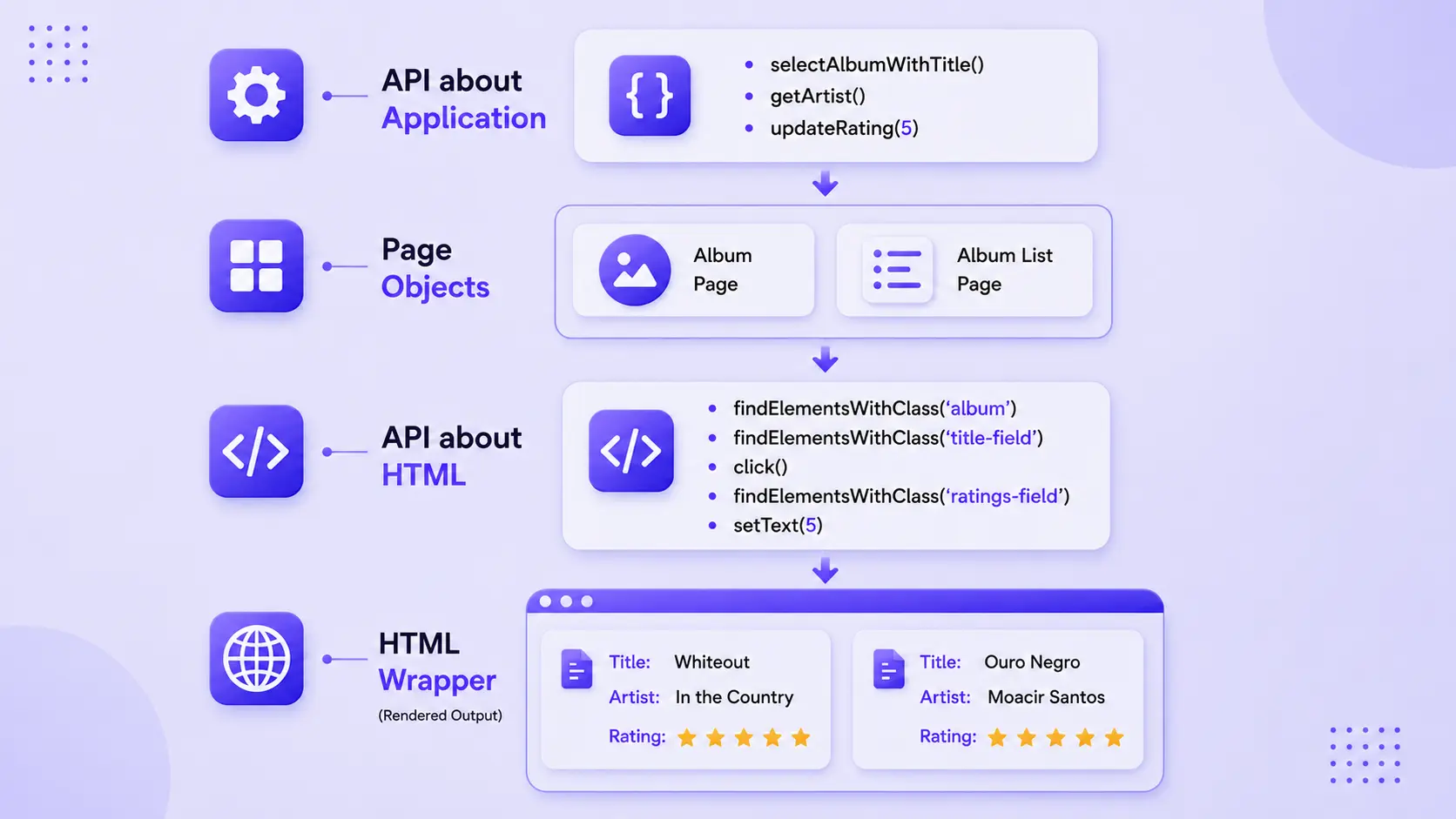
In practice, a POM implementation separates locators and page interactions from test logic entirely. Instead of every test file containing its own driver.findElement(By.id("submit-btn")), a single CheckoutPage class owns that locator, and every test calls checkoutPage.submitOrder(). When the button's ID changes, one file changes, not forty.
Where teams over-engineer POM:
- Building an abstraction layer for every conceivable interaction before they've written the tests that need it.
- Nesting page objects so deeply that a simple locator change requires tracing through four inherited classes.
Good POM implementations start to lean and grow into composable test libraries only as duplication actually appears, not before.
Page Object Model vs. Page Factory: When Each Makes Sense
Page Factory is a Selenium-specific extension of POM that uses annotations (@FindBy) to initialize elements more concisely, with lazy loading built in. Plain POM works for most teams and gives full control over locator initialisation. Page Factory earns its extra abstraction mainly for larger Java-based Selenium suites; for smaller suites or teams using Playwright or Cypress, plain POM is usually simpler and more maintainable.
Test Types, the Testing Pyramid, and Test Data Management
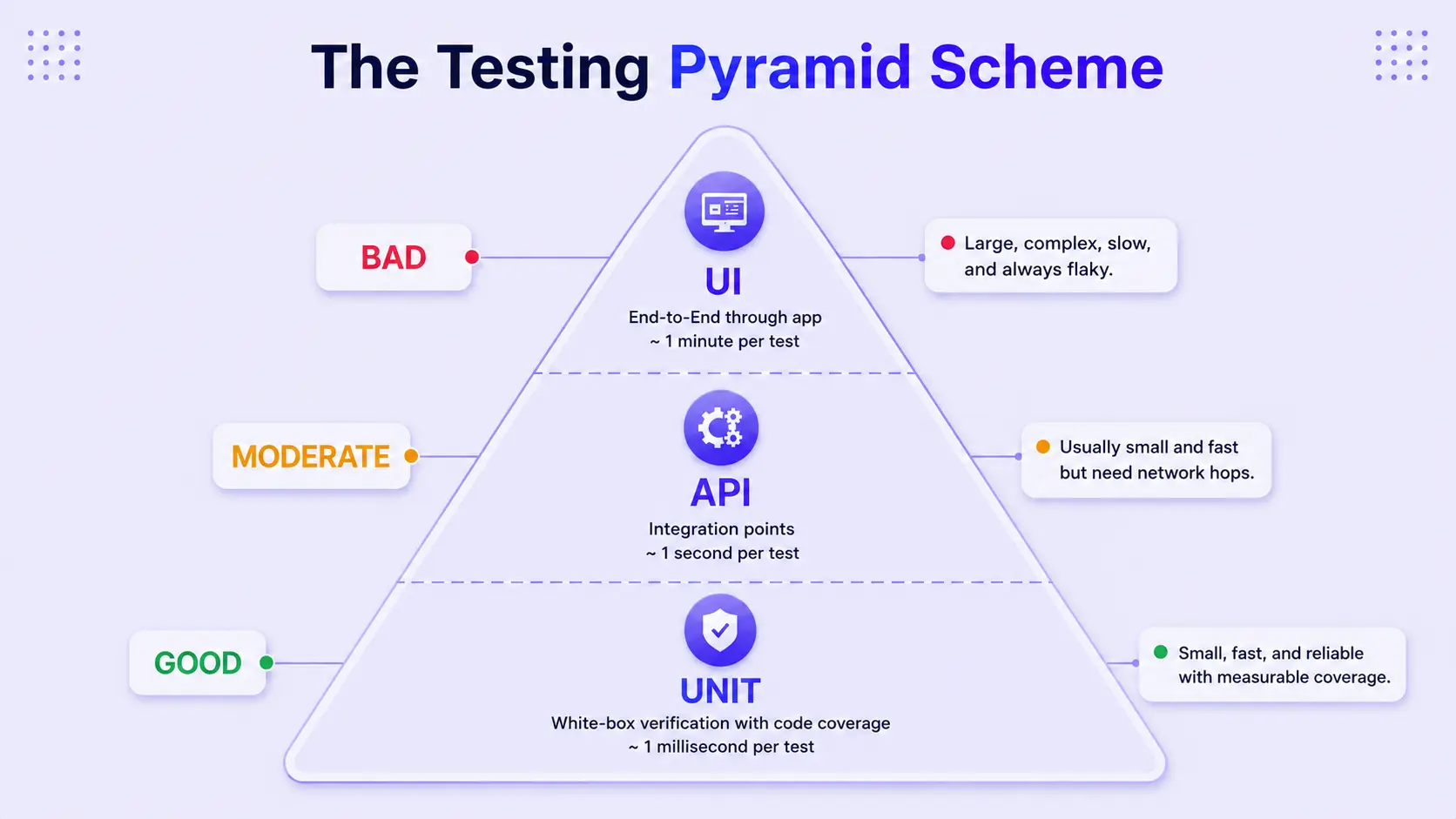
A test automation strategy also has to decide test types before it decides tools. The Testing Pyramid, a wide base of fast unit tests, a smaller layer of integration testing, and a thin cap of end-to-end and UI checks, still holds up as the default shape for a healthy automated testing portfolio. It keeps automation testing cheap at the base and expensive only where it has to be at the top.
Within that pyramid, a strategy needs an explicit mix of test types:
- Unit tests: The largest portion of automated testing, providing fast feedback through white-box verification of individual components.
- API tests: A smaller layer that verifies integration points and interactions between services, providing faster feedback than UI tests.
- UI tests: The smallest layer, covering critical end-to-end user journeys where higher execution and maintenance costs are justified.
None of this works without reliable test data. Test data management provisioning realistic, isolated test data across test environments without leaking production data is the piece most teams underinvest in, and it's usually the real reason "flaky" tests keep failing. Data-driven testing, where the same test scenario runs against multiple data sets, multiplies coverage without multiplying test scripts but only if the underlying test data pipeline is trustworthy.
Integrating Automated Tests into CI/CD Without Breaking the Pipeline
Where tests run in your CI/CD pipeline matters as much as which tests you write. We structure CI/CD pipelines so tests run earlier in the development lifecycle unit tests and integration tests at commit time, not just end-to-end tests gated before release because failures caught at commit are cheaper to fix than failures caught the night before release. This is shift-left testing in practice: moving test execution earlier in the development process, not testing everything earlier regardless of layer. A shift-left testing strategy is about testing the right layer at the right time: unit tests at commit, integration testing at merge, full regression testing at the pre-release gate.
Two levers keep test execution time sane as a suite grows:
- Test parallelization running independent test batches across multiple workers or a Selenium Grid for genuine parallel execution, which keeps a thousand-test suite from taking four hours
- Selective test-suite execution via risk-tier tagging, so every commit doesn't trigger the full regression suite; only tests relevant to the changed code path run on every push, with the full suite reserved for merge-to-main or nightly runs
Both levers are what keep automation efforts sustainable as the CI/CD pipeline scales without them, the testing tools you picked on day one start working against the team instead of for it.
Security deserves the same early placement functional tests get. We fold left security testing SAST scanning, dependency vulnerability checks into the same early CI/CD gates, mapped to SOC 2 and PCI DSS control requirements for enterprise teams in regulated industries. Waiting until a pre-release review to catch a vulnerable dependency is the same mistake as waiting until pre-release to catch a broken checkout flow.
The tooling pattern we use most: tagging tests by risk tier smoke, regression, full so CI/CD pipelines run the right subset on every commit. GitHub Actions and similar platforms make this straightforward with conditional job triggers based on tags or changed file paths.
Monitoring and Observability for Your Automated Test Suite
A test suite needs its own monitoring and observability layer separate from application monitoring tracking:
- Flaky-test rate
- Run-time trends
- Failure-pattern clustering
Most teams watch their production application closely and their test suite not at all, which is backwards: a degrading suite is often the earliest warning sign the delivery pipeline is breaking down.
We use test analytics dashboards to catch suite health degrading before it becomes a trust problem with engineering leadership. The metric that predicts suite abandonment fastest is a climbing flaky-test rate nobody is tracking. Once QA engineers and developers start assuming "it's probably just flaky" after every test failure, the suite has stopped doing its job. Test management platforms and CI/CD-native dashboards that surface run-time trends and failure clustering give teams the early signal needed to intervene before automated tests lose all credibility.
How Frugal Testing Builds Automation Strategies That Survive Scale
The service that maps directly to everything above is our test automation strategy and framework implementation engagement. As a test automation company working across web, mobile, and API testing for enterprise teams, we don't sell a script count, we sell the decision layer that keeps a suite maintainable years after we're gone, embedded earlier in the development lifecycle so the testing process itself doesn't become the bottleneck.
Our delivery approach starts with a scope and risk audit of your current test coverage, then a framework recommendation matched to your existing stack not the market leader by default plus a governance model (ownership, monitoring and observability, bug tracking integration) built alongside the technical implementation. Specific throughput or cost-saving numbers get confirmed with your team before publication.
Enterprises bring us in over building solo or through an offshore vendor for one reason: we hand over a strategy the internal team owns and can extend, not a black-box suite only we can maintain. As one of the software test automation services providers serving enterprise teams, our job is to make ourselves optional by the end of the engagement.
What Our Test Automation Strategy Engagement Looks Like
The engagement runs in four steps:
- Coverage and risk audit of your current suite, or a greenfield scope definition including which test types (unit, integration, black box testing, end-to-end, UAT process validation) deserve automated coverage.
- Framework and page object model prototype against a single pilot module before a full rollout.
- CI/CD pipelines and monitoring layer, built alongside your team using testing tools that already fit your day-to-day workflow, including project bug tracking integration so failures route straight in.
- Handover. The client owns the full framework, documentation, and governance model at close, not just a set of working tests.
Who This Is For
As an IT testing services and QA testing company partner, we work alongside internal teams rather than replacing them. This engagement fits:
- Engineering teams with a partially automated suite that's become too flaky or slow to trust
- Organizations scaling release cadence faster than their QA team can manually verify
- Teams facing a framework migration from a legacy tool to Playwright or Cypress with no internal playbook for the switch
If any of this sounds like where your team is right now, we'll walk through your current suite together before recommending anything.
Conclusion
A scalable test automation strategy starts with scope and risk-based test-case selection, not a tool purchase. It's built on an automation framework matched to your team's actual stack, architected with patterns like the page object model that keep maintenance costs from compounding. It integrates into CI/CD in risk-tiered stages, with shift left testing and shift left security testing catching problems when they're cheapest to fix. And it survives long-term only when someone is watching the suite's health monitoring and observability, flaky-test tracking, clear ownership instead of assuming more tests automatically means more coverage.
Get the test automation strategy right, and every new test makes the suite more valuable. Skip it, and your automated tests just automate their way toward a bigger maintenance problem.
People Also Ask (FAQs)
Q1. How much of your test suite should actually be automated?
Ans: There's no universal percentage it depends on how many of your test cases are stable, repetitive, and high-risk. Automate what changes rarely and breaks expensively; leave exploratory, one-off, or fast-changing UI checks to manual testing.
Q2. How do you measure ROI on a test automation investment?
Ans: Track hours of manual testing eliminated, reduction in production defects reaching customers, and release-cycle time saved then weigh that against ongoing framework maintenance cost, since ROI erodes fast if nobody's tracking the upkeep side.
Q3. Who should own test automation developers, QA engineers, or a dedicated team?
Ans: It depends on team maturity: early-stage teams often embed automation within QA, while scaling teams increasingly shift ownership to developers (aligned with shift-left) with a small platform team maintaining shared infrastructure.
Q4. How often should a test automation strategy be revisited?
Ans: Treat it as a living document, not a one-time plan revisit it at major framework migrations, when flaky-test rates spike, or roughly every 6–12 months as the application and team scale.
Q5. What's the most common reason test automation initiatives fail?
Ans: Underestimating maintenance cost teams budget for building tests but not for the ongoing time needed to update them as the application changes, and the suite quietly falls out of date until nobody trusts it.

.webp)

.webp)