


.webp)
A QA lead we worked with last year described the problem plainly: "Our CI pipeline takes 24 minutes, half the failures are noise, and the developers have stopped reading the results." His team had 380 Cypress tests. The suite had been running for eight months. It had never been wrong about the application in any way that mattered, because nobody trusted it enough to find out.
The fix was not a new tool. It was three architectural decisions that should have been made in week one, quietly compounding debt through every sprint since.
This guide covers those decisions. It is a Cypress test automation tutorial for teams that have moved past "getting started" or want to skip the part where they learn everything the hard way. Set up, architecture, CI integration, the patterns that keep a suite reliable at 500 tests as well as at 50.
Why Engineering Teams Keep Choosing Cypress
Cypress runs tests inside the browser, in the same JavaScript event loop as the application under test. That one fact explains most of its behaviour. There is no WebDriver protocol sitting between the test code and the DOM, translating commands across a network socket—the test and the application run in the same context.
For a QA lead managing a team, this matters as a weekly time calculation. Fewer unexplained timeouts. A test runner that captures a complete timeline of every run. A time-travel debugger that shows the DOM state at each command rather than leaving you to reconstruct a failure from a stack trace generated on a remote grid.
According to the DORA 2023 State of DevOps Report, elite engineering teams deploy four times more frequently and recover from failures three times faster than their low-performing counterparts. The mechanism is not remarkable: it is the speed of the feedback loop. A test suite that catches a regression before a pull request merges is a fundamentally different asset from one that runs at midnight and emails a 40-line failure report that nobody reads until Thursday.
That said, Cypress has real constraints worth understanding before you commit:
- It runs in Chromium-based browsers and Firefox. Safari is not supported.
- Multi-tab workflows and cross-origin navigation are possible, but require workarounds.
- Test code is JavaScript or TypeScript only. Teams in Java or C# need a wrapper strategy or a different framework altogether.
- Mobile browser testing is viewport simulation, not real device execution
For most B2B SaaS products built on modern stacks and targeting Chrome as their primary browser, none of these are blocking concerns. Hard Safari requirements or heavy multi-tab flows change that calculation.
.webp)
Cypress, Selenium, or Playwright: An Honest Comparison
A team we onboarded last quarter had spent three weeks in a framework evaluation meeting and produced a 12-page comparison document. They had not written a single test.
Framework decisions get overthought. The matrix that matters is shorter than most assume:
Our Take: Most teams choosing Playwright over Cypress are doing so for the wrong reasons. Unless Safari on iOS is a hard requirement or your application depends on multi-tab flows, Cypress wins on developer experience, debugging speed, and CI setup time for the vast majority of B2B SaaS products. The framework debate is a genuine one only at the edges.
Which one fits your team?
- Do you have a hard Safari on iOS requirement? Use Playwright.
- Is your test codebase already in Java or C#? Use Selenium.
- Modern stack, Chrome and Firefox as primary targets? Use Cypress.
Setting Up Cypress for a Codebase That Grows
The install takes two commands. The setup that holds up at 500 tests takes more deliberate decisions.
Prerequisites: Node.js 18 LTS or higher, npm or yarn, a running application with a stable base URL. Setup time: approximately 45 minutes for a clean repository. Migration from Selenium: two to five days, depending on suite size and selector patterns.
npm install --save-dev cypress
npx cypress open
The Launchpad scaffolds a baseline. Here is the structure we extend across client engagements:
cypress/
├── e2e/                  # Specs organised by feature or user flow
│   ├── auth/
│   └── checkout/
├── fixtures/             # Static JSON for seeding and API response stubs
├── support/
│   ├── commands.js       # Custom commands: cy.login, cy.seedUser
│   └── e2e.js            # Global before/after hooks
├── pages/                # Page Object Model classes
│   ├── LoginPage.js
│   └── DashboardPage.js
cypress.config.js
The cypress.config.js settings that generate the most CI failures when misconfigured:
const { defineConfig } = require('cypress')

module.exports = defineConfig({
  e2e: {
    baseUrl: process.env.CYPRESS_BASE_URL || 'http://localhost:3000',
    specPattern: 'cypress/e2e/**/*.cy.{js,ts}',
    viewportWidth: 1280,
    viewportHeight: 720,
    video: process.env.CI === 'true',        // record video in CI only
    screenshotOnRunFailure: true,
    retries: {
      runMode: 2,    // absorbs infrastructure noise in CI
      openMode: 0    // fail fast locally so real bugs surface immediately
    },
    chromeWebSecurity: false   // required for cross-origin OAuth redirects
  }
})
Two configuration decisions that catch teams off guard. First: chromeWebSecurity: false is not optional if your application performs cross-origin redirects during OAuth. Leave it out, and the login flow fails silently in CI with no useful error message, the kind of failure that gets logged as "environment issue" and never investigated properly. Second: the split retry configuration is deliberate. Retries in runMode absorb legitimate infrastructure noise in shared CI environments. Retries in openMode hide bugs you are actively trying to find. They serve opposite purposes and must be configured separately.
Free Resource: Cypress Production Setup Checklist, every configuration decision that breaks CI pipelines, the recommended values, and the reasoning behind each one. Check Out→
Architecture Decisions That Determine Whether Your Suite Survives Year Two
A QA engineer at a mid-size fintech we worked with described the maintenance problem with precision: "Every time the design system updates, we spend two days fixing selectors. We have 200 tests, and changing one component breaks 40 of them." The problem was not the design system. The problem was that selectors were scattered across 200 test files instead of being centralised in 12 page classes.
Page Object Model is the pattern that prevents this. Centralise selectors and page interactions in classes. When the UI changes, one file updates rather than forty. The pattern is straightforward in Cypress:
// cypress/pages/LoginPage.js
class LoginPage {
  visit() { cy.visit('/login') }
  fillEmail(email) { cy.get('[data-testid="email-input"]').clear().type(email) }
  fillPassword(pwd) { cy.get('[data-testid="password-input"]').clear().type(pwd) }
  submit() { cy.get('[data-testid="login-btn"]').click() }
}
export default new LoginPage()

// cypress/e2e/auth/login.cy.js
import LoginPage from '../../pages/LoginPage'

describe('Authentication', () => {
  it('allows a valid user to log in', () => {
    LoginPage.visit()
    LoginPage.fillEmail('admin@company.com')
    LoginPage.fillPassword(Cypress.env('TEST_PASSWORD'))
    LoginPage.submit()
    cy.url().should('include', '/dashboard')
  })
})
Custom commands handle the cross-cutting flows that appear in dozens of tests. Login is the obvious target. If every spec file navigates to /login, fills in credentials, and waits for a redirect, that is a dead UI-dependent runtime multiplied across the entire suite and a fragile dependency on every test that has nothing to do with authentication.
// cypress/support/commands.js
Cypress.Commands.add('login', (email, password) => {
  // Bypass the UI, hit the API directly
  cy.request({
    method: 'POST',
    url: '/api/auth/login',
    body: { email, password }
  }).then(({ body }) => {
    window.localStorage.setItem('authToken', body.token)
  })
  cy.visit('/dashboard')
})
Programmatic login drops per-test time from roughly three seconds to under 200 milliseconds. On a 300-test suite running in CI multiple times per day, that gap is the difference between a 15-minute pipeline and a 25-minute one. Estimated time saving: eight to twelve minutes per full CI run on a 300-test suite.
Across our engagements with over 40 engineering teams, skipping POM and custom commands in the first month, and never going back to retrofit them, is the single most consistent root cause of suites that become unmaintainable within a year.
.webp)
Fixing Flaky Tests at the Source, Not the Symptom
Most teams respond to flaky tests by adding retries. That is the wrong answer. Retries mask the symptom, slow the pipeline further, and create false confidence that the failures were merely infrastructure noise. Many of them are not.
cy.intercept() removes the cause. It intercepts network requests before they leave the browser and substitutes fixture data for real API responses. Tests that previously depended on slow staging environments, unpredictable database state, or third-party rate limits become deterministic:
cy.intercept('GET', '/api/products', { fixture: 'products.json' }).as('getProducts')
cy.visit('/products')
cy.wait('@getProducts')
cy.get('[data-testid="product-list"]').should('have.length', 5)
The test now runs identically every time. No staging dependency. No database seeding. Tests that previously took eight seconds routinely come in under two. According to the Stack Overflow Developer Survey 2024, CI pipeline speed ranks among the top three factors engineering teams cite for release velocity. Stubbing APIs is not a testing technique. It is a shipping strategy.
When flaky tests already exist and need diagnosis, work through this sequence:
- Pull the Cypress Cloud video replay and locate the exact command that timed out
- Check the network timeline: slow API response, or did the DOM element not render?
- Determine whether the failure is consistent or intermittent. Consistent means a bug. Intermittent means a race condition or an unstable external dependency.
- Isolate the suspect dependency with cy.intercept() and test without it
CI Integration: Where Most of the Productivity Gets Lost
A Cypress suite that only runs on developer machines is not a test suite. It is a collection of scripts. CI integration is what makes automation real, and the configuration choices here directly affect pipeline cost, failure visibility, and release confidence.
This is the GitHub Actions setup our engineers deploy for mid-size suites: Estimated setup time: two to three hours for a clean repository.
name: Cypress E2E Tests

on: [push, pull_request]

jobs:
  cypress-run:
    runs-on: ubuntu-latest
    steps:
      - uses: actions/checkout@v4

      - name: Run Cypress tests
        uses: cypress-io/github-action@v6
        with:
          build: npm run build
          start: npm start
          wait-on: 'http://localhost:3000'
          wait-on-timeout: 60
          browser: Chrome
          record: true
          parallel: true
        env:
          CYPRESS_RECORD_KEY: ${{ secrets.CYPRESS_RECORD_KEY }}
          CYPRESS_BASE_URL: ${{ secrets.STAGING_URL }}

      - name: Upload test artefacts
        uses: actions/upload-artifact@v4
        if: failure()
        with:
          name: cypress-artefacts
          path: |
            cypress/videos
            cypress/screenshots
Three decisions here that are frequently misconfigured:
- wait-on is not optional. Tests that fire before the application has started produce failures that look like application bugs and consume triage time that should not have been spent.
- Upload artefacts only on failure. Uploading videos on every run exhausts storage allocation rapidly on an active repository.
- Secrets belong in GitHub repository settings, not in the YAML file itself. Base URLs and authentication tokens hardcoded in version-controlled configuration are both a security problem and a maintenance burden.
Once the suite grows past eight to ten minutes of runtime, parallelisation through Cypress Cloud becomes worth the cost. Below that, --spec splitting across GitHub Actions matrix runners is cheaper and sufficient.
What Actually Goes Wrong Over Time
A team we spoke with had maintained a Cypress suite for 18 months, growing it from 80 tests to 600. The triage workload grew faster than the suite. Every sprint, someone was assigned to "fix the flaky tests." Nobody traced them to the root cause. Here is what we found:
Selectors tied to CSS classes or DOM position. cy.get('.btn-primary:nth-child(2)') breaks the moment a designer renames a class or reorders layout elements. Add data-testid attributes to all interactive components and make it a non-negotiable part of the frontend team's definition of done. This is not a QA ask; it is a team quality standard.
Tests that depend on execution order. If test B only passes when test A is run first, the suite is fragile by design. Each block must set up its own state through cy.request() seeding or fixture data. No exceptions.
E2E and component tests running in the same CI job. They have different setup requirements, different failure modes, and different feedback values. Mixing them produces slower pipelines and harder-to-read failure output. Run them in separate pipeline stages.
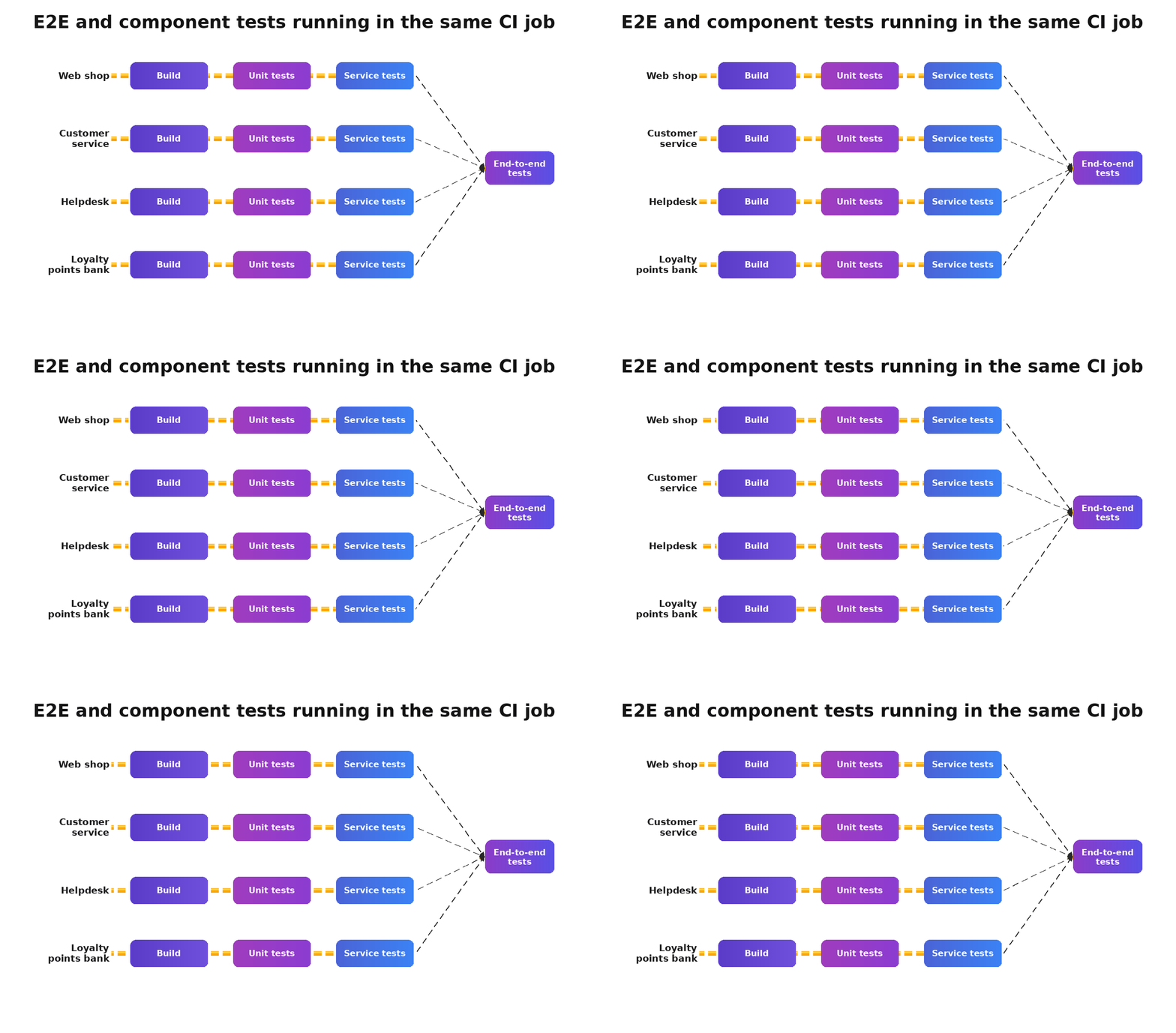
Not using cy.session() for authentication. Every spec file that performs a full UI login adds seconds to pipeline time. cy.session() caches the authenticated state after one login and restores it across runs. It exists for precisely this purpose and costs almost nothing to implement.
Treating Cypress Cloud as optional. At 50 tests, running without it is fine. At 500, the video replay, flake detection, and test analytics justify the cost in triage hours saved within the first month. Teams that skip it tolerate flakiness far longer than teams that do not.
Key Takeaways
"A smaller, reliable suite outperforms a large, flaky one. Every time. Without exception."
- Architecture decisions from week one compound over the years. Page Object Model, custom commands, and fixture-based stubbing are dramatically cheaper to set up before the suite reaches 100 tests than to retrofit afterwards.
- Retries are not a flakiness fix. They are a flakiness mask. cy.intercept() removes the cause rather than absorbing the symptom.
- CI integration is where most productivity gains disappear. Misconfigured pipelines, missing artefact uploads, and absent parallelisation quietly cancel out investment in test quality.
- Framework selection must follow requirements, not familiarity. Safari on iOS and multi-tab flows are legitimate reasons to choose Playwright. Outside those constraints, Cypress is the right call for most modern web applications.
- Flaky tests are a team problem, not a QA metric. If developers have stopped trusting the suite, the automation investment is effectively zero, regardless of how many tests exist.
The Architecture Pays Off, But Only If It Is Built With Intent
The teams that get the most from Cypress are not the ones with the most tests or the most sophisticated configurations. They are the ones that made a handful of good decisions early: deliberate folder structure, API calls stubbed before the suite scaled, CI configured before the suite became too large to parallelize cheaply, and a clear shared definition of what a test being "done" actually means.
None of the patterns here is complicated. The difficulty is not technical. The difficulty is prioritising them in early sprints when there is feature work to ship, and test architecture feels like an abstraction. Most teams skip them and pay for it every sprint afterwards.
Cypress, built with intent, holds up. Cypress, built in a hurry, becomes the thing nobody wants to touch.
Want a second opinion on your Cypress setup before you scale it further?
Our engineers have helped over 40 teams build production-grade Cypress suites, from initial folder structure through full CI integration and flake remediation. If your current setup is slowing the team down, let's look at it together.
People Also Ask (FAQs)
Q1.Is Cypress viable for suites with 1,000 or more test cases?
Ans: Yes, provided the architecture supports it, spec parallelisation via Cypress Cloud or a GitHub Actions matrix strategy, combined with cypress-grep for targeted smoke versus full regression runs. Suite size is less of a constraint than structural quality.
Q2.How do we avoid running through the login UI before every test?
Ans: Use cy.request() to authenticate via API and inject the token directly into localStorage, bypassing the UI entirely. If your SSO provider has no programmatic endpoint, cy.session() caches authenticated state after a single UI login and restores it across runs.
Q3.Can Cypress handle mobile-responsive layout testing?
Ans: Cypress supports viewport simulation with cy.viewport(), which covers responsive CSS breakpoints and layout behaviour. It does not execute on real mobile browsers. For Safari on iOS or gesture-based interaction testing, BrowserStack or Playwright are the more appropriate options.
Q4.When does Cypress Cloud become worth the cost over self-hosted runners?
Ans: At roughly the 500-test mark, depending on run frequency. Below that threshold, --spec splitting across GitHub Actions matrix runners is typically cheaper. Above it, Cypress Cloud's automatic load balancing and flake detection analytics pull ahead on engineering time saved.
Q5.Is TypeScript required for Cypress?
Ans: TypeScript is optional but strongly recommended for any team maintaining the suite past the first quarter. Type definitions on custom commands and Page Object Model classes catch authoring errors at write time rather than at runtime. Setup takes under an hour.

.webp)


.webp)
