Quick question before we start: what's the difference between a pipeline that's "automated" and one that's trustworthy? Most teams assume it's the tool: Cypress instead of Selenium, Playwright instead of WebdriverIO.
We saw this in our own office. A team migrated to Playwright expecting the flaky builds to disappear. Two sprints later, same red-rerun-green pattern, same line at standup: "ignore that, it's flaky." The tool changed. Nothing else did.
A test automation framework isn't the tool. It's the conventions, shared utilities, and infrastructure that govern how tests get written and trusted, separate from whatever's driving the clicks underneath. Get that wrong and green checkmarks stop meaning anything, no matter which tool you're running.
This piece covers what actually holds up at scale: layering, shared utilities, test data management, and flaky-test controls.
What Is a Test Automation Framework, and Why Does Its Architecture Matter in CI/CD?
A test automation framework is a set of rules, shared libraries, configuration settings and reporting tools that decide how tests are written, how tests are run and how test results are understood. A test automation framework is something that stays separate from any testing tool. Selenium and Playwright execute tests. The framework decides whether those tests are maintainable six months later. Similarly, when building modern frontend experiences, using structured solutions like shadcn landing pages helps developers create maintainable, scalable, and consistent user interfaces.
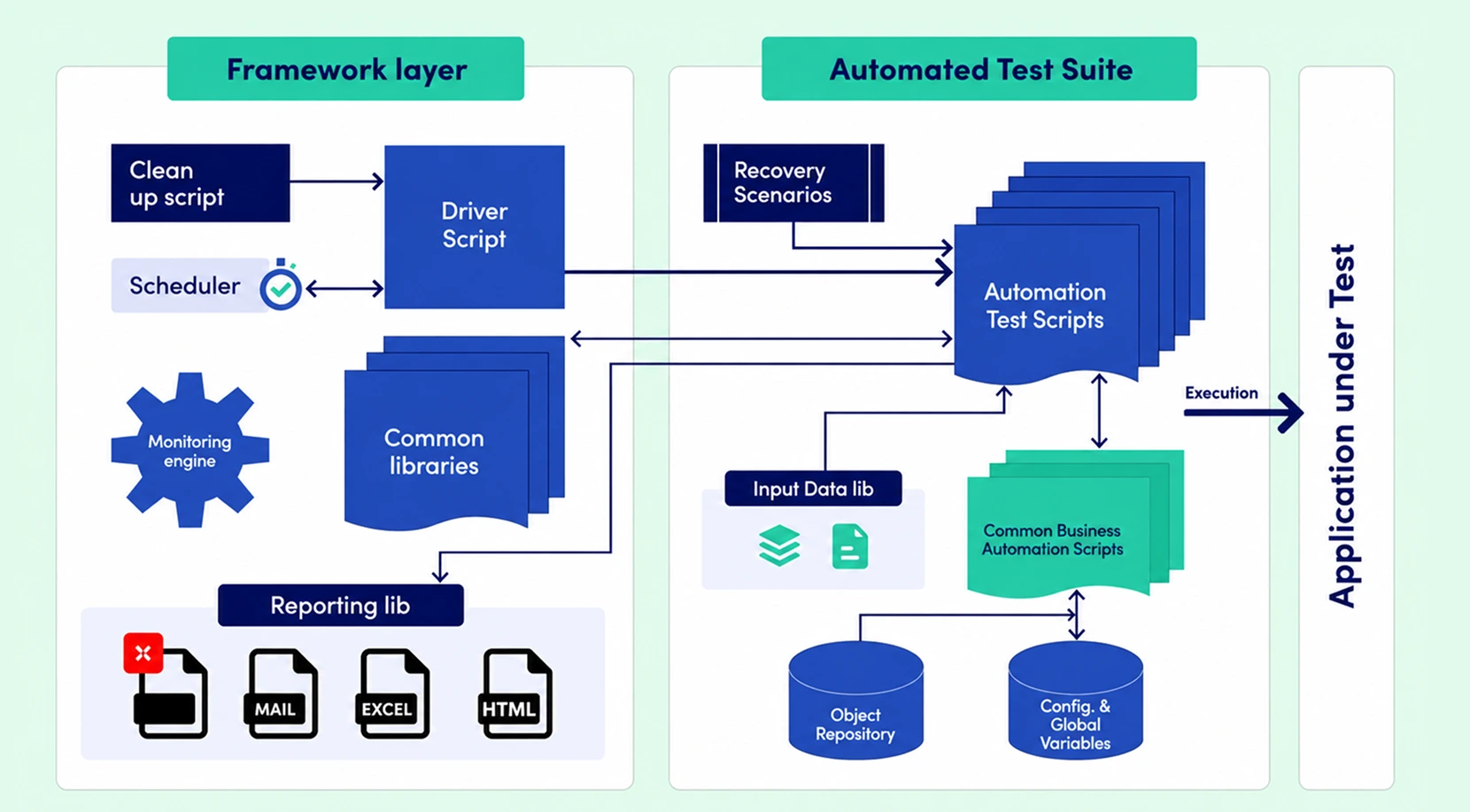
Architecture, not tool choice, is the variable that determines pipeline speed and stability at scale. A team running Playwright with no shared locator strategy and no flaky-test quarantine hits the same wall a Selenium team hits, just slightly later.
Picture two versions of the same suite. Version one: 300 tests, each repo with its own copy-pasted login helper, no shared reporting. Version two: the same 300 tests, built on a shared page-object layer, one config file per environment, and a dashboard that flags flake rate per suite. Same test count. Completely different trust level from engineering leadership.
Framework vs. Tool: Why the Distinction Matters for CI/CD
Selenium, Playwright, and Cypress are execution engines. They click buttons and assert values. None of them tell you how to structure test data, isolate environments, or report failures in a way an engineering manager can act on. That's the framework's job, and it's the part most teams skip because it doesn't show up on a feature comparison chart.
What Breaks First When Architecture Is Skipped
The sequence is predictable: duplicated locators lead to inconsistent waits, inconsistent waits produce flaky tests, flaky tests slow the pipeline as engineers rerun failed builds, and the team stops trusting red builds altogether. Once trust goes, people merge past failing checks. That's the real cost.
Core Components of a CI/CD-Ready Test Automation Framework Architecture
Six components need to exist before a framework touches a pipeline: test organisation, shared utilities, environment-specific configuration management, reporting infrastructure, test data handling, and CI/CD hooks. Skip any one and the gap shows up later, at the worst time.
- Test organisation maps to the build stage: how tests are grouped, tagged, and selected for a given pipeline run.
- Shared utilities (page objects, API clients, custom assertions) map to the test stage: they stop 200 tests from each reinventing the same login flow.
- Configuration management maps across build, test, and deploy: the same suite must run unmodified against dev, staging, and production.
- Reporting infrastructure maps to the post-test stage: raw pass/fail counts don't drive engineering decisions; trend data does.
- Test data handling maps to the test stage: what data exists, how it's isolated, how it's refreshed.
- CI/CD hooks map to the entire pipeline: how the framework triggers, gates, and reports back to the orchestration platform, whether that's GitHub Actions, Azure Pipelines, or a Harness Platform setup.
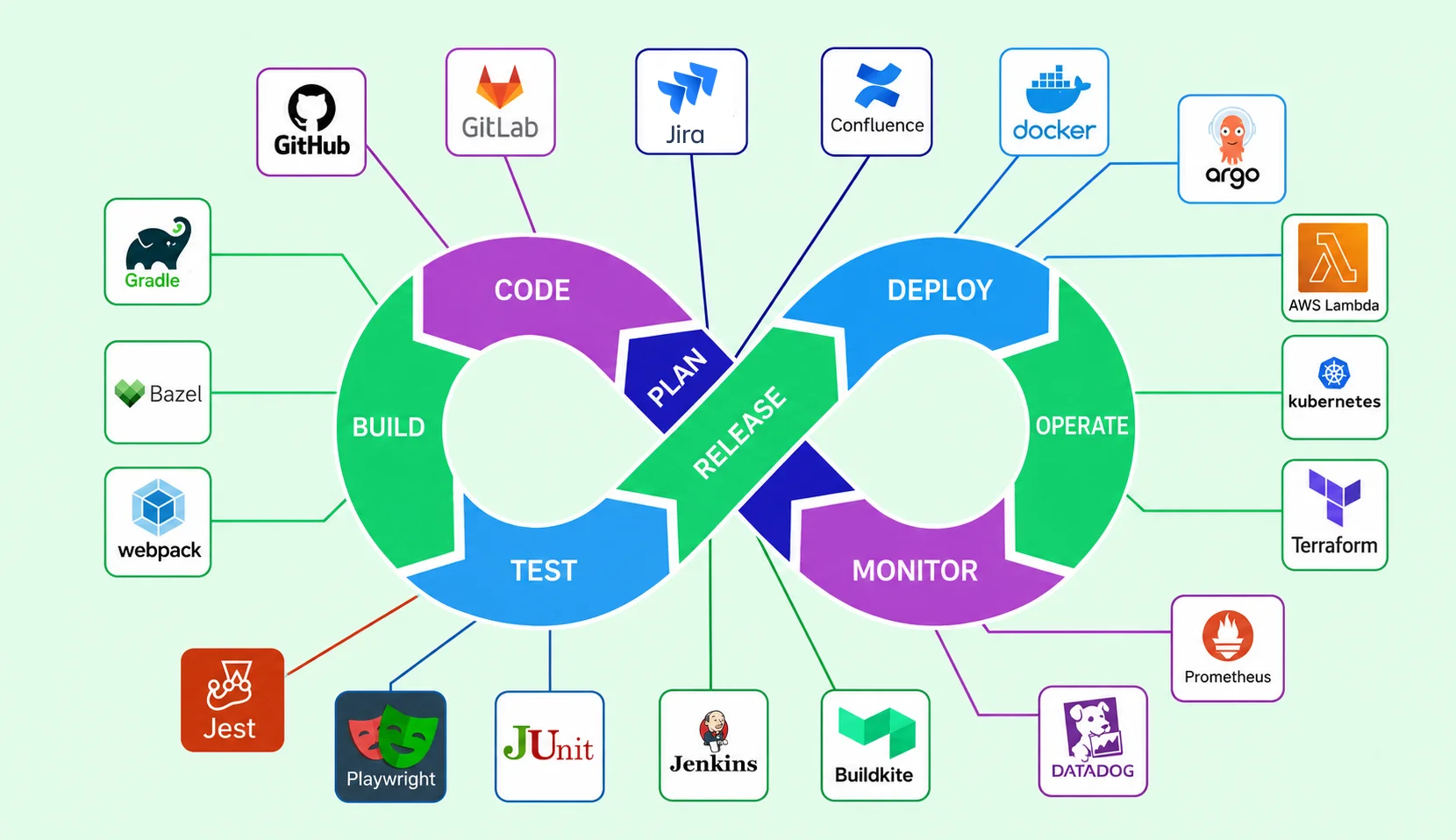
A few things trip teams up specifically at this stage. Ownership is one: shared utilities without a named owner turn into a graveyard of half-updated helper functions within two release cycles, so we assign a framework maintainer even on small teams. Versioning is another: treat the framework itself like a dependency, tag releases, log breaking changes to shared utilities, and let individual test suites pin a version rather than pulling from a moving target every run. And test organisation isn't just folder structure; it's tagging discipline. Smoke, regression, and slow suites need to be selectable independently, or every PR check ends up running the full suite regardless of what actually changed.
Configuration Management Across Dev, Staging, and Production Environments
We isolate environment-specific configuration into its own layer, typically a set of environment files or a secrets manager, so the same test suite runs unmodified across dev, staging, and production. Secrets management belongs here too. Hard-coding an API key into a test file is still the single fastest way to fail a security review.
Reporting Infrastructure That Engineering Managers Actually Read
Raw pass/fail counts don't drive decisions. A reporting layer needs to surface flake rate by suite, duration trends, and which test last blocked a deployment. Monitoring tools like New Relic or an ELK Stack pipeline can pull test telemetry into the same dashboards your production environment already uses, since engineering managers rarely open a separate test report.
The Testing Pyramid: Structuring Unit, Integration, API, and E2E Layers for CI/CD
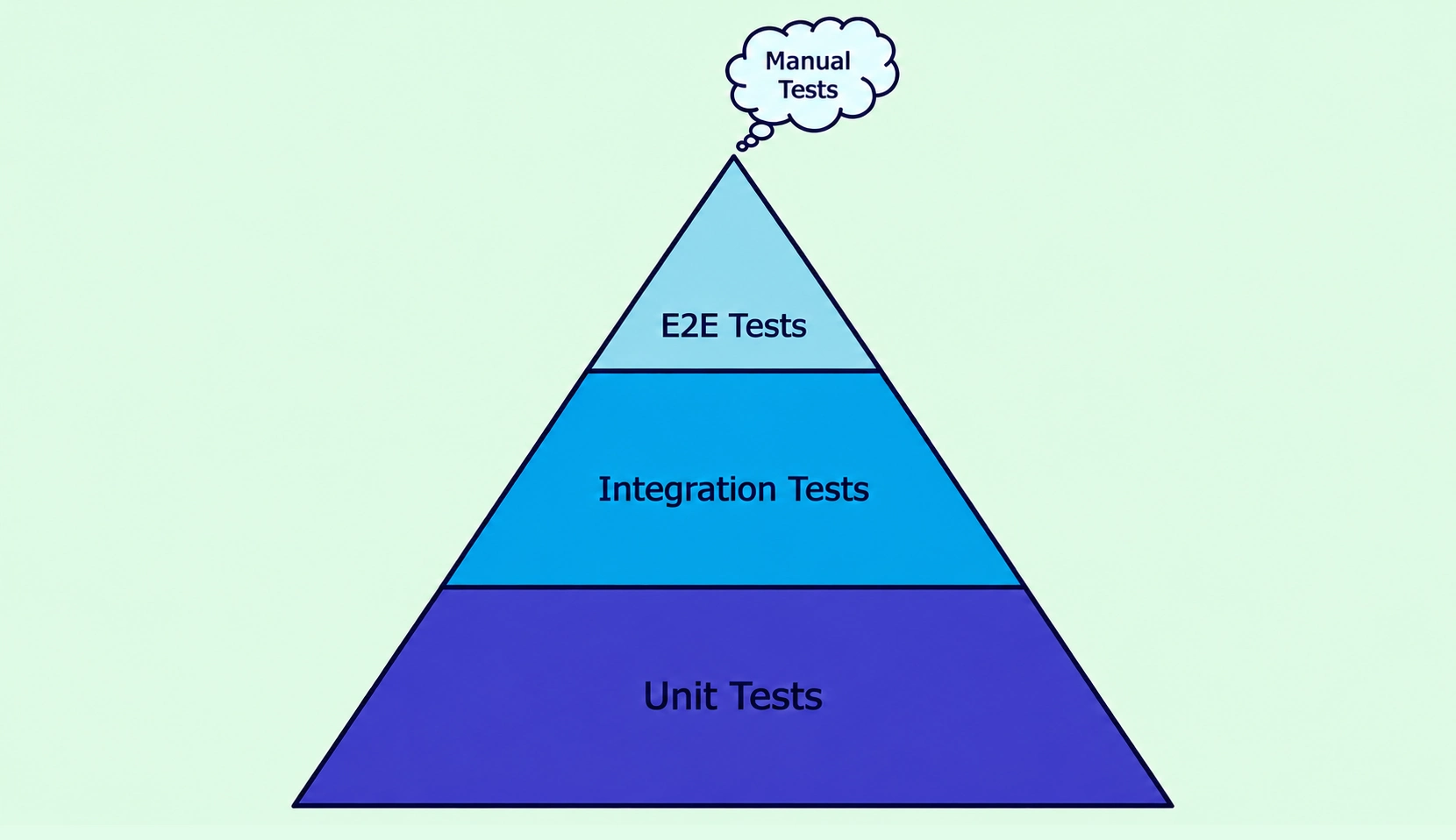
The pyramid, bottom to top:
- Unit tests carry the fastest-feedback burden and make up most of your suite.
- Integration tests check that two or more components work correctly together, without spinning up the full app.
- API tests validate endpoints directly, request/response schemas, status codes, auth, and error handling, without a UI in the loop.
- End-to-end tests are reserved for the handful of critical journeys that justify their runtime.
Pyramid imbalance: too much UI automation, not enough unit or API coverage is the single most common cause of slow, flaky CI/CD pipelines we see. A single bloated E2E layer will out-flake every other layer combined.
When E2E Is Worth the Runtime Cost
Reserve it for flows with direct revenue or compliance exposure: checkout, authentication, anything a regulator would ask about. If a failure wouldn't show up in a support ticket within the hour, it belongs at a lower layer.
Contract Testing for Microservices Boundaries
Contract testing (consumer-driven, like Pact) lets each service verify its API contract against consumers without the full dependency chain. One client replaced 40 E2E tests with five Pact contracts covering the same interactions, catching integration failures before they hit staging.
Embedding Automation Earlier in the CI/CD Pipeline
If you put automation in the CI/CD pipeline you can run automated tests and security checks while people are still working on commits and pull requests.
Doing this helps you find bugs and security holes away. It gives your team fast feedback. Keeps bad code from ever hitting the shared branch.
- Integrate Automation at the Commit and PR Stage: Embed automated testing directly into the CI/CD pipeline at the commit and pull-request (PR) stage instead of waiting until after code is merged. This helps identify defects early, reducing the time and effort required for debugging and rework.
- Automate Quality Checks in PRs: Configure unit tests, static analysis, functional checks, and lightweight security scans to run automatically whenever code is committed or a PR is created. These checks provide immediate feedback and prevent defective code from reaching the shared branch.
- Include Security Automation Early: Integrate SAST scanning and dependency checks into the PR pipeline so security vulnerabilities are detected before code is merged. This reduces dependency on a separate security testing phase just before release.
- Use Automated Gates with a Gradual Rollout: Configure critical automated checks as merge-blocking gates rather than simply generating reports that can be ignored. Initially, run the checks in warn-only mode for 2–3 weeks to help the team understand and resolve existing findings. Once the backlog is under control, switch the checks to blocking mode.
- Keep CI/CD Automation Fast and Focused: PR automation should focus on quick, lightweight checks that provide fast feedback to developers. More time-consuming activities, such as a complete dependency-tree audit or comprehensive security scan, should run as scheduled nightly jobs. This keeps the CI/CD pipeline efficient while maintaining broader test and security coverage.
yaml
# .github/workflows/pr-checks.yml
on: pull_request
jobs:
  shift-left-gates:
    runs-on: ubuntu-latest
    steps:
      - uses: actions/checkout@v4
      - name: Run unit tests
        run: npm test -- --coverage
      - name: Static Application Security Testing
        run: npx semgrep --config=auto
      - name: Dependency / SCA scan
        run: npm audit --audit-level=high
Shift-Left Security Testing at the PR Stage
Static Application Security Testing (SAST) and dependency or SCA scanning are the two gate types we wire in before merge, not after. SAST catches SQL command injection patterns baked into source code; SCA catches known-vulnerable packages in your dependency tree. Dynamic Application Security Testing still matters, but it runs later, against a running environment.
What Shift-Left Testing Does, and Doesn't, Replace
Shift-left reduces late-stage defect cost. It doesn't eliminate the need for later-stage integration and end-to-end coverage, and treating it as a full replacement for a proper DevSecOps culture leaves teams with clean PR checks and a broken staging environment anyway.
Test Data Management for CI/CD Pipelines
Test data management is the practice of provisioning, isolating, and refreshing the data a test suite depends on, kept separate from the framework code that consumes it. That's what test data management in software testing actually means once you strip the jargon: where does the data come from, and do one test's changes leak into the next?
Shared, stateful test databases are the most common source of intermittent CI/CD failures we've diagnosed. Test A deletes a record test B depends on, and the failure looks random until someone traces it back three runs later. Fixture-based data sidesteps that failure mode entirely.
Three approaches, in ascending order of setup cost and isolation strength: fixtures checked into version control, data factories generated fresh per run, and ephemeral database seeding scoped to a single pipeline job. Test data management tools that support ephemeral seeding solve this cleanly at the cost of slightly longer runtime.
Fixture-Based vs. Ephemeral Test Data Strategies
Taming Flaky Tests: Reliability Practices for CI/CD Test Suites
Flaky tests can reduce trust in the CI/CD test suite by producing inconsistent results against unchanged code.
- Flaky Test: A flaky test passes and fails intermittently against unchanged code. It is more damaging to a CI/CD pipeline than an honest failing test because an honest failure tells you something true, while a flaky test teaches the team to distrust the whole suite, and that lesson generalises fast.
- Quality Over Quantity: More tests is not automatically better. A smaller, reliable suite that engineers actually trust outperforms a large, flaky one every single time. Retries are not a flakiness fix; they are a flakiness mask that hides the real defect for another sprint.
- Diagnostic Approach: Start by isolating race conditions in async waits, replacing hard-coded sleeps with explicit waits tied to actual page or API state, and enforcing test independence so one test's leftover state cannot bleed into the next.
- Self-Healing Tests: Self-healing tests are often marketed as a solution, but they only patch a broken locator and do not fix the underlying race condition.
- Quarantine Known-Flaky Tests: For known-flaky tests that are still being fixed, quarantine rather than ignore them: flag them, isolate them from the blocking gate, and track them on a visible list with an owner and a deadline. Silently skipping a flaky test is how a suite loses coverage without anyone noticing.
Root Causes We See Most Often in Flaky UI Tests
Three patterns account for most of what we diagnose: unmanaged async waits (a click fires before the element is interactive), shared test state (one test's cleanup step never ran), and environment-dependent timing assumptions (a test written against a fast staging environment that chokes on a slower production-like environment).
Choosing Automation Tools by Layer: A Comparison
Selenium remains reasonable where a team is already deep in Java or C# tooling. It isn't the wrong answer, just not automatically the right one. Framing this as "which tool wins" misses that the real decision sits one layer up, in the architecture around whichever tool you pick.
How Frugal Testing Helps You Architect a CI/CD Test Automation Framework Without the Maintenance Overhead
This is exactly what our test automation framework design and CI/CD integration engagements exist for. We audit the pipeline and test suite, design the layered architecture across unit, API, and E2E coverage plus data management and reporting, implement the shared framework code, and hand off a suite your engineers can extend without calling us for every new test.
Framework architecture is a one-time design problem that's easy to get wrong and expensive to redo once dozens of tests depend on it. As a software test automation services partner and DevOps automation consulting team, we catch the structural mistakes early, before 300 tests inherit them. Any specific outcome number, teams served, defect reduction, or pipeline time saved gets verified before it reaches a client.
What Our Framework Architecture Engagement Looks Like
Four steps, in order: pipeline and suite audit, architecture design covering layering, configuration, data, and reporting, implementation and CI/CD wiring, then handoff and team enablement. At close, the client owns a documented, maintainable framework their own team can extend, not a black box only we understand.
Who This Is For
Engineering teams past their first flaky, unmaintainable automation attempt. Teams scaling CI/CD across a microservices architecture with more services than their framework was designed for. Teams whose QA function was never designed, just accumulated.
Two triggers tend to bring teams to us: pipeline runtime has crept past what anyone tolerates, or trust in green builds has eroded. If either sounds familiar, we're glad to talk through your pipeline. No pitch deck required.
Conclusion
Architecture, not tool choice, determines whether a test automation framework holds up once a pipeline scales. The pyramid shape, how early shift-left testing runs, and how disciplined your flaky-test quarantine is: those are the load-bearing decisions, and they're made once, early, or paid for repeatedly later.
A test automation framework built for CI/CD from the start avoids the rebuild most teams eventually need, usually around the point their pipeline runtime crosses twenty minutes and leadership starts asking why. Better to make that call on your own terms.
People Also Ask (FAQs)
Q1. How long does it take to build a test automation framework from scratch?
Ans: Most teams need four to eight weeks for a production-ready framework covering unit, API, and E2E layers, though a minimal version can be usable within two weeks if the pyramid stays lean.
Q2. Can you migrate an existing framework to a new testing tool without rewriting every test?
Ans: Yes, if the framework layer is properly abstracted, page objects and utilities can often be reimplemented against the new tool while test logic itself stays largely untouched.
Q3. How many engineers does it typically take to maintain a test automation framework at scale?
Ans: One dedicated framework owner per 200 to 300 tests is a reasonable baseline, though this varies with how much of the suite is shared utility versus one-off test code.
Q4. Does a test automation framework need to support parallel test execution?
Ans: Past roughly 100 tests, yes, parallel execution stops being optional; without it, pipeline runtime scales linearly with suite size and becomes the bottleneck engineers complain about first.
Q5. Should test automation framework code live in the same repository as the application, or a separate one?
Ans: Either works, but a separate repository is usually cleaner once the framework serves multiple services or teams, since it decouples release cycles and versioning.

.webp)

.webp)