

Let me paint a scenario most engineers have lived through. Green pipeline. Confident deploy. Twenty minutes later the Slack channel lights up users cannot complete checkout. You go back and check. Unit tests passed. Integration tests passed. Everything passed.
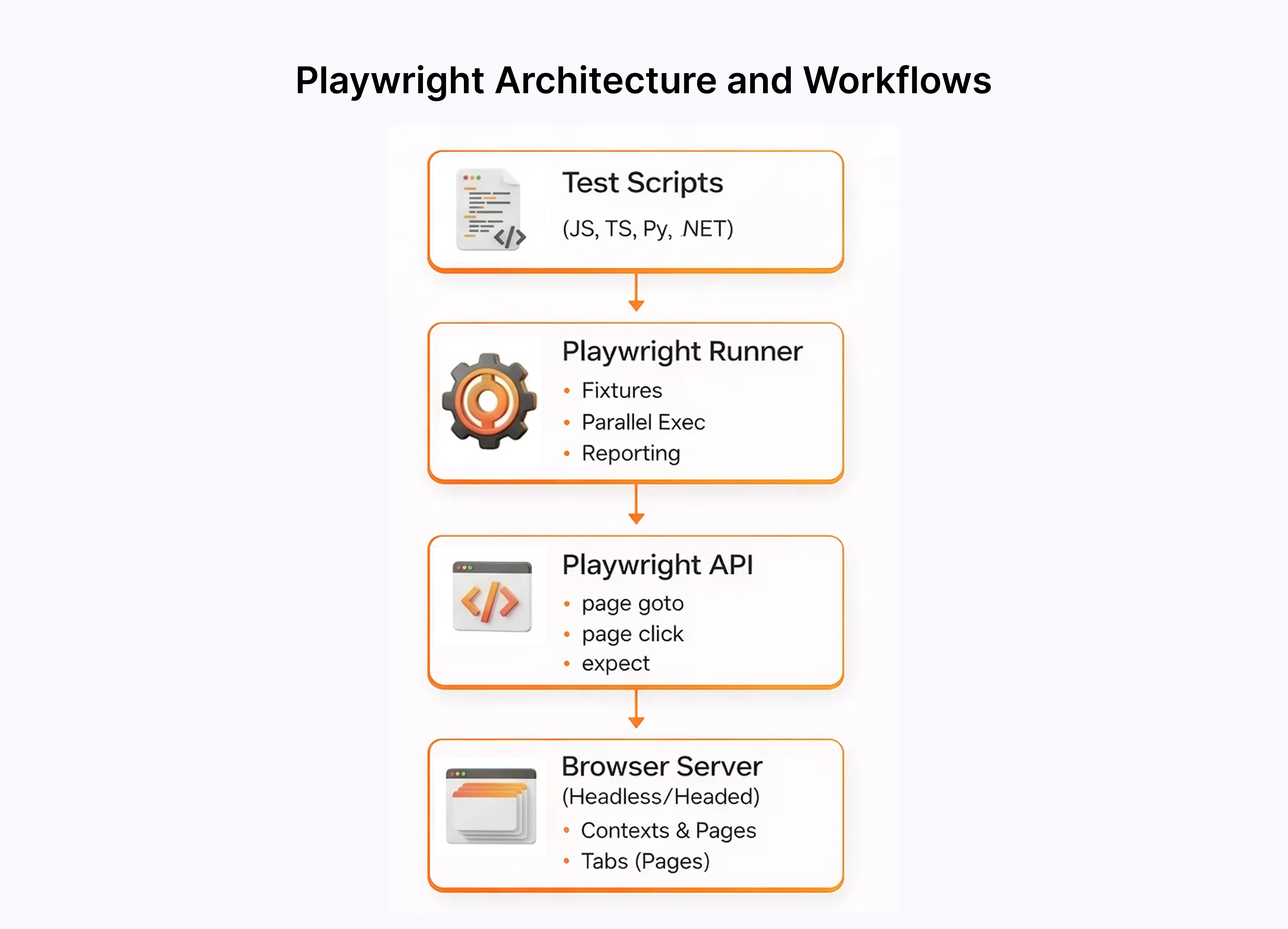
Microsoft built it to skip the WebDriver translation layer entirely. Playwright talks to browsers over the DevTools Protocol directly, which is why tests that randomly failed in Selenium or older automation testing tools just stop failing. The architecture is different at a fundamental level, not just a surface feature comparison.
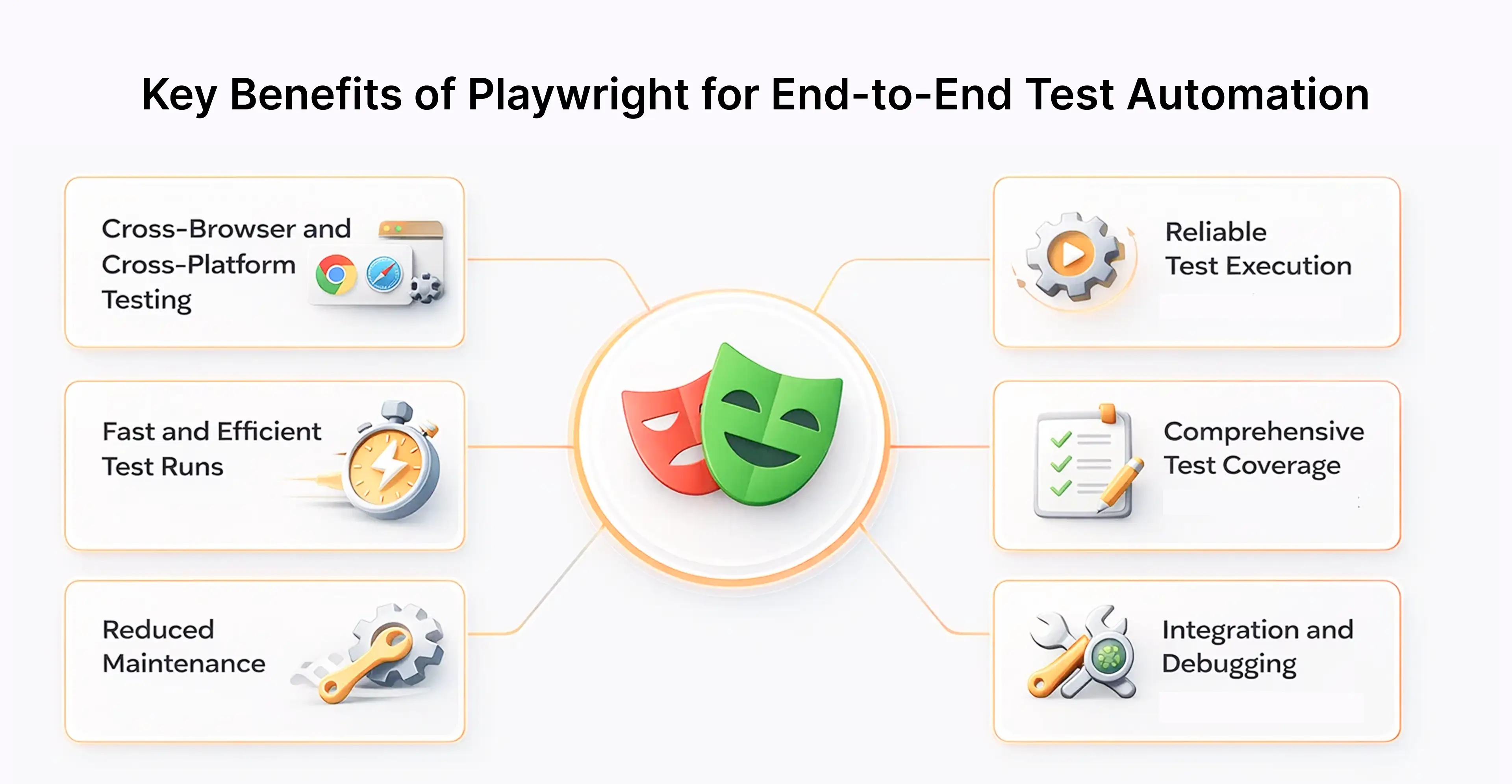
Core capabilities worth knowing before you start:
- Cross browser testing covering Chromium, Firefox, WebKit single suite, zero separate driver installs
- Playwright Python, JavaScript, TypeScript, Java, .NET works in whatever stack you already run
- Parallel workers with genuinely isolated browser contexts between them
- Playwright Inspector and Trace Viewer already included, not third-party add-ons
- Playwright MCP for AI-assisted workflows — covered properly later in this guide
- Headless default, headed mode available when you need to actually watch the test run
Core Concepts Behind Playwright End-to-End Testing
There is a specific type of Playwright confusion that shows up in every team that adopts it. It always traces back to the same three misunderstandings.
First: auto-waiting is not a feature. It is a contract.
When you call page.click(), Playwright does not immediately fire the event. It runs through a checklist first is the element in the DOM, is it visible, has it stopped animating, is it enabled, is nothing sitting on top of it. Five checks. All must pass. Only then does anything happen.
Second: locators and selectors are genuinely different things.
A CSS selector resolves at the moment you call it. DOM changes afterward? You are holding a stale reference. A Playwright locator is lazy it resolves every single interaction and retries automatically.difference is the entire reason Playwright tests stay green where Selenium tests collapse.
Third: browser contexts cost almost nothing.
Spinning up a browser takes seconds. A new context takes milliseconds. Each context gets completely isolated cookies, storage, and auth state. This is how Playwright runs parallel tests that never contaminate each other and how you simulate two different logged-in users interacting with the same app in one test run.
How Playwright Automates Complete User Workflows Across Browsers
Here is what a production registration test actually looks like. Not a tutorial example, the kind of thing that lives in a real repo:
import { test, expect } from '@playwright/test';
test('new user can register and land on dashboard', async ({ page }) => {
  await page.goto('/signup');
  await page.getByLabel('Full Name').fill('Jane Smith');
  await page.getByLabel('Email').fill('jane@example.com');
  await page.getByLabel('Password').fill('SecurePass123!');
  await page.getByRole('button', { name: 'Create Account' }).click();
  await page.waitForURL('**/dashboard');
  await expect(page.getByText('Welcome, Jane')).toBeVisible();
  await expect(page).toHaveTitle(/Dashboard/);
});
Developers use Playwright to control browser engines through direct connections, which use the DevTools Protocol and WebSocket protocol for automating form submission, navigation, and network request tasks.
Browser Context Isolation for Reliable Test Execution
That maddening experience test fails locally, passes in CI, you cannot figure out why almost always traces to shared state. Some tests that ran before left a cookie behind. An auth token sat in storage between runs. Nobody cleared local storage.
Key features of browser context isolation include:
- Separate storage, cookies, and authentication sessions per test
- Independent execution of test files without conflicts
- Support for multiple user scenarios within a single test run
- Clean parallel execution without shared state interference
Built-in Auto Waiting and Smart Synchronization Mechanisms
The five checks before every action DOM attachment, visibility, stability, enabled state, no overlapping element all within a 30-second default timeout. When something fails, the error tells you exactly which condition. Not a cryptic Java exception requiring stack trace archaeology. A plain message: "element is not visible." "Element is disabled."
What gets less attention is the retry behavior on assertions. expect(locator).toBeVisible() does not run once and exit. It polls continuously until the condition passes or the timeout expires. For any application where content loads after an API call returns, this behavior is what separates a test suite teams trust from one that fails randomly every few days with no reproducible explanation.
Building Robust End-to-End Test Scenarios with Playwright
Some test suites produce false confidence at scale tests so tightly coupled to internal CSS class names they break whenever a designer refactors a stylesheet, suites that run 25 minutes and generate HTML reports nobody has opened in three months.
Avoiding that requires three habits applied without compromise. Test what users see, not how the code implements it .btn-primary-v2 as a locator means your test breaks when someone renames a CSS class, which has nothing to do with whether the button works. Make every test independently runnable in any order on any machine. And mock third-party services at the network layer your checkout test depending on Stripe's uptime means an external outage can fail your CI pipeline at 2am.
Test Cases for Real User Interaction Flows
The tests worth writing first are ones that would catch a broken checkout, broken login, or broken signup in production. Everything else is optional until those four or five tests exist and run cleanly in CI.
Flows that consistently expose real bugs:
- Registration including email validation edge cases and post-signup redirect
- Checkout end-to-end including both success and failure API responses
- Role-based access — wrong user type hitting a restricted page
- Form validation error rendering, not just submission behavior
- API response handling when the backend returns unexpected data shapes
The Playwright test scripts generator and Playwright CLI create test files through automatic generation, which decreases the time needed for initial test setup.These are what smoke testing, regression testing, and integration testing pipelines build on top of.
Using Advanced Locator Strategies for Stable Element Selection
// Role-based — survives CSS refactors completely
await page.getByRole('button', { name: 'Submit' }).click();
// Label-based — survives structural changes to the form
await page.getByLabel('Email address').fill('user@example.com');
// Test ID — for high-stakes elements that must never break
await page.getByTestId('checkout-btn').click();
The data-testid attribute creates a written contract between your tests and your UI. Once engineers watch a test fail because someone deleted a test ID without thinking, they stop deleting test IDs. That feedback loop is worth more than it sounds it turns test stability into a shared engineering responsibility rather than a QA concern.
Handling Dynamic Web Components and Asynchronous UI Behavior
Modern applications do not load once and stay static. Data arrives asynchronously. Components mount and unmount. The DOM two seconds after initial render is completely different from what the test started with.
Playwright's auto-waiting and network interception handle all of this without you writing polling loops. Mock an API response, assert on the content it should produce Playwright waits for that content to appear. No timeout padding. No manual retry logic.
Playwright MCP: AI-Assisted Test Automation
Playwright MCP Model Context Protocol is genuinely different from everything else in this space right now. It exposes Playwright's browser automation as callable tools for AI models, meaning an AI assistant can navigate your application, interact with elements, and produce working test code without a human writing every line.
In practice teams are using it three ways. Recording a user session and having MCP generate the Playwright test rather than writing it from scratch. Pointing it at a UI redesign that broke 30 existing tests and having the AI repair the locators without manually hunting through each file. And describing in plain English what behavior needs testing, then getting runnable code back.
Cypress, Selenium, and TestCafe require external tooling plus significant manual integration to get anywhere close to this. For teams already running AI assistants in their development workflow, MCP removes the gap between identifying what needs testing and having a test that actually runs.
Designing Maintainable Playwright Automation Frameworks
Maintenance problems in test suites are never planned. They accumulate. A beforeEach block copy-pasted across five files because extracting it felt slow that week. A locator hardcoded directly into a test file because page objects felt like overhead on a tight deadline. Two weeks of those decisions creates six months of friction when the UI changes.
Keep interaction logic in page objects, assertions in test files, environment setup in config. When these blur together, a single UI change breaks tests with no obvious connection to what changed. Use TypeScript when a page object method signature changes, broken call sites surface before any test runs. And give every test its own browser context, regardless of how redundant it seems at the moment.
Applying Page Object Model for Scalable Test Architecture
The Page Object Model (POM) wrap how you interact with a page so tests read as behavior descriptions rather than DOM manipulation scripts. Login form gets redesigned LoginPage.ts changes in one place. The forty tests that use it keep working without changes.
That is genuinely the entire value. Not architectural elegance for its own sake just the practical reality that UI changes stop requiring test rewrites scattered across the whole suite. New engineers can read a test file and understand what the application does without needing someone to walk them through the implementation.
Reusable Test Fixtures for Efficient Test Execution
Seeing await loginPage.login(...) duplicated in beforeEach blocks across multiple files means fixtures are what the codebase actually needs:
export const test = base.extend({
  loggedInPage: async ({ page }, use) => {
    await new LoginPage(page).login('admin@example.com', 'admin123');
    await use(page);
  },
});
Setup runs, control passes to the test, teardown handles itself when the test completes. Pair this with Playwright's stored auth state and you authenticate once per worker instead of once per test. On suites above a few dozen tests, the runtime difference is noticeable.
Managing Test Data and Environment Configurations
BASE_URL from an environment variable controls which deployment gets hit. Everything else trace behavior, screenshot settings, browser project configuration lives in one config file and stays identical everywhere your pipeline runs. Local, staging, production verification: same tests, no code changes between them.
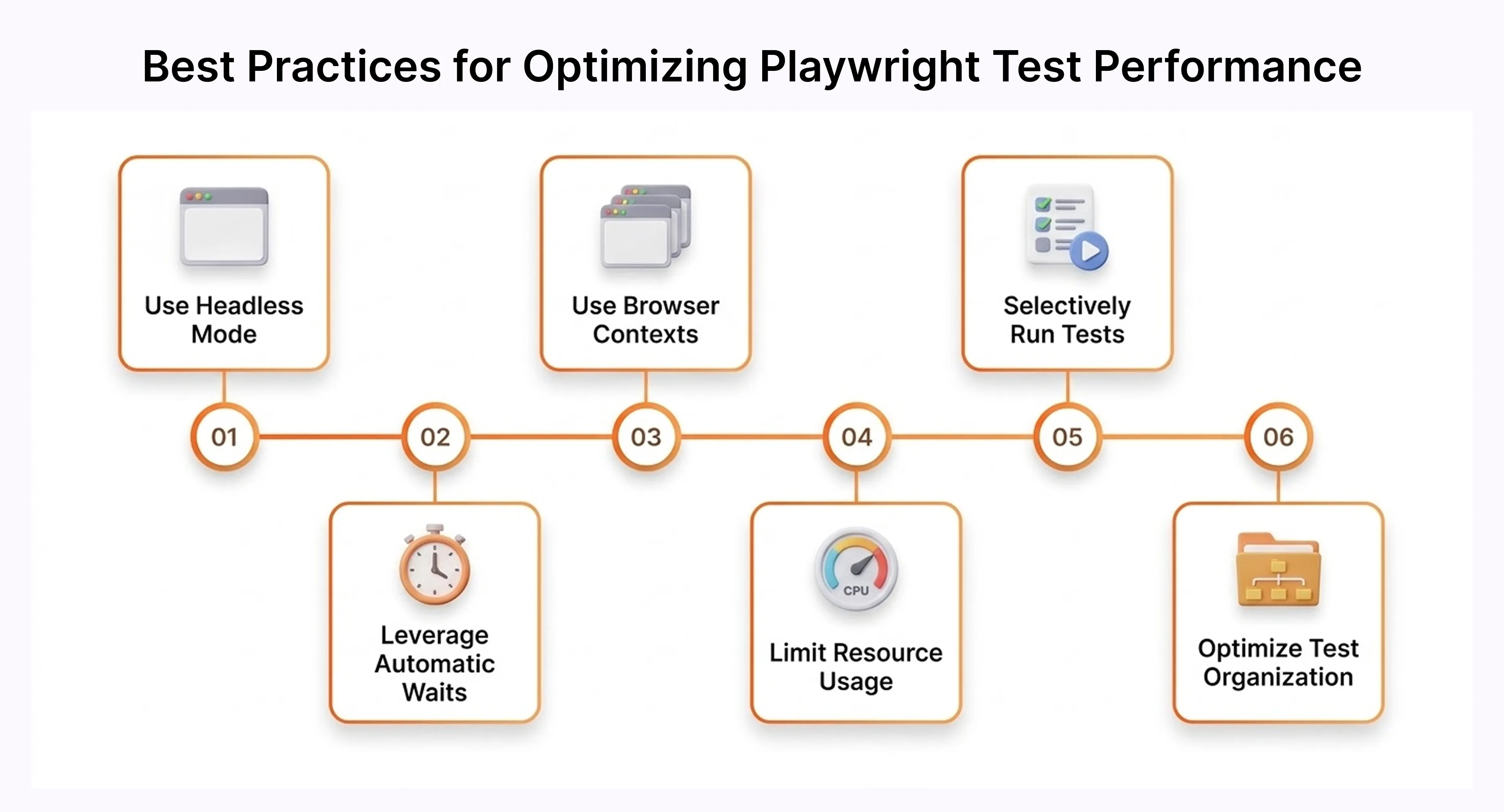
Improving Test Efficiency with Playwright Execution Capabilities
Slow suites get skipped before deploys. This is not an attitude problem there is genuinely no time, and everyone in the room knows it. A test suite that takes 40 minutes does not get run when the deploy window is 20 minutes.
Playwright's parallel workers run tests simultaneously, each with an isolated context. More workers means faster completion, not more flakiness. Auto-waiting removes the artificial sleep padding that inflates runtime in older frameworks. Fresh contexts take milliseconds — clean isolation is not a performance trade-off here.
Parallel Test Execution for Faster Validation Cycles
A 20-minute sequential suite becomes roughly 7 minutes sharded across three CI machines. Teams running tests on every pull request recover real hours weekly not theoretical improvement, something measurable when the pipeline stops blocking the team before deploying. Adding sharding takes three lines in an existing config file.
Cross-Browser Testing with Chromium, Firefox, and WebKit
npx playwright test
npx playwright test --project=webkit
One install command. All three engines are ready. No WebDriver configuration, no driver version compatibility management. WebKit coverage specifically catches Safari bugs and those bugs are real, they affect Apple device users, and they only show up in WebKit. Chromium-only setups miss them entirely. Running WebKit in CI finds them Thursday instead of Monday morning.
It also integrates well with platforms like Playwright Cross Browser Testing, BrowserStack and other cloud browsers.
Debugging Failures Using Trace Viewer and Test Report
When a test fails in CI, you do not reconstruct what happened from log output. You open a trace every action recorded, every DOM state at that exact moment, every network request captured.
Trace Viewer lets you step through the failure frame by frame. Video recording of failing runs happens automatically. Screenshots attach to the HTML report at the exact failing step. Intermittent failures that never reproduce locally become diagnosable because you have a recording of the exact failure.
Implementing Playwright in Continuous Testing Pipelines
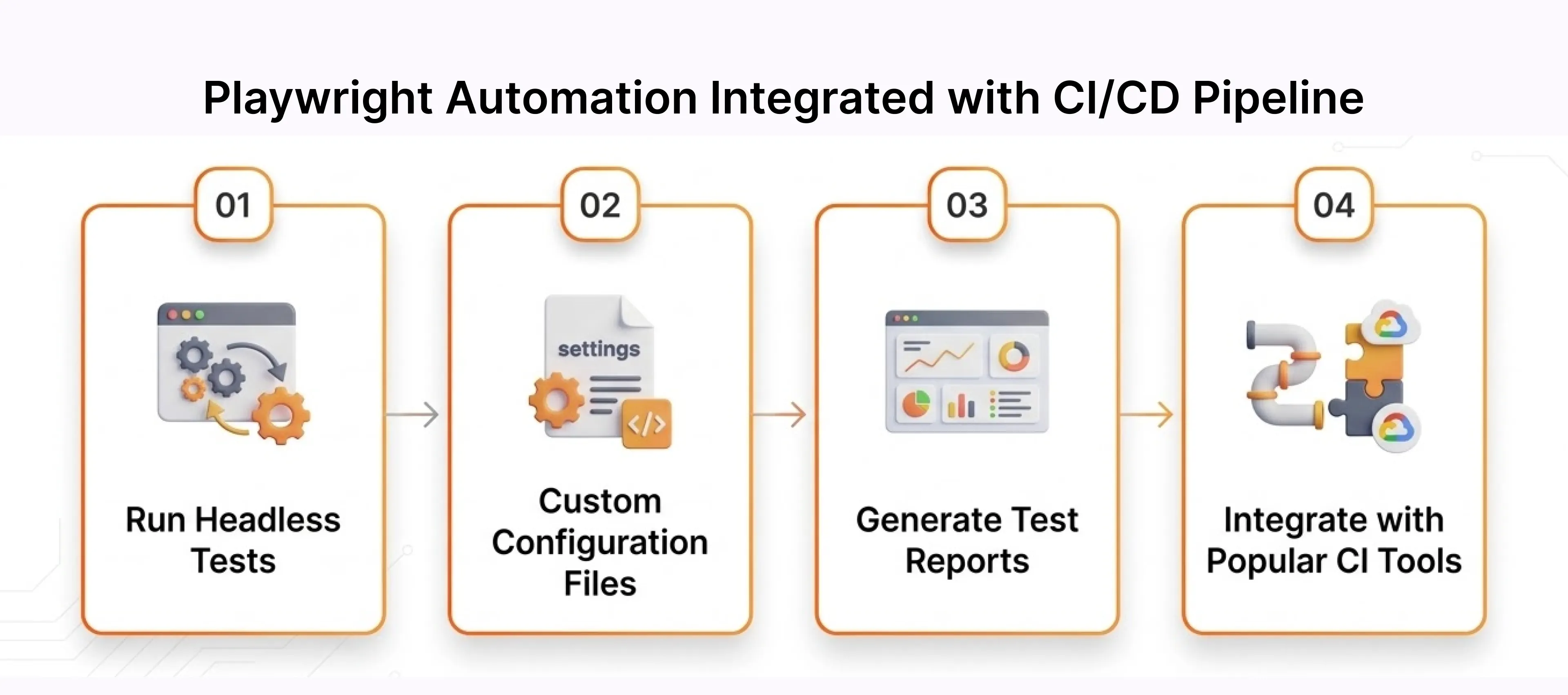
A test that only runs when a developer remembers to run it is not a safety net. The entire value of end-to-end tests comes from running automatically on every change, before anything reaches production, without anyone having to trigger them manually.
Broken commits surface within minutes while the engineer still has context. Clean CI containers eliminate machine-specific surprises. Auto-waiting handles CI timing variance without per-test workarounds. Sharding keeps large suites finishing fast as the application grows. Failure artifacts traces, screenshots, video attach automatically to every failing run.
Key Benefits:
Nothing here delete this sentence entirely. The bullet points that follow it make the point without the filler opener.
- Providing faster feedback: Bugs are caught within minutes of the commit that introduced them, while the context is fresh, rather than surfacing during a QA cycle days later.
- Ensuring consistency: Tests run in clean, reproducible containers on every execution. The "works on my machine" failure category disappears entirely.
- Reducing flakiness: Auto-waiting makes tests reliable in CI environments where timing is less controlled than on a developer's local machine.
- Enabling scalability:Parallel execution and sharding let large test suites complete in the same window as small ones as the application grows.
- Improving debugging: Traces, screenshots, and videos are captured automatically on failure and attached to CI reports for any team member to inspect.
Integrating Playwright Automation with CI/CD Workflows
Modern DevOps environments rely on automated testing within CI/CD pipelines. Playwright integrates easily with tools like Github Actions, enabling automated testing in every build.
name: Playwright Tests
on: [push, pull_request]
jobs:
  test:
    runs-on: ubuntu-latest
    steps:
      - uses: actions/checkout@v3
      - uses: actions/setup-node@v3
        with:
          node-version: 18
      - run: npm ci
      - run: npx playwright install --with-deps
      - run: npx playwright test
      - uses: actions/upload-artifact@v3
        if: failure()
        with:
          name: playwright-report
          path: playwright-report/
          retention-days: 30
The artifact upload on failure is the line that saves the most debugging time. Every broken CI run preserves its full report. Anyone on the team opens it and sees exactly what happened without needing to reproduce the failure locally.
Running Automated End-to-End Tests in Cloud Environments
Local CI handles most cases well. Where it falls short is scale running hundreds of tests across every browser combination takes infrastructure most teams do not want to manage themselves.
Microsoft Playwright Testing is the managed option for teams in the Azure ecosystem. It handles browser infrastructure entirely, uses Microsoft Entra ID for secure authentication, and works with existing Playwright configurations without requiring test rewrites.
Benefits include:
- Access to multiple browser versions
- Global testing environments
- Integration with Azure App Testing and Microsoft Playwright Testing
- Secure authentication using Microsoft Entra ID
Cloud testing also supports large-scale synthetic monitoring and user simulation.
Generating Actionable Test Reports for Quality Monitoring
Effective reporting helps teams identify defects quickly. Playwright generates rich test reports that provide insights into failures and system performance.
code:
npx playwright show-reportKey reporting capabilities include:
- Detailed HTML report visualization
- Logs capturing console output and error message traces
- Performance monitoring with trace attachment data
- Integration with monitoring workflows for synthetic Monitoring as Code
These reports provide actionable insights for both developers and QA teams.
Comparing Playwright with Other End-to-End Testing Tools
Modern end-to-end (E2E) testing relies on powerful automation frameworks that help developers and QA engineers validate application workflows across browsers and environments. Popular tools in the automation ecosystem include Playwright vs Selenium, Playwright vs Cypress, and TestCafe, each offering different capabilities, performance levels, and integration features.
Conclusion: Leveraging Frugal Testing for Efficient Playwright End-to-End Automation
Frugal Testing Frugal Testing is a methodology built around one uncomfortable truth most teams avoid: more tests do not automatically mean better quality. The name comes from the idea of being deliberate about where testing effort goes prioritizing the flows that matter most to users over writing tests for every edge case that may never affect anyone in production.
The question Frugal Testing asks is: which tests give you the most confidence per minute of execution time? Not "how do we test everything" but "how do we test the right things efficiently." It is the difference between a 400-test suite where 300 tests cover scenarios nobody has hit in two years, and a 80-test suite where every single test has caught a real bug at least once.
Key Takeaways from This Guide
- Playwright enables automated end-to-end testing for modern web applications.
- Auto-waiting, browser context isolation, and advanced locators improve test stability and reduce flaky tests.
- Page Object Model and reusable fixtures support scalable and maintainable automation frameworks.
- Parallel execution and modern debugging tools accelerate testing cycles and improve development productivity.
Ultimately, Playwright empowers developers and QA teams to build faster, more reliable automation pipelines. When paired with a frugal testing approach, it helps organizations deliver high-quality software while keeping testing efficient, scalable, and aligned with real-world development needs.
People Also Ask (FAQs)
Q1.What is Playwright used for in end-to-end testing?
Ans: Playwright is a browser automation tool used to automate full end-to-end testing workflows across multiple browsers.
Q2.How does Playwright improve the reliability of end-to-end tests?
Ans: Playwright uses test isolation, smart auto-waiting, and advanced debugging tools to reduce flaky tests.
Q3.What are the key advantages of using Playwright over other testing tools?
Ans: Advantages include cross browser testing, fast test execution, powerful debugging tools, and strong developer experience.
Q4.How do locators work in Playwright automation testing?
Ans: Locators identify UI elements using accessibility roles, CSS selectors, and DOM nodes.
Q5.What debugging tools are available in Playwright testing?
Ans: Tools include Playwright Trace Viewer, Playwright inspector, video recording, and detailed HTML reports.




.webp)