A mid-size fashion retailer came to us just before its flash sale. Product pages loaded fine, but checkout timed out for a slice of shoppers, and nobody noticed until support tickets piled up. The servers had scaled out exactly as configured. The payment call behind them hadn't. Customer experience took the hit long before anyone looked.
Cloud load testing involves performing load testing through load generators that reside in the cloud, allowing thousands of shoppers to be generated at once to test whether your store is up to the task before any sales season like Black Friday exposes its limitations. Auto-scaling simply scales more servers, but not if the database and payments API will handle the load.
What Is Cloud Load Testing
So what is load testing? You simulate lots of users hitting a site at once and watch how it copes with expected traffic. Cloud load testing, or cloud-based load testing, does that from cloud-hosted generators rather than machines you own. This is located under Cloud Testing & performance engineering, along with capacity planning and infrastructure readiness.
- Testers generate tests when needed, and thus you only pay for the number of hours tested.
- Virtual users can range from thousands to millions per test cycle.
- Load testing can be initiated from locations close to where your customers are.
Why E-Commerce Needs It
E-commerce websites undergo burst traffic because of flash sales, influencer drops, Black Friday, Cyber Monday, and other seasonal promotions. Peak days bring in maximum revenue but have the least tolerance for errors. If one customer sees a site as fast, it may not mean anything for the rest. What load testing can tell you is what the customers first encounter:
- Slow page loading, which pushes up bounce rate.
- Failed checkouts, which feed cart abandonment and hurt conversion rates.
- Sluggish application response times, which waste customer acquisition spend.
- Gaps that marketing analytics only reveal after the sale is over.
Key Testing Types for E-Commerce
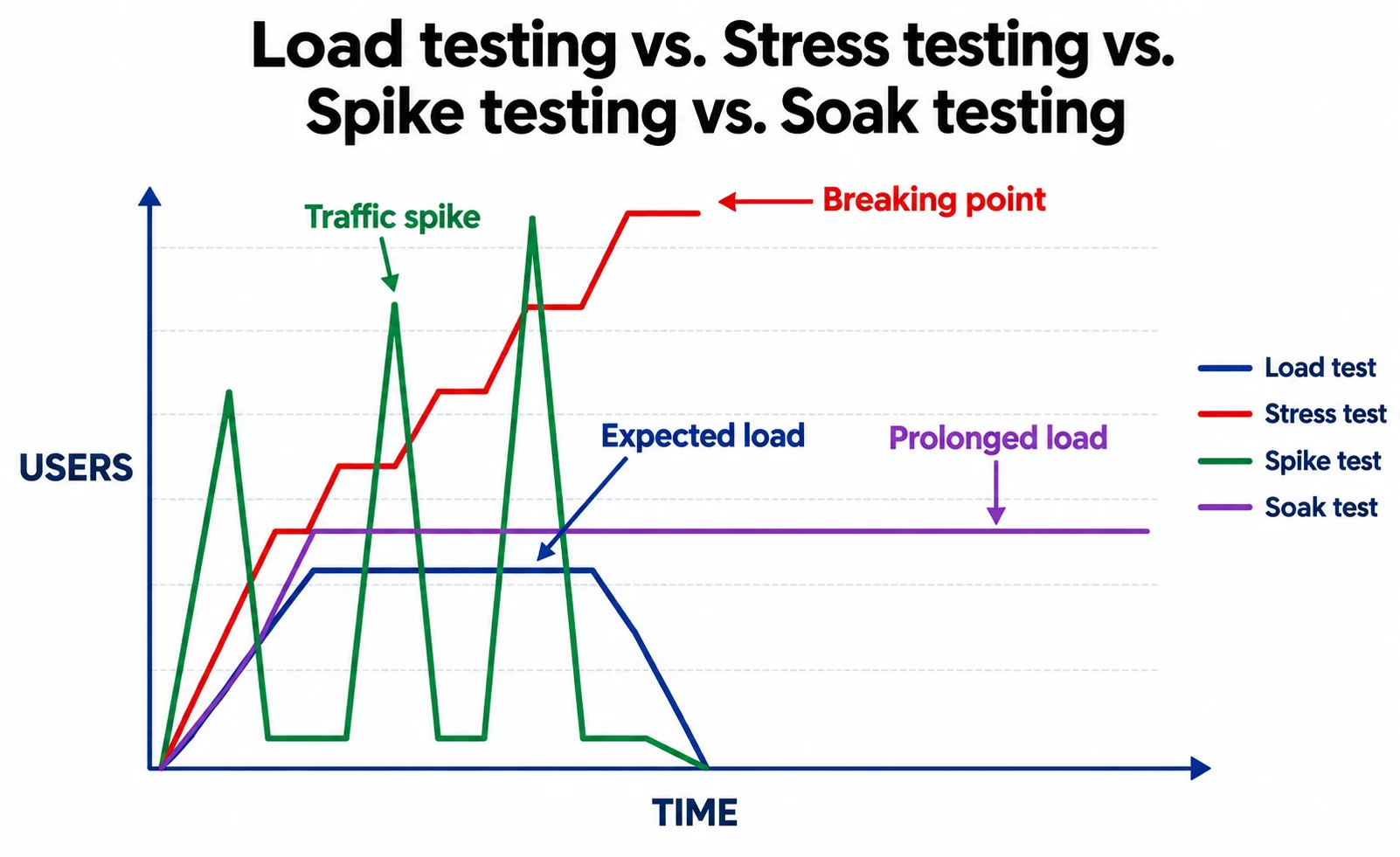
Load testing is one branch of performance testing, and the types of performance testing each answer a different question. Load testing vs. stress testing is the pair people mix up most, so here is each type in plain terms. Choose by the sale you're running.
- Load testing: This tests the website's ability to operate at normal levels of daily traffic to ensure stability and efficiency at steady-state conditions during a seasonal sale.
- Stress testing: Checks whether servers can manage the traffic beyond their breaking point in order to determine how gracefully the website fails.
- Spike testing: Checks whether there is any spike in traffic due to the viral nature of the website or the flash sale and makes sure that auto-scaling is done in seconds and not in minutes.
- Soak testing: Places a continuous load on the website for several hours or even days, like a multi-day sale, in order to detect memory leaks and database bloating.
- Scalability testing: This type of testing involves increasing load on the website to check whether extra capacity has an effect on network throughput.
Comparison
Core Strategies for High Traffic
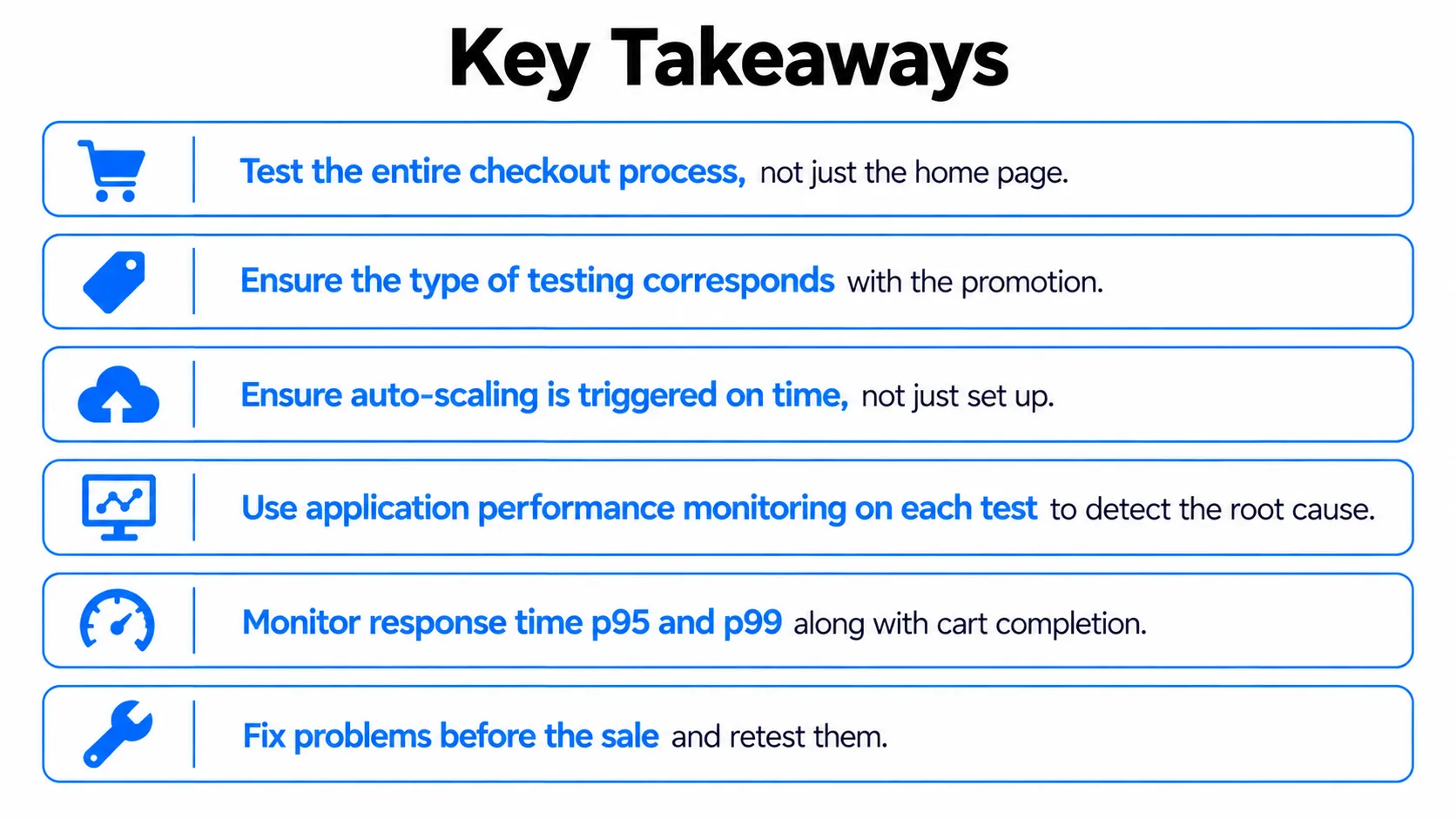
Auto-scaling is not a way to conduct a load test. Auto-scaling is what is tested. The question of how to optimize website performance under peak loads is the question of how to adopt a retail cloud strategy and treat load testing as a gate for release:
- Auto-scaling: Test the real performance of scale-out triggers in AWS, Azure, or GCP based on how quickly new instances get started.
- CDN & Edge Computing: Test how Cloudflare and Akamai distribute static files nearer to mobile-first users with balanced traffic flow distribution.
- Caching & database optimization: Apply Redis and Varnish caching to reduce the number of queries; apply horizontal scaling, indexing, and sharding to ensure quick checkout.
- Microservices architecture: In distributed systems, just one service that works slowly can freeze your checkout.
- Mobile: Most shoppers browse on their phones, so you need to include mobile performance testing, mobile app performance testing, and cross-browser testing in your plans.
Cloud Load Testing Tools Compared
Cloud load testing tools split into open-source engines and managed platforms, and the best load testing tools depend on your team's skills. Pick for fit first, then wrap monitoring around whichever load testing tool you choose:
- JMeter load testing: Handles HTTP scripts without much coding.
- k6 load testing: Slots into CI/CD pipelines, which suits developer-led teams.
- Monitoring: Include application performance monitoring and observability frameworks, plus AI-driven analysis as an additional opinion.
- Performance testing software with license: Tools like LoadRunner are suitable for large estates.
- Existing cloud automation testing tools: Reuse that pipeline wiring for performance testing tools.
How to Run Application Load Testing in the Cloud
This process works with any tool above. Application load testing in the cloud comes down to four steps: Set targets, script customer journeys, generate load from several regions, and read the website performance metrics.
Set Targets from Past Sale Traffic
Start with capacity planning, not scripts. Use your last sale and this year's marketing forecast to set targets:
- Peak concurrency from your last sale, adjusted for the forecast.
- Order rate at the busiest hour.
- Per-flow targets for search, cart, and checkout, each with a pass mark such as a p95 response time.
A target like "handle Black Friday" can't fail, so it can't guide a test. Write targets that can.
Script the Search, Cart, and Checkout Flows
Script customer journeys, not single endpoints. A shopper searches, opens a product, adds to cart, and pays. A loop on one endpoint hides the dependencies that fail first. Build the suite around these points:
- Cover Create account, sign up, and Log in flows.
- Include inventory system lookups, since stock checks add load.
- Session state must be kept along with realistic test data.
- Use the payment sandbox rather than the live gateway.
- Perform a security audit of test data and access first, with PCI DSS scope in mind.
- Connect the script with CI/CD pipelines to make it run before every deployment.
This minimal k6 example fails the run if p95 breaches the target. Adapt the stages to your own forecast:
// k6: ramp to peak, fail the run if p95 breaches target
import http from 'k6/http';
export const options = {
  stages: [
    { duration: '5m', target: 500 },
    { duration: '20m', target: 2000 },
    { duration: '5m', target: 0 },
  ],
  thresholds: { http_req_duration: ['p(95)<800'] },
};
export default function () {
  http.post('https://staging.example.com/api/checkout', { cart: 'test-cart' });
}
Generate Load from Multiple Regions
One load source misses latency and CDN behaviour for shoppers elsewhere. Split generators across cloud regions to match where your customers live, then compare:
- Latency: Shoppers far from your origin see slower page loading.
- Traffic flow distribution: Load balancers should spread requests evenly.
- Edge behaviour: Confirm cache hits come from the nearest location.
Website Performance Metrics to Watch While the Test Runs
The numbers required by various users differ; hence, include all three sets listed below. The average does not represent unlucky users, and every threshold must be linked to a business objective before testing.
- Speed: p95 and p99 response times and application response times.
- Stability: Error rates, network throughput, and general system performance.
- Business: Cart completion and checkout percentage.
Common Bottlenecks Cloud Performance Testing Uncovers
A team we worked with had tuned their web tier for weeks, yet the first real test failed at the database, capped at a connection limit nobody had checked. Cloud performance testing finds performance faults like these before shoppers do, which is how digital resilience gets built:
- Database limits: Slow queries and connection caps that only appear at high concurrency.
- Third-party delays: Payment and API calls that slow down while your own pages stay fast.
- Cache misconfiguration: Wrong keys or short expiry that send traffic to the origin you thought was protected.
- Staging gaps: Smaller databases and missing CDN rules that produce flattering results.
- Scaling lag: Auto-scaling that adds capacity too late for the surge.
How Frugal Testing Helps You Run Cloud Load Tests Without the Overhead
As a software testing and quality assurance company, we run performance testing services and load testing services for e-commerce platforms, from scoping to the final report. Across our e-commerce engagements, the first failure is rarely the web tier. You get test scripts, a results report, and a prioritised fix list, ranked by revenue risk.
A quality assurance testing company earns its keep on test design, since most teams rarely run load tests. We bring that practice to your sale calendar, so you go into the sale with baselines, a re-run plan, and fewer surprises on the busiest day.
What Our E-Commerce Load Testing Engagement Looks Like
- Scope: Map the test to your sale calendar, past traffic, and checkout dependencies.
- Script: Build search, cart, and checkout journeys with realistic test data.
- Run: Execute load, spike, and soak tests from multiple cloud regions.
- Report: Rank findings by revenue risk, with a prioritised fix list.
- Hand over: Leave you the scripts, baselines, and a re-run plan.
Who This Is For
E-commerce QA testing outsourcing would be best for mid-size to enterprise-level online retailers who lack performance testing skills in-house, particularly if they are preparing for a replatform, upcoming campaign, or recovery from a previous failure. The best time for e-commerce QA outsourcing is well before the sale.
Conclusion
There is no alternative but to load test at some point; it is just that you have to choose who your test audience will be. With cloud load testing, you can easily pick between the script and your users as a test audience. You get a clear picture of the point where scaling fails, and all before your sales fail.
The real challenge lies in how well you rehearse. It is something most organizations realize too late, often when their online payment system slows down on the busiest day of the year. Digital resilience has to be built before that day.
People Also Ask (FAQs)
Q1. What is performance testing?
Ans: Performance testing gauges the speed, stability, and responsiveness of an application under certain conditions. This includes load, stress, spike, and soak tests, along with functional testing.
Q2. How often should you perform load testing before a sales event?
Ans: Perform this test before each major release, migration, and planned campaigns, and also run the final test about two to three weeks before the sales event to give yourself time to solve any problems that arise.
Q3. Can we use Azure Load Testing for e-commerce?
Ans: Yes, especially on Azure. It is a fully managed platform that executes JMeter scripts in a scalable way, so any existing scripts work well, but you must also have realistic checkouts and data.
Q4. How do you conduct mobile app performance testing under peak traffic?
Ans: Start with back-end API performance testing under load, and then measure start times of the apps and the response of the screens on physical devices using 4G networks.
Q5. Does cross-browser testing cloud infrastructure replace load testing?
Ans: No. It checks that pages render and behave consistently across browsers and devices, while load testing checks capacity. Run both, because a page can pass one and fail the other.

.webp)