
A mid-size fintech spent four months migrating from Jenkins to a modern managed CI/CD platform. Six weeks in, auditors flagged an ISO 27001 requirement for self-hosted agents that the new platform didn't support, and the team rolled everything back. Nobody had asked the compliance question before signing.
That's the real risk with continuous integration tools. As per the State of Developer Ecosystem 2025 report published by JetBrains, 55% of developers today use CI/CD tools with the following breakdown: GitHub Actions (33%), Jenkins (28%), and GitLab CI (19%). Teams typically opt for what their platform offers and only realize the pain in the process about pricing or lack of security that they never noticed during the setup process. It's all about choosing the right CI/CD tools and DevOps pipeline tools based on your source code environment. Understanding what is CI/CD in DevOps at a basic level, and knowing which CI/CD services actually fit your stack, is the real starting point before any vendor call.
What Are Continuous Integration Tools, and What Should You Evaluate?
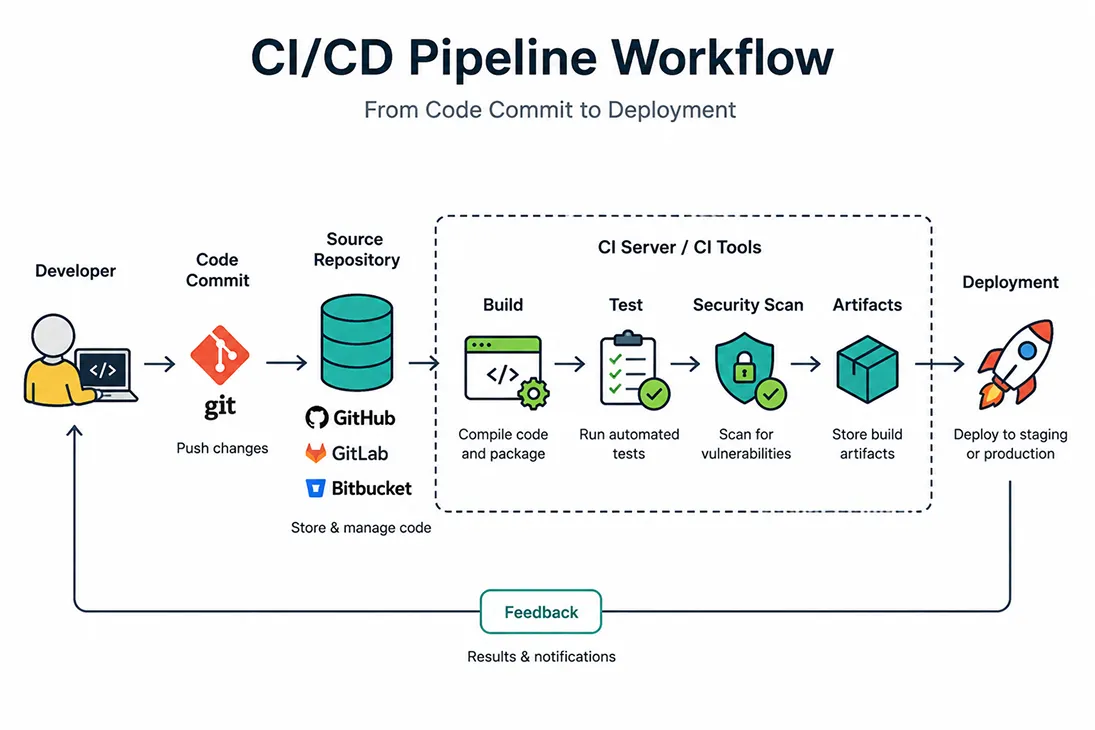
Continuous integration tools automatically build and test every change pushed to source control, catching breakages before they reach production. Continuous integration is one of the foundational DevOps practices, and what counts as a modern CI/CD platform keeps shifting, especially with AI-assisted failure triage now standard on most continuous integration platforms.
Five things separate a good choice from a bad one:
- Integration depth with your version control platform.
- Self-hosted agents on a Cloud VM versus a fully managed execution model.
- Pricing: per user, per minute, or credits.
- Automated security testing, dependency scanning, and audit logs.
- Maturity of the AI automation support compared to marketing promises.
Terminology gets blurred constantly, so it's worth being precise:
- Continuous integration: Triggers a build pipeline and automated testing run on every push
- Continuous delivery: Gets code deployable and pauses at a deployment stage for human sign-off
- Continuous deployment: Removes that gate entirely, shipping tested changes automatically
Mastering these continuous integration and continuous deployment techniques matters more, in practice, than which specific continuous integration software you end up licensing. This is also the essence of Pipeline as Code: Defining your build pipeline configuration alongside your source code, rather than clicking through a UI nobody can review in a pull request. It's one of the clearest signs of mature continuous integration tools in DevOps.
Integration Depth and Repo-Host Fit
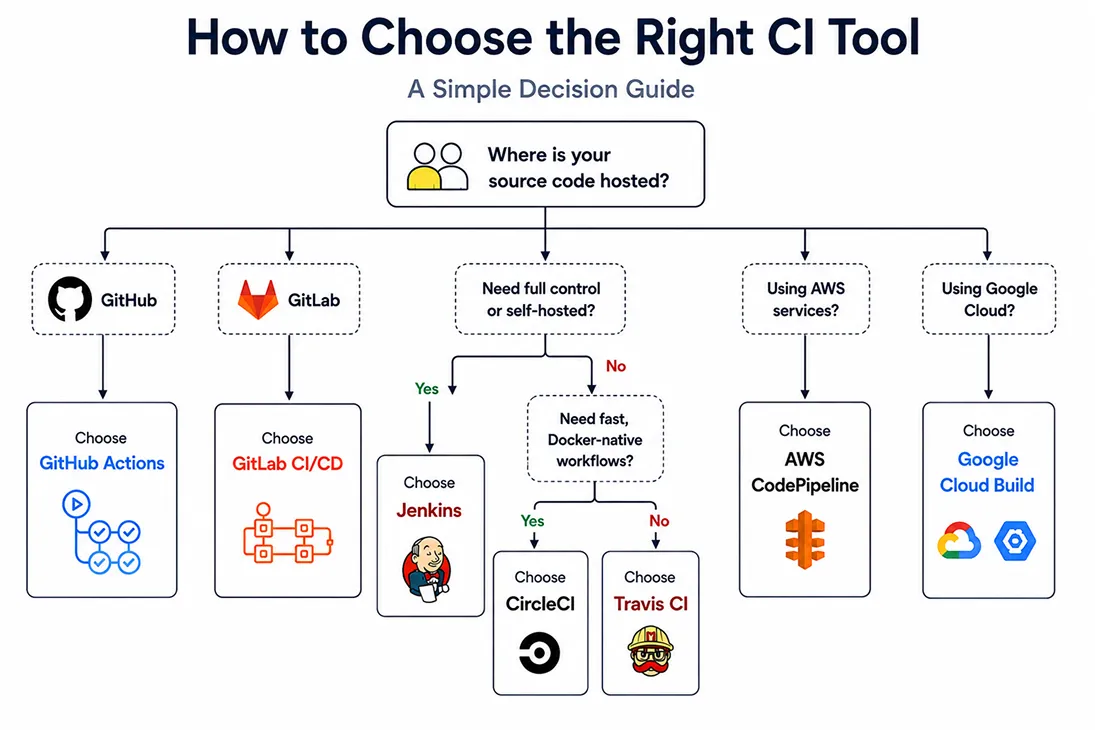
Using the right tool for your source control host creates less friction than any features list could possibly do, and it's usually the first sign of whether your DevOps pipeline tools were chosen deliberately or inherited by accident. GitHub repos are made for GitHub Actions and its cloud-native buildpacks, GitLab repos are made for GitLab CI, while Bitbucket Pipelines is usually the choice for Bitbucket-hosted repos.
Pricing Models: Per-Seat, Per-Minute, and Credit-Based
- Per-seat (GitLab CI/CD): cost stays flat regardless of pipeline usage
- Per-minute (GitHub Actions): scales with usage, which can spike fast if a flaky suite reruns constantly
- Credit-based (CircleCI): hardest to budget without a full quarter of historical usage data
Picking the model that matches how your pipeline actually behaves, rather than how it behaves in a demo, saves most teams an unpleasant invoice around month three. Vendors rarely volunteer this comparison themselves.
Top Continuous Integration Tools Compared for 2026
A DevOps engineering lead put it bluntly: "We didn't choose Jenkins. We inherited it, and never had a good enough reason to leave." That's true for plenty of teams.
What separates the best CI/CD tools teams actually shortlist:
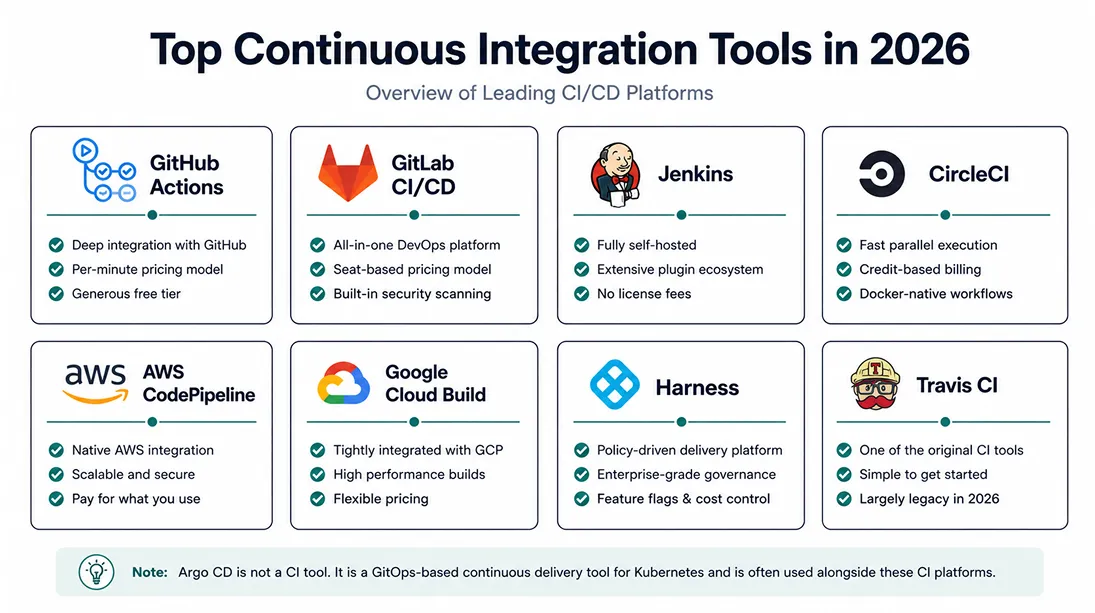
- GitHub Actions: Deep integration with GitHub, per-minute pricing model, extensive free plan, containers are supported out-of-the-box
- GitLab CI/CD: An all-in-one DevOps solution, seat-based pricing model, security scanning is an inherent feature
- Jenkins: Complete self-hosted nature, unrivalled plugins system, no license fees, actual need for patching
- CircleCI: Fast parallel execution, credit-based billing that's genuinely hard to forecast at scale
- AWS CodePipeline and Google Cloud Build: Tightly coupled to Amazon Web Services and Google Cloud services
- Travis CI: One of the original CI/CD tools, now largely displaced by GitHub-native and GitLab-native options
- Harness tool: A policy-driven delivery platform built for regulated, multi-team enterprises, with feature flags and cost governance built in from the start
- Argo CD: Not a CI tool at all, but the Kubernetes-native GitOps deployment layer teams pair with one of the above.
More platform features aren't automatically better. A build pipeline with fewer, well-maintained jobs consistently outperforms a sprawling multi-cloud setup.
Our Take: Jenkins is not dead. It's right for air-gapped, compliance-heavy environments with capacity to maintain self-hosted agents; everywhere else, the maintenance tax usually isn't worth paying.
When Jenkins Still Makes Sense
Self-hosted agents and complete execution model control make sense even when accounting for the added overhead, in cases where there is regulatory compliance or air-gapping involved, where the compliance department requires insight into what is running and where credentials to the infrastructure exist. This is no exception; that's why Jenkins continues to make the cut.
When to Pair a CI Tool With a Dedicated CD Tool
GitHub Actions or Jenkins typically handles the build pipeline and automated testing, then hands off to Argo CD for Kubernetes-native GitOps deployment. This is where build automation stops being a nice-to-have and becomes the backbone of your CI/CD pipeline tools stack. Mature deployment stages include:
- Preview environments for pull requests.
- Canary releases to a small slice of production traffic.
- Blue-green deployments for zero-downtime cutovers.
- Feature flags that decouple deploy from release.
- Artifact management for build artifacts and container images.
Pairing this with pretested commits, where changes are validated inside a build pipeline before reaching the main branch, catches broken code earlier than a post-merge fix ever could. Most continuous delivery tools support this pattern natively now, so it's rarely extra setup work once the base pipeline exists.
Comparison Table: CI Tools by Pricing, Hosting, and AI Features
Argo CD isn't in this table since it's a Kubernetes-native GitOps deployment tool, not a CI tool; it's the CD half of the pairing covered above. Teams leaning heavily on Kubernetes deployment tools alongside any row in this table should expect to pair CI with Argo CD regardless of which one they pick.
Which one fits your team?
- Need full self-hosted agents for a regulatory requirement? Jenkins
- Already committed to a unified DevOps platform? GitLab CI/CD
- GitHub-native, modern stack, no hosting constraints? GitHub Actions
- Infrastructure already lives entirely in one cloud? AWS CodePipeline or Google Cloud Build
Matching a CI Tool to Your Stack and Team Size
Feature checklists are a poor way to make this decision. Team size tells you far more about what your organisation needs than any spreadsheet comparison.
Solo Developers and Small Teams (Under 20)
Start with the free tier of whatever platform matches your source code host, and resist shopping around before you have a real reason to. The honest answer is usually to use what's already there.
Growing and Enterprise Teams (20+)
The calculus shifts once a few things enter the picture:
- Managed databases and cloud-native architectures needing coordinated deployment.
- Policy as code for compliance-driven approval gates.
- Disaster recovery planning across pipeline stages, not just application data.
- Automated deployment tools that plug into the broader DevOps deployment workflow.
- CI/CD security tools and software deployment tools that satisfy audit requirements without slowing releases down.
- Application deployment tools and continuous deployment tools in DevOps that support a gradual rollout across business units, rather than a single risky cutover.
A 600-person logistics company we worked with had exactly this problem: Three business units had each adopted a different build pipeline over five years, and nobody could say which was safest to keep. The fix wasn't picking a winner; it was auditing each pipeline's test coverage and security posture first.
What Most CI Tool Comparisons Get Wrong
A client adopts a faster CI tool. The team celebrates the shorter build pipeline. Three months later, defect counts are up, not down.
Predictions of DevOps platform market consolidation haven't matched reality either; roughly a third of organisations still run two CI/CD tools at once, often for years, because migration is expensive. That fragmentation creates its own risk:
- Secrets management and API keys left in plaintext variables.
- Missing dependency scanning on one of the two systems.
- Infrastructure credentials with broader access than either pipeline needs.
Across our engagements, that's exactly how a pipeline breach happens: not through a sophisticated attack, but through the tool nobody was watching closely enough. It's rarely dramatic until the week it turns into a full security incident.
Why a Fast Pipeline Isn't the Same as a Reliable One
Build velocity and build release confidence are two distinct measures, and the confusion that results from assuming them to be the same is what makes developers deploy faulty builds faster than ever before. According to the 2025 DORA study, 43.5 percent of teams took more than a week to get changes deployed to production.
How Frugal Testing Helps You Ship Faster Without Breaking Production
Our service maps directly to this problem: CI/CD pipeline test integration and regression suite design, not generic test automation bolted on afterward. Having worked across dozens of build pipelines, we audit the pipeline and test suite, identify flaky or missing coverage, and build a regression suite that runs inside the client's chosen tool. Enterprises tend to bring us in right after a CI/CD migration, once they realise the test suite wasn't built for the new pipeline's execution model.
What Our CI/CD Test Integration Engagement Looks Like
The engagement runs in four steps, and each one produces something the client keeps, not just a report that sits in an inbox.
- Pipeline audit: We map the existing build pipeline end to end, flagging where audit logs are missing, where secrets sit unmanaged, and where build automation has quietly drifted from what the documentation claims.
- Test suite gap analysis: We identify flaky tests, missing coverage, and any test that only passes because nobody runs it under real load.
- Regression suite build: We build a regression suite inside the client's existing CI/CD pipeline tools, not a parallel system that competes with it.
- Handoff with documentation: The team receives a suite they can maintain themselves, along with the reasoning behind every test we added or removed.
What the client owns at close is a maintainable test suite integrated into their pipeline, not a black box that only we can touch.
Who This Is For
This fits teams that recently migrated CI/CD tooling and want test coverage that keeps pace with the new pipeline's speed. It's also a good fit for teams evaluating application deployment tools for the first time, where nobody on staff has built a regression suite from scratch before.
Two situations trigger the conversation most: a recent migration, or a fast pipeline quietly shipping regressions. A third, less obvious one is compliance-driven: a team that just signed off on new CI/CD security tools and needs its test suite to meet the same bar.
Key Takeaways
- Match the CI tool to your source control host and team size before comparing features.
- Pricing models (per-seat, per-minute, credit-based) behave very differently once real usage scales up.
- A faster pipeline without proper security scanning is a risk, not a win. That's how pipeline breaches actually happen.
- Predictions of DevOps platform market consolidation haven't matched reality. Many teams still run two CI/CD tools at once.
- Speed and reliability are different metrics. A shorter pipeline means little if the test suite behind it hasn't kept pace.
Conclusion
Match the tool to your version control host first, check the real pricing math before committing, and keep Jenkins on the table for regulated environments. A faster pipeline without proper security scanning is a risk, not a win.
The CI tool decision is an ongoing operational commitment, not a one-time technical choice. As Cloud DevOps and agile practices keep maturing across the industry, the specific tool you pick matters less each year than the discipline your team builds around it.
People Also Ask (FAQs)
Q1. Is Harness a viable CircleCI alternative for enterprise CI/CD needs?
Ans: Harness offers enterprise features like governance and cost visibility that CircleCI alternatives often lack, but it requires more setup investment and suits larger, multi-team organisations best.
Q2. What is DevSecOps and where do DevSecOps tools fit into a CI/CD pipeline?
Ans: DevSecOps folds security testing directly into the build pipeline instead of running it afterward. DevSecOps tools scan dependencies and secrets automatically at each pipeline stage, before code reaches production.
Q3. Can Kubernetes CI pipelines run consistently across multiple cloud providers?
Ans: Yes, with the right abstraction layer. Portable manifests generally run consistently across major clouds, though networking, storage, and load balancer configuration still need provider-specific tuning.
Q4. Are free CI/CD tools suitable for regulated industries with strict compliance needs?
Ans: Sometimes. Free CI/CD tools can work if they support audit logging and self-hosted deployment, but most regulated teams eventually need paid tiers for dedicated support and compliance certifications.
Q5. What do real CI/CD pipeline examples look like for a typical SaaS release?
Ans: A typical example runs unit tests on every push, builds a container image on merge, runs integration tests in a preview environment, then promotes to production via a canary release.

.webp)