
A 2xx response code means that an HTTP request was successfully received, understood, accepted, and processed by the server. These codes are used by browsers, websites, APIs, and testing tools to confirm that the communication between the client and server was successful.
In simple terms, when a user opens a page, submits a form, or sends an API request, the server returns a 2xx status code when the request is handled correctly.
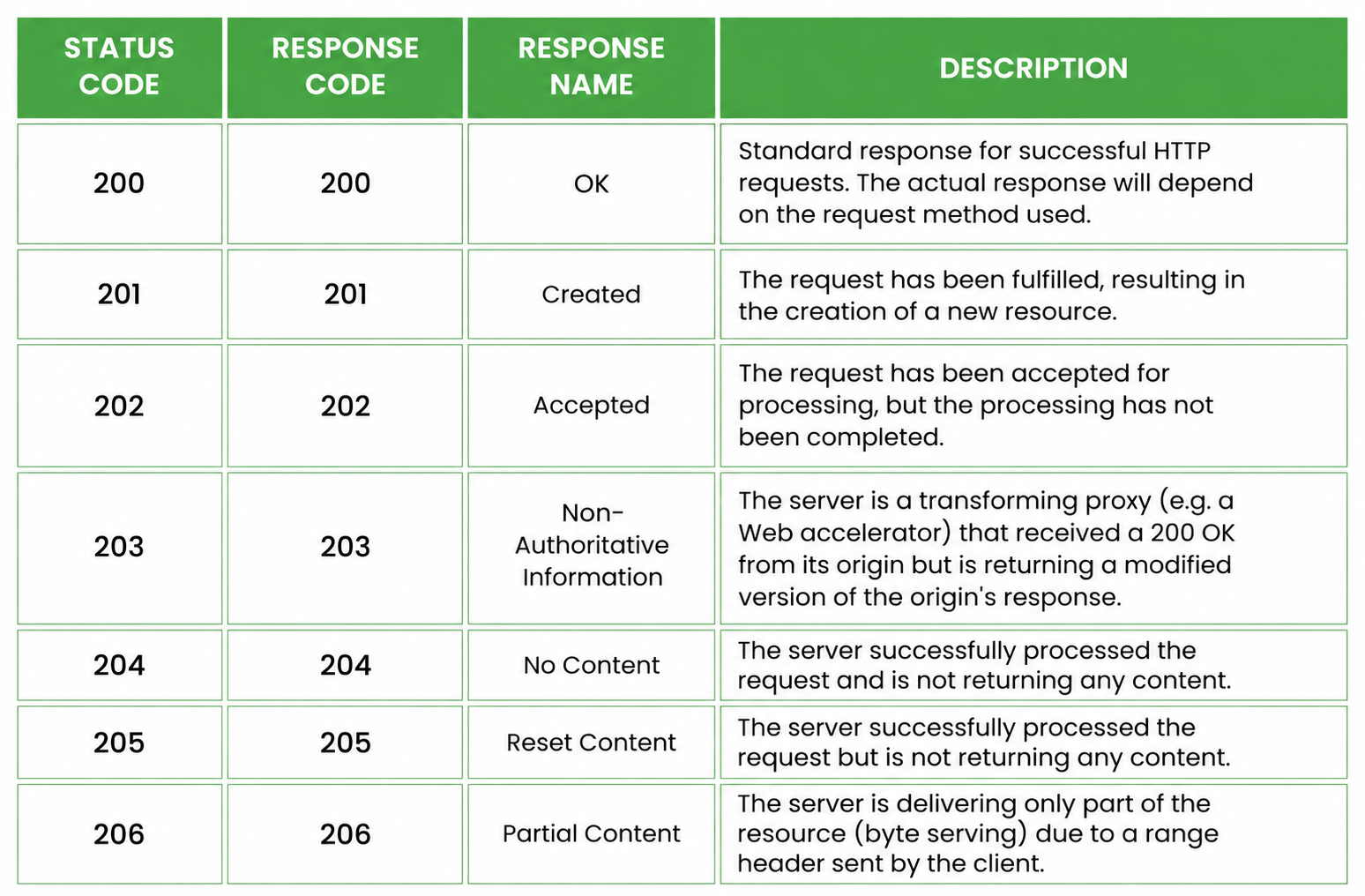
However, not every 2xx status code means the same thing. A 200 OK response usually means the request was completed and content was returned. A 201 response code means a new resource was created. Status code 202 means the request was accepted but may still be processed. A 204 status code means the request was successful, but the server has no content to return. A 206 status code is used when only part of a resource is returned.
- 200 – OK
- 201 – Created
- 202 – Accepted
- 203 – Non-authoritative information
- 204 – No content
- 205 – Reset content
- 206 – Partial content
What do 2xx response codes look like?
A 2xx response code appears in the server response after a client sends an HTTP request. For example, when a browser successfully loads a web page, the server usually returns a 200 OK status.
Example:
HTTP/1.1 200 OK
Content-Type: text/html
Guide to 2xx Response Codes
Some of the most common HTTP 2xx response codes are listed below. The visual below summarizes common 2xx response codes and their basic meanings.
Less common 2xx codes include 207 Multi-Status, 208 Already Reported, and 226 IM Used. These are used in more specific technical cases and are not as common as 200, 201, 202, 204, and 206 in everyday website and API testing.
When Should Each 2xx Status Code Be Used?
200 OK: When the Request Is Successful
200 OK is the most common 2xx response code. It means the request was successful and the server returned the requested information. For example, when a user opens a blog page, searches for a product, or fetches user details through an API, the server may return 200 OK.
201 Created: When a New Resource Is Created
A 201 response code means the request was successful and a new resource was created. It is usually returned after a POST request, such as creating a new user, order, ticket, or database record.
The main difference between 200 and 201 status code is that 200 means the request succeeded, while 201 means the request succeeded and created something new.
202 Accepted: When Processing Happens Later
Status code 202 means the server has accepted the request, but the processing is not complete yet. This is common when a task runs in the background, such as report generation, payment verification, file processing, or email sending.
204 No Content: When Success Does Not Need a Response Body
A 204 status code means the request was successful, but the server is not returning any content in the response body. This is commonly used after delete, update, or save actions where the client does not need new data from the server.
206 Partial Content: When Only Part of a Resource Is Returned
A 206 status code means the server is returning only part of the requested resource. This is commonly used for video streaming, audio playback, large file downloads, and resumable downloads.
2xx Response Codes in API Testing
In API testing, 2xx response codes help testers confirm whether successful requests are handled correctly. But testers should not only check whether the response starts with 2xx. They should also verify that the right success code is returned for the right action.
For example, a successful GET request usually returns 200 OK. A POST request that creates a new record should return 201 Created. A background task may return 202 Accepted. A successful delete request may return 204 No Content. A file or media range request may return 206 Partial Content.
Testers should also validate the response body, data accuracy, backend action, and business logic. A 200 OK response does not always mean the complete workflow is correct.
Common Mistakes When Using 2xx Codes
One common mistake is returning 200 OK for every successful request. While 200 is valid in many cases, it is not always the most accurate response. If a new resource is created, 201 Created is better. If processing will happen later, 202 Accepted is more suitable. If no response body is needed, 204 No Content is usually cleaner.
Another mistake is treating every 2xx status code as a complete success during testing. The server may return 200 OK, but the response body, database update, or business rule may still be incorrect.
2xx response codes are only one part of the HTTP status code structure. If you want to understand the full flow, start with 1xx response codes for informational responses, then review 3xx response codes for redirects, 4xx response codes for client-side errors, and 5xx response codes for server-side errors.
Conclusion
2xx response codes indicate successful HTTP requests, but each code has a different meaning. 200 OK is used for general success, 201 Created confirms that a new resource was created, 202 Accepted is used for background processing, 204 No Content means no response body is returned, and 206 Partial Content is used for partial file or media responses.
For developers, testers, and website owners, understanding these codes helps with API testing, debugging, SEO checks, and server response validation.
People Also Ask (FAQs)
Q1.What does a 2xx response code mean?
Ans: A 2xx response code means that the server successfully received, understood, and processed the HTTP request. These codes usually indicate that the request was completed without an error.
Q2.Is a 2xx status code an error?
Ans: No, a 2xx status code is not an error. It is a successful HTTP response. Error responses usually fall under 4xx client errors or 5xx server errors.
Q3.What is the difference between 200 OK and 201 Created?
Ans: 200 OK means the request was successful and the server returned the requested response. 201 Created means the request was successful and a new resource, such as a user, order, or record, was created.
Q4.When should an API return 202 Accepted?
Ans: An API should return 202 Accepted when the request has been accepted but the processing is not complete yet. It is commonly used for background jobs, report generation, file processing, and asynchronous workflows.
Q5.What does 204 No Content mean?
Ans: 204 No Content means the request was successful, but the server is not returning any response body. It is commonly used for delete, update, or save actions where no extra data needs to be sent back.