A mid-size e-commerce company came to us with a quiet, expensive problem: A payment provider's webhook had been failing silently for weeks. A field that used to be optional had become required, and the request failed without triggering any alert. Nobody saw an error or got paged until customer emails about unpaid orders started arriving.
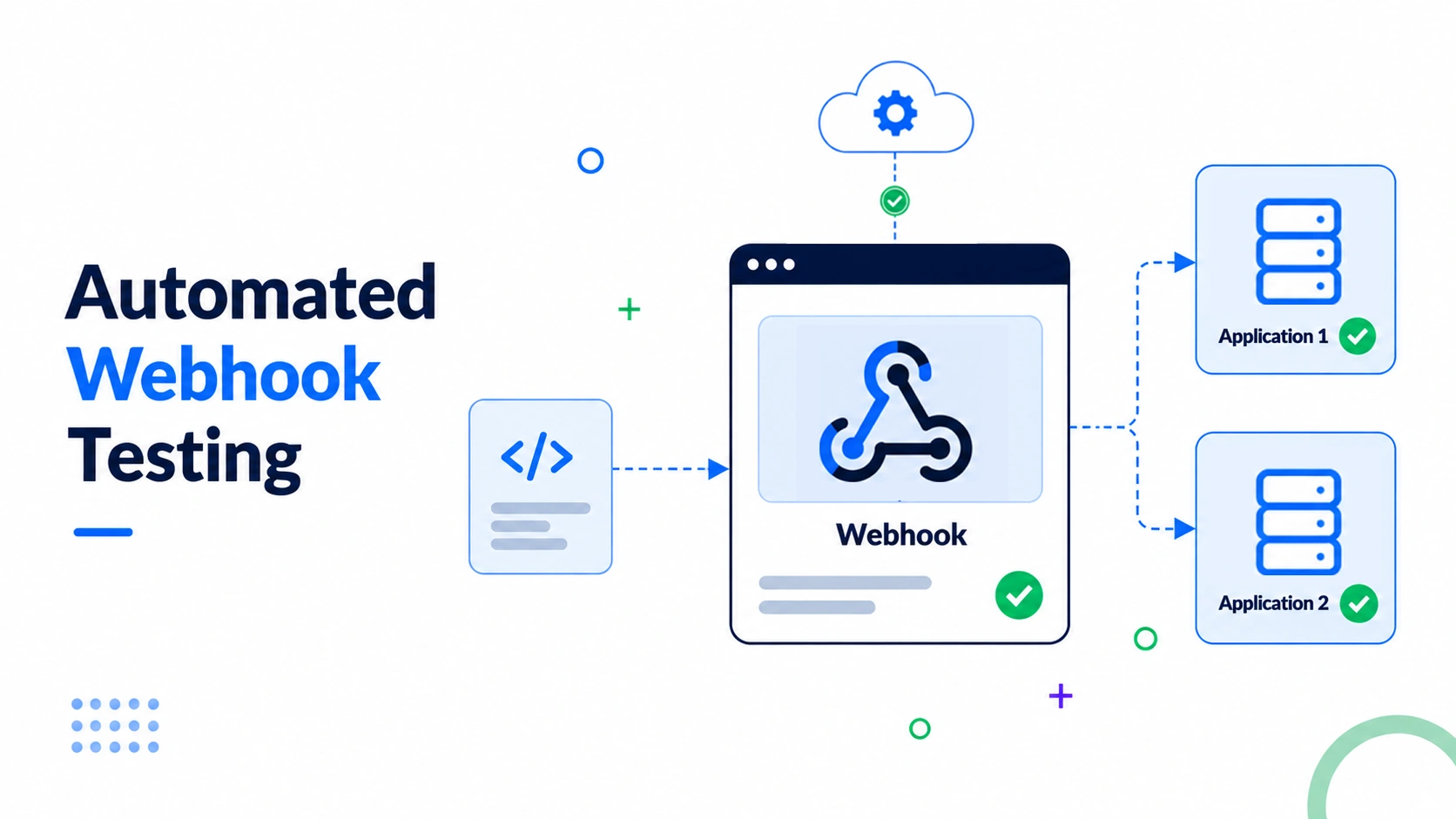
Automated webhook testing means running scripted checks, signature verification, retry handling, schema validation, and load testing against a webhook endpoint on every build, instead of manually firing test events. It's a specific slice of api automation testing, also called webhook automation testing, catching a webhook provider quietly changing a payload shape months into an integration nobody revisits. This guide covers what webhook testing involves, how to test webhook behaviour, and how to add automated webhook testing to a suite you already run.
What Is Webhook Testing?
Webhook testing means verifying that your endpoint correctly receives, validates, and processes an inbound webhook, checking the signature, payload structure, and how it handles duplicates or delays. The short answer to what a webhook is: it's an HTTP callback a provider sends to your endpoint the moment something happens on their side, not something you request. That's the webhook definition in one line, and the webhook meaning matters more in practice than as a dictionary entry.
Webhook vs API vs Polling
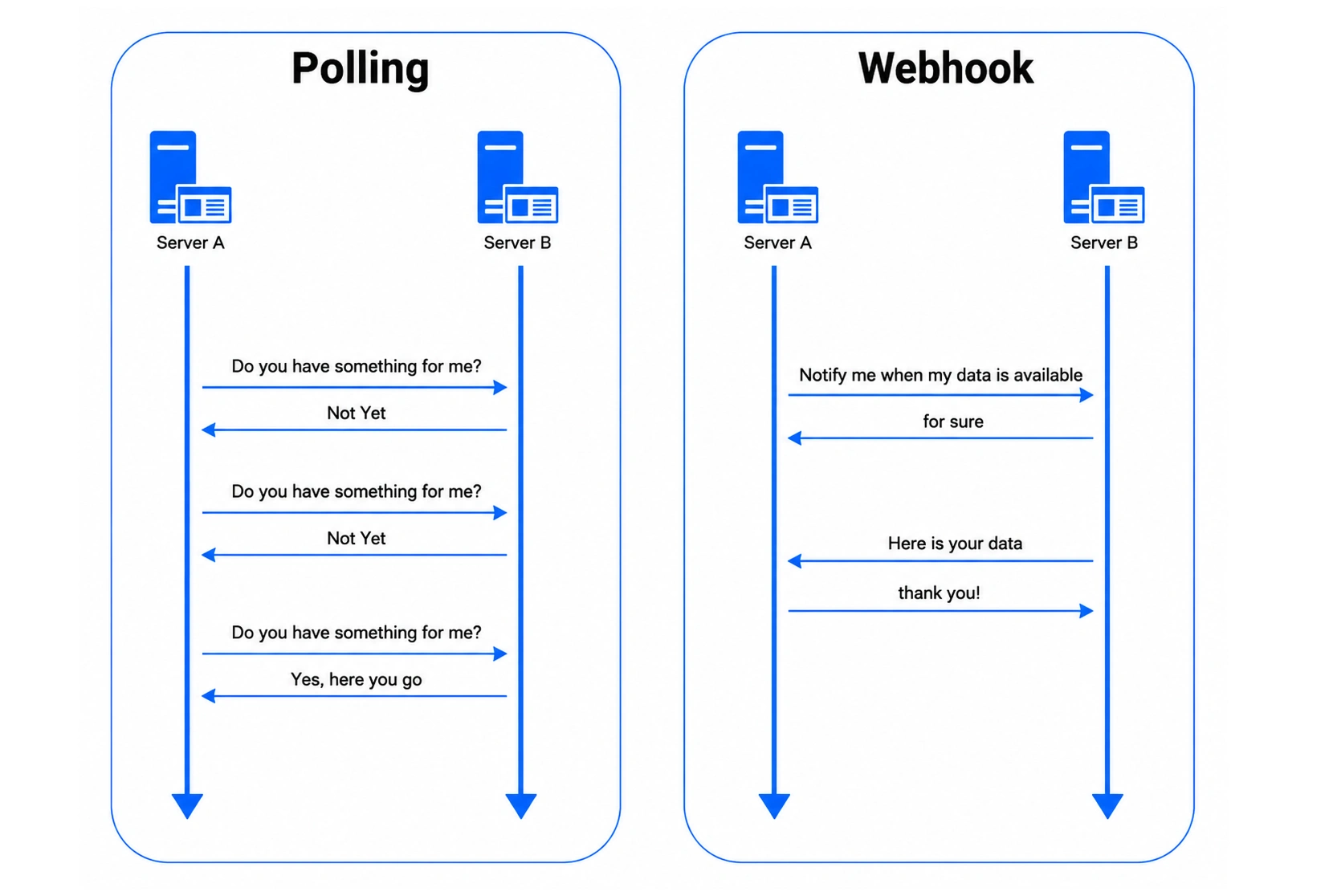
- API call: Your API client asks, "has anything changed?"
- Webhook: The webhook provider sends an unsolicited webhook request the moment something happens, without asking first.
- Polling: Repeatedly asking on a timer, burning requests and adding lag.
Webhooks remove the asking and the lag, but add a dependency: your endpoint has to stay available for events you didn't trigger. That's the core webhook vs API and webhook vs polling distinction, exactly why webhook testing exists as a branch of api automation testing.
How Webhooks Work in an API Architecture
Every webhook integration starts with one thing: A URL that can receive an inbound POST request. That URL goes by a few names: webhook endpoint, webhook listener, or webhook receiver, but they mean the same code path on your webhook server. Understanding how webhooks work and how to use webhook registration correctly comes down to a reachable URL, ideally on custom domains you control and restricted by security group rules, a parser, and a fast acknowledgement, since a slow response reads as a failure worth retrying. Once that's in place, the rest is a short lifecycle.
The Webhook Lifecycle Step by Step
- Registration: Give the webhook provider your endpoint URL, usually with a signing secret used for HMAC verification.
- Event trigger: Something happens on the provider's side: a payment succeeds, a record updates, a subscription changes.
- Delivery: The provider sends an HTTP POST carrying a JSON body and request headers.
- Validation: Your endpoint checks the HMAC signature, timestamp, and payload schema.
- Processing: Valid events update your systems; invalid ones are rejected and logged.
- Acknowledgement: You return a fast 2xx status, or the provider retries on its own schedule.
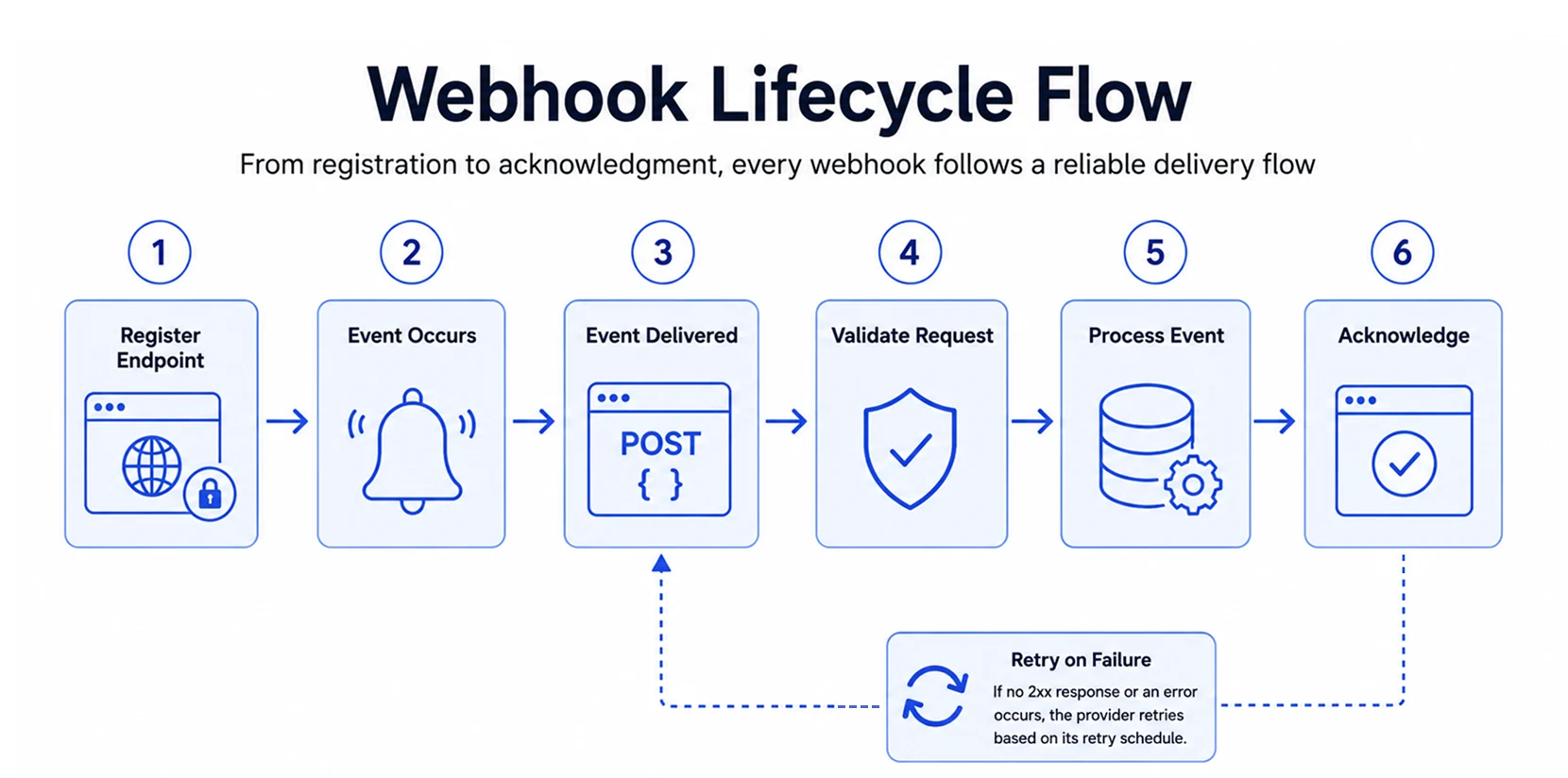
Provider-to-Server Flow
Take a payment provider as an example. It fires an event; your server checks the headers, verifies the payload against a shared secret, then updates records. Skip verification, and anyone who finds your URL can post fake events.8
Why Webhook Testing Is Critical for API Automation
Webhook failures are silent by nature: No stack trace, no error, just an event that never arrived. Left unwatched by any real security service, that silence turns into a business problem fast.
- An order that never updates, because the confirmation webhook silently failed.
- A payment that never reconciles, because a retry was dropped unnoticed.
- A customer record that quietly falls out of sync with the provider's own.
- Nobody manually re-checks an integration that "already works," so problems surface through support tickets, not test failures.
- An integration untested since it was built isn't tested; it's simply untested and hasn't failed yet.
How to Test a Webhook
Before automating anything, test a webhook manually first. It's the fastest way to catch problems before writing test code.
Using an Online Webhook Tester (Webhook Site)
An online webhook tester, or any webhook test site, gives you an instant, no-setup URL for quick event inspection:
- Generate a temporary URL from an online webhook tester; no account required.
- Point the webhook provider at that URL; most dashboards have a "send test event" button.
- Inspect what arrives: Method, request headers, body, and timing.
- Compare that against your assumptions before writing a fixture, since providers don't always match their docs.
This is an inspection step only. It confirms the data's shape and doesn't replace automated tests.
Testing a Webhook URL Manually
Acting as a simple API client, test webhook URL behaviour by sending requests to your own endpoint using curl or Postman:
- Send a valid request: POST a realistic payload with correct headers and confirm the status code.
- Send malformed data: Strip a required field, corrupt the JSON, or embed a SQL command, and confirm graceful rejection.
- Send it twice: Replay the request and check for duplicate processing, an early, manual form of webhook functional testing.
- Time the response: A slow acknowledgement triggers unnecessary retries with a real provider.
These checks, run by hand once, reveal more than the docs and are worth scripting into a suite that can test webhooks on every build.
Core Areas of Automated Webhook Testing
A mature suite checks five things: Cryptographic security, schema compliance, idempotency, error handling, and load. This is the backbone of webhook security testing.
Security and Authentication
- Signature validation: Test HMAC or token headers to confirm requests originate from the legitimate webhook provider, the core of webhook HMAC testing and webhook signature testing.
- Replay attack prevention: Check that timestamp tolerances reject stale or expired webhook events, covering webhook replay testing.
- Transport security: Ensure enforcement of valid SSL/TLS certificates and restricted access channels, backed by security group rules.
Payload and Schema Validation
- Data structure integrity: Assert that incoming JSON bodies contain all required fields and correct data types, the core of webhook payload schema validation.
- Backward compatibility: Verify how handlers process unexpected fields or missing optional attributes.
- Version handling: Test different schema versions sent by event providers during API updates.
Resilience and Lifecycle Management
- Idempotency checks: Send duplicate payloads to verify the system handles repeat deliveries without side effects,-what idempotent webhook handling means in practice.
- Out-of-order delivery: Simulate chronological mismatches where dependent events arrive out of sequence.
- Error response codes: Confirm the endpoint returns fast 2xx success codes only after safe processing or queued work.
Performance and Load
- Throughput capacity: Simulate high volumes of concurrent webhook triggers to check resource limits, covering webhook load testing and webhook performance testing.
- Timeout management: Measure processing latency to prevent the provider from timing out and re-sending, covering webhook retry testing and webhook timeout testing.
How to Add Webhook Testing to Your Test Suite
A QA lead at a mid-size SaaS company came to us with forty webhook consumers and zero coverage. Here's how we closed that gap in three steps.
Step 1: Mock the Sender (No Live Provider Account Needed)
Use a webhook catcher or a local tunnelling tool for exploratory testing only. Anything in CI needs a deterministic, scripted mock, not a live third party. Most API testing frameworks support this, plus webhook response variables letting one mock simulate success, retry, and failure. A minimal test in Node looks like this:
const crypto = require('crypto');

function verifySignature(payload, signature, secret) {
  const expected = crypto
    .createHmac('sha256', secret)
    .update(payload)
    .digest('hex');

  // timing-safe comparison, not a plain === check
  return crypto.timingSafeEqual(
    Buffer.from(signature),
    Buffer.from(expected)
  );
}

test('rejects an invalid signature', () => {
  expect(verifySignature(payload, 'wrong-sig', secret)).toBe(false);
});
That's the entire pattern for HMAC-SHA256 verification. Most teams need little more than this.
Step 2: Structure Your Webhook Test Fixtures
Keep one fixture file per provider and event type, stored alongside the code that tests it, so a payload change becomes a one-line diff instead of a code hunt. Where a provider offers configurable webhooks, match fixtures to that configuration to keep the set small.
Step 3: Place Tests Inside Your Existing Suite
Treat your endpoint as its own webhook consumption system, not a side effect bolted onto the main app. Tests live inside your existing testing system and regression suite, tagged separately so they can run alone whenever you need a quick, standalone check.
Adding Webhook Testing to Your CI/CD Pipeline
Run webhook checks as a pipeline stage on every pull request, as part of existing CI/CD workflows and automation workflows. Fail the build the same way as any other failing test results.
Which checks do you add first?
- Payments or e-commerce? Signature and idempotency.
- New integration? Schema validation.
- Stable and scaling? Load and timeout testing.
Webhook Testing Best Practices
Coverage doesn't stay useful on its own. Automated checks catch what's broken today, but the endpoint itself still needs to behave well in production: Fast, secure, and predictable under load. A few operational habits keep webhook checks accurate over time and stop the very failures automated testing exists to catch from creeping back in.
- Acknowledge events quickly and move heavy processing to a background job, so the provider doesn't retry unnecessarily.
- Always verify over HTTPS and reject anything over plain HTTP.
- Validate HTTP headers and authentication headers, including API keys.
- Enforce rate limiting and sensible request limits, part of ongoing webhook authentication testing.
- Log every webhook received, including rejected ones, the raw material for webhook reliability testing and webhook failure testing.
- Treat "we tested it once" as a warning sign, not coverage.
How Frugal Testing Helps With Webhook and API Automation Testing
When we test webhooks for a client, this is exactly the approach covered above: mock the sender, version fixtures per provider, and wire signature, retry, idempotency, and schema checks into the pipeline that's already there. It's part of our broader API integration and security solution work, not a bolt-on, so the webhook layer stops being the one piece nobody owns.
What Our Engagement Looks Like
- Audit current webhook integrations and flag what's untested.
- Build provider-specific fixtures and wire signature, retry, and schema checks into the pipeline, via the team's API workflow builder.
- Route every failing check to a test case log entry, defect creation, and defect reports.
- Hand off the fixtures, pipeline stage, and documentation.
Who This Is For
Teams running payment, e-commerce, or SaaS integrations, or with a new provider integration on the roadmap, whether you have one engineer maintaining webhooks or a full QA function, all fit here, along with teams needing coverage scoped to a specific integration rather than a generic retainer.
Conclusion
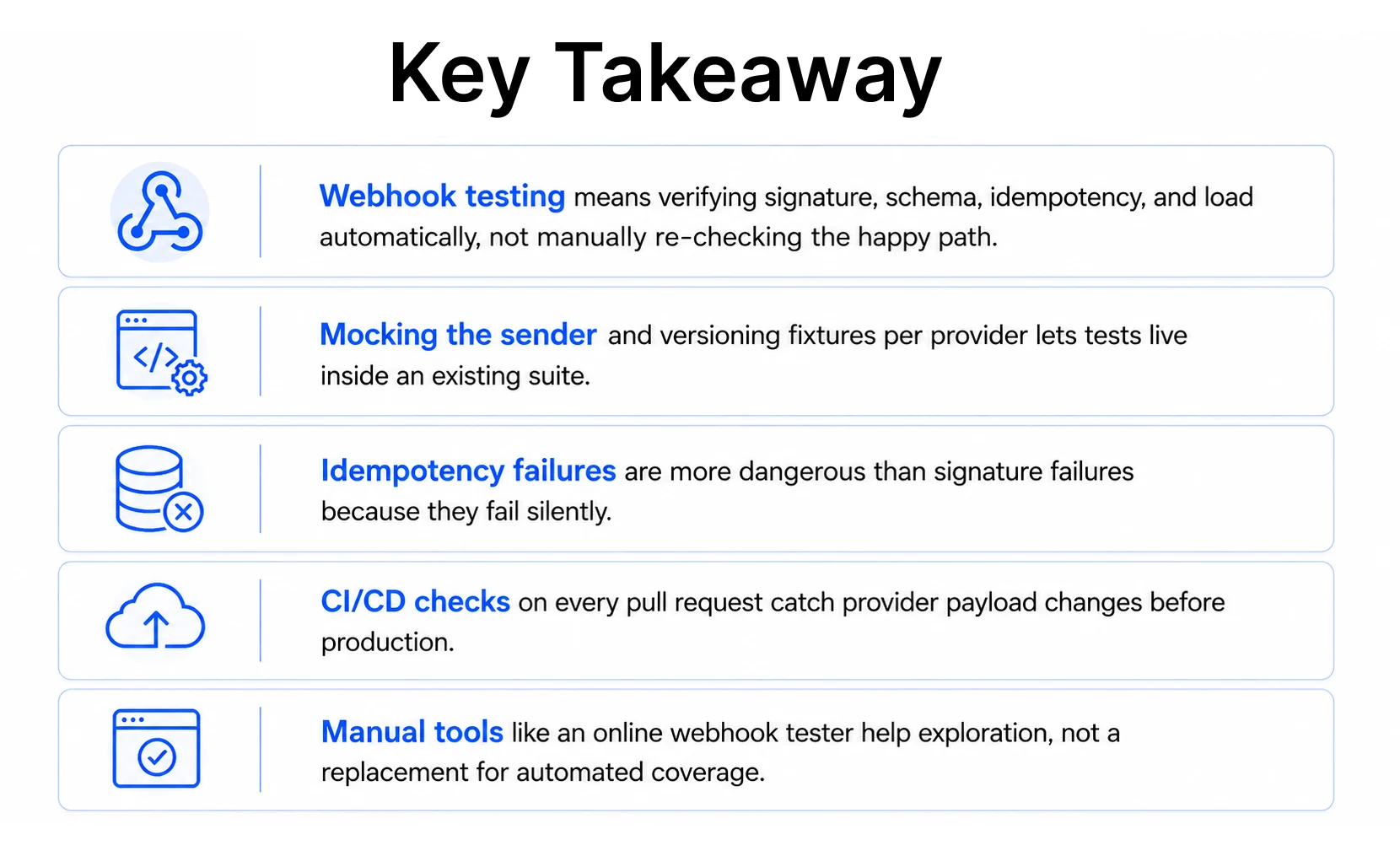
A webhook is an event you don't control, arriving on a schedule you don't set. Testing it automatically, rather than checking it once and moving on, keeps that dependency from becoming a liability.
Teams that get it right treat webhook testing like any other part of the suite: Mocked, versioned, run on every pull request. The harder part isn't writing the first signature test. It's deciding to keep testing after the integration stops feeling new.
People Also Ask (FAQs)
Q1. How is webhook testing different from monitoring a webhook in production?
Ans: Monitoring watches live traffic for errors after deployment. Webhook testing runs planned checks- valid, malformed, duplicate, delayed- before a change ships, catching issues monitoring only sees after customers do.
Q2. Can webhook testing catch issues a provider introduces after launch?
Ans: Yes. Versioned fixtures and scheduled test runs flag payload or schema changes a provider rolls out later- something a one-time integration test at launch can never catch on its own.
Q3. Do I need separate infrastructure to run webhook tests?
Ans: No. Webhook tests can run inside the same CI runners already handling the rest of the suite, since they rely on mocked requests rather than a live external service.
Q4. How many webhook events should a test suite cover per provider?
Ans: Enough to cover every event type the application actually consumes, plus the malformed and duplicate variants of each. For most SaaS integrations, that's a handful of events, not dozens.
Q5. What's the first sign a webhook integration needs better test coverage?
Ans: Usually a support ticket about a record that's out of sync, not a system alert. If nobody can say when that webhook was last verified, coverage is already overdue.