
Launch week looked perfect for one SaaS team. Every Cypress test on the React frontend was green, but the Supabase backend behind it had never been tested. Then a curious customer copied the public anon key from the browser and queried the invoices table directly. Every tenant's rows came back because one table never had Row-Level Security enabled.
That gap is a software quality assurance problem, and end users feel it first. Managed backends such as Supabase keep access rules in the database, so digital transformation projects inherit a layer that UI tests never touch. This guide walks through each layer from a QA angle, with the commands and assertions we actually run, so your policies are proven before launch rather than discovered by users.
What Is Supabase
Supabase is an open-source Backend-as-a-Service (BaaS) platform built on a full PostgreSQL database. Developers often describe it as an open-source alternative to Firebase, trading NoSQL documents for structured SQL data and avoiding proprietary lock-in.
Core Features of Supabase
- PostgreSQL Database: A genuine Postgres instance with full SQL, extensions, indexes, views, and stored procedures.
- Authentication: Email and password, magic links, phone login, and OAuth providers such as Google, GitHub, and Apple.
- Instant APIs: REST and GraphQL APIs generated from your database schema.
- File Storage: S3-compatible object storage with access rules.
- Real-time Subscriptions: Database changes streamed over WebSockets, so clients stay in sync without polling.
- Edge Functions: Serverless TypeScript functions on Deno for custom logic and webhooks.
- AI and Vector Search: The pgvector extension stores and queries embeddings for AI features and Retrieval-Augmented Generation (RAG).
Supabase Components QA Teams Must Cover
Each feature fails in its own way. The table below pairs each feature with the checks we run and the tool we use for them.
Setting Up a Supabase Test Environment
A dependable test environment separates fast checks from realistic ones. Build it in four parts:
- Local stack: The Supabase CLI runs Postgres, Auth, and Storage in Docker for everyday tests.
- Seeded test data: Commit users, roles, and sample rows to supabase/seed.sql so every run starts identically.
- Cloud smoke project: A separate Supabase project for pre-release checks, never your production project.
- Key discipline: Use the anon key in client tests, signed in as seeded users. Keep the service_role key in setup scripts only, because it bypasses RLS and would hide the bugs you're trying to catch.
Keep the cloud smoke project small: Deploy your migrations, run a handful of end-to-end flows (sign-up, login, a storage upload), and stop. Leave the exhaustive checks to your local stack.
Running Supabase Locally with the Supabase CLI
The Supabase CLI runs a full copy of your project in Docker, so tests never touch production. With Docker installed:
supabase init      # creates config.toml and folders
supabase start     # launches the local stack
supabase db reset  # reapplies migrations, then seed.sql
supabase test db   # runs pgTAP files in supabase/tests
supabase start prints your local API URL and keys. Studio runs on port 54323, and a local mail catcher (Mailpit in recent CLI versions, Inbucket in older ones) runs on port 54324 to capture confirmation emails. Ports can change between CLI versions, so trust the output of supabase start.
Testing Supabase Auth and Row-Level Security
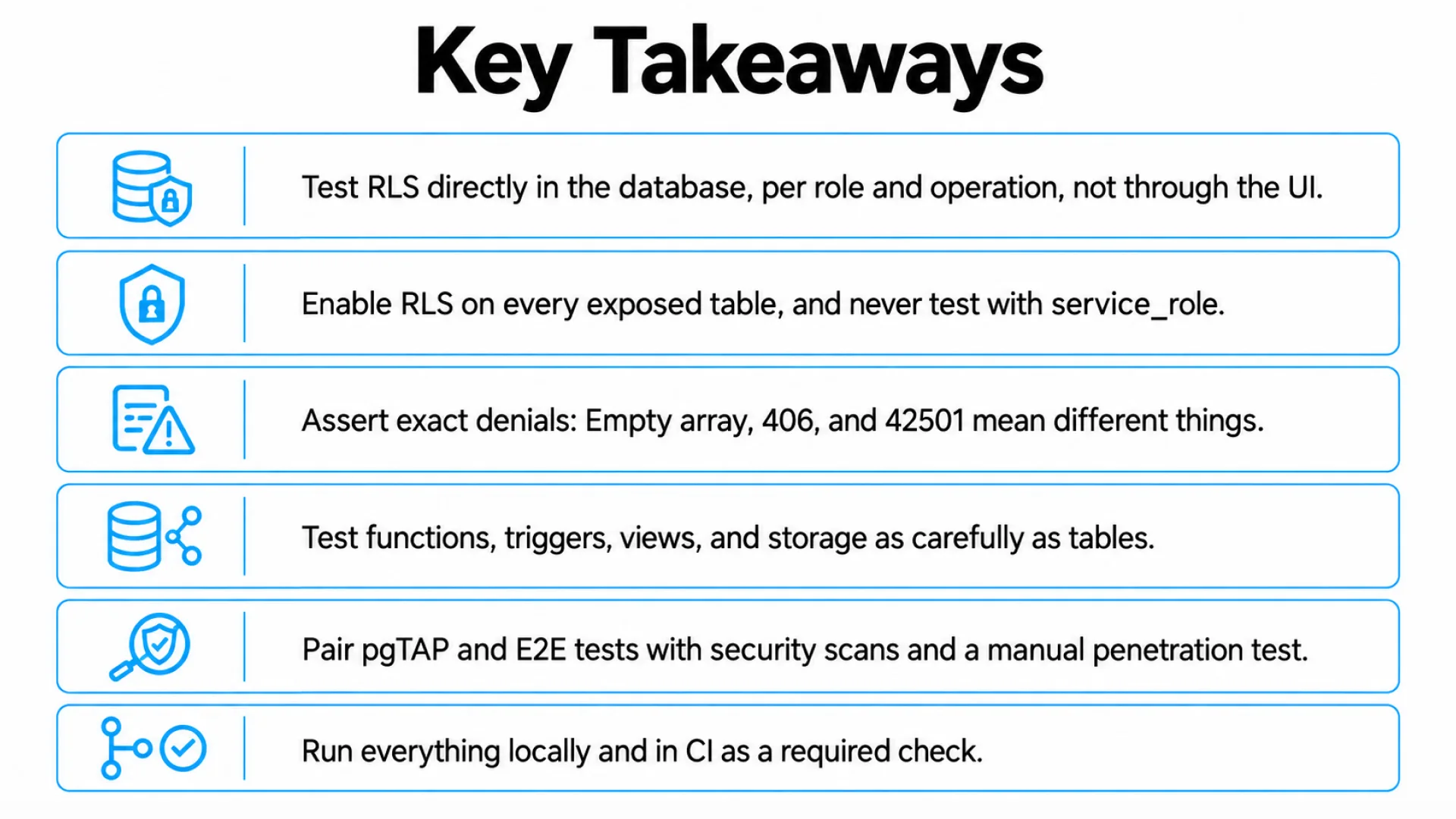
Row-Level Security (RLS) is the lock on every table. The anon key ships in your frontend by design, so RLS is the only thing between a visitor and your data. Start from your functional requirements, turn each into test cases for your test plan, and check these in order:
- Every table in an exposed schema has RLS switched on.
- Grants are correct, because Postgres checks them before any policy runs.
- anon reads and writes only what you intended.
- User A reads user A's rows; user B gets nothing and cannot insert, update, delete, or reassign them.
- Role checks read app_metadata, never user_metadata, which users can edit.
Auth flows need their own test cases, including sign-up with and without email confirmation, session persistence, JWT expiry and refresh, and OAuth redirects (check site_url and additional_redirect_urls in config.toml). Keep service_role out of test clients, because it bypasses RLS and makes every assertion pass.
Verifying RLS Policies Per Role with pgTAP
pgTAP is the method Supabase recommends. SQL assertions run as a chosen role inside a transaction that rolls back.
begin;
select plan(3);

-- Setup runs as the privileged test role, so it bypasses RLS.
-- Seed users A and B first, so the user_id foreign key passes.
insert into auth.users (id, email) values
  ('<user-a-uuid>', 'a@example.com'),
  ('<user-b-uuid>', 'b@example.com');
insert into public.orders (id, user_id)
  values (1, '<user-a-uuid>'), (2, '<user-b-uuid>');

-- 1. Anonymous visitors see nothing
set local role anon;
select is_empty('select * from public.orders', 'anon sees nothing');

-- 2. User A sees only their own rows
set local role authenticated;
select set_config(
  'request.jwt.claims',
  '{"sub":"<user-a-uuid>","role":"authenticated"}',
  true
);
select results_eq(
  'select count(*) from public.orders',
  'values (1::bigint)',
  'A sees only own rows'
);

-- 3. User A cannot insert a row owned by user B
select throws_ok(
  $$ insert into public.orders (id, user_id)
     values (3, '<user-b-uuid>') $$,
  '42501'
);

select * from finish();
rollback;
Note that is_empty as anon raises a permission error instead of passing if anon has no grant on the table. That is a useful signal, and it is why the grants check comes before the policy checks.
Reading results is the harder part. An error and an empty result mean different things.
Blocked updates and deletes succeed with zero rows affected, so check that the row is unchanged. Then repeat the key cases in supabase-js with two seeded users: Sign in as user B, request user A's row by ID, and expect an empty array.
API Testing for Supabase Endpoints
API testing checks that each endpoint returns the right status code, payload, and error for a given request. PostgREST builds Supabase's endpoints from your schema, so every API test also exercises your policies.
- Responses: Assert codes, body, and error messages with a valid JWT, an expired one, and none.
- Writes and filters: Test inserts, updates, deletes, and query filters for each role.
- Edge Functions: Run supabase functions serve, then send good and bad Authorization headers.
- Non-functional requirements: Run performance testing on list endpoints, because a slow policy subquery is a bug end users feel.
Among API testing tools, pgTAP suits policy checks, while Vitest with supabase-js fits the real client path. Low-code frontends such as Power Apps call the same endpoints, so these tests protect them too.
Testing Database Functions, Triggers, and Storage
Policies cover rows. Logic also lives in functions, triggers, views, and storage rules, and each fails differently.
- Sign-up trigger: Create a user, then assert the matching profiles row exists. Repeat with null metadata, because one exception here blocks every registration.
- Functions: Call them with null, empty, and duplicate inputs and assert clean errors. Pin search_path on security definer functions and call them as anon and as user B, since they run with the owner's rights.
- Views: Create them with security_invoker = true on Postgres 15 and above, then query as user B.
- Storage: Upload an oversized file and a disallowed MIME type, then download user A's object as user B. Private buckets must reject public URLs.
- Vector search: If a Data Engineer adds embeddings for Generative AI or Artificial Intelligence features, run similarity queries as user B and confirm none of user A's rows appear. Machine Learning and Data Science jobs should read through a restricted role, never service_role.
An empty .list() proves nothing, so always attempt the direct download.
Security Testing for Supabase Applications
The anon key is public by design, so its exposure is not the finding. The findings are RLS gaps, over-permissive policies, and misconfigured buckets. One audit by AxonBuild reported row-level security gaps in nine of 21 apps it reviewed.
Layer your application security testing, from application security testing tools to cybersecurity penetration testing:
- Static analysis (SAST): Static application security testing tools scan migrations and code for unsafe patterns, such as a policy that reads user_metadata.
- Dynamic analysis (DAST): Dynamic application security testing probes a deployed staging app from outside. It cannot read policies, so it complements pgTAP rather than replacing it.
- Manual penetration testing: Finish with a human pass. Security penetration testing of your own project's Auth, Database, Edge Functions, Storage, and Realtime is allowed without prior approval under Supabase's security testing policy, but denial-of-service tests and attacks on other tenants are prohibited. Re-read the policy before you start.
If a mobile client uses your project, add mobile app security testing for the device side. Check that the app ships only the anon key, never service_role, and route findings to your cybersecurity operations team early.
Mapping Tests to the OWASP Web Security Testing Guide
The OWASP Web Security Testing Guide gives you a shared vocabulary with auditors. Our mapping for Supabase:
- Authorization: Role and cross-user tests in pgTAP.
- Authentication and sessions: Sign-up, OAuth, JWT expiry, and logout at runtime.
- Input validation: Function inputs and API payloads.
pgTAP covers authorization. The rest needs runtime tests.
Frontend Integration and End-to-End (E2E) Testing
Unit tests with a mocked @supabase/supabase-js client run fast, but a mock can only agree with you. E2E testing runs a real browser against the local stack, so it proves that policies, auth, and UI work together. Codeless test automation tools can cover simple sign-up flows, but not policy checks.
Build the E2E layer in four steps:
- Point the app at the local stack, using the URL and anon key printed by supabase start.
- Seed two users with auth.admin.createUser and email_confirm: true, so tests skip the inbox. Create them before inserting any rows that reference them, or the foreign key will fail. Use MFA-free test accounts, or generate TOTP codes in setup.
- Script the critical path in Playwright or Cypress: Sign up, log in, create a record, and confirm user B cannot see it. Tag these critical path packages so you can run them as release validation.
- Give each run unique data and clean up in afterAll.
Running It in CI
Run the same commands on every pull request. Here is a GitHub Actions starting point:
name: backend-tests
on: [pull_request]

jobs:
  test:
    runs-on: ubuntu-latest
    steps:
      - uses: actions/checkout@v4
      - uses: supabase/setup-cli@v1
      - run: supabase start
      - run: supabase db reset
      - run: supabase test db
      - run: npm ci
      - run: npx playwright install --with-deps
      - run: npx playwright test
Pin the CLI version in real projects so a new release can't break your pipeline unannounced. Then make the job a required check, or it is advice, not a gate. A failing gate is useless if nobody hears it, so connect it to your team's alert system and test alert delivery by breaking a policy in a branch. Confirm the release engineer is notified and that Quality tickets open with the failing assertion attached.
How Frugal Testing Helps You Test Supabase Applications
We run Supabase and BaaS application testing covering RLS, auth, API, and security. As a provider of software test automation services and application security testing services, we leave you with a reviewed policy set, a working suite, and CI gates. Our QA outsourcing guidance shows how that fits your sprint cycle.
Our QA process applies product assurance and total quality control thinking to backend policies. We plot product quality data, such as failed RLS assertions per release, on a control chart, then use statistical process control and the DMAIC model to fix recurring defects. Teams in the medical industry or under ISO 9000 get an audit trail from the same records.
What Our Supabase Testing Engagement Looks Like
- Week 1: Kickoff and access, then a review of tables, grants, policies, and functions that ranks risks by data sensitivity.
- Week 2: Local stack, seed.sql fixtures, and pgTAP tests for RLS on the highest-risk tables.
- Weeks 3 and 4: API, auth, storage, and trigger tests, plus Playwright flows for the critical path.
- Week 5: CI gates, alerting, and a security pass: Scanners first, then manual penetration testing.
- Week 6: Handover with suites, runbook, team walkthrough, and a findings report ranked by severity.
Conclusion
Supabase gives small teams a production backend in an afternoon, along with an authorization layer nobody has asserted against. Start with the tables that hold customer data, write one pgTAP file per role, and add the rest as the schema grows.
A dashboard badge cannot tell you whether your policies hold under a hostile second user. The cheapest time to find out is before launch, while a failing test costs minutes instead of customers. Treat every new table as untested until a role-based assertion says otherwise.
People Also Ask (FAQs)
Q1. What is API testing in software?
Ans: API testing checks that endpoints return the correct data, status codes, and errors for valid and invalid requests, covering logic, security, and performance without the user interface.
Q2. What is software security testing?
Ans: Software security testing finds weaknesses attackers could exploit, such as broken access control or exposed data. It uses automated scans, code analysis, and manual penetration testing before each release.
Q3. What is test automation in software?
Ans: Test automation uses scripts and tools to run repeatable software checks automatically, usually on every code change, so regressions surface within minutes instead of waiting on slow manual testing.
Q4. Supabase vs Firebase: Which is easier to test?
Ans: Supabase is easier to assert against because access rules are Postgres policies testable with plain SQL and pgTAP, whereas Firebase security rules need a separate emulator and rules language.
Q5. How do you test Supabase Realtime subscriptions?
Ans: Subscribe a test client to a table, insert a row as another user, and assert the event arrives only for users whose policies allow reading that row.

.webp)

.webp)