
The world of coding has changed dramatically over the last decade. Early code editors were simple tools designed mainly for writing and editing text files. Today, modern developers and programmers work with massive codebases, complex microservices, cloud-native architectures, and rapidly evolving frameworks. As a result, the editor has become the central hub of the entire software development lifecycle.
Choosing the right code editor directly affects productivity, collaboration, debugging efficiency, and even long-term maintainability. Tools like Visual Studio Code (VS Code) and VSCode have dominated the market due to their powerful extension ecosystem, strong developer communities, and flexibility. However, the rise of artificial intelligence is reshaping how developers write, review, and refactor code.
This is where Cursor enters the picture. Unlike Traditional Code Editors, Cursor adopts an AI-first IDE approach, placing AI-powered tools at the core of the developer workflow rather than as optional add-ons. This blog explores what Cursor is, how it works, and how it differs fundamentally from VS Code and similar editors.
Understanding Cursor
What Is Cursor?
Cursor is an AI-powered coding editor built specifically for modern development needs. Instead of treating AI as a plugin or extension, Cursor is designed as an AI-native approach to coding. The goal is to help users move faster when building, refactoring, debugging, and reviewing code across entire repositories.
At its core, Cursor acts as an intelligent coding partner. It understands functions, syntax, comments, architecture patterns, and even the intent behind natural language prompts. Developers can ask Cursor to generate AI-generated code, explain existing logic, refactor legacy modules, or modify multiple files simultaneously using multi-file editing.
Key features that define Cursor include:
- Cursor AI with project-wide understanding
- AI chat and AI autocomplete built into the editor
- Composer feature for structured, multi-file edits
- Agent Mode for agentic coding and automation
- Integrated diff view, Code review, and refactoring tools
For users focused on speed, clarity, and scale, Cursor offers a fundamentally different experience compared to traditional editors.
User Interface and Overall Experience
Cursor’s user interface is intentionally minimal but powerful. Instead of overwhelming users with panels, pages, and menus, it emphasizes context-aware interactions. Developers can trigger actions through AI command workflow, inline prompts, or a terminal command input box.
This approach supports modern practices such as vibe coding, rapid prototyping, and iterative refactoring. Cursor also makes it easier to navigate large codebases, which is especially useful for enterprise environments and teams working with monorepos or distributed services.
The Technology Behind Cursor
Cursor’s strength lies in its advanced architecture and use of machine learning models. It relies heavily on Natural Language Processing to understand both code and human intent. Rather than scanning files individually, Cursor builds a semantic index using embedding-based codebase indexing, allowing it to reason across multiple files and directories.
Unlike traditional editors, Cursor supports multi-model flexibility, integrating with multiple LLM providers such as OpenAI and Anthropic. This allows developers to choose between models optimized for speed, reasoning, or accuracy similar to workflows seen in Claude Code.
Technical highlights include:
- Project-wide understanding across repositories
- Multi-file edits and multi-file editing
- Syntax-Based Suggestions and real-time suggestions
- Automated debugging and error prevention
- Context-aware code snippets and explanations
This technology enables agentic coding, where Cursor can independently execute tasks like refactoring, updating API endpoints, or generating architecture proposals.
Traditional Code Editors: An Overview
What Is VS Code?
Visual Studio Code, commonly known as VSCode or VSCode, is one of the most widely adopted Traditional Code Editors in the world. Developed by Microsoft, it gained popularity due to its lightweight design, cross-platform support, and extensive extension ecosystem.
VS Code supports a wide range of languages and frameworks, including JavaScript, TypeScript, Python, React, and HTML for HTML landing page development. It is commonly used for front-end development, back-end development, and data science workflows involving Jupyter notebook.
Popular VS Code features include:
- Built-in debugging
- Git integration and Code review
- Live Share for collaboration
- Thousands of extensions and plugins
- Integration with GitHub Copilot
VS Code remains a favorite among developers due to its flexibility and strong community backing.
Limitations of Traditional Code Editors
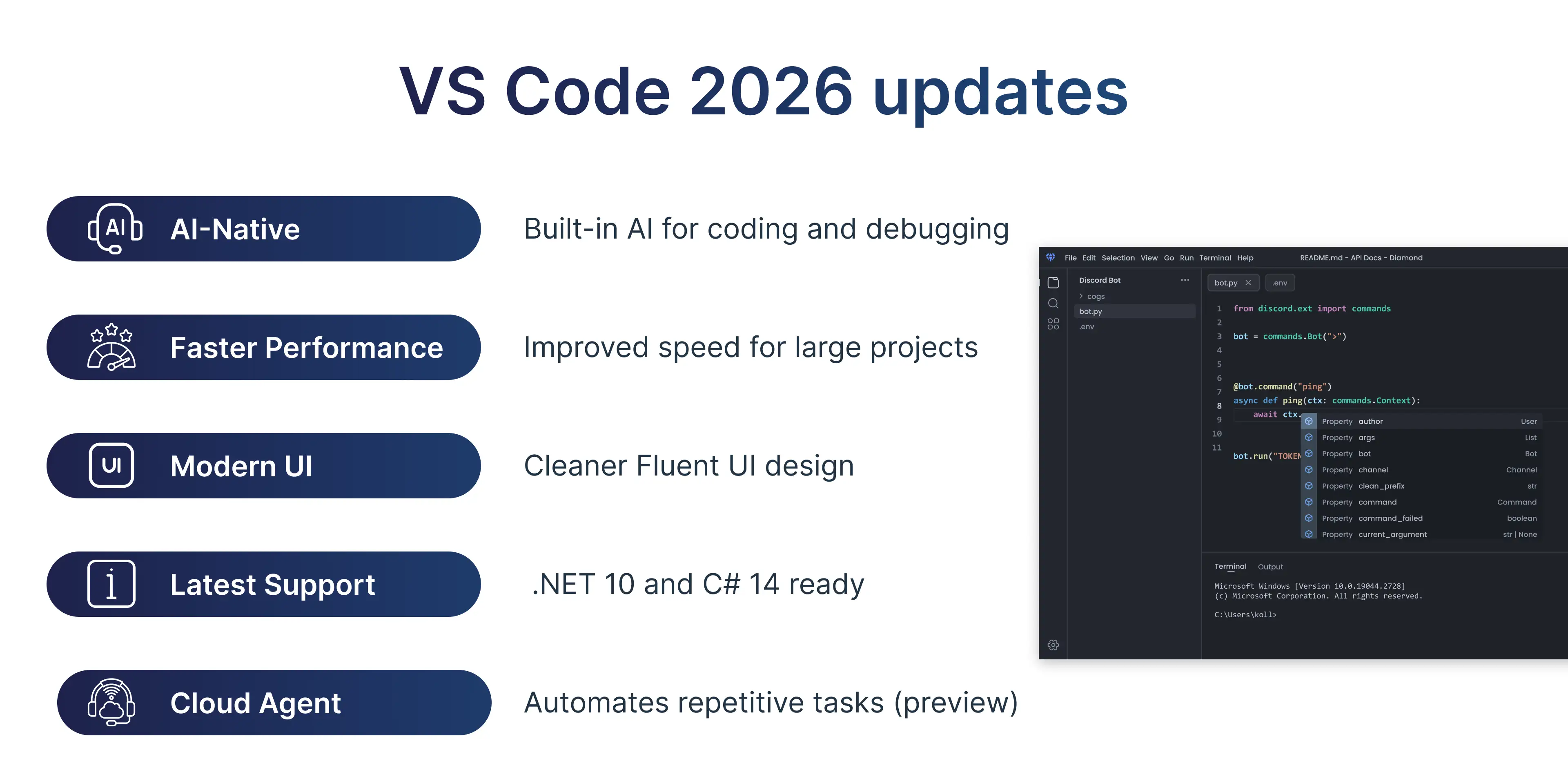
Despite its strengths, VS Code faces limitations that become more apparent as projects scale. AI tools like GitHub Copilot function as an AI copilot layer, not as a core component of the editor. This means AI lacks deep project-wide understanding.
Common challenges include:
- Manual refactoring across files
- Limited understanding of large repositories
- Dependency on extensions for advanced workflows
- Context switching between tools and pages
- Performance constraints with large codebases
For enterprise teams and fast-moving startups, these limitations can slow down innovation and increase cognitive load.
Key Differences Between Cursor and VS Code
Cursor and VS Code represent two different philosophies. VS Code emphasizes customization through extensions, while Cursor focuses on an integrated AI-first development workflow.
User Interface, Workflow, and Customization
Cursor and VS Code represent two different philosophies. VS Code emphasizes customization through extensions, while Cursor focuses on an integrated AI-first development workflow.
Cursor simplifies navigation by allowing users to issue commands via AI chat, natural language, or Composer-driven workflows. VS Code, on the other hand, requires configuring extensions and settings manually.
While VS Code offers greater UI customization, Cursor prioritizes intelligent defaults that adapt to the user and project context.
Collaboration and Team-Oriented Development
Collaboration is a key requirement for modern development teams. VS Code’s Live Share allows multiple members to collaborate in real time, sharing terminals and debugging sessions.
Cursor extends collaboration further by enabling:
- AI-assisted Code review
- Shared comments and diffs
- Contextual explanations for team members
- Faster onboarding and training for new developers
This makes Cursor especially attractive for distributed teams and enterprise environments.
AI-native tools beyond traditional code editors
As AI-native development tools continue to evolve, the line between design and coding is becoming increasingly blurred. While editors like Cursor focus on accelerating how developers write and refactor code, a new generation of tools is emerging that also rethinks how user interfaces are created in the first place.
One example is Subframe, an AI-powered design tool that allows teams to visually build interfaces using real production-grade components and instantly export clean React code. Instead of translating static mockups into code, Subframe enables designers and developers to work from the same system, generating production-ready UI that can be directly integrated into modern development workflows. This approach reduces friction between design and implementation, especially in AI-assisted environments where tools like Cursor are already streamlining code generation and editing.
Performance, Speed, and Refactoring Abilities
Cursor is optimized for performance at scale. Its ability to understand entire repositories allows for faster refactor, better refactoring abilities, and reduced errors.
Key advantages include:
- Automated debugging
- Smarter diffs and diff view
- AI-generated commit message
- Reduced manual effort in large repositories
VS Code remains fast for individual files, but Cursor excels when handling large systems with multiple services.
User Reviews and Developer Community Feedback
Many registered users report measurable improvements in productivity after switching to Cursor. Teams note faster prototyping speeds, improved collaboration, and reduced time spent on repetitive tasks.
Positive feedback often highlights:
- Better developer workflow
- Faster onboarding for new members
- Stronger Code review processes
- Improved clarity in architecture decisions
Critiques include:
- Initial learning curve
- Dependence on AI models and API rates
- Concerns around security
Cursor addresses these with strong compliance measures such as SOC 2 Type I, SOC 2 Type II, and ISO/IEC 27001:2013, making it suitable for enterprise environments.
Cursor vs VS Code: Which Code Editor Should You Choose in 2026?
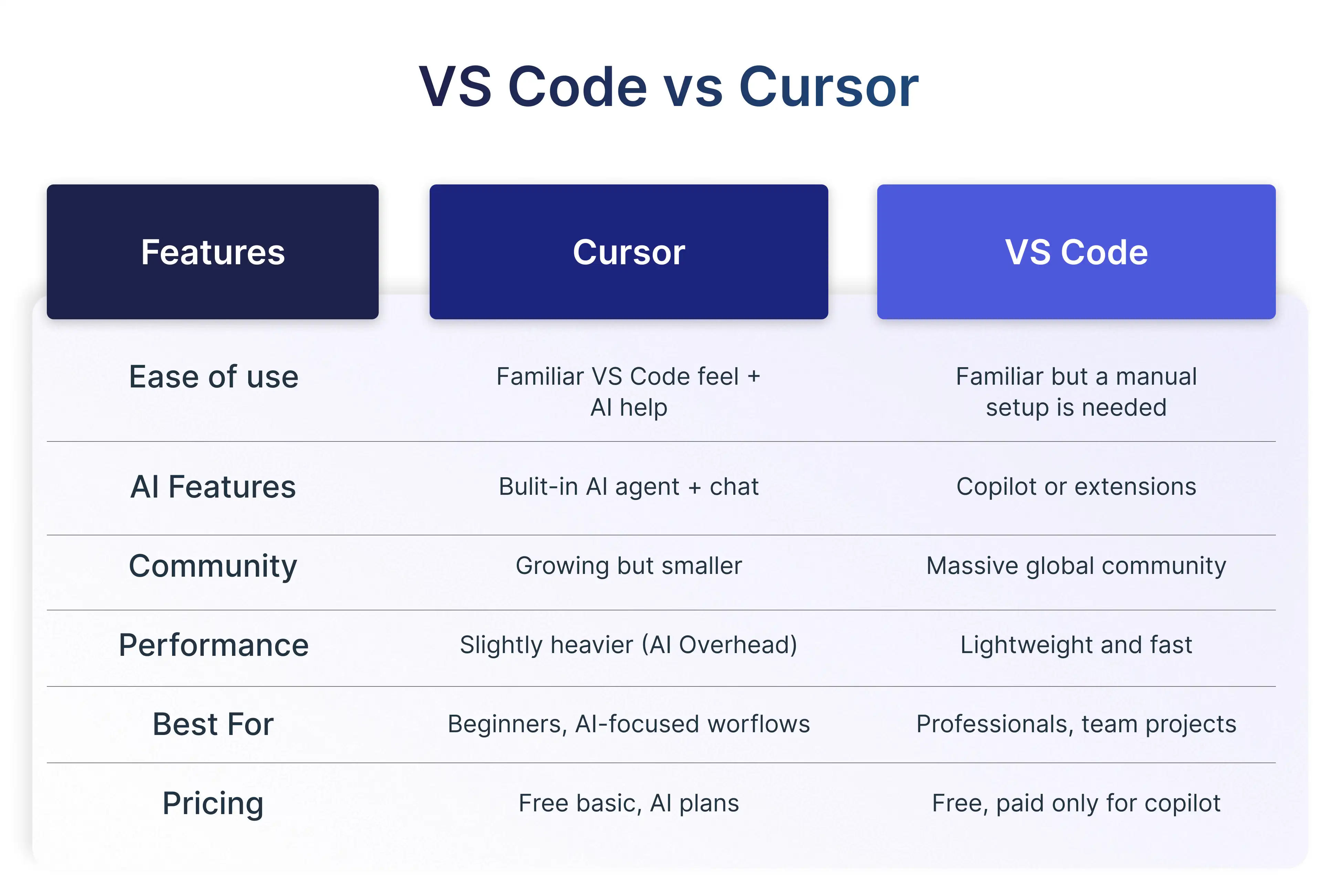
Choosing between Cursor and VS Code can feel confusing at first. They look similar, and that’s because Cursor is built on top of Visual Studio Code. However, their philosophy is very different. VS Code follows a traditional, extension-driven approach, while Cursor adopts an AI-first IDE approach with artificial intelligence deeply embedded into the editor itself.
Below is a structured breakdown to help developers quickly understand the differences.
Cursor vs VS Code: Feature Comparison Table
Ease of Use and Developer Experience
Cursor feels instantly familiar to anyone who has used VS Code before, but it adds AI shortcuts everywhere. Developers can refactor functions, explain bugs, or generate code using natural language prompts directly inside the editor.
VS Code, on the other hand, offers unmatched flexibility. You can keep it minimal or turn it into a full IDE using extensions. The downside is that beginners may feel overwhelmed by configuration choices.
Summary:
- Cursor → smoother onboarding and faster learning
- VS Code → full control and customization
Community, Collaboration, and Ecosystem
VS Code dominates when it comes to community size and collaboration resources. With millions of developers, extensive tutorials, themes, and plugins, you’ll almost always find an answer online.
Cursor’s community is smaller but growing rapidly. Instead of relying on forums, Cursor focuses on AI-powered collaboration, where the editor itself helps explain code, suggest improvements, and assist with code reviews.
Performance and Speed Comparison
VS Code is lightweight by design. When used without too many extensions, it is noticeably fast and responsive. However, loading dozens of plugins can slow it down.
Cursor includes AI models running in the background, which adds some overhead. On modern machines, the difference is minimal, but VS Code still wins in raw performance.
Trade-off:
- VS Code = speed and stability
- Cursor = smarter workflows and automation
Performance Benchmarks: Cursor vs VS Code
Best Use Cases
Use Cursor if:
- You are learning coding
- You want AI-powered debugging and refactoring
- You work with large codebases and want project-wide understanding
- You prefer an AI-first development workflow
Use VS Code if:
- You work on enterprise-scale projects
- You need maximum stability and performance
- You rely heavily on specific extensions
- You want full manual control over your editor
Cursor vs VS Code: Decision Matrix
Final Verdict
Cursor is essentially VS Code with AI built in, redesigned for the future of coding. VS Code remains the industry standard with unmatched stability, speed, and community support.
The Future of Coding with Cursor
Cursor represents a clear shift in how coding tools are designed. The industry is moving toward AI-first IDE approach solutions that embed intelligence directly into the development process.
Upcoming innovations include:
- Enhanced Agent Mode
- Improved Composer model
- Advanced Prompt Booster
- Deeper agentic coding workflows
- Stronger enterprise integrations via MCP server
This positions Cursor as a leader in the AI coding revolution.
The Expanding Role of AI in Software Development
AI is no longer limited to autocomplete. It now supports:
- Architecture patterns and proposals
- Automated debugging
- Error prevention
- Code documentation and comments
- Secure development workflows
Cursor’s AI-powered tools are designed to grow alongside these trends, offering a future-proof solution for modern teams.
Conclusion
Cursor and Visual Studio Code serve different purposes in today’s development ecosystem. VS Code remains a powerful, flexible editor with a massive extension system and community support. Cursor, however, reimagines the editor as an intelligent collaborator built around AI-first development workflows.
For developers working on large codebases, complex architectures, or fast-paced projects, Cursor offers compelling advantages in speed, clarity, and automation. For those who value manual control and customization, VS Code continues to be a reliable choice.
The best way forward is to explore both. Sign Up, experiment with Cursor and VS Code, and choose the tool that best aligns with your experience, workflow, and long-term goals in modern software development.



.webp)