TLDR: Your router logs every site you visit, even in private browsing mode. In 2026, a $9 chip and free software can track exactly where you are standing inside a building using your Wi-Fi signal. Here is what is happening and what you can do about it.
Ever felt like someone knows a little too much about which sites you visit? That feeling might be right.
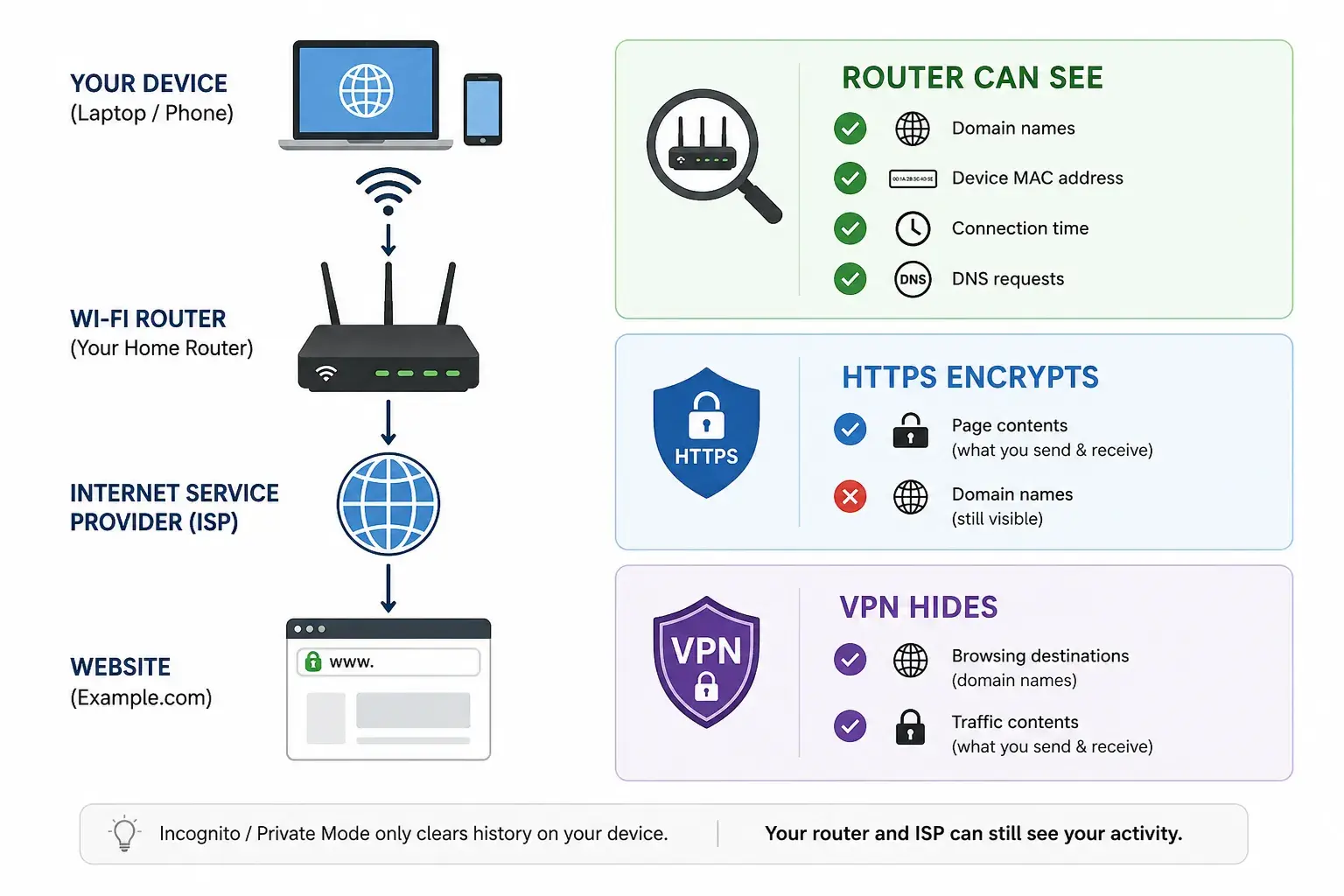
Your router quietly logs every website you visit, every app that connects, and every domain name your device touches. All of it passes through the router before reaching the internet, and private browsing mode has no say in that. Clearing your browsing history in your web browser does nothing at the network level.
In 2026, researchers at the Karlsruhe Institute of Technology made this even more alarming. They proved a standard home router can identify who is standing where inside a building, through walls, at 99.5% accuracy. No cameras. No device needed on the person being tracked. Just the Wi-Fi signal already in your home.
This blog explains what your router sees, how that location tracking works, and what actually protects you.
Your Router Sees More Than You Think
Most people treat private browsing mode as a privacy shield. It is not. It only clears your browsing history from the device. Your router keeps its own separate records, and those are much harder to clear.
What the Router Owner Actually Logs
Think of your router as the gatekeeper of your home network. Every request your device makes passes through it. The router records the domain names of every site you visit, when you visited, and for how long. This network traffic is logged automatically in security logs and system events.
It does not matter which web browser you use or whether you are in private browsing mode. On public Wi-Fi, that exposure extends to the access points operator and their internet service provider. A network owner with standard network monitoring tools can see your full internet history, the MAC addresses of your devices, and detailed user activity patterns, all without touching your device.
Why HTTPS and Incognito Mode Don't Save You
HTTPS, the padlock in your browser, encrypts the content of what you send and receive. It does not hide where you are going. The domain name of every site you visit travels as unencrypted data in a DNS query before the connection is even made. Your router, your internet service provider, and any network owner can all see it. Private browsing mode clears your local browsing data. It stops nothing at the network level.
Wi-Fi Can Now Track Where You Physically Are: Here's the Science
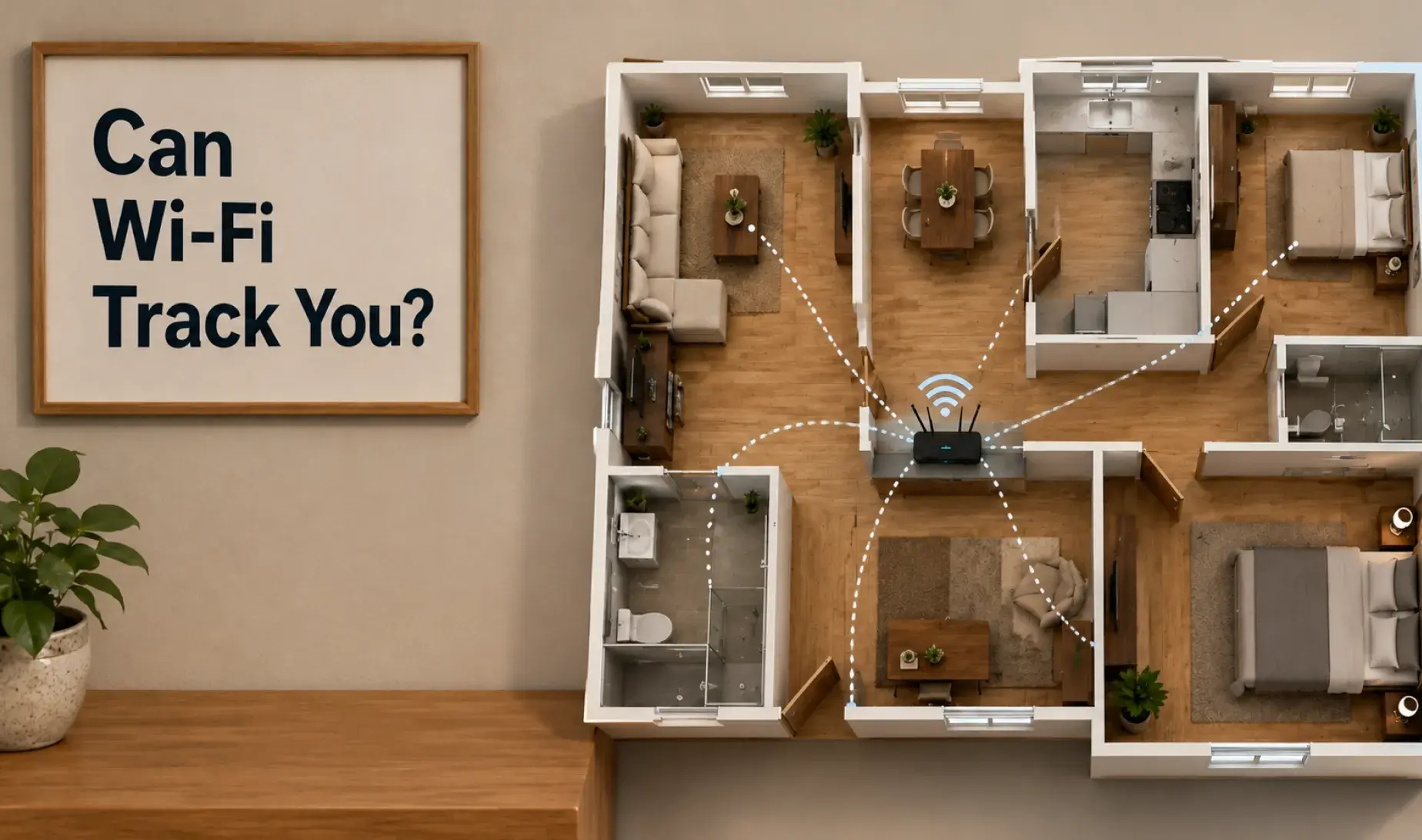
This is the part most people have not heard. Wifi location tracking has moved out of university labs and into something anyone can build cheaply at home. Your router is not just logging your internet history. It can now be used to sense where you are physically standing.
How Unencrypted Beamforming Data Gives Away Your Position
Routers from Wi-Fi 5 through Wi-Fi 6 and Wi-Fi 7 use a technique called beamforming to focus signals toward your devices. As part of this, your device sends feedback signals back to the router called beamforming feedback information (BFI). This feedback travels as unencrypted data because IEEE 802.11-2016 never required it to be encrypted.
Routers from Wi-Fi 5, Wi-Fi 6, and Wi-Fi 7 use a technique called beamforming to direct signals straight at your device instead of broadcasting in all directions. To do this, your device constantly sends small feedback signals back to the router, known as beamforming feedback information (BFI). The catch is that this feedback has always travelled as unencrypted data, because the IEEE 802.11-2016 standard never made encryption a requirement for it.
The problem: those signals change when a human body is in the room. Researchers used this channel state information (CSI) to identify 197 people through walls at 99.5% accuracy using a regular consumer router. This is wifi indoor location tracking using Wi-Fi RTT signals your router is already sending right now, with no device needed on the person being tracked.
IEEE 802.11bf: When Wi-Fi Sensing Ships in Every New Router
A new Wi-Fi standard called IEEE 802.11bf makes Location Tracking and Positioning a built-in feature of Wi-Fi. Routers like the Google Nest lineup and Arris Surfboard models will have movement tracking built in by default, with no opt-out for users. There is no law yet requiring companies to mention this in their privacy policy or user agreements. Most data-collection practices around Wi-Fi sensing remain completely unregulated.
A $9 Chip and Free Code Is All It Takes: Anyone Can Build This Now
It all comes down to wifi sensing. This is what makes physical location tracking possible using nothing but a Wi-Fi signal. This is not a government-level surveillance tool. The tools to do this are free and publicly available. The hardware costs less than a takeaway meal.
The Open-Source Project and the ESP32-S3
RuView (ruvnet/RuView) is a free, open-source project with around 78,000 GitHub stars. It is software that reads Wi-Fi signals and turns them into a live view of who is moving where inside a building. It runs on a regular laptop with no cloud account needed. The hardware it works with is a small chip called the ESP32-S3 microcontroller, available for roughly $9. This chip picks up channel state information from nearby Wi-Fi signals and streams that data to RuView on your laptop, giving you real-time presence detection and motion tracking. No device fingerprinting or MAC address lookup is required.
How to Build a Basic Wi-Fi Sensing Rig: Step by Step
Build time: 2 to 4 hours. Cost: under $10.
Step 1: Flash the firmware onto the chip
Download the pre-built firmware from the RuView releases page. Connect the ESP32-S3 via USB and run:
pip install esptool
esptool.py --port /dev/ttyUSB0 write_flash 0x0 ruview_firmware.bin
Step 2: Set up the Wi-Fi details
Run the included setup script to tell the chip which network to use and which laptop to send data to:
# provision.py (included in the repo)
python provision.py --ssid "YourNetwork" --password "YourPassword" --server-ip 192.168.1.100
Step 3: Start the software on your laptop
git clone https://github.com/ruvnet/RuView
cd RuView && pip install -r requirements.txt
python server.py
The dashboard opens at http://localhost:3000. No cloud, no account.
Step 4: Test it
Place the chip across the room and walk between it and your router. The dashboard shows your position and movement in real time, even through an interior wall.
How to Actually Protect Yourself (Not Just Feel Protected)
The browsing exposure problem is fixable with the right tools. The location tracking problem is harder. Here is what actually works and where the limits are.
VPN and DNS over HTTPS: What Actually Works for Browsing
A VPN creates an encrypted tunnel between your device and the internet. Once active, your router can no longer see your browsing destinations or internet traffic. All it sees is encrypted activity going to the VPN server. The trade-off is that your VPN provider can see your traffic instead, so choosing a trustworthy one matters.
Even with a VPN running, DNS queries - the requests that tell your device which server to connect to - can still leak out in plain text. Enabling DNS over HTTPS (DoH) encrypts those queries. You can switch it on in Chrome or Firefox under privacy settings, or enable encrypted DNS at the router level using Cloudflare (1.1.1.1). A password manager alongside this covers most of your personal data exposure in day-to-day browsing.
WPA3, Firmware Updates, and the Honest Limit of All of This
Enable WPA3 on your router if your devices support it, change the default admin credentials, disable remote management, and keep your firmware updated. These steps stop unauthorised access to your router logs and security logs. MAC address randomization, which most modern phones do automatically, also limits device fingerprinting across networks.
The honest limit: none of this stops passive Wi-Fi sensing. Wholesale surveillance using CSI does not need access to your router. An internet service provider like Broadlink Internet Services running shared access points, or anyone nearby with a $9 chip, is completely outside the protection WPA3 gives you.
Is Your Network or Product Actually Leak-Free?
If you build connected products or manage a business network that handles personal data, you need to know what it actually exposes, not just what you assume it protects.
What Our Security Testing Engagement Looks Like
At Frugal Testing, we run network and IoT security testing for teams who need real answers about their exposure. We cover reconnaissance and scoping, active penetration testing, unencrypted data analysis, and CSI signal-layer assessment. You get a clear findings report and a prioritised remediation list.
Who This Is For
This is for product teams shipping Wi-Fi-connected hardware, businesses facing customer security audits that require network-level proof, and any team launching a connected product without having checked what it broadcasts on public Wi-Fi or private networks.
Key Takeaways
- Your router logs every site you visit, even when private browsing mode is switched on.
- HTTPS encrypts what you send and receive but does not hide which sites you are visiting.
- In 2026, Wi-Fi signals alone can identify and track who is standing where, through solid walls.
- A $9 chip and free open-source software is all anyone needs to build a working sensing rig.
- A VPN paired with DNS over HTTPS is the strongest first step to protect your browsing data.
Conclusion
Your router has been logging your browsing data, internet history, and user activity for years. Most people just never knew to look. In 2026, wifi location tracking through walls became a $9 build that anyone can put together in an afternoon.
Protecting your internet traffic starts with a VPN and DNS over HTTPS together. Add WPA3 and firmware updates to reduce access to your router logs. These cover what a network owner and your internet service provider can see.
The physical location tracking side is a different problem, one that IEEE 802.11bf is building into new hardware by default. If you ship connected products, finding out what your device exposes at the signal layer is worth doing now.
People Also Ask (FAQs)
Q1. Can my Wi-Fi owner see what I search if I use HTTPS?
Ans: Yes for domain names and which sites you visited, no for the page content. The DNS query revealing your destination travels as unencrypted data and is visible to the network owner and internet service provider.
Q2. Does a VPN fully hide my browsing history from the router owner?
Ans: Yes, from the router, but your internet traffic becomes visible to your VPN provider instead. Without DNS over HTTPS, your DNS queries can still leak outside the encrypted tunnel.
Q3. Can Wi-Fi actually track my physical location indoors?
Ans: Yes. The 2026 KIT research achieved 99.5% through-wall identification using a standard home router and unencrypted beamforming feedback information. No device is required on the person being tracked.
Q4. Does turning off my phone's Wi-Fi protect me from sensing?
Ans: No. Passive sensing picks up signal reflections from any active nearby device or access point. Your phone being switched off does not stop detection by hardware already in the room.
Q5. What is the single best privacy move I can make today?
Ans: Enable a VPN and DNS over HTTPS together as your first step. Then switch on WPA3, change your router's default admin credentials, and run a firmware update in that order.