
Your Mobile app passes every test yet users keep leaving. The problem isn’t your code. It’s what your testing isn’t measuring.
We are all guilty of it: you get the signed-off QA list, launch the app and then see a trickle of users despite there being no bugs. In Google's study of user experiences 88% of users will never return to an app after a poor mobile experience - and most won't even report a bug. They simply leave.
It's the difference between your testing and the user's experience that kills user retention. Mobile app testing makes apps function. Behavior-first testing ensures users are successful. In 2026, these are not the same - and only one ensures your app's success.
The gap between functional testing and user experience has measurable business consequences. The data below shows what teams miss when behavior is not part of the test strategy.
Why Traditional Mobile App Testing Fails to Protect User Experience
All mobile teams invest a huge amount in quality assurance - and yet suffer from user attrition. The reason for this is there is a gap between scripted tests and real-world use cases.
What Standard QA Misses Beyond Functional Performance
Standard QA tests the things we can script - clicking buttons, filling forms, receiving API data. That's a function, not feeling. The checkout function can pass all tests, but fail if a button is placed too low on a screen on the Android.
- Functional tests test inputs and outputs - not confusion
- Functional tests follow a linear path that humans don't
- Device lab tests rendering, not UX
- Crash logs don't show silent UX errors - just crashes
Silent UX errors are found during usability testing, which records the user's point of stutter, backtrack and abandon.
The Real Business Cost of User Experience Failures
UX failures are revenue failures. Uninstalls because of bad onboarding do not show in logs - but they do show in acquisition and quality data. Top-quality software testing companies demand behavior analytics as well as QA.
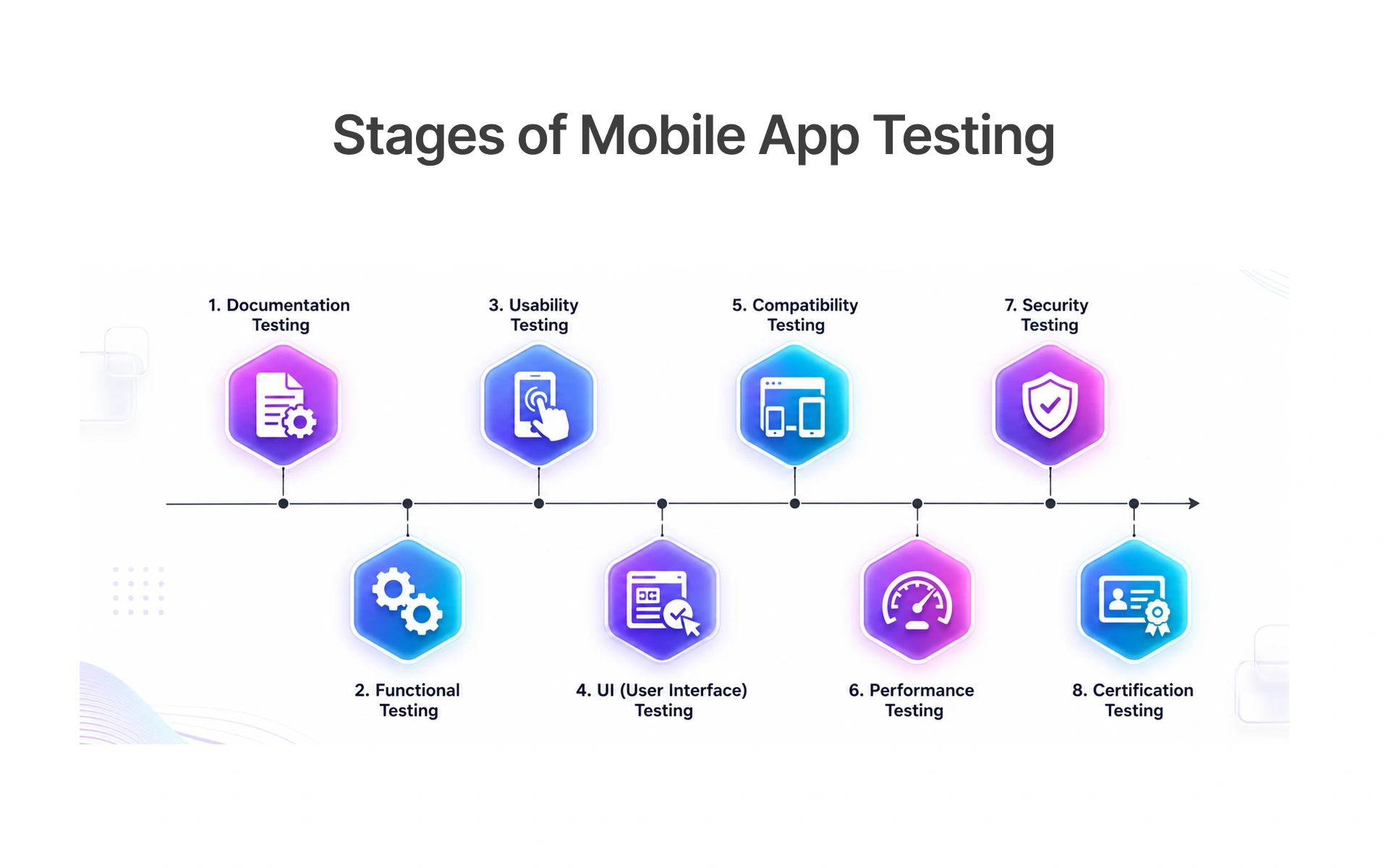
The Most Dangerous Types of Mobile App Bugs That Drive Users Away
There are good bugs and bad bugs. Some are the ones that make the app crash, but the worst are the ones that are hidden - the ones that make users lose trust and confidence, become slower and make users want to click the "uninstall" button without opening an error report.
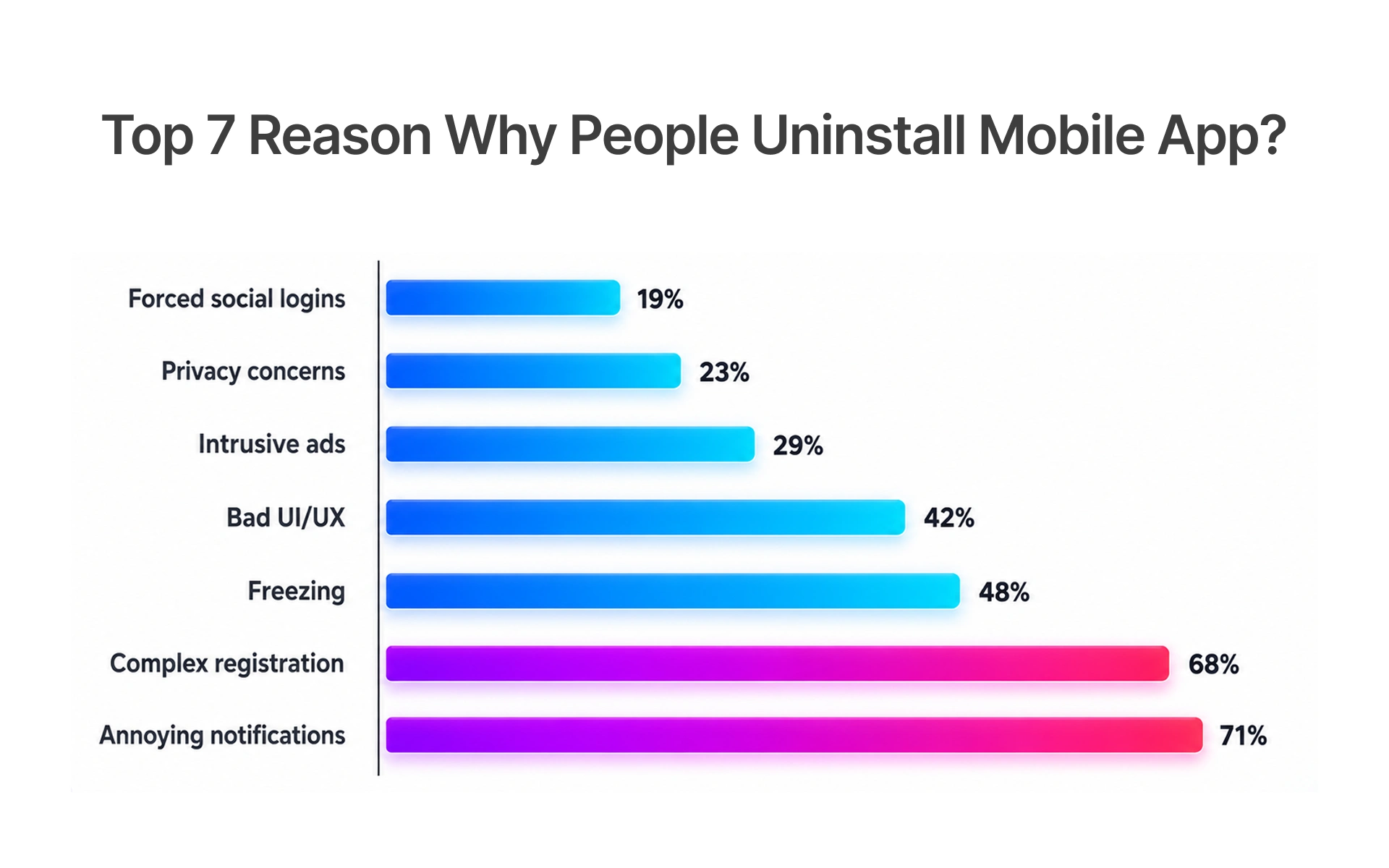
Performance Bugs That Quietly Increase User Frustration
Mobile software testing means testing with poor network connections and low battery levels - not just in the lab. You can't test with delays; after three clicks the user assumes it's not working.
Usability Failures That Break User Journeys
Usability issues don't crash your app. They just eat retention. These are what every user testing company will tell you after a few weeks of user testing.
- Tap targets misaligned to fingers
- Error messages that tell you about the system
- On-boarding with too many up-front permissions
- Different navigation guidelines on iOS vs Android
These bugs are not detected by automated test cases but are obvious to the user - and professional usability testing companies know to look for these bugs before products are released to the market.
Trust-Damaging Bugs That Reduce Customer Confidence
Trust bugs are the most costly because they don't show up in logs and are irreversible. A payment screen that flashes, then proceeds. A save that fails without error. A message that doesn't link to the right page. Each one plants a seed of doubt. For apps that deal with finances, health and e-commerce, trust is essential.
Psychological Friction Points That Trigger App Abandonment
Cognitive friction is not a glitch, but it's a driver of abandonment. Having too many options, no user feedback, and not knowing where you are in a multi-step process lead to back button abandonment.
How Real Users React to Mobile App Bugs in 2026
Users don't log tickets with mobile apps when they encounter bugs. Instead, they trigger an emotional journey, from trust to anger to acceptance. Understanding the arc is crucial to preventing churn.
The Emotional Journey From Frustration to Uninstall
The abandonment journey is natural. Understanding it is the way to stop it resulting in an uninstall.
Behavioral Warning Signs That Reveal Hidden UX Problems
Users will not file bugs - they will uninstall. Your mobile app testing service should log telemetry as well as logs.
- Tap-tap on non-interactive elements - user thinks it should do something
- Tap-happy on "back" on conversions - can't find what they need
- Bounces from engagement pages
- Bounces from almost completed form - too much work or not secure enough
They don't show up in crash reports - but they do show up in behavior analytics. If you're looking for them, you can stop churn.
Why Usability Testing Is Essential for Modern Mobile App Success
QA tests if the app is functional. Usability testing provides the answer to the question that drives retention: can people complete their task - without getting lost, frustrated or abandoning the task?
How Usability Testing Reveals What Functional QA Cannot
Usability testing involves putting users in the path of your app. Nielsen Norman Group says only five users uncover 85% of the issues, something that can't be achieved with automation.
That coverage is achieved through structured task observation five users completing real journeys surfaces the following issues that automation cannot.
- Surfaces navigation problems pre-code
- Surfaces copy and label issues automation doesn't test
- Uncovers device problems not found in simulation
- Ensures new features help, not hurt, the task
You can only learn this through unmoderated task observation real users completing journeys without intervention, which is the value formal usability testing delivers that no automated script can replicate.
Designing Tests Around Real User Behavior Instead of Features Alone
Testing product usability is testing tasks. Test: 'Can a user buy a present in 3 minutes or less?' This will expose bugs and feature wish lists.
Tools and Monitoring Strategies to Detect Behavior-Related Bugs Early
To monitor for behavioral bugs, you need to have the right tools in place before bugs transition to churn. The right tools and post launch process turns the invisible into visible - data into action.
Behavior Analytics Tools Every Mobile Team Should Use
Post-Launch Monitoring Strategies for Continuous UX Improvement
Launch is the beginning, not the end. Set up baseline usage at launch. Any anomaly (increased back-navigation on a screen) should be resolved before feedback. Across Frugal Testing's mobile QA engagements, customers have identified 60–70% fewer UX defects in SaaS and e-commerce apps.
- Establish weekly goals: time on site, tasks completed and 7- and 30-day cohort retention
- Measure funnel drops, by device and OS
- Link app store reviews to release versions
- Do monthly spot-checks of top three journeys for usability
Teams that build these rhythms into their release process stop reacting to churn and start preventing it turning post-launch monitoring from a passive safety net into an active quality advantage.
Building a Behavior-First Mobile Testing Framework
Adopting a behavior-first approach to testing is not a case of replacing functional QA with something else - it's a case of adding to it. A process brings usability knowledge into development throughout the lifecycle - from design to post-release monitoring.
Shifting From “Does It Work?” to “Does It Feel Reliable?”
Frugal Testing's mobile app testing practice elevates usability engineering to a first-class citizen not an afterthought before release.
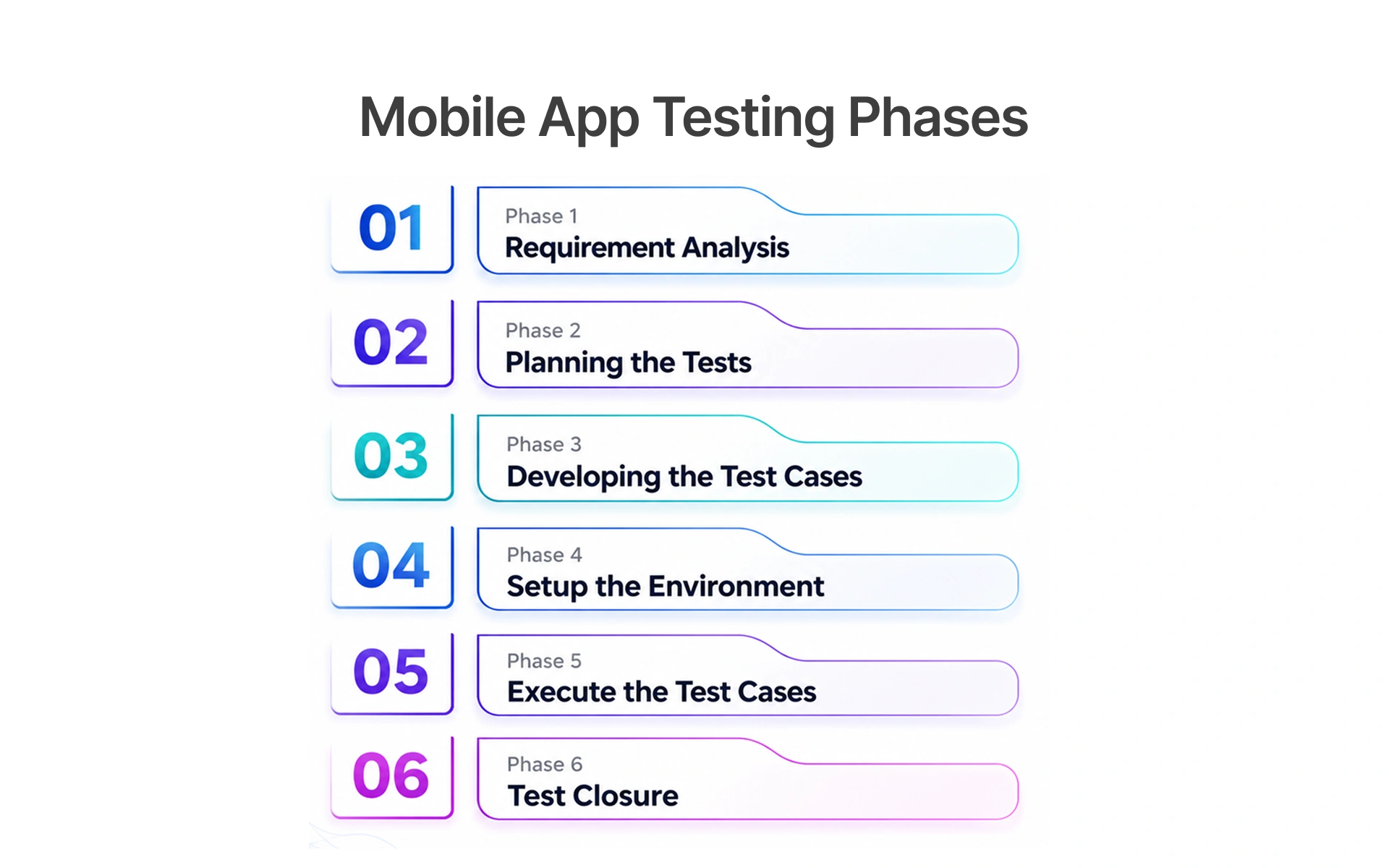
Turning User Behavior Insights Into Better Product Releases
Data from mobile app monitoring must seep into the backlog. If 40% of users abandon step three of a form, that's a product issue - not a bug.
- Ticket everything with a page, user type and device
- Add behavioural regression to sprint definition-of-done
- Export replays to product and design - not just QA
Mobile app automated testing takes care of regression Behavior analytics covers the human part. Both are non-negotiable.
Conclusion: Behavior-First Testing Is the Future of Mobile Quality
Functional bugs are visible. Behavioral bugs are invisible - and deadly. If your mobile app tester is asking "does it work?", you could end up missing the bugs that cause users to abandon your app or give it a bad review.
Mobile teams that test for behavior - usability testing, real user analytics, post-release monitoring and behavioral KPIs - are how successful mobile teams avoid churn in 2026.
The teams that protect retention in 2026 are the ones testing what users experience, not just what the code does. If your current QA process cannot answer that question with data, that is where to start.
Ready to test what users actually experience? Book a free consultation: Frugal Testing QA Audit
People Also Ask (FAQs)
Q1.What is the difference between functional and behavior-first mobile testing?
Ans: Functional testing and behavior-first testing serve different purposes functional QA confirms that features work as specified, while behavior-first testing reveals whether users can complete their goals without confusion or abandonment. They both complement each other: functional QA catches bugs in the system; behavior-first QA catches bugs that don't show up as bugs.
Q2.How can businesses detect hidden UX bugs before users churn?
Ans: Businesses can detect hidden UX bugs before users churn by monitoring three signals: behavioral analytics (rage taps, funnel drop-offs), pre-launch user testing, and post-launch real-user monitoring with day-one baselines. Variance from baseline means a problem before churn.
Q3.Which tools best monitor real user behavior in mobile apps?
Ans: Dynatrace is best for enterprise real-user monitoring. FullStory does session replay and rage taps. Mixpanel does retention cohorts. Firebase Crashlytics tracks device crashes. Appium + BrowserStack for cross-device regression.
Q4.Why do users uninstall apps without reporting any bugs?
Ans: Users uninstall apps without reporting bugs because they experience UX failures as personal preference rather than technical errors a confusing screen feels like the wrong app, not a defect to file. Passive behaviour tracking helps us watch what users are doing, not what they are saying, and gives us insight into failures before users abandon.
Q5.How does behavior analytics improve long-term mobile app retention?
Ans: Frugal Testing's software testing consulting teams use behavioural analytics to improve day-30 retention by 40–60% by eliminating UX friction not caught by functional QA.

.webp)

.webp)