
UI testing lives in Playwright. API calls validation is split across Postman collections that nobody fully trusts and some curl commands in a Notion doc. End-to-end test automation is held together by a bash script one engineer wrote 18 months ago, and everyone’s too afraid to touch it. When something breaks in prod, it takes 40 minutes just to figure out which layer failed not to fix it.
That’s the reality for most teams running automated testing across a modern stack. And it’s exactly the gap Playwright MCP was built for.
Built on Anthropic’s Model Context Protocol, Playwright MCP gives AI agents a direct, unified connection to your browser, your API calls, and your CI pipeline through the same MCP servers and MCP SDK. You describe what needs testing. The agent runs it. Every layer, one session, no tool switching.
Worth saying upfront though: Playwright MCP speeds up test creation; it doesn’t replace QA strategy. Frugal Testing fills that gap structured regression coverage, end-to-end testing services, performance benchmarking, and security testing, all with human oversight at every stage. We’ll come back to where that line falls.
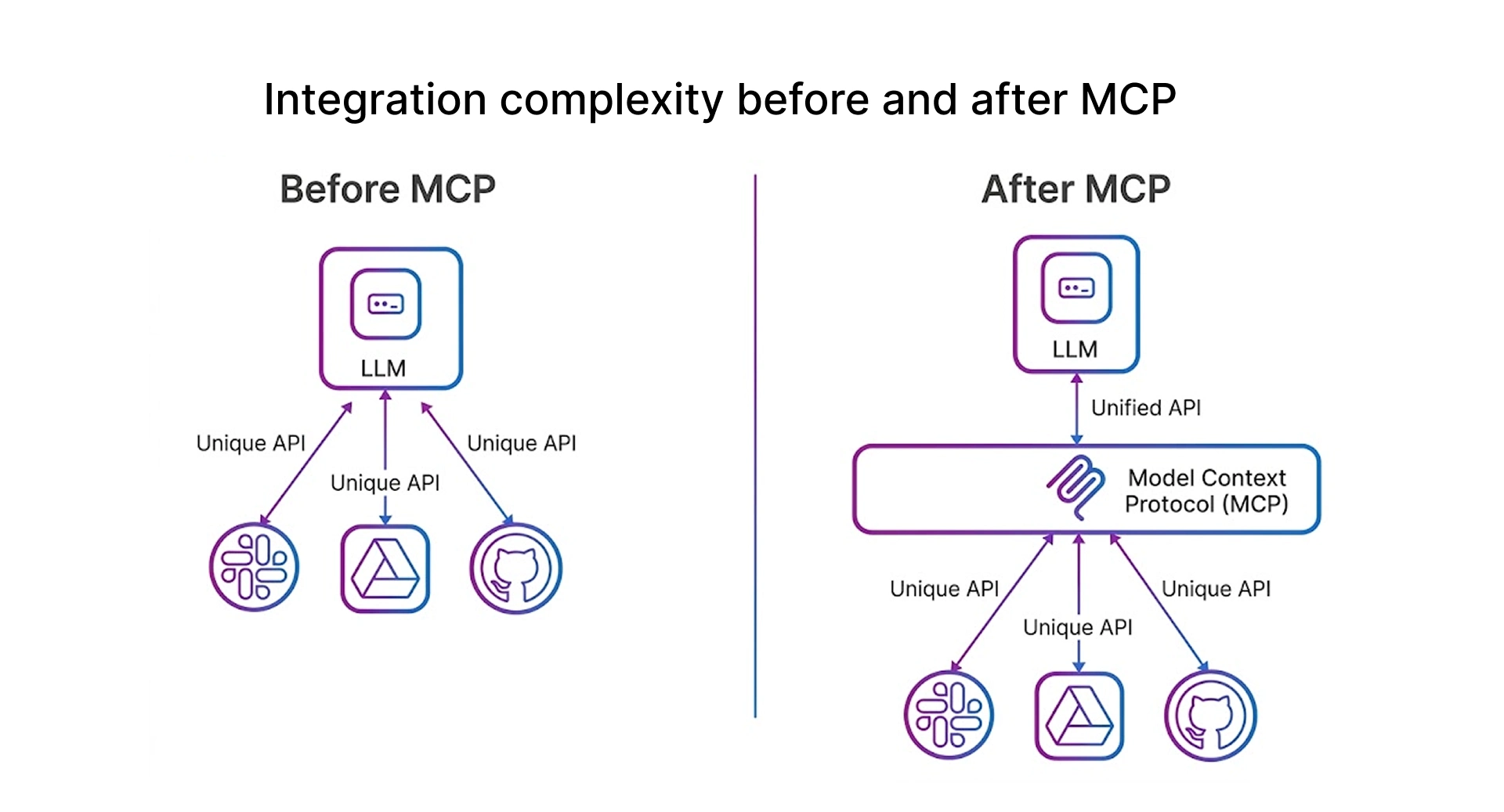
What Is MCP, and Why Should Testers Care?
What Is Playwright MCP?
Microsoft released Playwright MCP in early 2025. It’s an MCP server that connects AI agents Claude, GitHub Copilot, and Cursor directly to a live Playwright browser session. Instead of writing scripts by hand, you describe what you want tested, and the agent controls the browser using Playwright’s full automation capabilities underneath.
What makes it genuinely different from earlier browser automation tools is its breadth. One MCP server covers UI testing, API calls, and end-to-end test automation no additional tooling per layer. That’s not a small thing when you’re the one maintaining the stack.
The Multi-Tool Problem and How MCP Solves It
Selenium WebDriver for UI, Postman for APIs, and a custom script stitching E2E together. Each works fine in isolation. Together they’re a maintenance nightmare every layer has its own config, its own failure format, its own context. When a deployment breaks something, half the investigation is figuring out which tool’s territory the bug lives in.
Model Context Protocol is an open standard think USB-C for AI assistants that defines how large language models talk to external tools. The MCP SDK handles the protocol, so engineers aren’t writing glue code. The TypeScript SDK is well-documented and actively maintained. For debugging an MCP server connection or checking what tools are registered, the MCP inspector is genuinely useful it shows exactly what’s exposed and what each tool accepts.
For testers, the practical shift is from Selenium WebDriver-style explicit scripting to an intent-based message system. You describe what the user is trying to do the agent figures out execution, navigating by accessibility attributes like ARIA roles rather than CSS selectors. It doesn't matter whether your UI components are built with Tailwind CSS, Material UI, or custom CSS styling the agent finds elements by meaning, not markup. That’s why MCP-driven tests don’t shatter every time a developer touches the stylesheet.
MCP vs Traditional Test Automation
MCP for UI Testing: Playwright as Your AI Browser Agent
Setting Up the Playwright MCP Server
Two steps. First, install the Playwright MCP server via command line the SDK architecture needs Node.js 18+:
npm install -g @playwright/mcpFor Claude Desktop, add the following to your MCP client configuration file:
{
    "mcpServers": {
        "playwright": {
            "command": "npx",
            "args":["@playwright/mcp@latest"]
        }
    }
}
If you’re already on VS Code with Copilot agent mode, skip the config Playwright MCP is already baked in. The MCP Apps Extension for Visual Studio Code also surfaces a marketplace of preconfigured MCP Apps you can activate in one click. Worth knowing about if you’re juggling multiple MCP servers across projects.
Snapshot Mode vs Vision Mode: Why Accessibility Trees Win
Playwright MCP gives you two ways to read page state. Snapshot mode the default parses the browser’s accessibility tree. Every accessibility attribute, every ARIA role, and every label, all as clean structured text. Vision mode falls back to screenshots when the accessibility tree isn’t enough canvas elements, data visualization components, or anything that doesn’t surface visual context semantically.
Stick with snapshot mode for testing. It’s faster, cheaper on LLM tokens, and far more stable across UI component changes. Web Components, shadow DOM, Material Design elements, and fully interactive user interfaces with dynamic content snapshot handles all of it without turning HTML content into image data. Vision mode is the fallback, not the default. There’s rarely a good reason to switch unless you’re dealing with a custom-rendered chart that genuinely doesn’t expose accessibility information.
Real-World UI Testing Use Cases With Playwright MCP
Three scenarios where this pays off most noticeably in day-to-day work:
Authentication flows. Auth testing is one of the more tedious things to script manually redirects, session cookies, SSO edge cases. A prompt like “navigate to login, enter test credentials, and verify the dashboard loads with the correct username” replaces 30+ lines of Playwright code. No selector maintenance when the UI updates.
Form validation and error states. Error state coverage gets skipped more than it should because setting up those states is painful. With MCP, “submit the registration form with an invalid email and verify the inline error appears” runs in seconds. The agent interacts with form components exactly as a real user would tab order, required field validation, and dynamic error rendering are all covered.
Cart and checkout flows. Multi-step interactive user interfaces add to cart, promo code, shipping, confirmation are where MCP’s session persistence earns its keep. State doesn’t reset between steps. No re-authentication mid-flow. The agent navigates card layouts, modals, and payment UI components the same way a QA engineer would during a manual regression pass. Responsive breakpoints, dark mode toggle behavior, animation sequences, and grid background rendering all testable the same way; just specify it in the prompt.
Cross-Browser Testing With a Single Prompt
Chromium, Firefox, and WebKit same prompt, all three engines, no per-browser scripts. Catch rendering differences in navbar implementations, form components, card layouts, and responsive breakpoints that single-browser suites quietly miss. WebKit-specific CSS behavior things that look fine in Chromium and silently break in Safari surfaces here before your users find it.
MCP for API Testing: CRUD Operations Without a Single Line of Code
Something that catches people off guard: Playwright MCP handles API calls natively. The same session driving your user interface can fire REST requests directly authenticated, chained, validated without opening Postman or writing request code. For teams building agentic apps on backend services, this is where the time savings really stack up.
How It Works
Playwright’s built-in request context handles API calls GET, POST, PUT, PATCH, DELETE through the same intent-based message system. The TypeScript SDK gives you typed interfaces, so schema validation comes built in.
The part that genuinely surprises people is session chaining. Log in through the UI, the auth token gets captured automatically, then authenticated API calls fire using that token all in one MCP session. No manual token copying, no separate Postman env vars to keep in sync. The MCP SDK manages the request context throughout.
Here’s what an API test prompt actually looks like:
Prompt: "POST to https://api.example.com/users with {'name': 'Test User', 'test@example.com'}." "Verify 201 and that the body contains an 'id' field."
Status: 201 Created
Body: { "id": "usr_abc123", "name": "Test User" }
Status 201 confirmed
'id' field present
PUT and PATCH API calls surface before-and-after values automatically. For API load testing tools and volume scenarios, MCP isn’t the right fit use dedicated load platforms. But for functional API endpoint testing and chained UI-plus-API validation, it covers most of what teams actually need.
MCP vs Postman Where Each One Actually Wins
Use both. They solve different problems at different points in the workflow.
MCP for E2E Testing: Full-Stack Flows From One Prompt
This is the use case that made me take Playwright MCP seriously. Traditional e2e testing tools require you to juggle UI state, API calls, and test data setup across separate systems simultaneously. MCP collapses that into a single conversational flow one agent, one session, every layer covered.
Where MCP Fits in the Testing Pyramid
MCP belongs at the top of the pyramid smoke testing and exploratory coverage, not unit tests or integration suites. It’s faster to write than traditional e2e testing tools and more resilient to UI changes than selector-based scripts. Smoke testing after deployment, accessibility validation across full user flows, and exploratory testing on newly shipped features those are the natural fit.
Now for the honest part. MCP isn’t great for long regression suites that need deterministic, repeatable outputs. The agent doesn’t always take the same path twice fine for exploration, a problem for regression. And performance implications matter at scale. Every step is an API call to the LLM, so costs compound fast on long flows. Don’t throw Cypress or Playwright CLI away. Use MCP alongside them, not instead of them.
Running a Full E2E Scenario: Cart to Order Confirmation
Step 1: "Search for 'wireless headphones,' and add the first result to the cart." Step 2: "Checkout using the test shipping address and test credit card." Step 3: "Verify the confirmation page shows an order number and correct total."
No state resets between steps. No re-authentication. Each prompt picks up where the previous one ended. The agent handles interactive user interfaces along the way modals, lazy-loaded content, dynamic dropdowns without any explicit handling code. Same session pattern used in agentic apps like the Shopify Storefront MCP UI Server, managing product catalog flows inside sandboxed iframes.
Self-Healing Tests: What They’re Actually Worth
The self-healing pitch sounds like marketing, but there’s a real mechanism. Playwright MCP navigates by accessibility attributes ARIA roles, labels, and descriptions not CSS selectors or DOM structure. So when a developer refactors CSS styling, restructures a UI component, or renames a class, the test doesn’t care. The button labelled ‘Checkout’ still gets found, regardless of what the Remote DOM looks like underneath. Works for web components and shadow DOM too.
Honest caveat: if the accessible name itself changes, the test breaks too. Self-healing has limits. Keep that in mind before cutting your committed regression scripts in traditional e2e testing tools.
Integrating MCP Into Your CI/CD Pipeline
Real Example: Running a Playwright MCP Test in CI
Here’s what the agent actually does when triggered after a deployment:
CI Trigger: “Staging at https://staging.example.com just deployed.
Smoke test: the homepage loads, and login works with test credentials. The product listing returns results, and checkout reaches the payment step. Report failures with page state at the point of failure.”
The agent runs all four checks sequentially in a single browser session. To make this work in CI, the MCP server needs two environment variables configured:
PLAYWRIGHT_MCP_SNAPSHOT_MODE: incremental
PLAYWRIGHT_MCP_ALLOWED_HOSTS: staging.example.com
PLAYWRIGHT_MCP_SNAPSHOT_MODE: incremental tells the agent to only send changed accessibility tree nodes per step cuts token usage significantly in CI. PLAYWRIGHT_MCP_ALLOWED_HOSTS restricts the MCP server to your staging domain, which matters for the security model in shared CI runners.
Failures return a full accessibility snapshot not just a stack trace, but actual visual context for diagnosis. In Visual Studio Code, copy the failure snapshot from Playwright’s Trace Viewer into Claude Code as a prompt it reads the HTML content, accessibility attributes, and network activity together and returns a diagnosis rather than leaving you to piece it together manually.
GitHub Actions Setup for Playwright MCP
The security model for CI mirrors how sandboxed iframes work each browser context is fully isolated, with no shared state between runs:
name: Playwright MCP Smoke Tests
on: [push, deployment_status]
jobs:
    smoke-test:
      runs-on: ubuntu-latest
      steps:
        -uses: actions/checkout@v4
        -uses: actions/setup-node@v4
         with: {node-version:'20'}
        -run: npm ci
        -run: npx playwright install --with-deps chromium
        -run: npx playwright test --grep @smoke
         env:
           PLAYWRIGHT_MCP_SNAPSHOT_MODE: incremental
           PLAYWRIGHT_MCP_ALLOWED_HOSTS: staging.example.com
        -uses: actions/upload-artifact@v4
         if: always()
         with: {name: playwright_report, path: playwight-report/}
Sanitize artifact logs before storage-HTML content from sessions can carry tokens or PII. Teams running OpenAI Apps SDK alongside Claude-based MCP Apps follow the same setup: agent interfaces swap at the client config level, not in CI.
Benefits and Limitations of Playwright MCP in CI
Conclusion: One Protocol to Test Them All
Playwright MCP is the most practical AI testing tool I’ve worked with not because it replaces anything, but because it plugs into what you already have. User interface coverage, API call validation, and end-to-end test automation all driven by the same Model Context Protocol, all from one session.
But MCP handles the generative, fast parts of testing. The structured parts regression coverage, load benchmarks, security validation still need human ownership. That’s where frugal testing comes in. 400+ projects across 150+ companies, 350,000+ hours of QA work. Functional testing, automation, load testing, security, and full end-to-end testing services covering what Playwright MCP doesn’t reach. For engineering teams evaluating QA outsourcing services or test automation consulting to sit alongside an MCP-driven workflow, they’re a strong partner. And if your team needs the development side covered too AI, cloud, web, or app development bnxt.ai is Frugal Testing's specialist arm for exactly that.
Getting familiar with the protocol now is genuinely worth the investment. The window where early adopters have an advantage won’t stay open long.
Next Steps
If you’re starting from scratch:
- Connect the MCP server to Claude Desktop, VS Code, or Cursor
- Run a login flow test against staging first fastest way to see the value
- Add the smoke test. GitHub Actions job from the YAML above
- Use the MCP inspector to check what tools are registered before building on them
- For regression, load, and security coverage bring in professional qa automation services alongside MCP
People Also Ask (FAQs)
Q1.What is MCP, and how is it different from traditional test automation?
Ans: Traditional automation Selenium WebDriver, Cypress, Postman requires explicit step-by-step code for every scenario. Model Context Protocol flips that. You describe intent; AI agents handle execution using accessibility attributes like ARIA roles rather than CSS selectors. Tests stay intact when the user interface changes because they’re not tied to DOM implementation details. The MCP SDK handles the protocol layer no custom integrations needed per MCP server.
Q2.Can Playwright MCP replace Selenium or Cypress for UI testing?
Ans: Not as a direct replacement they operate at different levels. Selenium WebDriver and Cypress are built for deterministic, maintainable regression suites where consistency matters. Playwright MCP is built for speed rapid test generation on interactive user interfaces that change frequently. Most mature teams run both: MCP for iteration via the TypeScript SDK and the Playwright CLI for the committed regression suite in CI, where token costs would otherwise accumulate.
Q3.Is MCP good for API testing, or is Postman still better?
Ans: It depends on what you need it for. MCP is genuinely strong for development-time api endpoint testing especially chaining API calls with UI session state or generating tests without writing assertion code. Postman is still better for shared collections, documented contracts, and production monitoring. The MCP SDK manages auth context automatically chained flows are noticeably cleaner than handling them across separate tools.
Q4.How do I integrate Playwright MCP into a CI/CD pipeline like GitHub Actions?
Ans: The YAML above covers the full setup. Two env vars that matter: PLAYWRIGHT_MCP_SNAPSHOT_MODE set to incremental cuts CI token usage significantly; PLAYWRIGHT_MCP_ALLOWED_HOSTS locks the MCP server to your domains for the security model. Both are configured through the MCP SDK no custom code. Keep MCP scoped to smoke tests in CI; full regression stays in traditional Playwright scripts where there’s no per-step LLM cost.
Q5.What are the real limitations of using MCP for end-to-end testing?
Ans: Two things come up consistently in practice. Non-determinism first Large Language Models don’t always follow the same path through a conversational flow across runs, and without careful prompt design, results vary. Second, cost: every step is an API call to the LLM, and performance implications compound fast. MCP excels at smoke and exploratory coverage. Full regression depth still needs traditional e2e testing tools and professional qa automation services running alongside it not instead of it.



.webp)