The five most common ERP testing challenges are integration complexity, customisation debt, unrepresentative test data, automation instability, and continuous system changes. Each is addressable: end-to-end business process mapping, risk-tier classification, production-representative data, maintainable automation frameworks, and regression baselines tied to vendor update cycles.
Testing of enterprise software, ERP systems in particular, is one of the least well-planned parts of those projects. Teams treat it as a pre-go-live task. That is where it all goes wrong.
Overcoming them requires a structured approach: business process mapping, risk-tier classification, API and end-to-end testing across CRM and ERP systems, and regression baselines that survive every vendor update.
If your project team is about to implement an ERP, is mid-implementation, or you have a production system that keeps breaking after patches, this is for you.
ERP Testing: From Module Verification to End-to-End Business Validation
Enterprise Resource Planning (ERP) testing ensures that enterprise business systems perform as expected across modules, integrations, and business processes, individually and as a complete system.
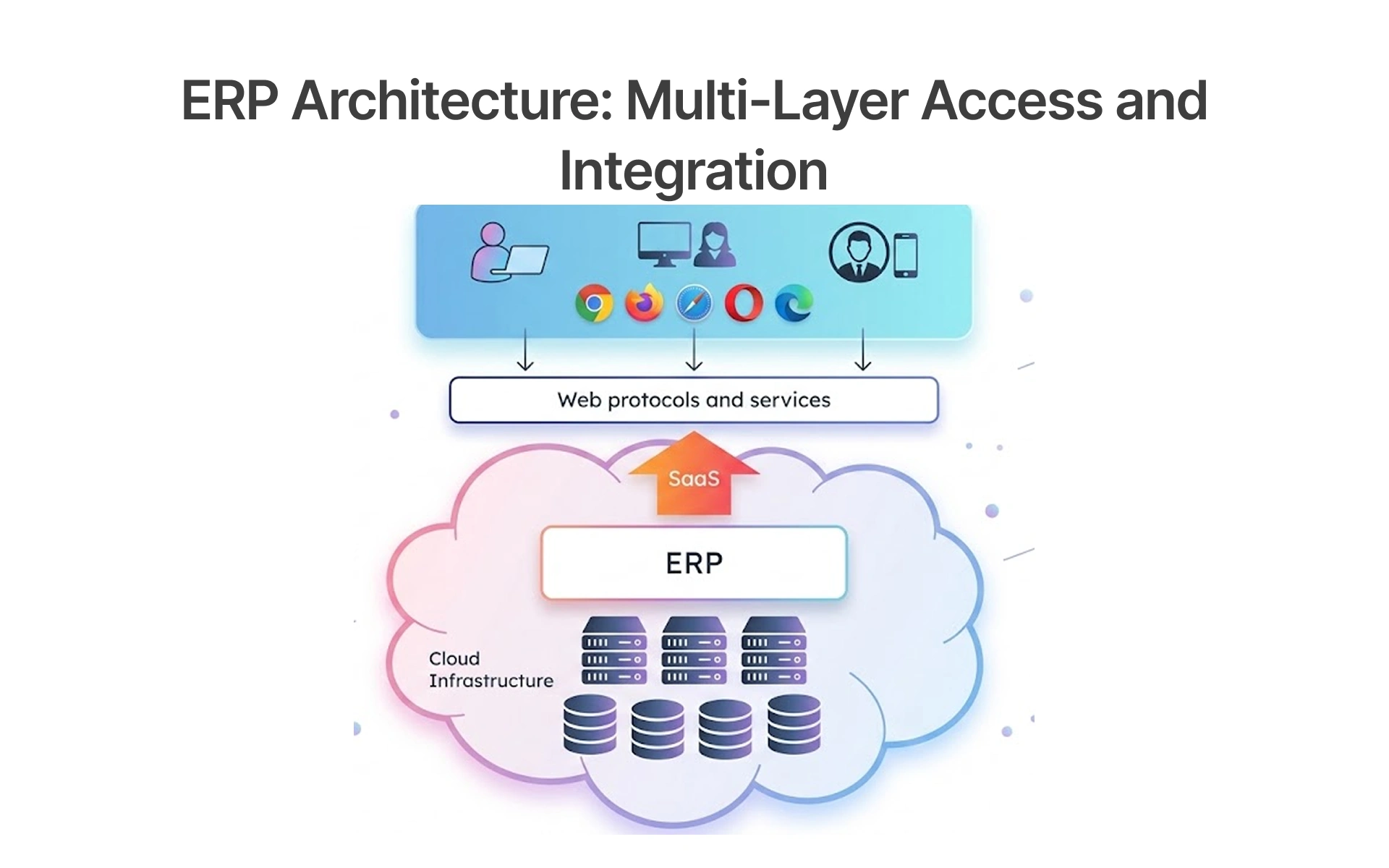
These are then accessed by multiple layers (web, desktop, mobile, etc.) that interface with the SaaS layer to the ERP core & infrastructure, and all can be a point of failure. If the testing of the ERP is only focused on the modules, then important things like web services, integration & consistency are missed.
The Need for Multiple Layers of ERP Testing:
ERP testing is not one step; it requires multiple levels of testing to discover different risks:
- Functional Testing: Test each module of the ERP application to confirm whether it meets business and functional requirements.
- Integration Testing: Examine the flow of data between ERP systems and other applications like CRM and other third-party systems.
- End-to-End Testing: Validate the end-to-end business process, like data entry to accounts, and so forth.
- UAT: Use business users to confirm whether the system is ready to go into production.
- Automated Regression Testing: This finds defects at any of the levels, and these can arise from configuration, customization, or upgrade of the ERP.
Each of the different types of tests deals with specific risks. Any gaps in testing not only affect testing coverage but also increase the risk of system bugs.
Core ERP Testing Challenges Impacting System Stability and ROI
Challenge 1: Integration Complexity: High Dependency on Interconnected Systems
The Core Problem
Enterprise development teams test the individual API interfaces, but they don't test the interactions between three or four systems in a business process. Software testing does not facilitate that.
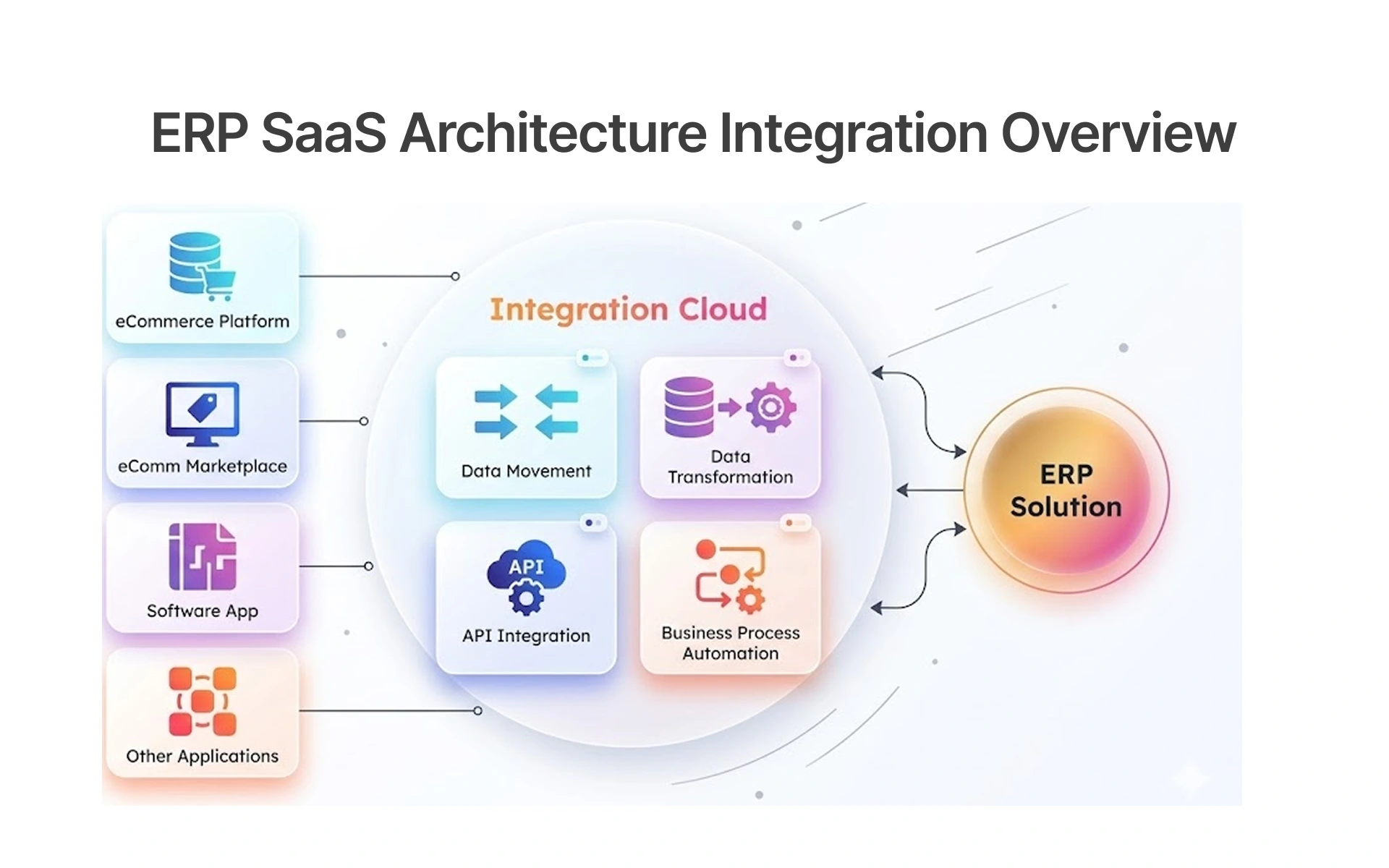
What Actually Fixes It: The complexity of integration, the one thing underestimated most often with ERP software testing, is the most cited issue; this can be backed up with data.
Testing needs to be performed against the end-to-end business processes, which means ERP software to CRM software (such as Salesforce and HubSpot), and so on.
Challenge 2: Excessive Customization: Increased Testing Variability and Risk
The more customised the ERP becomes, the further it deviates from what the vendor's test suite was designed to discover.
No ERP project goes live without customisations. Z-code, custom workflows, unique reports, whatever it may be, customisation brings another test variable which the methodology doesn’t acknowledge.
For each piece of customisation, make a business-process connection, establish ownership of each business process between relevant business departments, and incorporate customisation regression testing into each release cycle. A custom ERP software development company should also account for these tailored workflows when defining regression and end-to-end test coverage. Vendor test scripts test a generic system; they don't test yours.
Challenge 3: Test Data Issues: Non-uniform and non-representative data sets
The easiest way to appreciate what a test data problem really is is to compare what we traditionally test against and what is present in the live system.
Pre Go-Live - What We Tested Against
- 400 good customer data sets
- 1 currency (USD)
- 1 legal entity
- Good address and tax data
- 0 past transactions
- One product catalogue
Post Go-Live;
- 280,000 customers – (legacy records, duplicates, merges, accounts)
- 14 currencies
- 6 legal entities
- 7 years worth of data (with varying formats and structures, back-dated data from 3 legacy systems, 23% of customer records didn't have valid Tax codes assigned)
- Product variants, SKU numbers, overlapped regions, and varying definitions, etc.
The ERP passed every test. It wasn't ready for any of that.
What fixes it
It is the live system data that production test data should emulate; it's not an 'option'. Data management tools/synthetic data generation tools should be implemented, and the cleansing/consolidation of test data should be an ongoing activity.
Challenge 4: Automation Instability - Maintenance Intensive Test Scripts
ERP environments change constantly: UI, configuration, vendor updates, customisations. Test scripts break faster than teams can fix them. Without a proper automation framework, maintenance replaces testing. That is the maintenance spiral.
- Vendor UI updates break hard-coded locators script them to semantic attributes, not element positions.
- Configuration changes invalidate test inputs parameterise inputs at the framework level, not the script level.
- Mid-cycle customisations break process flow tie regression triggers to customisation deployment events, not fixed calendars.
- ERP upgrades silently change API contracts validate contracts as part of every regression cycle, not after deployment.
- A third-party or CRM change breaks end-to-end automation mid-test integration ownership must be assigned per connection, not assumed by the implementation team.
Automation built for maintainability, not default features, delivers the strongest, fastest ERP automation solution with minimal maintenance cycles.
Challenge 5: Constant System Changes: Time of Each Update Derails the Stability of Tests
Every vendor update creates an unforeseen regression risk that will not be discovered until the actual release of the system, and after it is already in production.
No ERP technology stays the same, and every implementation is followed up by mandated vendor updates to its system: for SAP, Oracle, and Dynamics 365, it occurs up to once every four to six weeks, and these are not just enhancements but core functionality and configuration updates, which can often include API contract updates needed to drive interconnected business systems.
Where Testing fails:
- Coverage rarely accounts for inefficient workflows added after go-live. Operations change. Test suites often do not.
- Manual tests performed in the rush for a time-constrained release may miss critical edge cases in the business departments and processes.
- Lack of a regression baseline implies that the original configuration settings are already not recalled.
- Production errors may be identified first when they occur to actual production users instead of during planned benchmark testing.
What really works:
Define and take the regression baselines before the update process occurs; after the update has already happened, it cannot be solved.
Having the automated regression testing framework tied to all critical business processes will have teams operating within an optimal framework for success, and will present problems to be resolved before going live in the production system, not after customers can detect them.
How to Build a Reliable ERP Testing Strategy: What Actually Works
Map Critical ERP Business Processes Before Designing Test Cases
Most implementation teams jump into designing test cases. This is the wrong way to start.
Test cases developed without an upfront discovery process will validate the system features and not the business outcomes. The distinction is important because an ERP failure rarely occurs in one module; failures usually occur during the transition from one module to another.
- Step 1 - Identify Critical Business Workflows: Interview departmental leaders and subject matter experts to understand all the workflows that the ERP system supports: order-to-cash, procure-to-pay, hire-to-retire, etc. It needs knowledge of how the business runs and the goals the implementation was built to achieve.
- Step 2 - Document Every System: For each identified workflow, identify every module, integration, and data handoff involved. This is where a genuine mismatch between system configuration and business reality surfaces. User resistance usually follows the same gaps.
- Step 3 - Convert Workflows Into Test Scenarios: Each of the mapped business workflows becomes a test scenario, or validation of a business process from start to end, rather than simply testing the system functionality.
Prioritize ERP Testing Using Risk-Based Business Process Classification
Not all business processes are created equal in terms of risk, so not all business processes are tested equally. That’s where defects typically occur, and where standard software testing services may miss them because they treat all modules with equal priority.
The table below maps ERP business processes to risk tiers, testing strategies, and automation priorities use it to allocate test resources before the first test case is written.
How to implement:
- Map every business process against this framework before test planning begins.
- The risk tier tells you where automation benefits are highest, where UAT effort delivers the most value, and where the opportunity to prevent production failure is greatest, every upgrade cycle.
Create production-like ERP test environments with representative data and configurations
A test environment is only as good as its likeness to production.
- Match data volume to production scale functional test example datasets are not sufficient.
- Track results against a consistent benchmark across every update cycle teams that do this hold a clear advantage over those discovering failures in production.
- Configure all customisations and integrations the base configuration alone cannot support end-to-end test scenarios.
- Connect all integrated systems, CRM platforms, third-party tools, and data management software to the test environment.
- Refresh the test environment before every regression cycle or end-to-end test run.
- Assign environment ownership with realistic timeframes and sign-off criteria before testing begins.
Validate ERP Systems with API Testing and Database-Level Verification
UI test scripts confirm screen behaviour, not data integrity. The difference between surface-level testing and reliable validation is API-level and database-level verification:
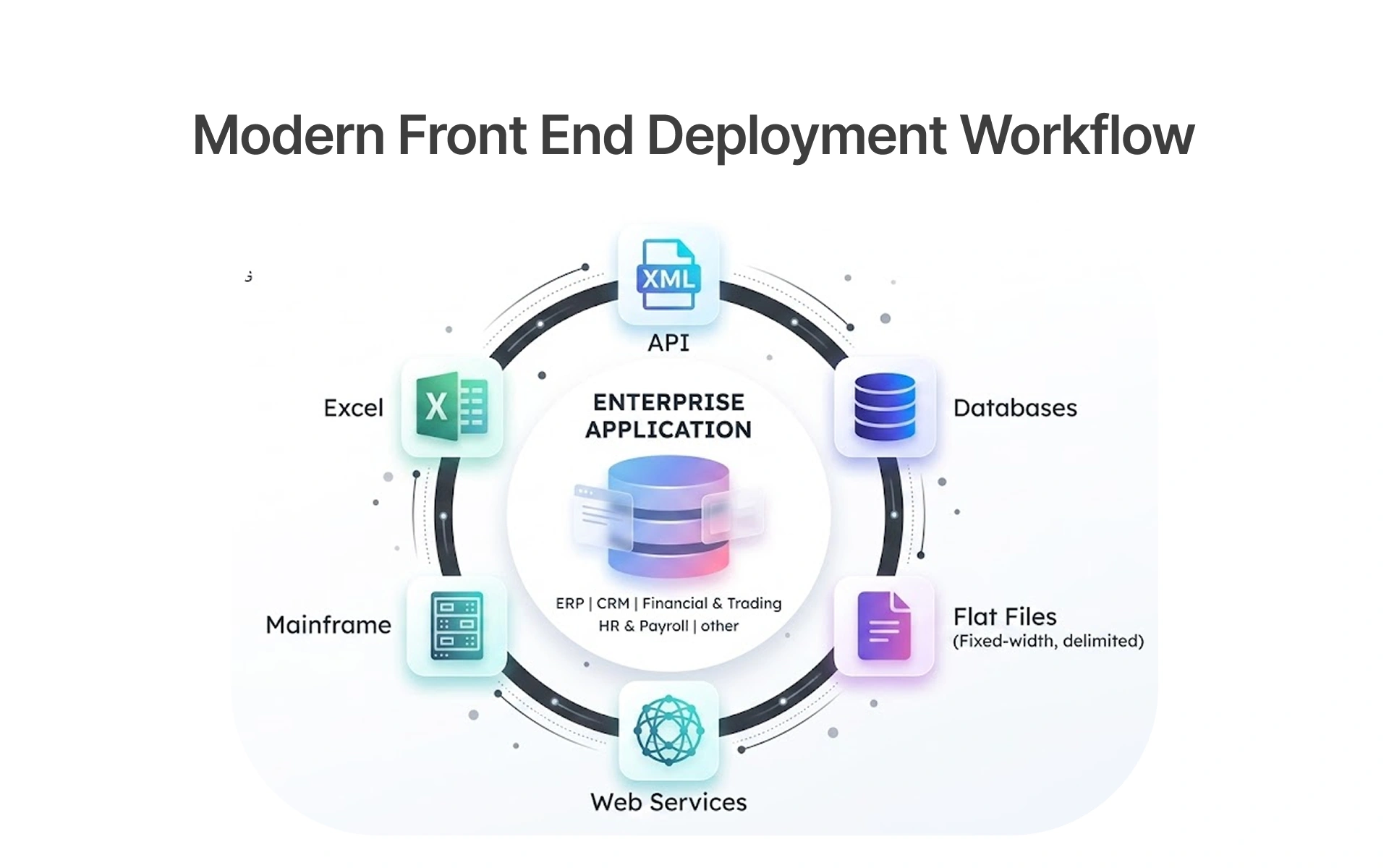
- Run API-level automated tests to verify data exchanged between ERP and CRM. Integration completion alone proves nothing; real examples of silent data mismatches confirm why payload validation is essential.
- Verify data across all of your business software (your ERP, CRM, third-party integrations, etc.). You'll be amazed at the discrepancies you find that simply weren't apparent through UI testing.
- Automate duplicate checks. Static validation has limitations; tuning thresholds as configurations evolve keeps coverage accurate.
Testing teams that use this layered approach are bridging the gap between what their testing reports as passed and what's actually happening in their production environment.
Execute End-to-End ERP Integration Testing Across CRM and Connected Systems
ERP handles orders, pricing, and stock. CRM manages customers and quotes. A BPA platform and staging database connect them both. Every arrow in that architecture is an integration test waiting to fail.
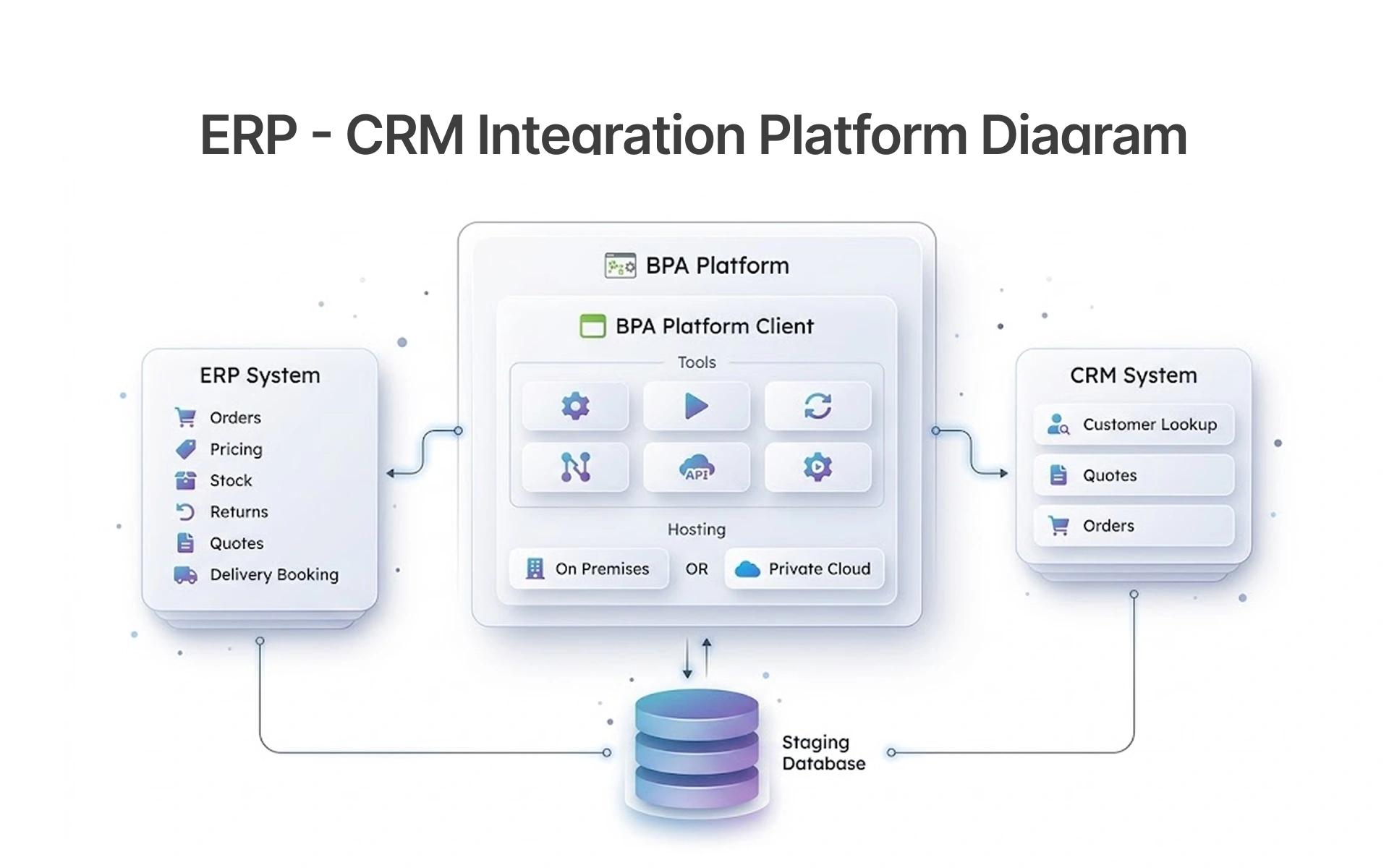
What end-to-end integration testing validates across this setup:
- Data accuracy between CRM platforms and ERP modules at every handoff, not just transfer confirmation
- Business rules are applied correctly across the integration layer during each deployment cycle
- Staging database records reflect the correct outcome after every automated test run
- No duplicates or data mismatches created across connected business systems during order, quote, or returns processing
- Progress tracked against a consistent benchmark across every update cycle
Test scenarios must reflect real business transactions, not how the system looked during demos.
Create Automated ERP Regression Tests Before Making System Upgrades
In theory, regression testing happens before updates go live. In practice, expectations fall apart, and users report what testing should have caught.
How to Build It:
- In the planning phase, decide the regression baseline against all critical processes - before the update
- Understand priorities - payroll software, financial posting, order processing, before features that come with defaults and template implementations.
- Automate regression tests for all critical and high-risk processes - no longer bound by manual execution and time constraints
- Time and date regression before deployment - not afterwards. Here's where we find antiquated processes and workflows, not in production
Building the suite is not the hard part. Accountability for maintaining it is across every update, every customisation, every training cycle. That commitment, rooted in a proper discovery process and attention to detail, is what separates stable ERP systems from fragile ones.
Frugal Testing's Risk-Based ERP Testing Strategy
Across Frugal Testing's ERP integration engagements, risk-based testing has delivered: 80% faster report generation, 25% faster client management processes, 100% uptime during integration, and complete testing cycles within 6 months.
The biggest gap we see across ERP testing projects is not endpoint testing, but missing critical end-to-end paths. All modules and APIs are tested, but not the automation of full business processes, order-to-cash, procure-to-pay, and CRM-to-ERP integration.
What Frugal Testing's ERP Projects Mean:
- ERP Integration Testing Strategy: Identify integrations based on business risks
- Test Automation Services: Minimize manual testing and increase test coverage
- API Testing Services: Validate integrations ahead of time to catch possible errors faster
- QA and testing alignment: Align testing processes with business realities
With the right strategy, companies are not only saving money on test execution - they are ensuring that every test investment safeguards the business against risk.
Conclusion: Creating an ERP Ecosystem that Protects Business
The volume of test cases matters far less than whether business-critical workflows were properly validated.
All five challenges- integration complexity, customization, test data, automation, and continuous system changes- escalate when teams treat ERP testing as a one-time event rather than a continuous practice. That is the real challenge.
Organizations that succeed have a deep understanding of their processes, proper planning that replaces outdated ones, and realistic timelines that are not compressed by upfront costs.
Through this approach, implementation teams can:
- Identify integration problems before they become customer issues, not after they have been reported
- Provide end-to-end testing across CRM, ERP, and related business software systems for each update cycle
- Create test schedules that match complexity, not agile deadlines from the project plan
- Build legacy processes and poor workflows into automated, proven test scenarios that survive vendor upgrades
The 2023 ERP Report by Panorama Consulting states that integrations are a major barrier to cloud ERP adoption, with nearly 25% of companies citing them as a main pain point.
People Also Ask (FAQs)
Q1.How do you test ERP system failover and disaster recovery mechanisms?
Ans: ERP failover testing simulates unplanned outages to validate whether critical business systems recover within defined recovery time objectives. Teams test database failover, backup restoration, and integration continuity across connected CRM systems and third-party platforms. The goal is to confirm that operations, payroll, order fulfilment, and financial posting continue with minimal disruption during an actual system failure.
Q2.What are the most common ERP testing tools used by enterprises?
Ans: Enterprise testing software commonly used across ERP projects includes Tricentis Tosca and Worksoft for automated tests, SAP Solution Manager for SAP-specific regression testing, LoadRunner and JMeter for performance testing, and Postman or ReadyAPI for API testing. Tool selection depends on ERP platform, customization depth, and whether end-to-end testing or module-level functional testing takes priority.
Q3.What logging and monitoring practices support ERP testing?
Ans: Effective ERP testing relies on centralised logging across all integration points, capturing API calls, database transactions, and workflow events in a single observability layer. Teams should monitor response time thresholds, failed job queues, and data sync errors between CRM platforms and ERP modules. Logs should be reviewed after every automated regression testing cycle, not only when production issues surface.
Q4.What strategies help in handling dynamic test data in ERP testing?
Ans: Dynamic test data management in ERP software testing requires three practices: synthetic data generation that mirrors production volume and structure, version-controlled data fixtures tied to specific test scenarios, and automated environment refresh before every regression testing cycle. Data management software should handle cleansing and consolidation, ensuring datasets remain representative of real business systems without exposing actual customer records.
Q5.How do you test role-based access control (RBAC) in ERP systems?
Ans: RBAC testing in ERP business systems validates that each user role can access only the modules, data, and workflows permitted by their assigned permissions. Test scenarios should cover both positive access, confirming authorised actions complete correctly, and negative access, confirming unauthorised actions are blocked. Automated tests should run RBAC validation before every deployment to catch permission drift introduced by configuration changes.

.webp)