
Unpredictable tests are silently destroying QA automation processes. Today the test passes, tomorrow it fails - all without code ever changing. For QA automation teams engaging a QA automation testing service, this is not just an annoyance but a serious threat to release, productivity, confidence, and quality.
A recent study by a team of Google engineers revealed that almost 16% of their entire test suite was flaky, and that it wasted hundreds of engineer-hours a week. In enterprise QA, the rate is even higher.
Flaky tests delay releases, undermine confidence in automation, increase the cost of testing on every sprint, but most critically, condition the team to no longer trust test results. Here's how enterprise QA services find, fix and avoid flaky tests so you have a reliable pipeline that passes every time.
Do you have flaky tests in your QA pipeline? Speak to Frugal Testing's QA automation experts for a free pipeline audit.
What Are Flaky Tests in QA Automation?
Flaky tests are automated tests that pass and fail at random without any changes to the code or test harness.
Often, teams focus on treating the symptoms - re-running tests, changing selectors - instead of the disease. To resolve flaky tests, you have to identify what they are and why they are flaky.
Definition of Flaky Tests
Here's the difference between flaky tests and failures:
- Intermittently passes and fails.
- Produce false negatives, misleading QA and development.
- Difficult to reproduce and debug.
- Undermines trust in your overall software quality assurance testing services.
- Trains people not to believe any alarm, even true alarms
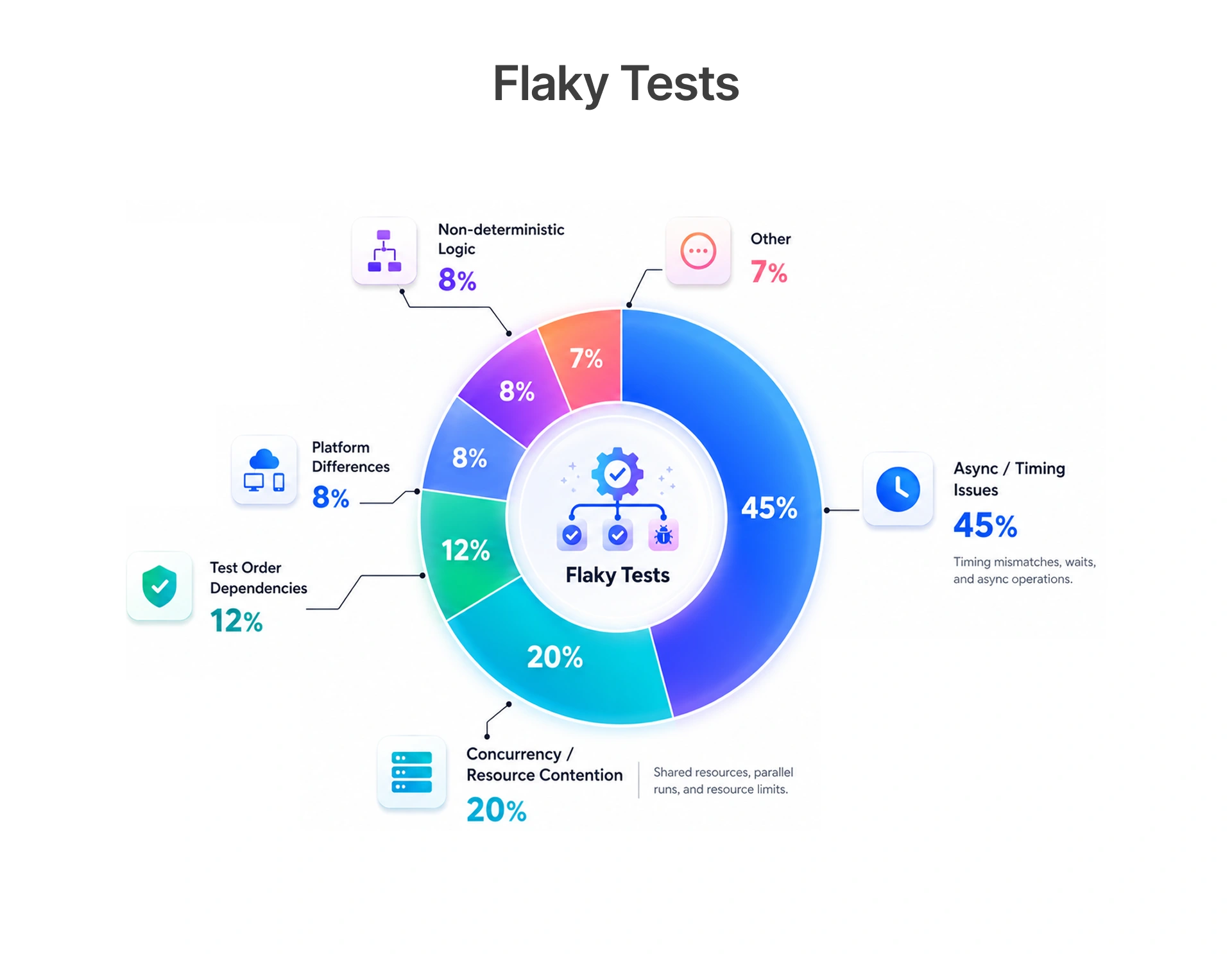
Common Causes of Flaky Tests
There's always a reason for flaky tests, and we want to be sure of the issue before we begin to fix it - otherwise, we are only treating the symptoms, and often making things worse.
Here are a few of the more common things we see in software testing services firms:
- Timing & synchronisation - Tests interacting with elements before they're ready
- Environmental issues - Browsers and servers are not identical for each run
- Test data issues - Parallel runs use the same data, or the data is stale
- Integration tests - External services that are sometimes slow or unavailable
- Fragile locators - XPath/CSS selector strings break with minor UI changes
Atlassian's investigation into flaky tests found that over 56% of flaky test failures are related to timing, so synchronisation issues should be your first port of call.
How QA Automation Services Detect and Fix Flaky Tests
There's a method to QA automation testing madness. Fixing follows detection - always. Fixing before diagnosing is a common trap for QA.
How to Identify Flaky Tests in Your Pipeline
Finding flaky tests quickly prevents hours of pain. Key methods:
- Watch CI/CD builds for tests flapping pass/fail with no code changes
- Examine 10-20 past runs to identify where tests failed
- Review logs, screenshots and video recordings of failed runs to detect timing and network problems
- Count test retries - one or more retries per 10 runs is flaky
- Measure test failure rates and environment dependency in test analytics dashboards
In Frugal Testing enterprise QA engagements across SaaS and FinTech teams, 60–70% of flaky tests trace to two root causes: timing issues and shared test data.
Proven Strategies to Fix Flaky Tests
- Use dynamic explicit waits, not hard-coded waits (no Thread.sleep() in production tests).
- Use explicit locators (IDs, data-test attributes, aria-label), not flaky XPaths or CSS classes.
- Mock external services using WireMock, MockServer or cy.intercept() to eliminate flaky external services.
- Never share data - never use the same data in parallel test runs, create new data for each run.
- Separate flaky tests until they are stable (20+ runs).
- Vary retries - try once and log; never hide behind retries.
Let's name the retry trap: when we retry a flaky test, we hide the failure on the build dashboard but not the extra minutes it takes and we encourage distrust. Log it, quarantine it and then fix it.
How Test Automation Framework Helps Reduce Flaky Tests
A good test automation framework is a structural approach to flaky tests. Your test framework is the foundation of your test suite - and if the foundation is not right, the tests will be flaky regardless of how good the tests are.
How the Right Framework Prevents Flaky Tests
The right framework prevents flakiness by creating a stable framework design:
- Utilities for synchronisation of dynamic UI elements, AJAX calls, and asynchronous events
- Modular testing with page-objects to prevent test pollution
- Retry management at the framework level, not in each test
- Isolated parallel test execution to avoid test data leakage
- Environment setup to control browser versions and other dependencies
This is true whether you use Selenium Grid and TestNG or Playwright and pytest. Modern frameworks also support self-healing to update locators.
Framework Best Practices to Keep Tests Stable
- Use page-object model (POM) to separate test code and locators (a UI change means a locator change)
- Apply data-driven testing with fixtures for test data
- Use version control, check stability in PRs
- Fix the version of the framework and update to avoid silent test breakage .
The POM constraint is the most important in practice: when locators in 40 raw scripts break due to a UI change, it will be a day of pain. When they are part of a single page object, it’s five minutes of work.
Test Automation Maintenance Keeping Tests Stable Over Time
It's good to have a stable test suite. Test automation maintenance is what allows you to have a stable test suite for months or for weeks, to crash and burn as your application is being developed.
Why Maintenance is Critical in QA Automation
Many teams invest in initial automation, but then consider the suite to be "done" - the main reason enterprise test suites become flaky, broken masses of scripts after 6-12 months. Software releases new features each sprint, test data is time-sensitive, and new dependencies trickle down to existing tests. Continuous maintenance (not maintenance every six months) reduces production defects by 40%.
Common Maintenance Challenges in Automation Testing
- Locator drift - CSS classes or DOM elements are changed in production, invalidating hundreds of tests.
- Environment drift - Test environments are different from production due to unrecorded configuration changes and library upgrades.
- Data collisions - Tests use the same data in a shared database.
- Script creep - Redundant and irrelevant tests hide test failures.
- Knowledge gaps - Team members leave, and key suites are not owned and documented.
Best Practices for Maintaining Automation Test Scripts
- Test health meetings - dedicating a sprint for test health: removing old tests, updating locators.
- Automated flakiness detection - any test that fails and then passes without code changes should be investigated.
- Test owners - individuals should be identified as owners of modules.
- Document test dependencies - API's, test databases and environment variables should be installable
- CI/CD build failure alerting - distinguish between failures in the application and test infrastructure to avoid "alarm fatigue"
The test health review is the most commonly overlooked and regretted sprint-based practice. Take two days per quarter to keep the maintenance workload low - otherwise, it's a bigger mess every six months.
Best Automation Testing Tools That Help Fix Flaky Tests
Flaky tests require the right tools. The right tool choice reduces flakiness structurally through built-in auto-wait, network interception, and parallel isolation — rather than relying on retry logic to paper over timing failures.
Which is the Best for Flaky Tests: Selenium, Cypress or Playwright?
The most popular tools for QA automation testing on websites are:
For teams that use cloud automation testing platforms such as BrowserStack Automate or Sauce Labs, all three are compatible. The cloud introduces additional stability issues such as network connectivity, resource exhaustion and parallel isolation that need to be managed at the framework level.
Playwright has an article on reliability that states that setting up project-level retries for tests and using waitFor in tests removes more than 80% of flaky tests caused by timings in typical web application test suites.
How to Pick the Right Tool to Minimise Flaky Tests in Your Pipeline
Considerations when choosing tools to reduce flakiness:
- Synchronisation model — auto-wait (Cypress, Playwright) vs explicit configuration (Selenium).
- Debugging features screenshots, videos and traces of failure, and speeds up the problem-solving process.
- Environmental flakiness is one of the biggest reasons for parallel testing and poor isolation.
- Well-developed CI/CD integration with both Jenkins, GitHub Actions and GitLab CI.
These days, playwright is the new kid on the block when it comes to starting a flakiness-reducing project, and even more so in a modern DevOps-enabled QA flow.
Regression Testing and Its Connection to Flaky Tests
It's here that the impact of flaky tests is obvious. If you have a flaky regression suite, your most important quality gate is your least trustworthy.
How to Run Reliable Regression Tests
Running reliable regression tests requires isolating flaky tests, using a stable production-mirroring environment, and integrating regression into every CI/CD deployment rather than saving it for major releases.
- Isolate all unknown flaky tests before adding them to the regression suite.
- Have a separate environment core that matches production and is not touched by development.
- Execute regression on all deployments using CI/CD (continuous integration/continuous delivery), not only before major releases.
- Keep test history to separate first-time (real bugs) from repeat offenders (flaky tests).
- Prioritise tests: smoke, critical path, full (regression).
Future of QA Automation and Flaky Test Management
AI is moving from experimental QA tooling to production-grade infrastructure — and the changes most relevant to flaky test management are already shipping in tools teams use today.
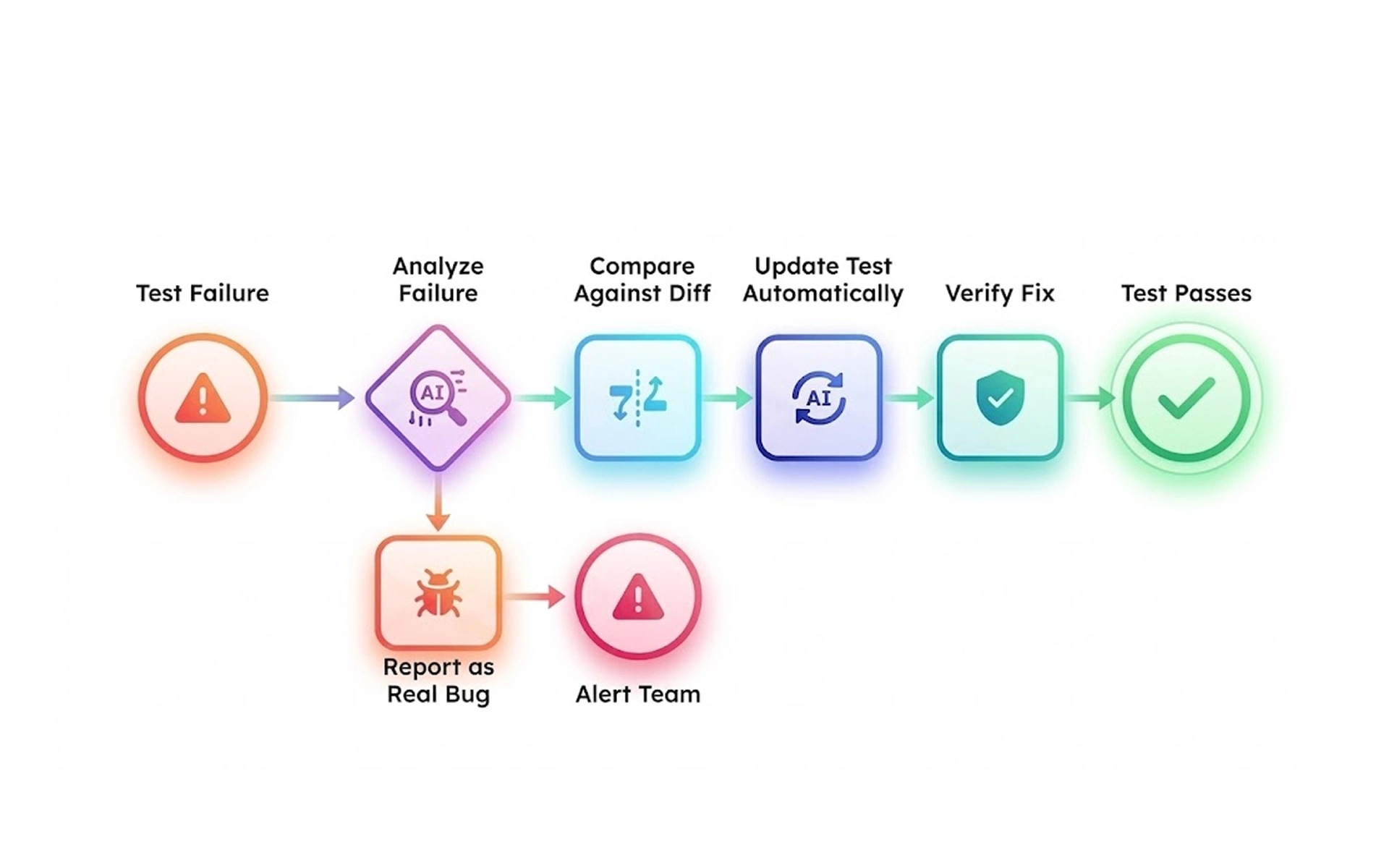
This shift is moving AI for QA automation from the lab to production. The biggest use cases are addressing the causes of flakiness:
- Next flaky test prediction - Machine learning models predict flaky tests that are next to fail in prod, and then re-add them to the test suite.
- Self-healing selectors - Testim, Mabl and Applitools automatically update flaky selectors when the UI changes.
- Smart test scheduling - AI prioritises tests according to their risk of failure, from highest to lowest.
- Node-0 classification - AI can automatically identify environmental and timing issues.
- Automated wait strategies - Wait times are automatically adjusted based on the load time of the app.
In Frugal Testing's AI-augmented QA engagements, teams integrating auto-healing and predictive detection have reduced false failure rates by 60–70%, with a corresponding reduction in manual triage effort.
Building a Future-Proof QA Automation Strategy
- Use AI testing tools with features such as auto-healing and intelligent waits.
- Involve developers and QA in the shared responsibility of test stability.
- Flakiness is a quality problem for the team, not just QA. Shift left to detect flakiness during feature development, not during release testing.
- Establish stability targets and track flakiness rate and false failure rate as key performance indicators (KPIs) for sprints.
Conclusion
Flaky tests slow down your pipeline, prevent releases, reduce confidence and cost money, but you can systematically address the issue. The way to a stable pipeline is:
- Diagnose - root cause analysis of logs, patterns, and history.
- Fix-implement strategies to fix root causes.
- Prevent - design for stability.
- Maintain - consider test suite maintenance a habit.
- Scale - leverage automation with AI-based tools.
Cypress, Playwright and Selenium are the tools. Appropriate framework design and maintenance ensures continued operation.
Ready to Fix Flaky Tests in Your Pipeline?
Frugal Testing's QA automation experts have helped enterprise teams eliminate flaky tests and cut false failure rates by over 70%.
Get your free QA pipeline audit today →
People Also Ask (FAQs)
Q1.What is the Difference Between Flaky Tests and Failing Tests?
Ans: A failing test is failing all the time; it is pointing to an issue, a bug. A flaky test passes and fails at random for no reason (no code change) when it runs; it generates noise and noise is a confidence killer for all tests in the suite.
Q2.How Long Does it Take to Fix Flaky Tests in QA Automation?
Ans: Fixing flaky tests takes between 30 minutes and 3 days, depending on root cause simple locator or wait issues resolve quickly, while environment or data isolation problems can take a full cluster fix of 1–3 days. Expert audits of the pipeline will resolve 80 % of the issues in 2 weeks.
Q3.Can AI Completely Eliminate Flaky Tests in Automation?
Ans: Not entirely. AI QA automation will take you a long way to reducing the flakiness with auto-healing locators, predictive failure detection and smarter wait times, but more fundamental environmental instability and data collisions will always need human intervention.
Q4.How Much Do Flaky Tests Cost a Development Team?
Ans: The cost of flaky tests to a development team is higher than most assume, spanning direct engineer effort (30–60 minutes per false failure), rerun compute, and delayed releases. A single flaky test on a fast-moving pipeline can consume 10+ hours of engineer time per week.
Q5.Is it Better to Fix or Delete Flaky Tests in QA Automation?
Ans: Keep tests of essential journeys (typically represented by critical journeys) or key business logic, the two sources of priceless coverage we couldn't live without. Delete any redundant or irrelevant tests. Don't allow flaky tests in the production pipeline.