


What Is a PEAR Assessment for Cloud Migration?
A PEAR assessment is a cloud migration readiness framework that evaluates four areas before a team moves workloads: PEAR full form (People, Environment, Applications, and Risk)..
The core idea is simple: most cloud migrations fail not because of the cloud platform chosen, but because of what teams skip before they start. Skills gaps go unmeasured. Application dependencies remain unmapped. Security and compliance risks surface after cutover instead of before.
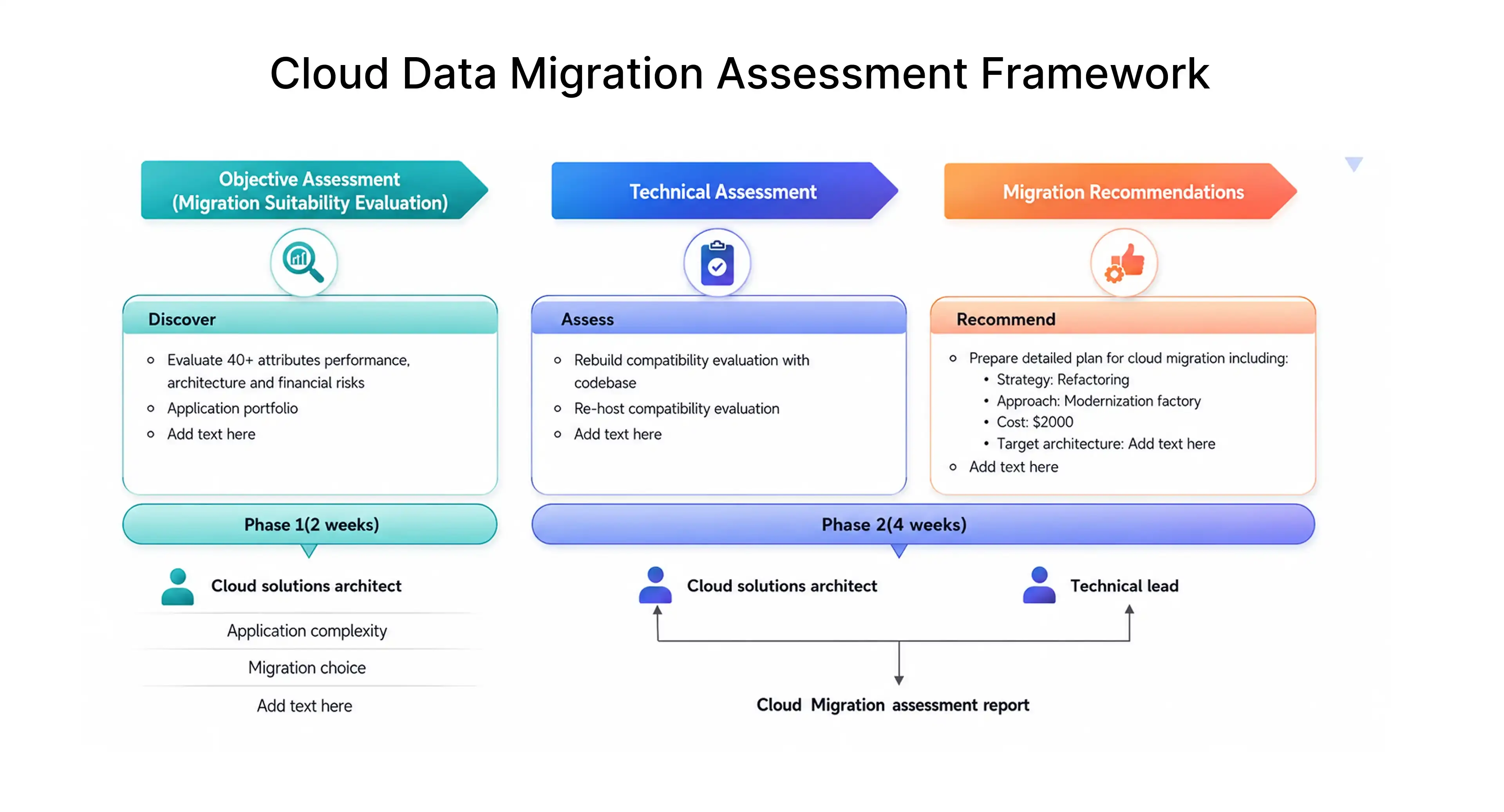
PEAR gives engineering leaders, DevOps teams, QA engineers, and business stakeholders a shared structure to answer: Are we ready to migrate - not just technically, but operationally?
Why Cloud Migrations Underdeliver
Cloud migration is often framed as a cost and scalability play. The benefits are real - faster deployments, elastic infrastructure, reduced hardware overhead, improved resilience. But they are not automatic.
Gartner estimates that through 2025, 99% of cloud security failures will be the customer's fault - driven by misconfiguration, poor access controls, and gaps in operational readiness rather than platform vulnerabilities.
The gap between what teams expect and what they deliver usually comes down to this: they chose a cloud provider before they assessed their own environment.
Common failure modes include:
- Cloud bills that exceed on-premise costs by 40–60% due to over-provisioning and idle resources
- Performance degradation caused by application architectures that assume local network latency
- Integration failures from unmapped dependencies discovered post-cutover
- Compliance violations from inadequate data residency planning
- Prolonged downtime from missing rollback procedures
A PEAR assessment forces these questions before they become production incidents.
P: People Readiness
Cloud migration is not an infrastructure team project. It touches developers, QA engineers, DevOps teams, security teams, finance, product, and business stakeholders. When ownership is unclear, cloud adoption stalls after go-live.
What to Evaluate
Cloud skills inventory :- Check whether engineers understand compute, storage, networking, IAM, observability, and cost management in the target cloud environment. Identify skill gaps before migration, not during it.
Operating model :-Cloud operations require clarity on who handles deployments, access provisioning, incident response, monitoring, backups, and cost optimization. Document this before moving workloads.
FinOps ownership :- Cloud cost is ongoing. Define who tracks usage, reviews spend, identifies idle resources, and enforces tagging policies. McKinsey research indicates that organizations without FinOps ownership overspend cloud budgets by an average of 35% in the first year.
Change management :- Migration affects users, support teams, and workflows. Prepare communication plans, training schedules, and support channels before cutover.
People Readiness Checklist
- [ ] Migration roadmap has a named owner
- [ ] Each application has a post-migration owner
- [ ] DevOps team understands CI/CD, IaC, monitoring, and rollback in the cloud
- [ ] QA team has a validation plan for migrated workloads
- [ ] Security team is involved before architecture decisions, not after
- [ ] Finance team has cloud cost monitoring processes defined
- [ ] Business stakeholders understand downtime windows and workflow impacts
People Readiness Output
Document which skills are missing, which roles need training, and whether business and technical teams are aligned before the migration roadmap is finalized.
E: Environment Readiness
Hidden dependencies are the most common source of migration failures. Teams map the servers they know about - and miss the middleware, service accounts, legacy firewall rules, and batch jobs that quietly hold production together.
What to Evaluate
Infrastructure inventory :- Build a complete inventory of servers, VMs, databases, storage systems, middleware, APIs, third-party integrations, and internal tools. Include version information and license status.
Network dependencies :- Map firewall rules, VPNs, DNS configurations, IP allowlists, private connectivity requirements, and latency-sensitive paths. A workload that performs acceptably on-premise can degrade significantly if network topology is not replicated correctly in the cloud.
Identity and access management :- Review users, roles, service accounts, secrets, and privileged access. Cloud IAM models differ from on-premise Active Directory. Plan this transition carefully.
Data environment :- Inventory data size, classification, residency requirements, retention policies, backup state, and transfer method. Data migration is frequently the most complex and highest-risk phase of cloud adoption.
Monitoring and logging gaps :- Migrating into a new environment with weak observability makes troubleshooting significantly harder. Define how logs, alerts, metrics, traces, and incident workflows will operate in the cloud before workloads move.
Landing zone readiness :-The cloud foundation - account structure, networking, security policies, access controls, logging, and governance - must be built before workloads are migrated, not during.
Environment Readiness Checklist
- [ ] Full infrastructure inventory documented
- [ ] Application dependency map completed
- [ ] Network topology and firewall rules reviewed
- [ ] IAM model designed for cloud environment
- [ ] Data residency and compliance requirements confirmed
- [ ] Monitoring and alerting approach defined
- [ ] Cloud landing zone built and validated
Environment Readiness Output
A complete asset list with dependencies, a clear view of what stays on-premise, and a validated cloud foundation ready to receive workloads.
A: Application Readiness
Not every application should move in the same way or at the same time. Application readiness determines the right migration path - and prevents teams from migrating technical debt directly into the cloud.
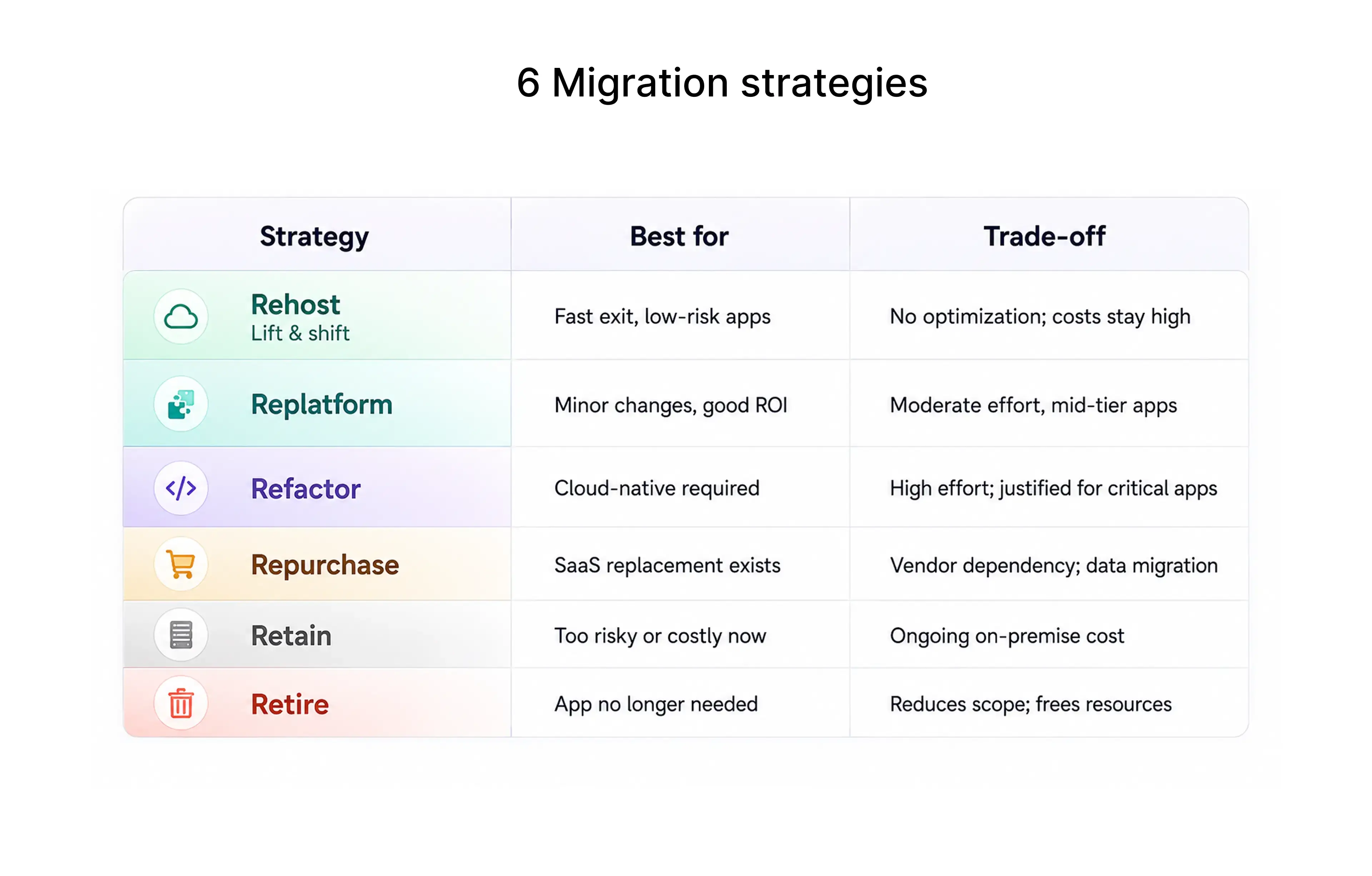
Migration Strategies: Choosing the Right Path
What to Evaluate
Application inventory and classification :- List all applications with business criticality, technical complexity, owner, technology stack, and migration priority. This classification drives phasing decisions.
Dependency mapping :- Applications depend on databases, APIs, file systems, authentication services, scheduled jobs, and third-party tools. Map these before finalizing migration sequence. Migrating an application without its dependencies breaks workflows.
Architecture fit for cloud :- Review scalability limits, session handling, local storage dependencies, hardcoded configurations, and deployment process. Applications with fixed resource assumptions or local filesystem dependencies need rework before they perform reliably in the cloud.
Performance baseline :- Capture current response time, throughput, CPU usage, memory usage, database query performance, and error rates before migration. Without a baseline, there is no way to confirm whether migration improved or degraded performance.
Testing requirements :- Cloud migration requires more than smoke testing. Plan for regression testing, integration testing, performance testing under cloud network conditions, security testing, data validation, and disaster recovery validation before go-live.
Application Readiness Checklist
- [ ] All applications inventoried and classified by criticality
- [ ] Migration strategy assigned to each workload
- [ ] Dependency map completed for each application
- [ ] Architecture reviewed for cloud compatibility
- [ ] Performance baseline captured
- [ ] Test plan documented before migration begins
- [ ] High-risk and high-complexity workloads identified for later phases
Application Readiness Output
A workload portfolio with a migration strategy, risk classification, dependency map, and test plan for each application.
R: Risk Readiness
Risk is present in every migration. The problem is not risk - it is discovering risk after cutover. Risk readiness means identifying, scoring, and addressing risks before they affect users or business operations.
Key Risk Categories
Security risk :- Review encryption at rest and in transit, access control policies, secrets management, network exposure, vulnerability management, logging coverage, and incident response procedures. Cloud security requires explicit configuration - nothing is secure by default.
Compliance risk :- Regulated industries must address data residency requirements, audit trails, retention rules, privacy obligations, and specific compliance frameworks such as SOC 2, ISO 27001, HIPAA, or GDPR before workloads move.
Downtime risk :- Define acceptable downtime, migration windows, communication plans, failover procedures, and rollback steps. A migration plan without a tested rollback procedure is incomplete.
Data risk :- Plan data validation, backup confirmation, reconciliation steps, and recovery procedures. Define how the team will confirm that data migrated correctly before decommissioning the source environment.
Cost risk :- Cloud spend can accelerate quickly without governance. Model compute sizing, storage growth, data transfer costs, licensing, and support tiers before migration. Include reserved instance planning for steady-state workloads.
Vendor lock-in risk :- Identify which cloud-native services create long-term platform dependency. Managed databases, serverless functions, and proprietary AI services all carry lock-in implications. Determine whether that dependency is acceptable before adoption.
Risk Readiness Checklist
- [ ] Security review completed for each workload
- [ ] Compliance requirements mapped and addressed
- [ ] Rollback plan documented and tested
- [ ] Data migration validation steps defined
- [ ] Cloud cost model reviewed against current spend
- [ ] Downtime windows agreed with stakeholders
- [ ] Go-live approval process defined
- [ ] Success metrics established
Risk Readiness Output
A risk register with likelihood, impact, mitigation plan, and owner for each identified risk, plus confirmed rollback procedures and go-live criteria.
6 Migration strategies
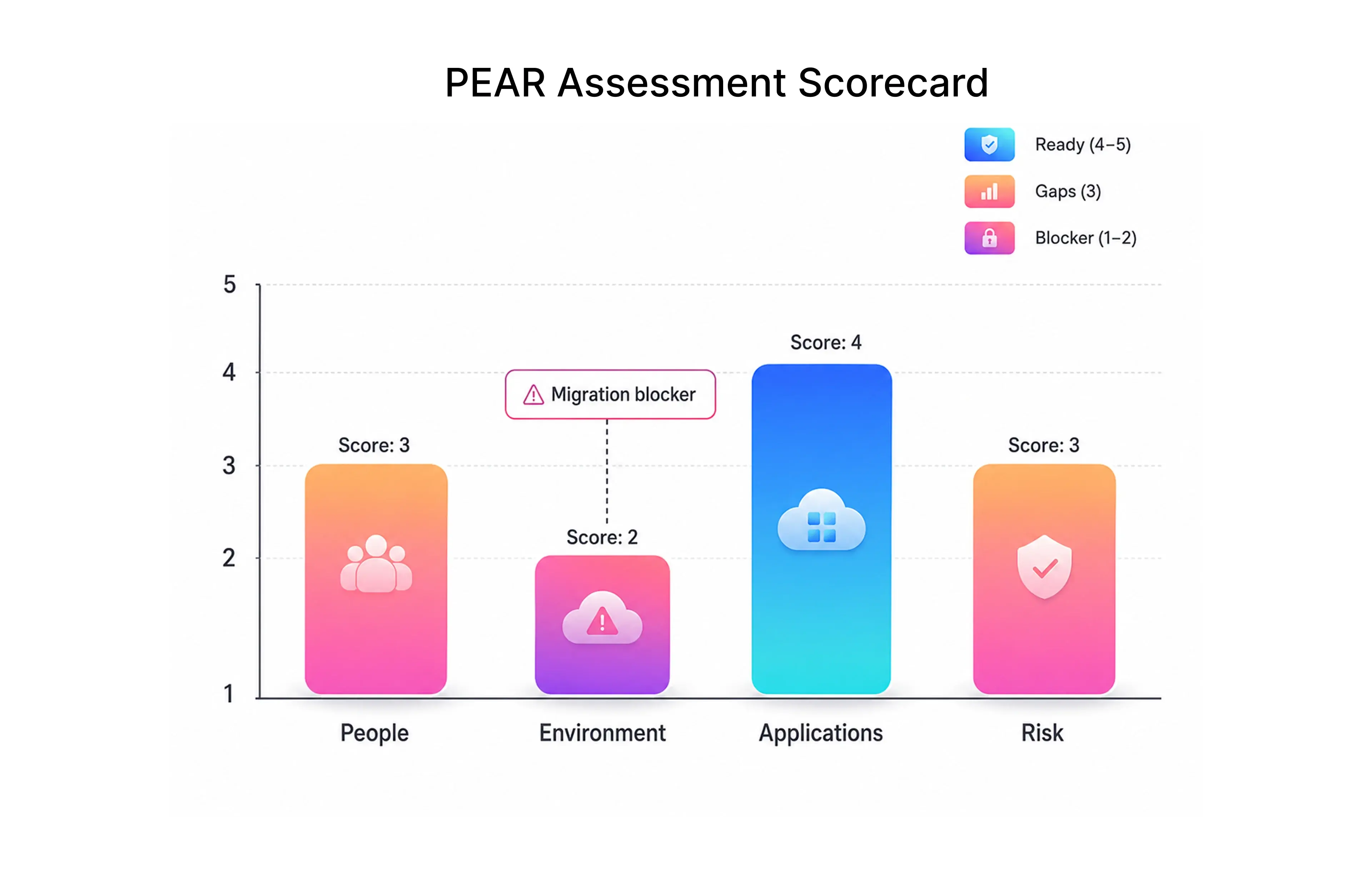
PEAR Assessment Scorecard
Use this scoring model to assess readiness before migration planning begins.
PEAR Area
What to Evaluate
Score (1–5)
People :- Skills, ownership, training, operating model, FinOps responsibility
Environment :- Infrastructure inventory, network, data, identity, monitoring, landing zone
Applications :- Architecture fit, dependency mapping, migration strategy, test plan
Risk :- Security, compliance, downtime, cost, rollback, operational risk
Score interpretation:
- 5 - Ready for migration planning and execution
- 3 - Partially ready specific gaps must be addressed before proceeding
- 1 - Not ready significant remediation required
A low score in any single area is a migration blocker. The goal is not a perfect score - it is identifying which gaps, if unaddressed, will surface as production problems.
How to Run a PEAR Assessment
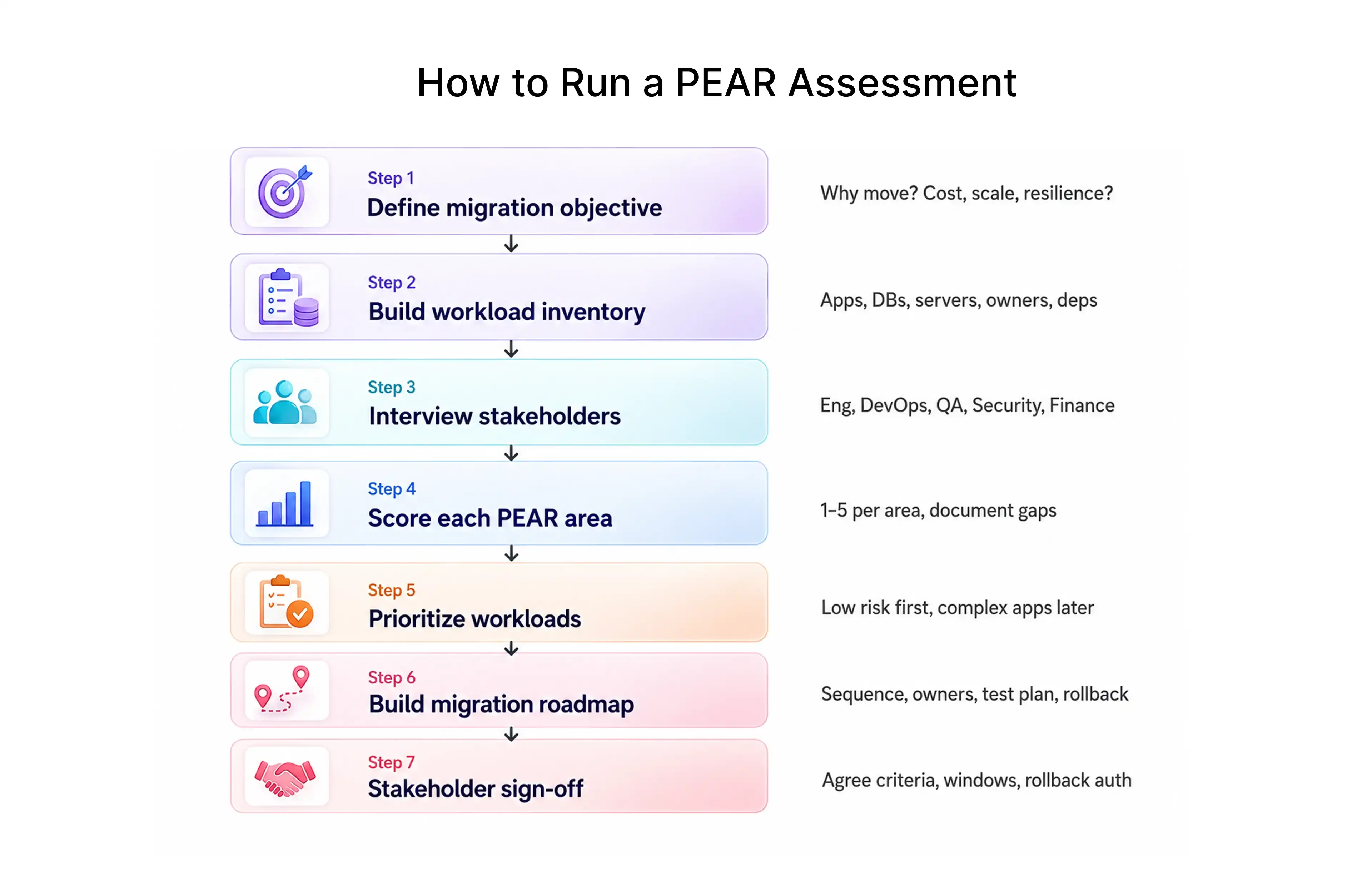
Step 1: Define the migration objective
Start with why. Cost optimization, data center exit, scalability, modernization, and resilience require different migration approaches. Clear goals produce better decisions.
Step 2: Build the workload inventory
Create a complete list of applications, databases, servers, integrations, data stores, owners, and dependencies. This inventory drives every subsequent step.
Step 3: Interview stakeholders across teams
Speak with engineering, DevOps, QA, security, finance, product, and business teams. Each group sees different risks and priorities. A migration plan built from only the infrastructure team's perspective will miss critical gaps.
Step 4: Score each PEAR area
Work through People, Environment, Applications, and Risk systematically. Document gaps clearly. Avoid scoring optimistically to accelerate a migration timeline.
Step 5: Prioritize workloads
Move low-risk, low-complexity workloads first. Reserve business-critical and high-complexity applications for later phases, after the team has validated the cloud environment and built operational confidence.
Step 6: Build the migration roadmap
Convert the assessment into a sequenced roadmap with workload order, timeline, owners, test plans, cost projections, risk mitigations, and rollback criteria.
Step 7: Get stakeholder sign-off before execution
Confirm that business and technical stakeholders agree on readiness criteria, downtime windows, rollback authority, and success metrics before migration begins.
Common Mistakes PEAR Assessment Prevents
- Treating cloud migration as only an infrastructure project :- Cloud adoption changes how developers deploy, how QA validates, how security monitors, and how finance plans. PEAR keeps all of these areas visible.
- Migrating applications without mapping dependencies :- Unmapped dependencies are the primary cause of broken integrations after cutover. Environment and application assessment address this directly.
- Moving technical debt into the cloud :- Lift-and-shift can be a valid strategy. It should be a deliberate choice, not a default. Application readiness helps teams make that decision explicitly.
- Skipping performance baselines :- Without pre-migration benchmarks, teams cannot confirm whether cloud migration improved or degraded application performance.
- Planning testing after migration instead of before :- Test plans, regression coverage, and rollback criteria should be defined before migration begins - not assembled under production pressure.
- Migrating without a rollback plan :- A migration plan without rollback is incomplete. Risk readiness ensures teams know what to do when something goes wrong.
Conclusion
Cloud migration delivers real business value - but only when teams are ready to operate in the cloud, not just ready to move to it.
A PEAR assessment gives engineering leaders, DevOps teams, QA engineers, and business stakeholders a structured way to evaluate readiness before migration begins. It surfaces the people gaps that slow cloud adoption after go-live, the environment dependencies that break integrations at cutover, the application architecture issues that inflate cloud costs, and the risks that only become visible under production load.
The most successful cloud migration projects share a common characteristic: teams understood what they were moving before they moved it.
Before choosing a cloud platform, before sizing instances, before scheduling migration windows - run the assessment. The time invested in readiness is the most reliable predictor of migration success.
Ready to Assess Your Cloud Migration Readiness?
Frugal Testing helps engineering teams evaluate migration readiness, build test strategies for migrated workloads, and validate cloud deployments before and after cutover.
If your team is planning a cloud migration and wants an independent readiness assessment or a structured QA plan for the migration phase, get in touch with our team.
People Also Ask (FAQs)
Q1.What is a PEAR assessment in cloud migration?
Ans: A PEAR assessment is a cloud migration readiness framework that evaluates four areas before migration begins: People (skills, ownership, and operating model), Environment (infrastructure, network, and data), Applications (architecture, dependencies, and migration strategy), and Risk (security, compliance, downtime, cost, and rollback). It helps engineering teams identify gaps before they become production problems.
Q2.How long does a PEAR assessment take?
Ans: For a mid-sized organization with 20–50 applications, a structured PEAR assessment typically takes two to four weeks. Larger portfolios with complex dependencies may require six to eight weeks. Timeline depends on the quality of existing documentation and stakeholder availability.
Q3.What is the difference between a PEAR assessment and a cloud migration plan?
Ans: A PEAR assessment evaluates readiness. A migration plan describes execution. The assessment should come first - it identifies gaps that affect sequencing, timeline, resourcing, and risk, which in turn shapes the migration plan.
Q4.Which applications should move to the cloud first?
Ans: Start with low-criticality, low-complexity workloads that have well-understood dependencies and straightforward rollback options. Early migrations build team confidence, surface operational gaps, and validate the cloud landing zone before higher-risk workloads are moved.
Q5.How does application dependency mapping affect cloud migration?
Ans: Applications rarely run in isolation. Unmapped dependencies - databases, APIs, scheduled jobs, authentication services - are a common source of integration failures after cutover. Dependency mapping ensures that related workloads move together or in the correct sequence.

.webp)


.webp)
