
Large Language Models (LLMs) are already involved in common testing tasks - they are debugging failure, log analysis, and test reporting assistance. However, in actual test scenarios, there is a steady issue: the model does not know what is actually going on at the moment. It reacts to previous training and not the state of the system.
Model Context Protocol (MCP) solves this by connecting LLMs to live system data logs, metrics, and external tools so responses are based on actual execution context instead of assumptions. In testing workflows, this shifts AI from guesswork to accurate analysis.
- AI-based test assistants, debugging copilots and analytics are applied to QA and engineering teams to save them the time spent on manual debugging and accelerated test analysis.
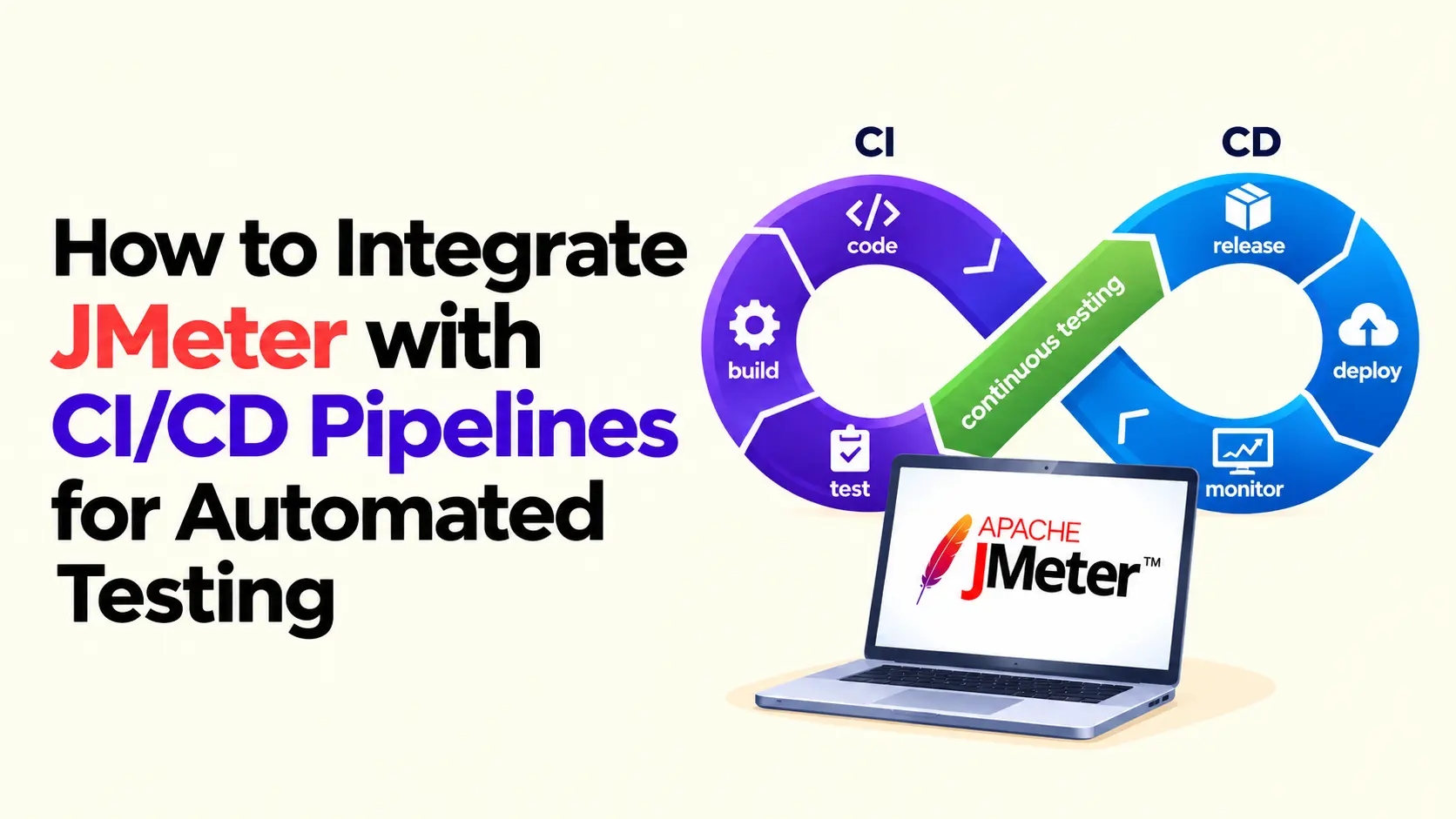
- Current testing and development pipelines are based on workflow automation systems to control the CI/CD processes, test execution, and reporting.
This limitation was evident at Frugal Testing, as it occurred in actual test cycles. AI responses proved useful, yet they were in most cases irrelevant. The precision and usefulness became much better after the introduction of MCP servers and context-driven workflows. In practice, this gap becomes obvious the moment you try to debug a real failure using only static AI responses.
Understanding Model Context Protocol (MCP)
MCP is used to give AI systems access to external data rather than alone. AI, without MCP, produces responses based on pre-trained information without real time data.
- MCP server connects AI to external systems, tools and data.
- Integrations can also lead to an emerging list of MCP servers.
- There are those configurations based on OpenAI MCP server and those that utilize Google MCP servers.
After MCP has been deployed, the system data of real-time systems rather than pattern-based predictions are used in the model. The operational AI model prohibits the act of guessing in accordance with the pattern and starts acting in line with the real situation.
What Is Model Context Protocol (MCP) and How It Works
Model Context Protocol (MCP) is a communication layer between LLMs and external systems
It connects three main components:
- LLM (the brain)
- MCP Server (the bridge)
- Data Sources (the knowledge)
When a query is triggered:
- The LLM sends a request
- The MCP server retrieves relevant data
- The model uses that context to generate a response
For example, during test failure analysis:
- The model retrieves logs and error traces
- It identifies the failure point
- It explains the root cause
This makes responses context-aware and reliable.
Why MCP Is Important for Large Language Models (LLMs)
Even the best LLMs struggle without context. This is why MCP is becoming essential.
Real-time data access allows the model to work with current system state instead of static prompts. This reduces hallucinations, improves decision-making during testing, and makes automation workflows more reliable.
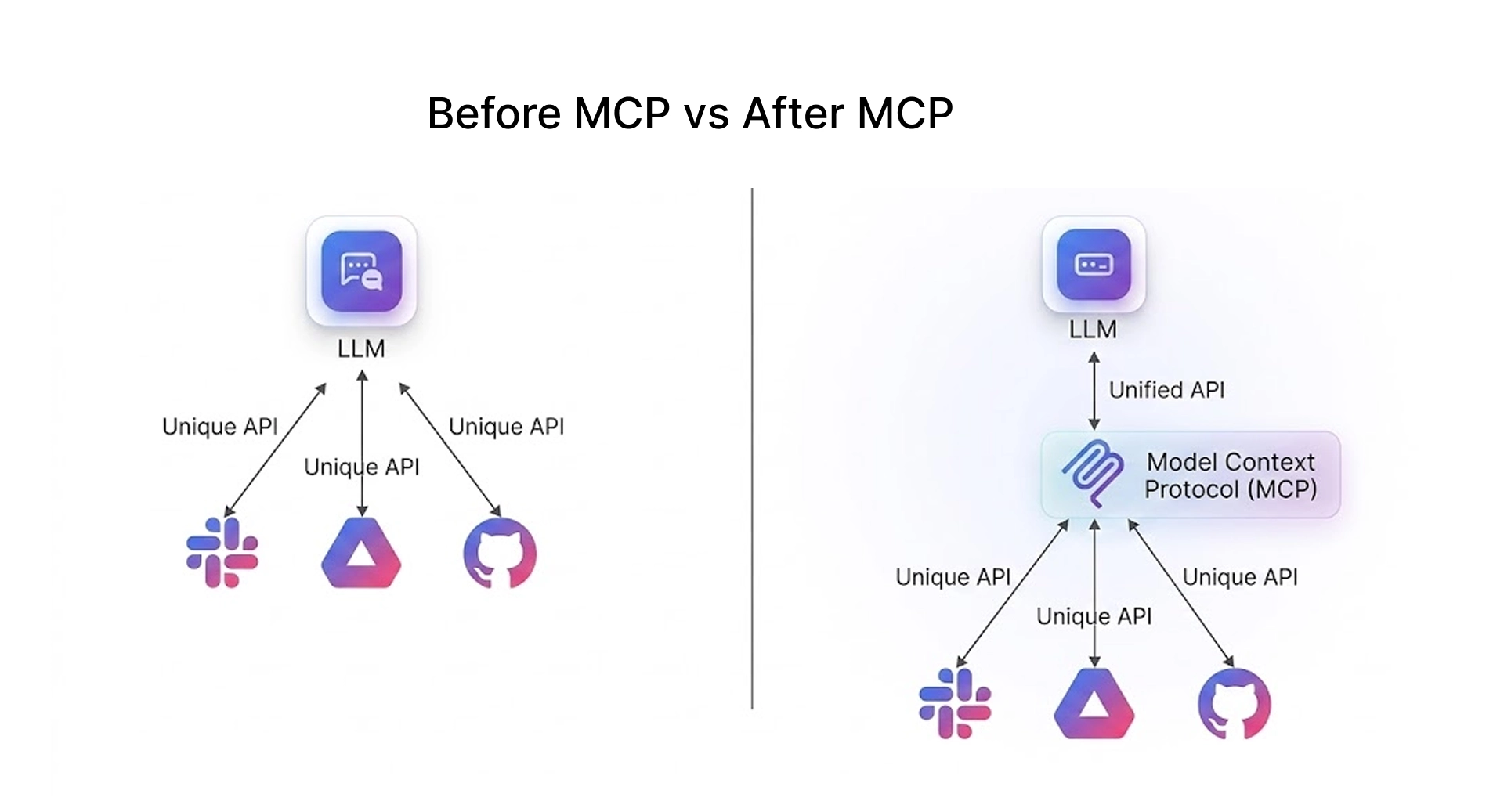
MCP vs Traditional AI Integration Approaches
Traditional Generative AI integrations rely heavily on predefined APIs and static prompts. While effective for simple tasks, they struggle in environments where context changes frequently.
The key difference lies in adaptability MCP allows systems to respond based on current data, not assumptions.
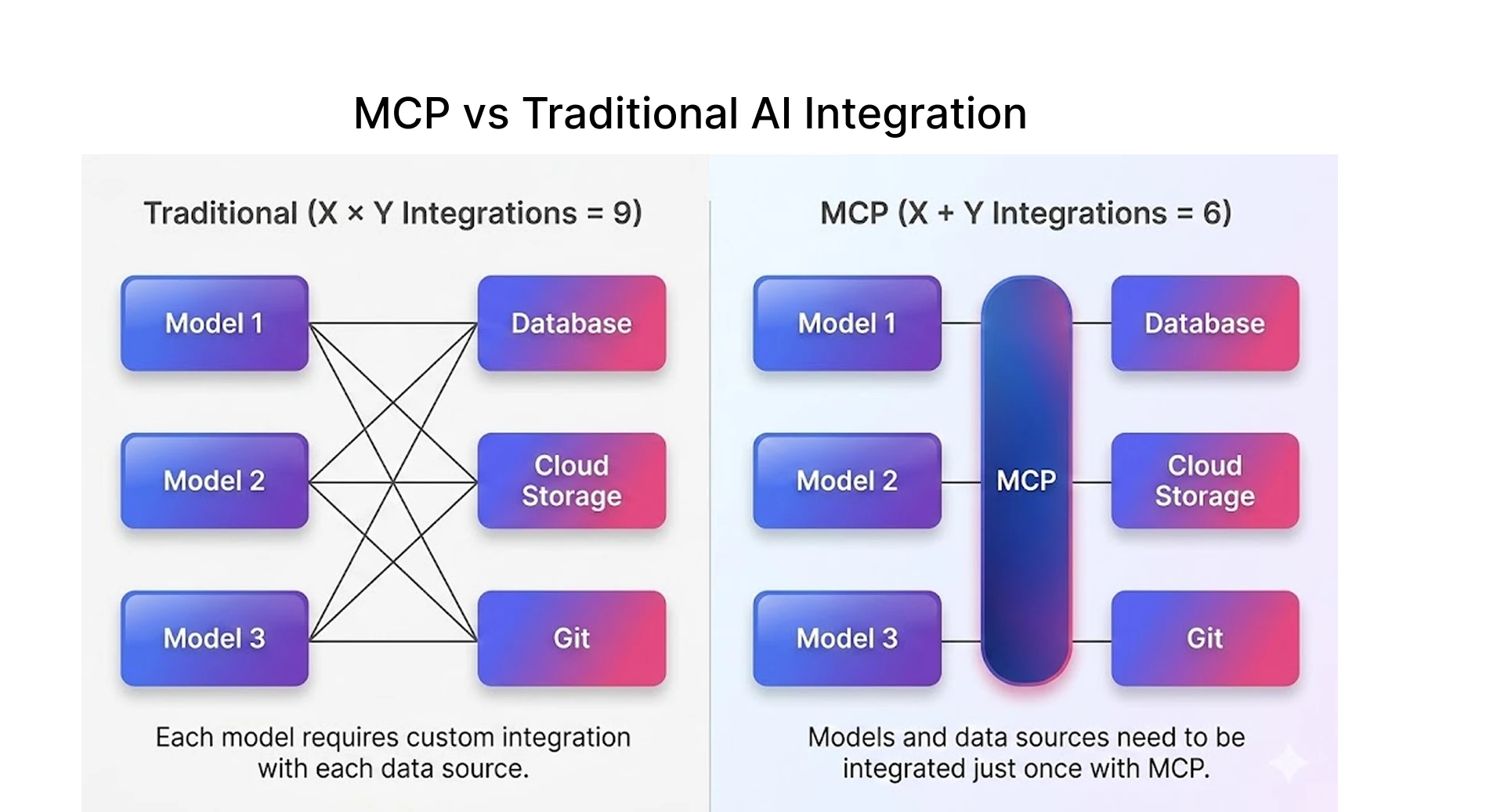
With the Model Context Protocol, things feel different. The MCP server handles most of that complexity in the background. It connects the AI with the right MCP tools when needed, without requiring constant manual intervention.
How LLMs Use MCP to Understand Test Context
The process works through a simple client–server setup. The AI application (host) connects to external systems using an MCP client, which communicates with MCP servers in the background.
When the system starts, the MCP client connects to available servers and discovers what they offer like tools, data sources, and reusable prompts.
- Tools (e.g., database queries, API calls, CI trigger actions) allow the LLM to actively interact with systems instead of just analyzing data
- Resources (log files, JSON schemas, test reports) provide structured, read-only context that the model can reference
- Prompts (predefined debugging templates or analysis instructions) guide the LLM to generate consistent and task-specific responses
The server also shares clear details about each tool and resource what it does, what input it needs, and what it returns. This helps the model understand when to use something and how to use it correctly.
Structured Context Exchange Between LLMs and Systems
When an LLM is integrated with MCP, it no longer works in isolation. Instead, it becomes part of a structured ecosystem where it can request and receive context from multiple sources.
In a testing environment, the LLM can access execution logs, error traces, performance metrics, and test history together. This allows it to identify failure patterns, detect bottlenecks, and provide more accurate root cause analysis instead of relying on isolated outputs.
This leads to responses that are directly tied to system behavior, validated through execution data, and useful for identifying root causes instead of generic suggestions.
Using Natural Language Queries to Analyze Test and Analytics Data
One of the key advantages of MCP is its ability to enable natural language interaction with complex systems.
i)“Why did test case 42 fail in the last build?”
ii)“What changed between the last successful run and this failure?”
iii)“Are there any recurring failures in the recent test cycles?”
The LLM reads the query, gets the data through MCP and gives an accurate explanation depending on the logs and metrics. This reduces the effort required to analyze testing data.
MCP in Practice: A Real Testing Scenario
At Frugal Testing, this limitation became clear during a release cycle for a mid-sized e-commerce platform running checkout workflows under load.
A set of checkout tests started failing intermittently in the CI pipeline, but only under specific traffic conditions. Initial assumptions pointed to flaky tests or network instability. The team retried executions, adjusted timeouts, and ran tests across environments—but the failures remained inconsistent.
Architecture of MCP in AI Systems
The Model Context Protocol (MCP) connects AI systems with real-world data sources in real time instead of just relying on what it was trained on. It lets AI systems pull information from tools like databases, APIs, or even local files when needed.
It works with three main parts:
- Host: the AI app where everything runs
- Client: the part that manages connections
- Server: the source that provides data or tools
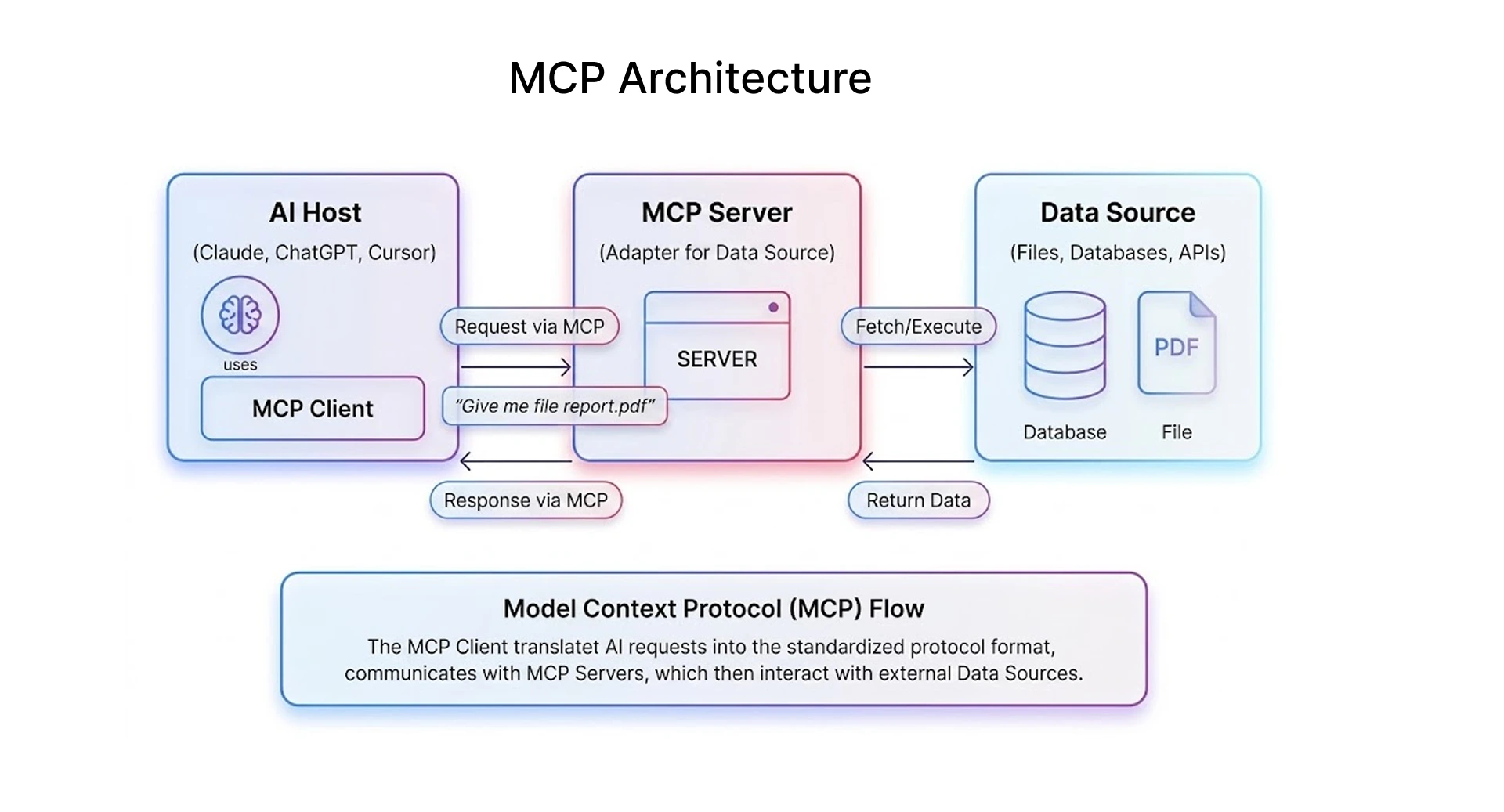
MCP servers can give access to data (resources), perform actions (tools), or guide responses (prompts).
In simple terms, MCP helps AI move from guessing answers to actually checking and using real information.
Key Components of MCP (Data Sources, MCP Server, LLM)
An MCP-based system is built on three primary components:
The data sources include logs, databases, APIs, and analytics tools that store real-time information. The MCP server fetches and filters this data. Finally, the LLM consumes this context to generate meaningful responses.
The MCP server fetches relevant data from connected systems and passes it to the LLM, which uses it to generate a response based on the current context.
Example MCP Server Implementation for LLM Integration
To understand how MCP works in practice, consider a simple server implementation:
# Example: Simple MCP Server (Python)
from fastapi import FastAPI
app = FastAPI()
@app.get("/context")
def get_context():
    return {
        "logs": "Test execution failed at step 3",
        "metrics": {"accuracy": 92, "latency": "120ms"}
    }
In this setup, the LLM can call the /context endpoint whenever it needs additional information. The server returns structured data, which the model then uses to generate a more accurate response.
Secure Context Transfer and Data Governance
Since MCP deals with potentially sensitive data, security becomes a critical factor. Proper safeguards must restrict access to authorized data only.
This includes authentication mechanisms, role-based access control, and encryption of data in transit. For example, test logs containing sensitive user data must be filtered before being passed to the LLM.
Best Practices for Implementing MCP with LLMs
Enterprises are rapidly deploying Large Language Models (LLMs) into production environments to automate workflows, enhance customer service, and accelerate development cycles. The Model Context Protocol (MCP) has emerged as the standard for connecting these AI agents to enterprise tools, databases, and services.
Without proper security controls, that same connectivity creates direct paths for attackers to access sensitive production systems.
Authentication and Token-Based Access in MCP Systems
In real-world MCP implementations, securing access between LLMs and external systems is one of the biggest challenges.
Most production systems rely on token-based authentication instead of static credentials. This includes:
- OAuth 2.0 flows for secure, delegated access
- Short-lived API tokens with automatic rotation
- Service-to-service authentication using identity providers
For example:
- An LLM querying test logs should not have full database access
- Instead, MCP servers issue scoped tokens that only allow read access to specific resources
In practice, getting scoped token access right often takes more iteration than expected, especially when balancing security with usability across multiple systems.
Managing Security and Access Control
Security isn’t about restriction it’s about control.Security should never be an afterthought when implementing MCP.
Common production MCP security failures include:
- Static credentials stored in plain text configuration files
- Overly broad permission scopes connecting LLMs to sensitive data
- Shadow servers deployed without a security review
- Missing audit logs for AI agent actions
- No human oversight for high-risk automated operations
How to Mitigate These Risks
i)Use secure authentication mechanisms
Replace static credentials with token-based authentication (OAuth, API keys with rotation) to prevent unauthorized access.
ii)Apply role-based access control (RBAC)
Restrict LLM access to only required data and tools instead of granting full system permissions.
iii)Validate and monitor MCP servers
Ensure every MCP server is registered, reviewed, and monitored to avoid shadow or unmanaged integrations.
iv)Enable audit logging and tracing
Track every request made by the LLM, including accessed data and executed actions, to maintain accountability.
Optimizing Performance with Large Datasets
Handling large datasets efficiently is essential for maintaining system performance. Techniques like caching frequently accessed data, filtering unnecessary information, and optimizing query execution can significantly reduce latency.
Efficient data handling ensures that the LLM responds quickly without compromising accuracy.
# Example: Simple caching for MCP context to improve performance
cache = {}
def get_cached_context(key):
    if key in cache:
        return cache[key]  # return cached data
    # Simulate fetching from MCP server
    context = {
        "logs": "Recent test failure due to timeout",
        "metrics": {"latency": "130ms"}
    }
    cache[key] = context  # store in cache
    return context
# Usage
context_data = get_cached_context("latest_test_run")
print(context_data)
How MCP Enhances LLM Capabilities and Performance
The Model Context Protocol (MCP) connects Large Language Models to real-time data and external tools.
Instead of relying only on training data, MCP lets AI access updated information and actually perform tasks.
- Real-time data: AI can fetch live data from databases, files, or APIs
- Action-based workflows: It can send emails, update records, or run code
- Better understanding: With structured context, responses become more relevant
- Easy integration: One MCP setup can work with different AI systems
- Collaboration: Multiple AI agents can work together on tasks
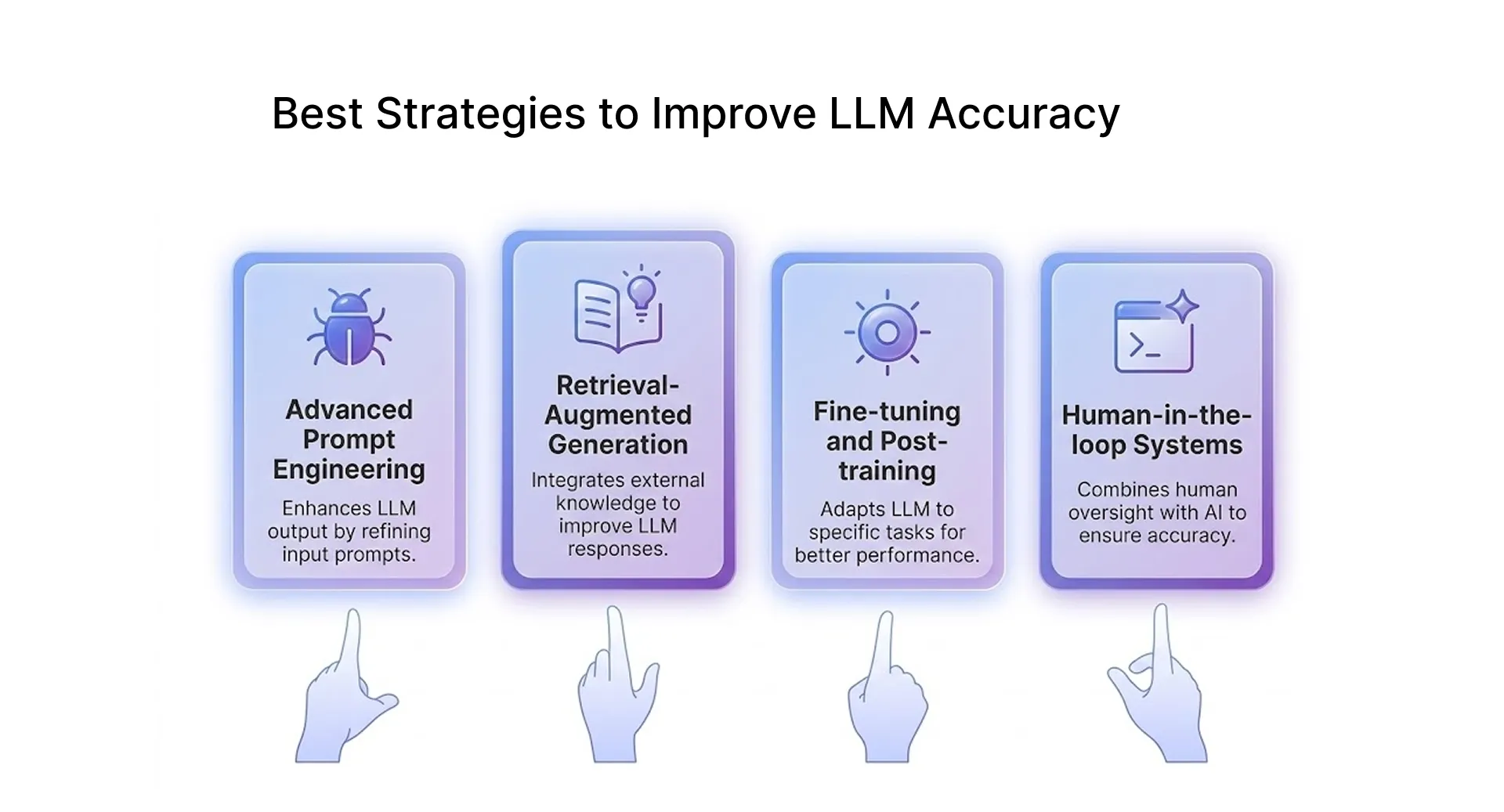
Improving LLM Accuracy with Real-Time Context
When LLMs can access live data, the difference is immediately noticeable. Instead of relying on past training or assumptions, they respond based on what’s actually happening in the system at that moment.
In testing scenarios, this becomes especially useful. For example, while debugging a failed test, the model can look at the latest logs, identify where things went wrong, and suggest fixes that are actually relevant. The model responds based on actual system data instead of assumptions.
Enabling Tool Access and Workflow Automation in LLMs
MCP makes it possible for LLMs to go beyond just answering questions. They can interact directly with tools and systems, which opens up a lot of practical use cases.
Tasks like analyzing test results, generating reports, or even updating issue trackers can be handled automatically. This reduces manual effort and speeds up repetitive testing cycles.
Scaling LLM Performance with MCP Server Infrastructure
Scaling introduces high data load and latency challenges, but MCP distributes requests across multiple servers to maintain performance. As systems grow, the workload increases, but MCP spreads that load across multiple layers.
- Multiple MCP server instances distribute load across services, preventing bottlenecks during high test execution cycles
- LLMs can interact with multiple systems simultaneously (CI/CD pipelines, monitoring tools, databases) for faster analysis
- Agent-level execution allows separate AI agents to handle debugging, reporting, and monitoring independently
- Supports collaborative agents, independent agents, and smart agents
MCP systems continuously improve through better model tuning, optimized tool usage, and expanded data integrations. These agents improve through model updates and optimized tool usage.
MCP Integration with Playwright for Real-Time Test Debugging
Playwright-based test automation becomes more effective when combined with MCP because the model can access real-time browser execution data instead of relying only on test outputs.
For example, during a failed UI test:
- MCP can fetch browser console logs and network requests
- The LLM can analyze DOM state at the moment of failure
- It can correlate UI issues with backend API responses
Instead of just reporting that a test failed, the system can explain why it failed based on actual browser behavior.
In practice, this helps identify issues like:
- Element not visible due to delayed rendering
- API response mismatch causing UI breakage
- Timing issues in asynchronous workflows
Conclusion: How Frugal Testing Enhances MCP-Driven Test Context for LLMs
The Model Context Protocol changes how LLMs are used in testing by connecting them to real-time system data instead of relying only on pre-trained knowledge. Without context, even strong models can give answers that sound right but don’t reflect what’s really happening. Once MCP is in place, that changes.
At Frugal Testing, this issue became clear during a release cycle for a mid-sized e-commerce platform. A set of checkout tests started failing intermittently in the CI pipeline, but only under certain load conditions. The initial assumption was typical network instability or flaky tests so the team retried executions, adjusted timeouts, and even re-ran builds across environments. Nothing changed.
At that point, it honestly wasn’t clear whether the issue was in the test setup or the application itself. We initially suspected flaky tests, but the inconsistency didn’t match typical test instability, which made the debugging process more frustrating than expected.
After integrating MCP into the workflow, the model was able to correlate logs, API traces, and deployment changes in a single context. This made it possible to identify issues like race conditions that were not visible when analyzing systems in isolation.
Once identified, the team adjusted the request handling and synchronization logic in the payment flow. After that fix, the same test suite that had been failing intermittently stabilized, and failures dropped by over 85% across subsequent runs.
In this case, the same test suite stabilized within two runs after the race condition was fixed something the team had been trying to resolve for weeks.
People Also Ask (FAQs)
Q1.How do LLMs use MCP to access structured data?
Ans: LLMs use an MCP server as a bridge to connect with external systems like databases, APIs, or files. When a query requires real-time or structured data, the model sends a request through MCP, retrieves relevant information, and uses it to generate a response based on current data rather than relying only on pre-trained knowledge.
Q2.Can MCP improve software testing and analytics workflows?
Ans: Yes, MCP can significantly improve testing and analytics workflows by giving AI access to live logs, test results, and system metrics. This allows models to analyze real-time data, automate repetitive tasks like report generation, and provide more accurate insights, helping teams identify issues faster and reduce manual debugging effort.
Q3.Can MCP connect LLMs with multiple data sources?
Ans: MCP enables LLMs to connect with multiple data sources at the same time, such as analytics tools, CI/CD systems, databases, and dashboards. This unified access allows the model to combine information from different systems, giving more complete and context-aware responses without needing manual data collection from separate tools.
Q4.Why is MCP important for AI-powered analytics?
Ans: MCP is important because it allows AI systems to work with real-time and relevant data instead of outdated information. By connecting to live data sources, LLMs can generate insights that reflect current trends and system behavior, making analytics more accurate, actionable, and useful for decision-making in dynamic environments.
Q5.Can non-technical teams benefit from MCP?
Ans: Yes, non-technical teams can benefit because MCP allows them to interact with data using simple, natural language. They don’t need to write code AI can fetch information, generate insights, and even perform tasks for them, making tools easier to use.



.webp)