


Login and authentication flows are often treated as “basic functionality,” yet they are among the most business-critical paths in any application. A single failure in login testing can block users, damage trust, and expose security vulnerabilities.
For businesses across the United States - whether SaaS platforms, fintech products, healthcare portals, or e-commerce systems - authentication failures directly impact customer experience, compliance, and revenue. This guide breaks down how login and authentication work, the edge cases teams often miss, and how QA teams can test them effectively using functional testing, manual testing, automation testing, and regression testing strategies.
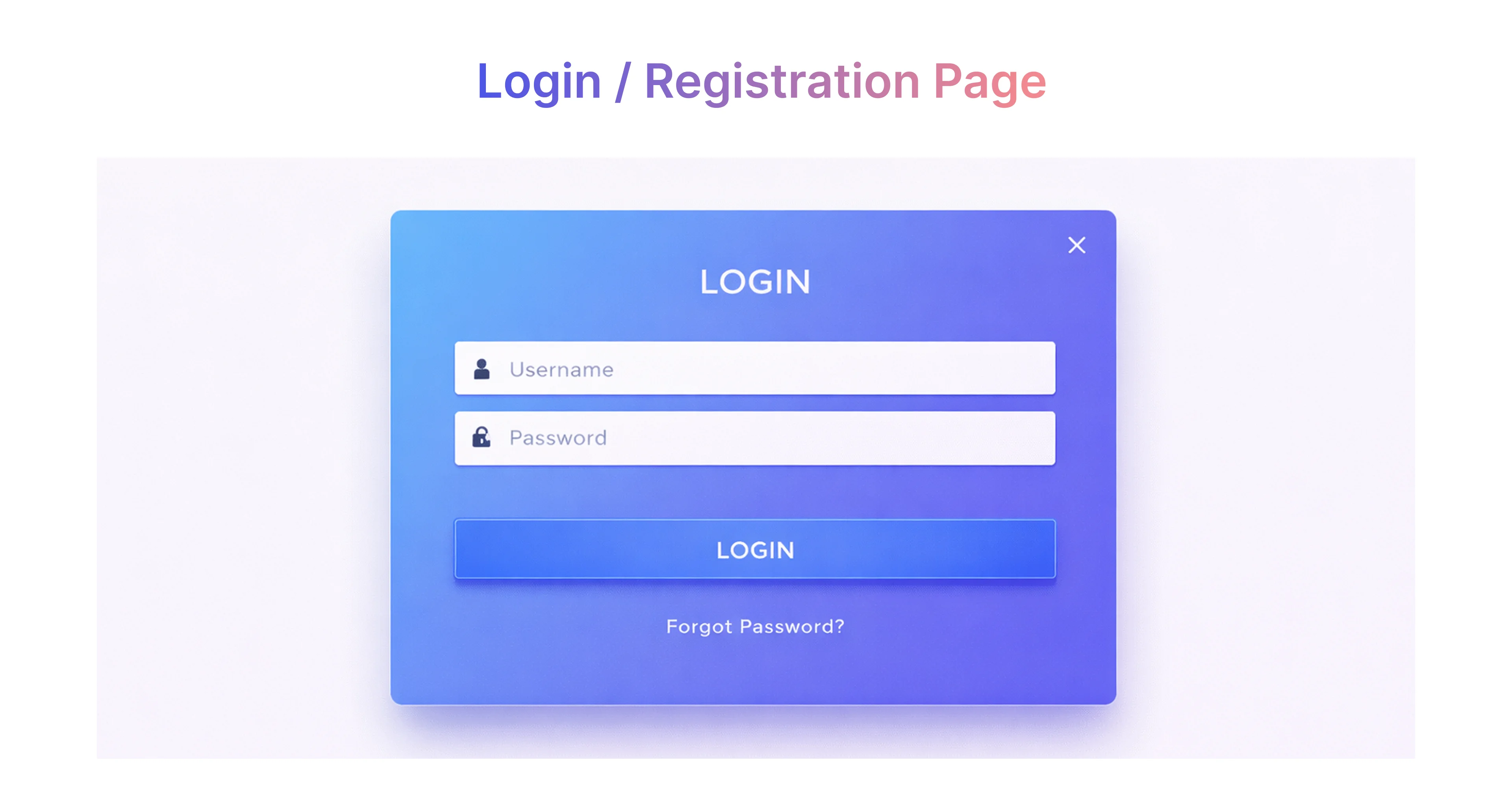
How Login and Authentication Work in Modern Applications
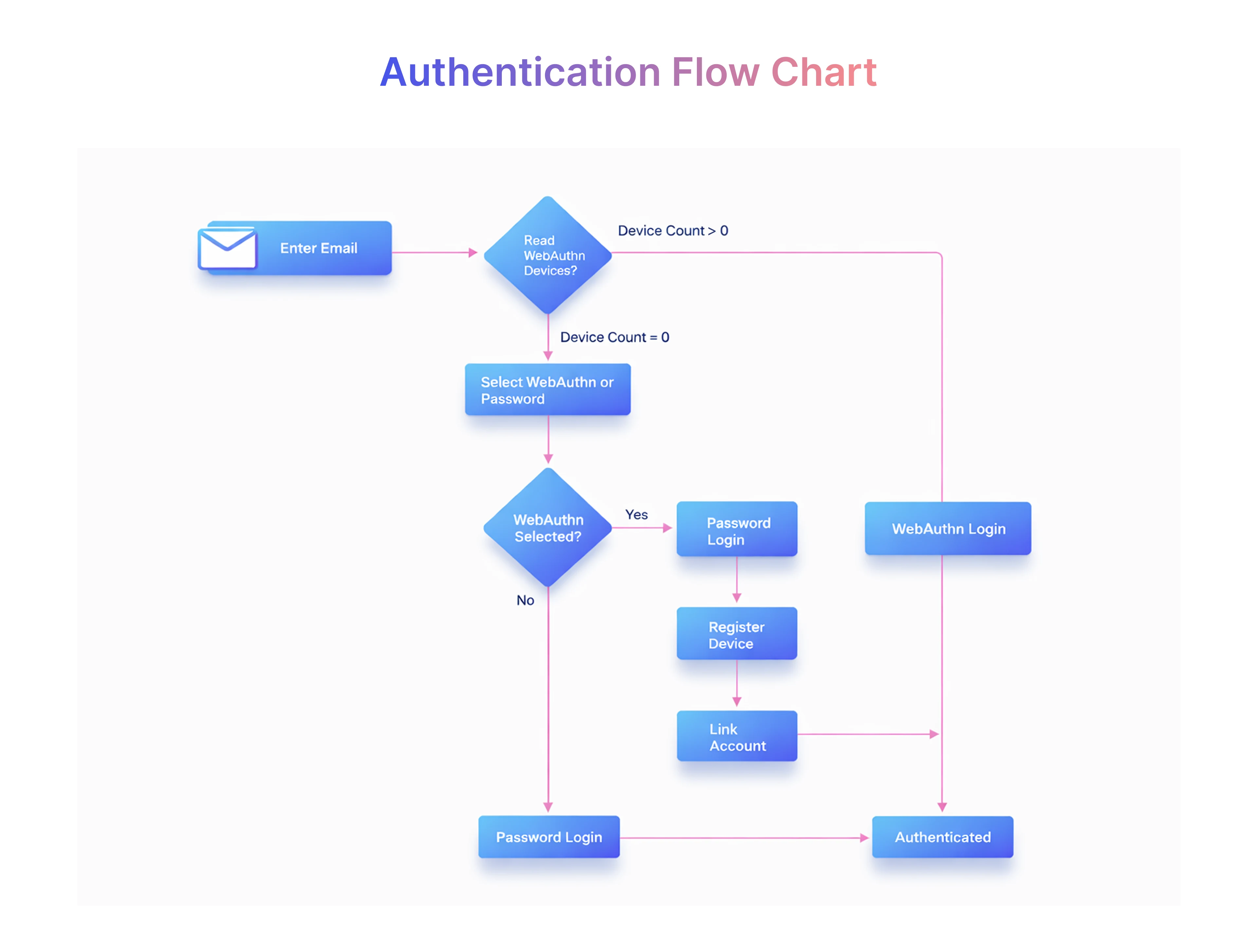
Modern applications use layered identity and access flows that span the UI, client-side logic, backend APIs, identity providers, and data stores. For U.S. SaaS, fintech, healthcare and e-commerce platforms these flows must not only authenticate users but also enforce who can do what after sign-in (authorization). Failures can be UI bugs, API regressions, token-handling mistakes, or authorization misconfigurations — all of which affect security, compliance, and user experience. Test coverage must therefore include end-to-end functional checks, API validation, security testing, and integration tests with third-party identity providers.
Login vs Authentication vs Authorization: Roles, Failure Modes, and Where to Test
Why this matters:
Many production “login bugs” are actually authorization defects—for example, users logging in successfully but accessing incorrect features, data, or roles. Effective login testing must therefore validate all three layers together, not in isolation.
Modern Authentication Realities You MUST Cover in Tests
Modern applications no longer rely on simple username-password flows. The following realities introduce forgotten edge cases that teams often miss during login testing:
- OAuth 2.0 & OpenID Connect (OIDC)
Token expiry, invalid scopes, redirect URI mismatches, and provider downtime handling. - SSO / SAML Authentication
Assertion expiry, clock skew issues, incorrect role mapping, and identity provider outages. - Refresh Tokens & Token Rotation
Expired refresh tokens, token reuse attempts, concurrent refresh requests, and logout invalidation. - JWT & Access Tokens
Token tampering, expired claims, incorrect signature validation, and stale authorization data. - Passkeys (Passwordless Login)
Device compatibility, browser support gaps, account recovery flows, and fallback authentication. - Device Fingerprinting & Risk-Based Authentication
Changed device behavior, false positives, step-up authentication triggers, and privacy constraints. - Bot Protection & Abuse Controls
Rate limiting failures, CAPTCHA bypass attempts, and legitimate user lockouts during peak traffic. - Third-Party Login Dependencies
Revoked permissions, partial provider outages, and mismatched user profile data.
Covering these scenarios ensures authentication testing reflects real-world usage, especially for U.S.-based SaaS platforms where security, compliance, and user trust are critical.
Why Functional Testing Is Critical for Authentication Success
Functional testing verifies that login, authentication, and authorization flows behave exactly as defined by business rules — not just that users can sign in.
It ensures the system correctly handles:
- Valid and invalid credentials across password, passkey, and SSO flows
- Clear, consistent error states without revealing security details
- Session and token lifecycle behavior, including expiration and renewal
- Role- and permission-based authorization after login
- Access restrictions across APIs, pages, and user journeys
Without targeted functional testing in software testing, applications may allow users to log in successfully but access incorrect features, data, or roles — one of the most common causes of post-login defects in production systems.
Common Edge Cases in Login Testing
Edge cases occur when users don’t follow the “happy path.” These scenarios are common in production and must be covered during login flow testing.
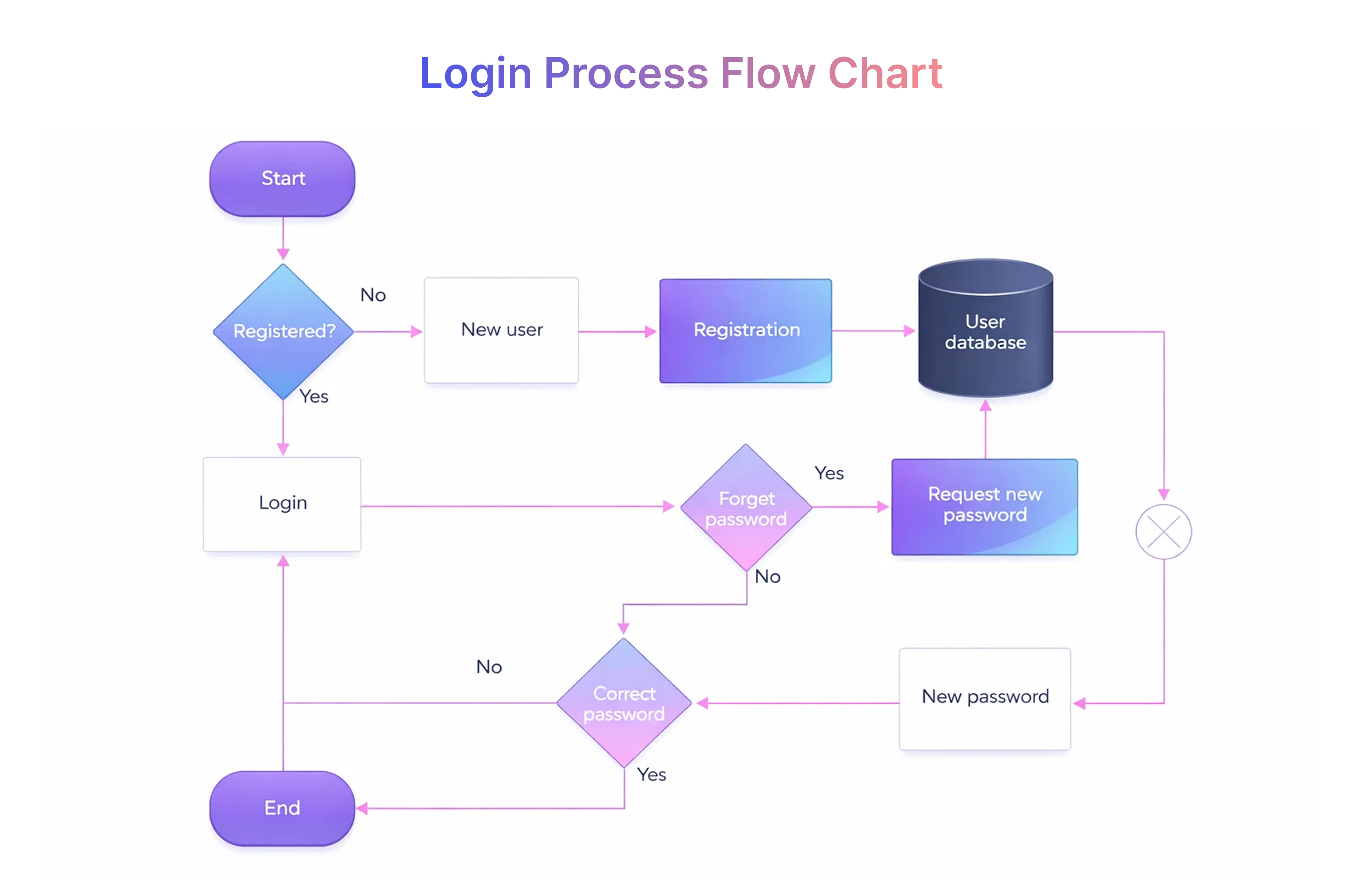
Forgotten Password Scenarios
Password recovery is a high-risk flow often overlooked in smoke testing.
Key scenarios:
- Expired reset links
- Multiple reset requests in a short time
- Reset emails marked as spam
- Weak or reused passwords during reset
Failure here leads to account recovery issues and increased support costs.
Account Lockout and Recovery
Account lockouts protect against brute force attacks but can frustrate legitimate users.
Test for:
- Lockout thresholds and cooldown periods
- Clear, non-revealing error messages
- Recovery via email, SMS, or support contact
- Behavior across shared accounts and devices
Invalid Credentials Handling
Incorrect credentials should never reveal sensitive system information.
Validate:
- Consistent error messaging
- No indication whether username or password is wrong
- Behavior after repeated failures
- Logging and monitoring triggers
Session Management Issues
Session management errors often appear after login succeeds.
Edge cases include:
- Session expiration during inactivity
- Concurrent login from multiple devices
- State management after browser refresh
- Logout behavior across tabs and browsers
Multi-Factor Authentication (MFA) Challenges
MFA improves security but increases complexity.
Test scenarios:
- Delayed or missing OTP delivery
- Incorrect OTP attempts
- Time-based token expiration
- MFA bypass attempts during network issues
User Account Status Variations
Authentication behavior changes based on account state.
Cover:
- Disabled or suspended users
- Unverified email accounts
- Role-based access restrictions
- Name change or profile updates affecting login
Social Media Login Failures
Third-party authentication adds dependency risk.
Test:
- Token expiration from providers like Twitter or Google
- Revoked permissions
- Provider downtime
- Mismatch between social profile data and app metadata
Security Edge Cases in Authentication
Security testing is non-negotiable for authentication flows, especially in regulated U.S. industries such as healthcare and finance.
SQL Injection Attempts
Login fields are prime targets for SQL injection attacks.
Validate:
- Input validation and sanitization
- Boundary value analysis and equivalence partitioning
- Safe handling of unexpected characters
HTTPS Enforcement
Authentication data must always be encrypted in transit.
Check:
- Forced HTTPS redirects
- Secure cookies
- Mixed-content issues on login pages
Brute Force & Rate Limiting
Rate limiting protects against automated attacks.
Test:
- Request throttling
- CAPTCHA triggers
- IP-based blocking
- Logging and alerting behavior
Secure Session Management
Session tokens must be protected at all times.
Verify:
- HttpOnly and Secure flags
- Token regeneration after login
- Proper invalidation on logout
Manual vs Automated Testing for Authentication Flows
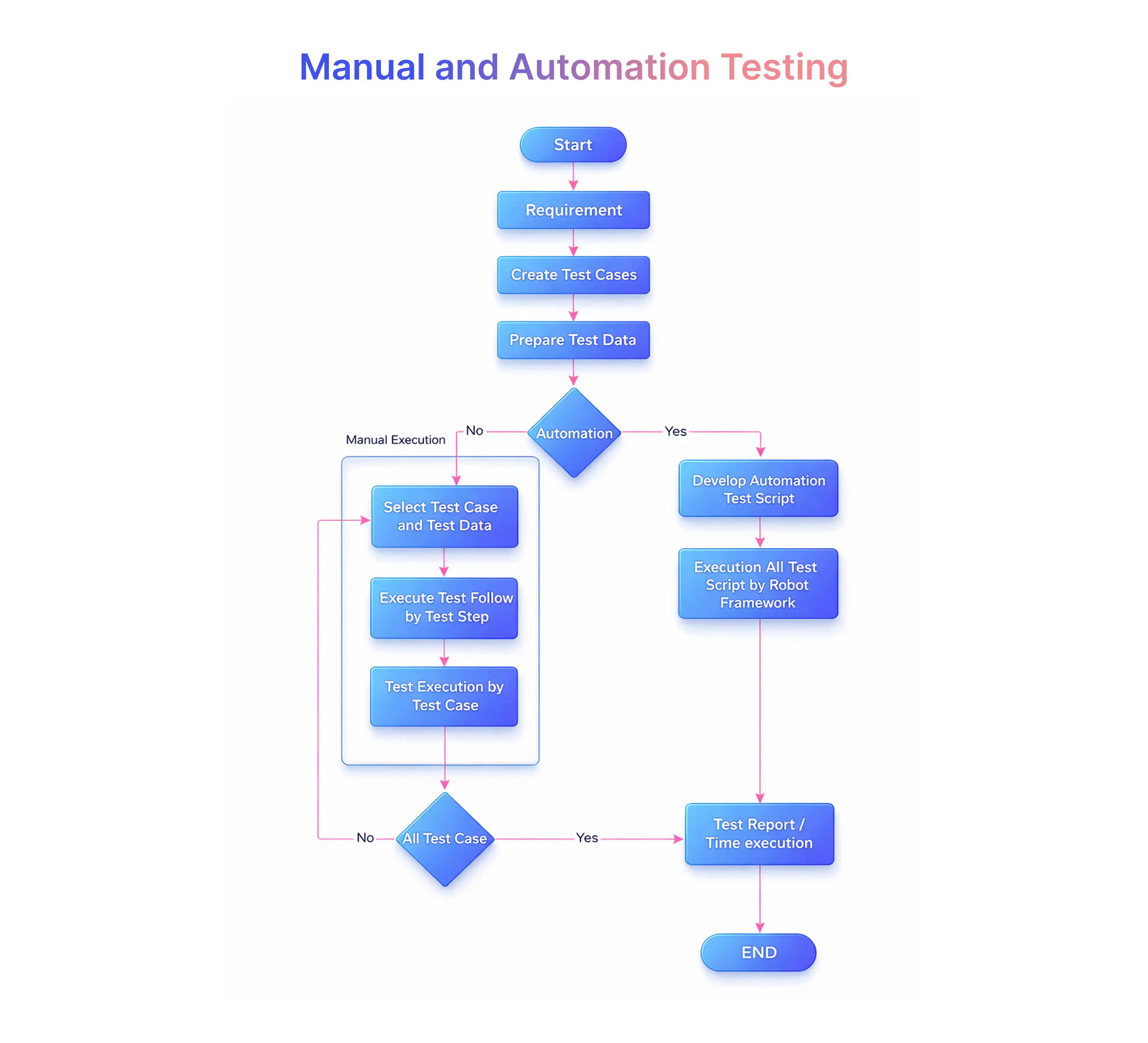
Both manual testing and automation testing approaches play critical roles in authentication testing.
When to Use Manual Testing
Manual testing is ideal for:
- Exploratory testing of edge cases
- Usability tests and accessibility checks
- Error message clarity and tone
- New or frequently changing user flows
Manual testing tools like browser dev tools and API clients help uncover issues automation may miss.
The Advantages of Automated Testing
Automation testing ensures consistency and speed.
Benefits include:
- Faster regression testing in software testing
- Reliable smoke testing after deployments
- Load and stress testing of login APIs
Regression Testing in Login Flows
Importance of Regression Testing
Login flows are tightly coupled with system integration testing and process validation. Even small UI or backend changes can break authentication.
Regression testing ensures:
- Existing users remain unaffected
- Security controls stay intact
- Business rules continue to apply
Strategies for Effective Regression Testing
Effective approaches include:
- Automating high-risk login test cases
- Prioritizing authentication during release cycles
- Including negative testing and boundary testing
- Running regression in CI pipelines
The Software Testing Life Cycle and Its Impact on Authentication Testing
Stages of the Software Testing Life Cycle (STLC)
Authentication testing spans multiple STLC stages:
- Requirement analysis for security and compliance
- Test planning for edge cases and risk analysis
- Test execution across environments
- Defect tracking and verification vs validation
Continuous Integration & Continuous Testing for Authentication Flows
CI/CD pipelines enable:
- Early detection of login failures
- Faster feedback for developers
- Reduced production incidents
This is especially important for large U.S. platforms with frequent releases.
Performance & Usability Considerations
Authentication success depends on both speed and usability. Because users may access secure portals through home Wi-Fi, mobile data, office networks, or public connections, QA teams should test authentication flows across different internet environments. This helps confirm that login pages, OTP steps, session handling, and API requests remain stable for real users.
Login Response Time
Slow login responses frustrate users and increase drop-offs.
Test under:
- Normal load
- Peak traffic
- Poor internet connection scenarios
Load & Stress Testing Login APIs
Stress cases reveal system limits.
Validate:
- Concurrent login handling
- Database and memory usage
- Dependency resource failures
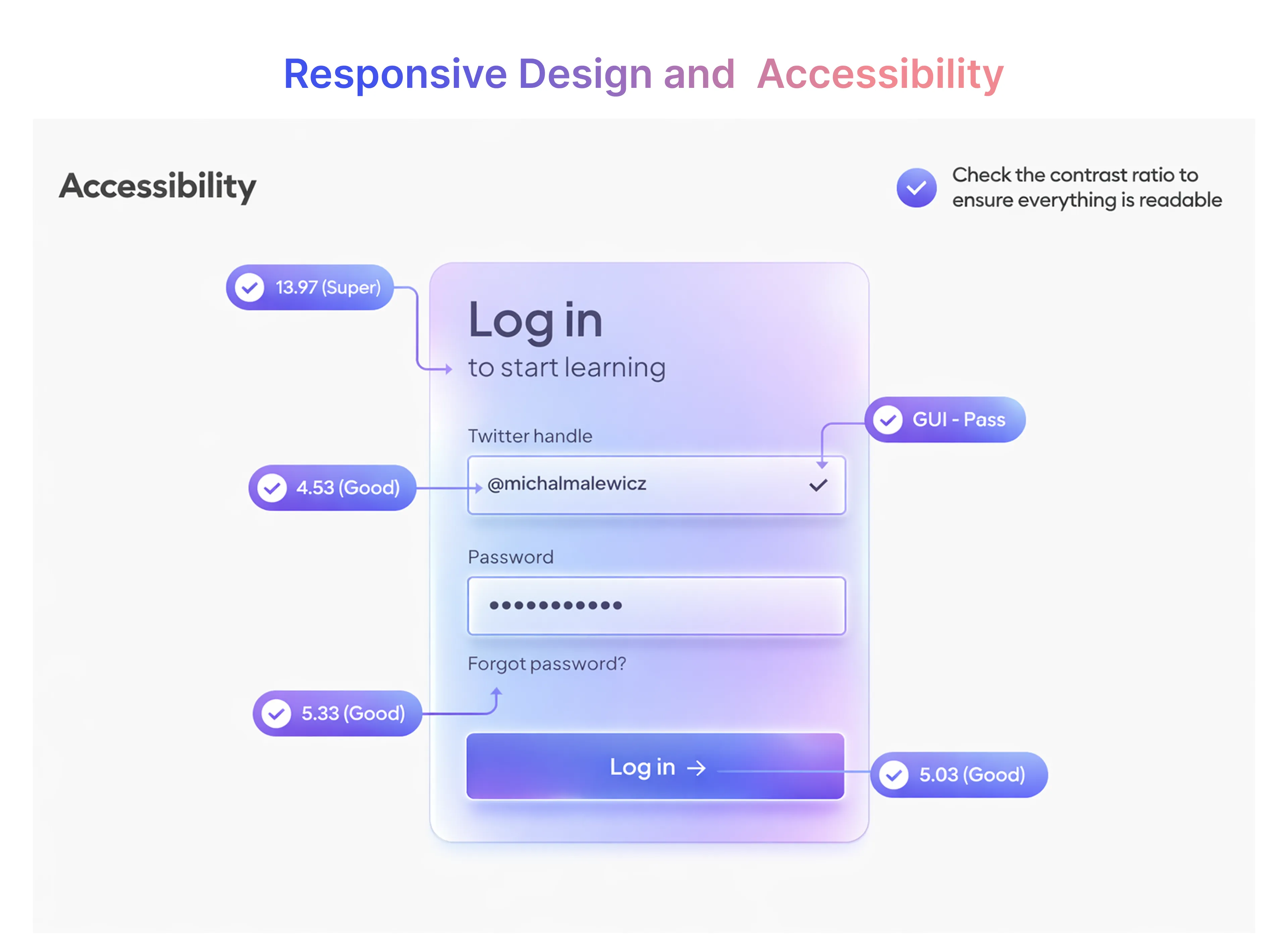
Responsive Design & Accessibility
Inclusive design improves reach and compliance.
Check:
- Screen reader compatibility
- Keyboard navigation
- Assistive tech support
- Consistent UI design across screen sizes
Best Practices for Testing Authentication Flows
Incorporating User Feedback into Testing
User feedback highlights real-world problems QA may miss.
Use:
- Support tickets
- Social media reviews
- Customer service insights
- User journey mapping and personas
Preventing Authentication Vulnerabilities Through Testing
Strong authentication and authorization testing reduces more than just technical defects — it protects revenue, user trust, and compliance posture.
Well-designed testing helps organizations prevent:
- Security vulnerabilities such as access bypass and privilege escalation
- Reputational damage caused by login failures or data exposure
- Support bloat from account lockouts, MFA issues, and access complaints
By validating authentication, token handling, and post-login authorization together, QA teams catch issues that are commonly missed until production.
Frugal Testing works with SaaS, fintech, healthcare, and enterprise platforms to test authentication flows at scale — covering login, SSO, OAuth/OIDC, role-based access control, and regression impact across releases. Our testing focuses on real user journeys, not checkbox compliance.
Want us to audit your authentication flow?
Frugal Testing will review your login, authentication, and authorization workflows and deliver:
- A risk-based authentication test case pack
- Authorization and role-mapping validation scenarios
- Regression impact analysis for future releases
Delivery timeline: 5 working days
Talk to Frugal Testing QA experts and secure your authentication workflows before they break in production.
Conclusion
Testing login and authentication flows goes far beyond checking whether a user can sign in. It requires a deep understanding of edge cases, security threats, performance constraints, and user experience expectations.
Businesses in the United States use functional testing, manual testing, automation testing, and regression testing. These tests follow the software testing life cycle. This helps them deliver secure, reliable, and easy-to-use authentication that grows with their business.
People Also Ask (FAQs)
Q1. How do multi-factor authentication (MFA) flows change the testing approach?
Ans: MFA introduces additional steps beyond basic login, which means testing must focus on more than just successful authentication. QA teams need to validate how the system behaves when one factor fails, when codes are delayed, expired, or entered incorrectly, and when users switch between devices during the process. It’s equally important to test usability aspects, ensuring MFA strengthens security without confusing or blocking genuine users during real-world login attempts.
Q2. What challenges arise when testing authentication across multiple environments?
Ans: Authentication issues often appear when moving between environments because configurations, user data, and third-party integrations may not be identical. Testers must ensure that login flows work consistently in development, staging, and production while accounting for environment-specific limitations. Careful validation helps prevent surprises where authentication works in testing but fails after release.
Q3. How should authentication testing be handled for microservices-based applications?
Ans: In microservices-based systems, authentication is usually shared across multiple services, making failures harder to trace. Testing should verify how tokens are issued, validated, and refreshed across services, and how the system behaves if one service is slow or unavailable. This approach ensures users experience stable access even when backend components change independently.
Q4. What are the risks of third-party authentication providers in login systems?
Ans: Relying on third-party authentication providers introduces dependency risks such as outages, token expiration, or permission changes outside your control. Testing should cover how the application responds during provider downtime and whether users receive clear guidance when login fails. This reduces frustration and helps maintain trust even when external services are unstable.
Q5. How do compliance requirements impact authentication testing?
Ans: Compliance requirements influence how authentication data is handled, stored, and protected throughout the login process. Testing must ensure that security, privacy, and accessibility expectations are met without exposing sensitive user information. This helps organizations stay audit-ready while delivering a smooth and trustworthy login experience for users.

.webp)


.webp)
