
Validating OTP delivery, email authentication, and multi-channel notifications is a vital part of making the user experience smooth in the current digital applications scenario. Nowadays, users are looking for instant accessibility, secure logins, and timely notifications, regardless of whether they are signing in, resetting a password, or getting updates of importance. A minor delay or a failure in message delivery can cause user dissatisfaction, abandonment of the registration process, and even cause a major trust crisis.
Key Points Covered
- How OTP delivery works across SMS, email, and authenticator apps
- Verifying email authentication, inbox delivery, and avoiding spam
- Testing push, text, and in-app notifications for reliability
- Preventing misuse from fake email addresses and blocked notifications
- Ensuring secure two-factor authentication with Google tools
- Why reliable messaging builds trust and boosts user confidence
There are several services working in collaboration with each other, such as email providers, SMS gateways, notification services, and backend APIs. All win the technology through robust testing, which discovers problems before they actually unfold, enhances the app's dependability, and ensures user security. Following a systematic validation procedure guarantees that users are always the first ones to receive messages, authentication processes are not compromised, and apps' and devices' communications are always consistent.
Understanding Email, OTP, and Notification Systems in Modern Apps
No doubt, modern applications have a heavy reliance on communication systems that are reliable to the extent of providing verification, security alerts, and updates in real-time. In fact, when a user is either registering or signing in, the application must deliver messages that are done swiftly, accurately, and securely.
Email, OTP, and notifications are the channels that together form a trusted connection between the app and the user. If an OTP code, email link, or push alert doesn't come, users will lose trust, drop actions, and may even uninstall the app. This is why every product team has to rely on proper validation and testing as a critical requirement.
What Is OTP and Why It Matters in Authentication
An OTP (short for One Time Password) is a temporary security code used to verify a user’s identity during login, signup, or sensitive actions like password reset.
Many users ask “What is OTP?” or “What is OTP in messages?” — and the answer is simple: it’s a unique OTP code sent to a registered device or inbox to confirm identity.
Why OTP is important in authentication includes:
- Secure verification using a one-time password.
- A rapidly expiring OTP code is a security measure set to prevent unauthorized access.
- Identity verification through SMS OTP, email OTP, or authenticator applications.
- There is no requirement for a password to be stored or remembered.
- Protects accounts from hackers, bots, and stolen credentials
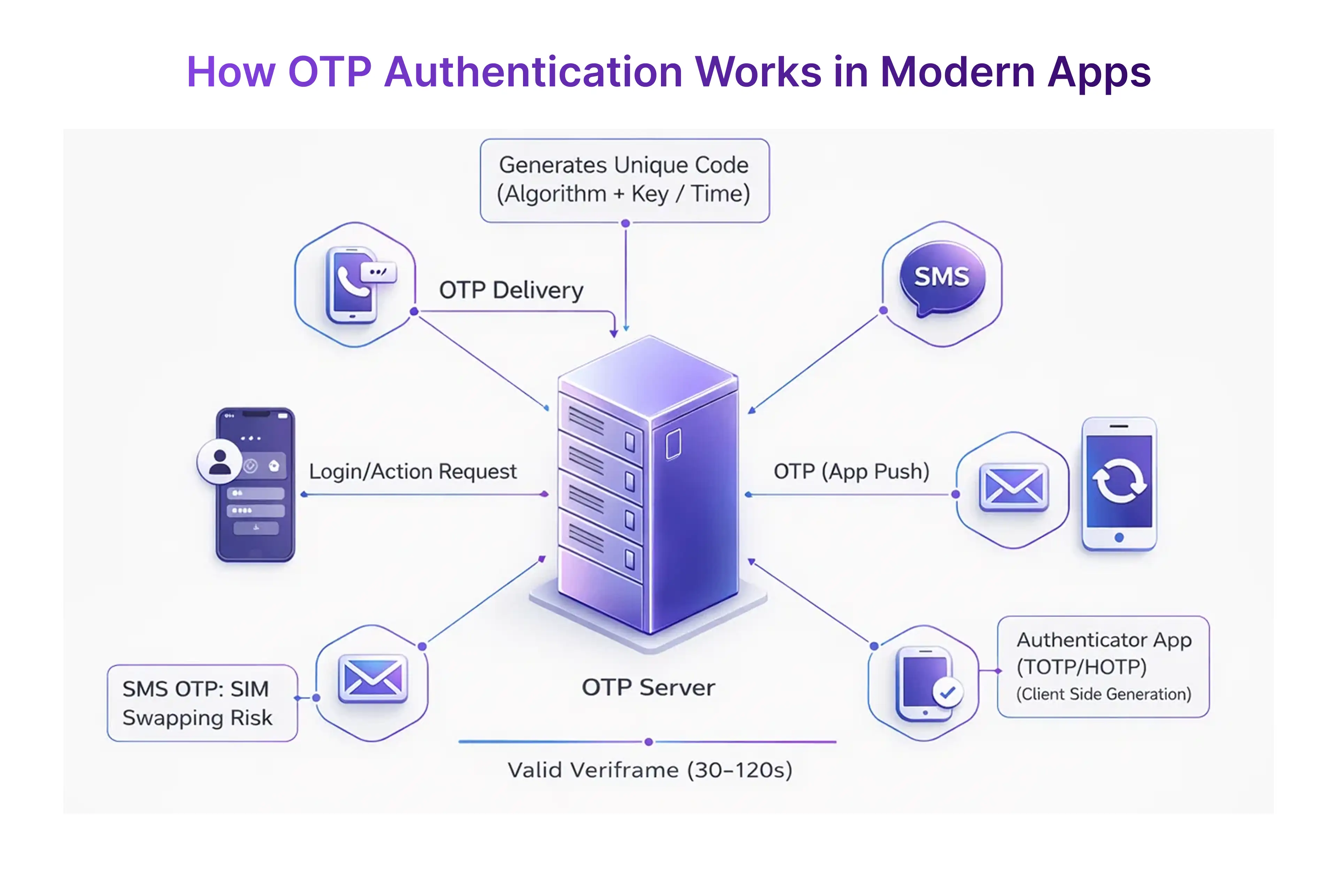
With SMS OTP now common in banking, fintech, and e-commerce onboarding, one-time password authentication has become a core pillar of digital security.
How Email Communication Supports Secure User Onboarding
Email is probably the most important communication channel between the applications and users during onboarding and identity verification.
No matter if it is account activation links or password reset emails, this channel always plays its part in verifying that the email address is a true, reachable one, and email validation helps confirm that the address can be trusted and reached by the actual owner.
How email supports user onboarding includes:
- Sending verification links to confirm user identity
- Delivering welcome messages and account setup information
- Providing fallback options if an SMS OTP is delayed
- Helping users regain access via recovery emails
- Creating a traceable communication log for security events
Email continues to be the foundation of digital onboarding due to its reliability, accessibility, and verifiable audit trail.
What Are Push, Text, and In-App Notifications
Notifications are real-time communication factors, and they serve to keep the users updated, engaged, and aware of the key actions taking place in the app. The notifications assure that the users are always aware of the important events, whether it is a code, a change in account, or a security alert.
Types of notification channels include:
- Push notifications, which arrive even when the app is closed
- Text (SMS) notifications, often used for urgent alerts, including SMS OTP delivery
- In-app notifications, visible only while the user is active in the application
These three notification types help applications guide users, prevent missed verification steps, and support fallback when one communication channel fails.
Testing Email Workflows End-to-End in Real Scenarios
Email remains the preferred and most significant channel for communication during user onboarding, authentication, and account recovery processes. To ensure fostering of trust and reliability, the developers and QA team need to perform real-life users' behavior and verify the application sends emails correctly, securely and uniformly across platforms.
End-to-end validation ensures emails are delivered without errors, verification links function correctly, and the entire authentication flow is protected from misuse.
It must also test system behavior against delayed inbox delivery, invalid addresses, email forwarding, and spam filtering challenges.
Validating Mailbox Delivery and Inbox Formatting
To fully authenticate system accuracy, testers confirm that every message reaches a valid inbox and appears clean, readable, and formatted correctly.
This includes testing various email providers, devices, regions, and network conditions to ensure the email is actually received and displayed as intended.
Key validation points include:
- Confirming email verification messages arrive in the primary inbox
- Ensuring messages avoid email spam folder triggers.
- Checking branding, subject lines, sender identity, and preview text.
- Testing CTA buttons, HTML layouts, and markdown
- Verifying links are clickable and not broken
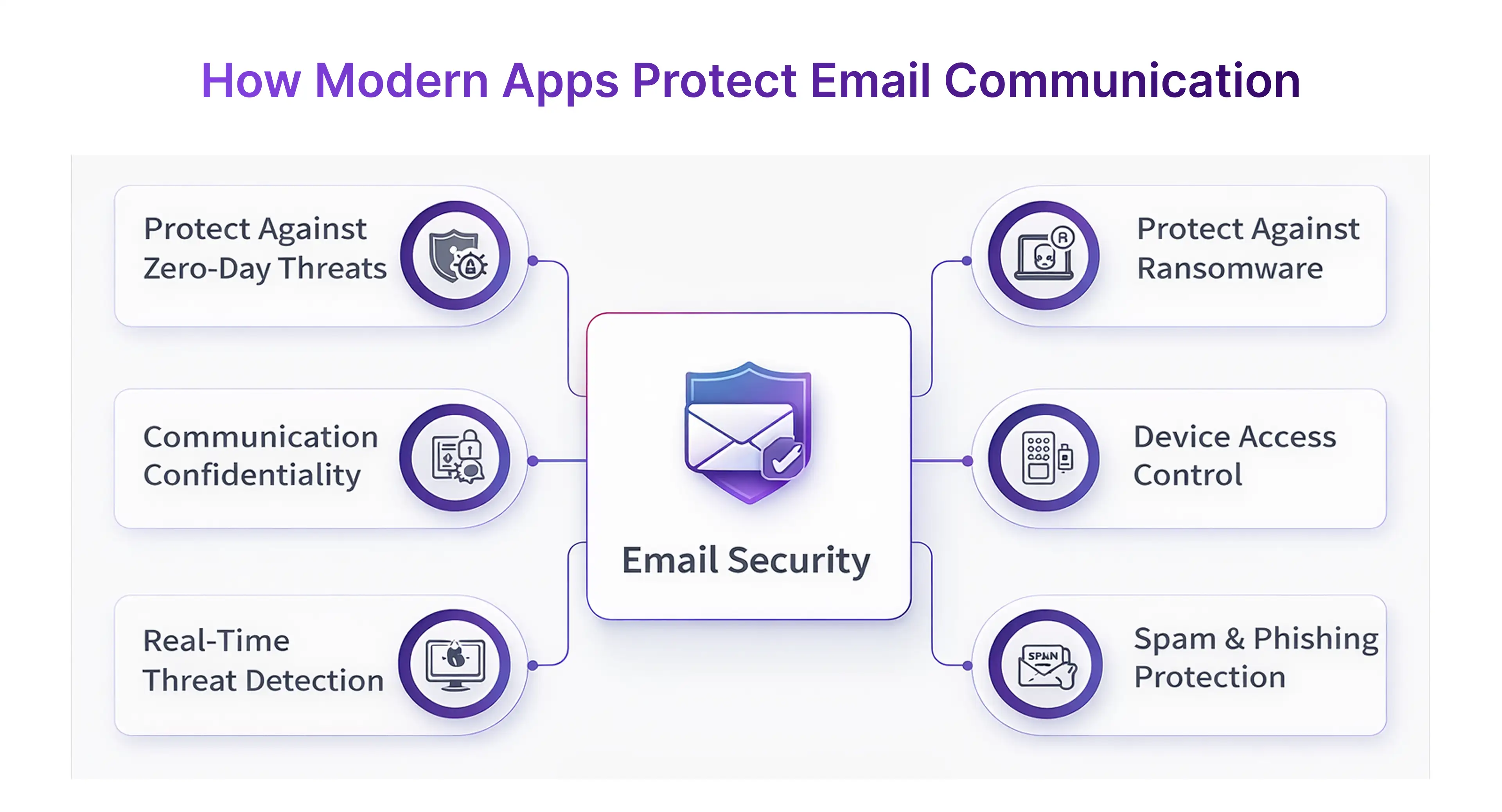
Accurate mailbox delivery testing prevents user frustration and ensures the message reflects trust and professionalism.
Security Testing Using Verification Links and Spam Checks
Email plays a major role in authentication, so verifying its safety is essential.
Testers must check that every email verification link leads to a secure, unique, and time-bound endpoint that correctly validates the user account.
Critical security elements include:
- Testing expiry behavior for expired, reused, and invalid links
- Ensuring links are protected against tampering or replay attacks
- Using spam testers to keep messages out of email spam filters
- Checking behavior when email forwarding obscures addresses
- Confirming the system blocks invalid or risky disposable addresses
This security testing ensures only legitimate users activate accounts and attackers cannot bypass validation using loopholes.
Dealing With Errors From Fake Emails and Disposable Mailboxes
Apps must safely handle malicious intent and user mistakes — from typos in signup forms to deliberate abuse using temporary mail services.
Test flows should include both accidental and intentional misuse of invalid or temporary inboxes.
Important validation behaviors include:
- Rejecting or flagging a fake email address
- Blocking signups coming from a fake mail generator or fake mail inbox
- Showing clear error messages and not breaking workflows
- Resending email verification without exposing system details
- Identifying repeated abuse or automated temp mail submissions
Testing with intentionally incorrect data hardens the system against fake account creation and fraud.
OTP Testing: From Request Trigger to Code Validation
One-time password (OTP) authentication is a very important security measure that is applied to the signing-up and signing-in process, as well as to any sensitive transactions involving the account. The end-to-end testing verifies the very same thing for the one-time password flow — it ensures the whole process works without any mistakes, starting when a user requests a code and ending with the code being validated to grant or deny access.
An OTP system that has been thoroughly tested not only verifies the reliability of the delivery channels but also confirms that they are time-bound, secure, and resistant to fraud. Modern applications must validate SMS OTP, email OTP, and app-generated codes via tools like Google Authenticator and Google Password Manager, ensuring a user-friendly but robust login experience.
Testing One-Time Password Delivery Channels
A core part of OTP testing is checking how quickly and consistently a one-time password reaches the user.
This involves validating multiple sources, such as SMS, email, and app-based codes that generate OTPs offline.
Key testing behaviors include:
- Confirming the OTP request triggers a code instantly
- Checking delivery to SMS, inbox, and Google Authenticator
- Ensuring support for backup channels when a device has no network
- Capturing delays, failures, or duplicate code requests
- Verifying that stored codes are safely handled by Google Password Manager when applicable
Reliable delivery testing ensures users never get stuck waiting for an authentic meaning verification step that should take seconds.
Testing OTP Timers, Resend Rules, and Replay Prevention
Beyond delivery, OTP validation must be secure and time-bound.
Testers verify how long a code remains valid, what happens when users attempt to reuse it, and how the system responds to repeated incorrect entries.
Critical behaviors to validate include:
- Expiry enforcement after predefined minutes
- Blocking reused or already-validated codes
- Allowing limited retry attempts
- Preventing brute-force guessing
- Showing accurate and user-friendly error messages
- Re-sending codes responsibly without opening loopholes
These tests confirm that the authentic meaning of the OTP remains intact — a temporary security token that verifies identity only once.
Multi-Factor Authentication and Device Security
With the increasing security expectations, OTP testing is now considered in the two-factor authentication (2FA) cases. Out of these, the verification of the primary factor (password) and secondary factor (OTP or app code), along with trust-based access to devices, is included.
Important validation points include:
- Testing two factor authentication flows using SMS + Google Authenticator
- Verifying seamless fallback with Google Password Manager
- Checking device enrollment, recognition, and removal
- Ensuring that attackers cannot access accounts without the second factor
- Providing backup and recovery paths supported by Google Support or help flows
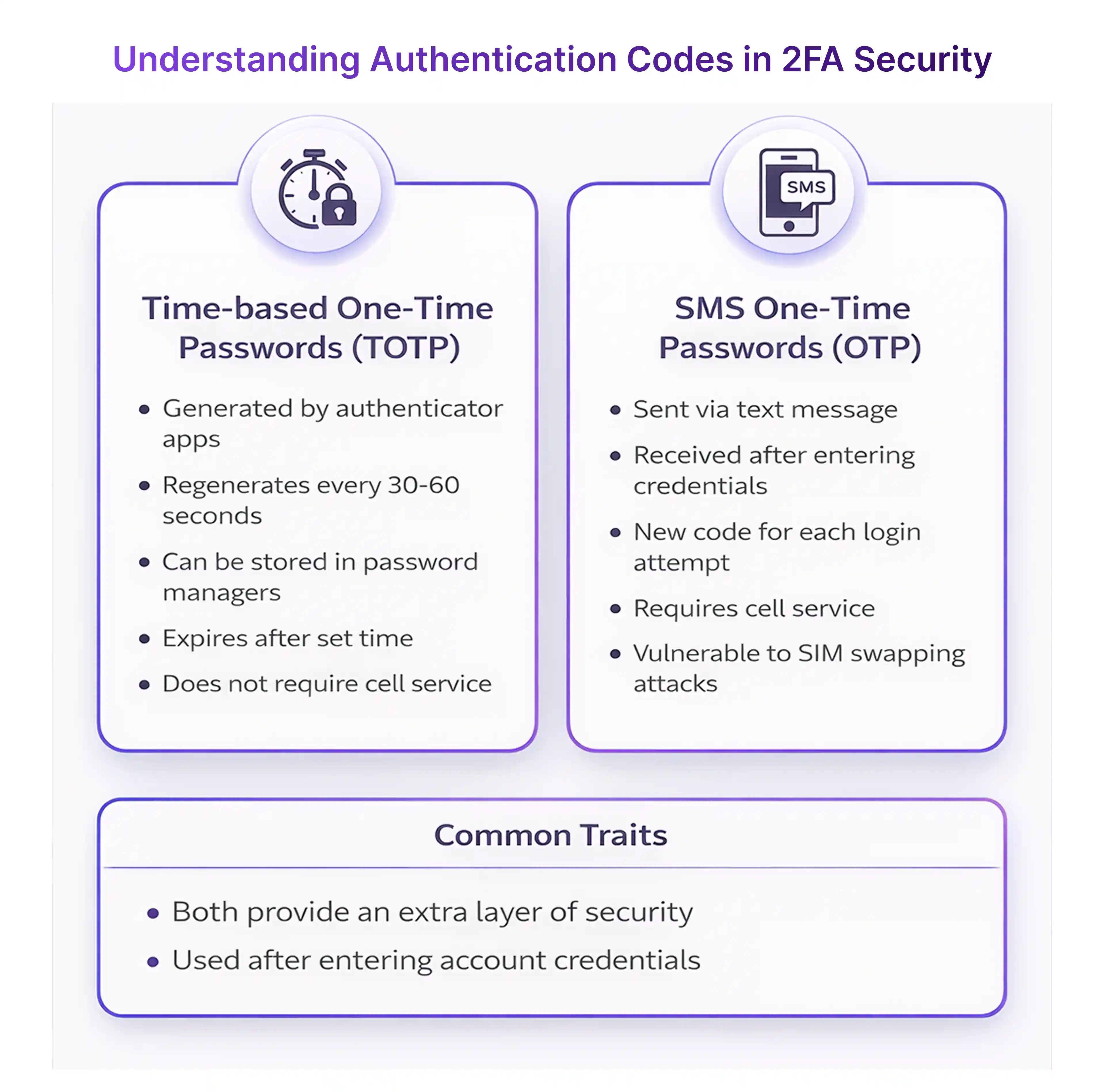
Multi-factor testing ensures that even if a password is compromised, access stays protected — the core authentic meaning of secure identity verification.
Notification Testing for Web, Mobile, and SaaS Platforms
Notifications play a crucial role in the communication between users and applications, as they keep users informed, engaged, and aware of the most important actions taking place in the application. The method of notifications that an application uses, whether it be push, text messages, or emails, the message must always be received by the user on a reliable basis on all types of devices — browsers, Android, iOS, and desktop clients.
All the steps from end-to-end testing will make sure that the notifications are correctly triggered, displayed uniformly, and respected by the user, such as Turning Off, blocking, or choosing not to receive notifications at all. An accurate notification procedure makes sure that users stay in the loop while preventing missed actions, confusion, or alert fatigue — especially in large-scale SaaS systems.
Push Notification Handling Across Devices
A push notification is a kind of alert that an app sends in real-time, and it is received by the user even when the app is not being used. The tests done on these messages include observing their actions across various platforms, browsers, network types, and operating systems.
Push notification testing confirms:
- The message is triggered at the correct moment
- Content renders properly on lock screens and banners
- Background restrictions do not block the alert
- Gmail notifications, app alerts, and system alerts appear consistently
Proper testing ensures content delivery regardless of Android/iOS versions, browsers, or network conditions.
Text Notifications and User-Triggered Alerts
Besides push notifications, a large number of applications use text alerts to send updates that are time-sensitive, for instance, OTP confirmations, delivery messages, or account activity alerts. Testing is concentrated on the timing and the method of sending notifications, particularly in cases where user actions like filling forms, making purchases, or pressing request buttons trigger them.
Key behaviors include:
- Receiving text notifications instantly on the correct device
- Confirming fallback alerts appear through Gmail notifications or in-app banners
- Ensuring alerts trigger only once and not repeatedly
- Capturing responses when a user takes action directly from a notification
- Validating how changes are reflected in the notification history
Reliable text alert handling helps keep users informed and prevents missed actions at critical steps.
Debugging Silent Drop, Muted Alerts & Stop Notification Settings
Not every notification problem comes from the server — sometimes the device or user settings block alerts. Testing must include negative scenarios to understand how systems behave when notifications are restricted or stopped completely.
Important validations include:
- Messages that silently fail due to network or OS throttling
- Behavior when users choose to stop notifications manually
- Muted channels on Android, Focus Mode on iOS, or browser blocklists
- Updates disappearing into notification history without alerting
- Missing Gmail notifications due to priority filters or quiet hours
The tests guarantee that the application will go down smoothly, notify the users if necessary, and will not produce confusion when the notifications do not show at the expected time.
Practical Test Scenarios and Checklists Used by Top QA Teams
Top-quality assurance teams rely on structured, measurable testing steps to validate every communication channel in a modern application.
From email login flow checks to validating a one time password during onboarding, real-world scenarios confirm whether the user journey behaves exactly as expected across apps, devices, and networks.
These checklists also catch failures that users experience every day — missing alerts, email spam, expired codes, blocked text notifications, and data mismatch during authentication.
By treating every scenario as a real user action rather than a theoretical case, QA teams build confidence that each system behaves with authentic meaning, secure delivery, and fail-safe protection.
Functional Testing in Real User Journeys
Functional testing follows the exact path a user takes, step by step.
Teams begin with email login, triggering email verification, and completing authentication using an OTP code sent via SMS or a secure app.
Key actions validated include:
- Receiving a valid one time password in SMS OTP form
- Checking what is OTP in messages for clarity and accuracy
- Verifying business email messages render correctly in mailbox view
- Ensuring buttons, links, and content follow proper email format
- Tracking web and mobile alerts across notification history as steps progress
Convince subclasses that the test plan will be conducted in a real-life scenario, allowing plausible subscribers to sign up, log in, update their profiles, and check in at everyday mundane routines.
Negative & Edge Case Testing Examples
Negative testing validates how secure the system remains when users make mistakes or attempt harmful actions.This includes intentionally requesting invalid credentials, trying to reuse codes, or attempting sign-ups with a fake email address.
QA teams simulate:
- Signing up with a fake email or a fake email generator account
- Letting the OTP code expire and retrying submissions
- Incorrect codes were entered multiple times
- Emails slipping into email spam folders
- Muted apps, where users manually stop notifications
- Attempting logins after deleting accounts, even testing how to delete a Gmail account, is a behavior
Edge case testing confirms the app protects users from fraud and handles unplanned situations gracefully.
Automation and Tools to Scale Notifications Testing
One of their benefits is that they can test hundreds of workflows through automation, which is also applicable to different devices, locations, and time zones. By employing such tools, the testing of delivery speed, the checking of UI behavior, and the assurance of security would be done automatically without the necessity of manually monitoring every single message.
Systems used include:
- Auth tools like Google Authenticator and Google Password Manager for two factor authentication checks
- Web automation frameworks to simulate email notifications, browser prompts, and alert prompts
- Scripts triggering text notifications and verifying presence in notification history
- Bots logging into mailboxes and tracking email verification success
- Internal debugging environments supported by Google Support and integrated cloud tools
The Quality Assurance (QA) teams have the freedom to concentrate on strategy, exploration, and making the user experience more comfortable end-to-end by means of automation, controlling volume and repetition.
Conclusion: Why Reliable Email, OTP, and Notifications Improve User Trust
Reliable communication is the backbone of modern applications, shaping how users perceive safety and transparency. When emails land in inboxes, OTPs arrive on time, and notifications trigger correctly, users feel protected and confident in the system.
Trust grows when:
- Emails stay out of spam,
- Email login and verification run smoothly,
- OTP delivery is fast, accurate, and secure.
- Push alerts reach users at the right moment.
If these channels fail, users may hesitate to engage, complete transactions, or stay on the platform.
Ultimately, reliable messaging is not a feature — it’s a commitment.It demonstrates that the product values security, transparency, and real-time user communication at every touchpoint.
FAQ’ S
1) How do OTP codes keep your online accounts secure?
OTP codes expire quickly and are valid for only one login event. Even if someone knows your password, they can’t access your account without the additional code.
2) Why do email notifications arrive faster than SMS messages?
Emails are routed through the internet, which is typically faster than carrier-based SMS systems.Mobile networks can slow down SMS delivery due to traffic, congestion, or lack of coverage.
3) Can someone hack my account if they know my OTP?
Only if they also have access to your phone/email and your login details.OTP alone is not enough — apps use it along with a password to block unauthorized users.
4)Why do apps limit how many times I can request an OTP?
To prevent abuse by bots or attackers sending endless code requests.Rate limits protect the system and ensure fair service for all users.
5)Are email login links as secure as OTP codes?
Yes — login links are unique, expire quickly, and can’t be reused.They work like a one-time code without needing manual typing.





.webp)