Sanity testing is a focused validation run after minor code changes or bug fixes to confirm that critical workflows such as login, transactions, or key integrations still work correctly. It is not a replacement for regression testing; it acts as a quick gate within the QA process to help teams decide whether a build is stable enough for deeper testing.
In fast-moving release cycles and CI/CD pipelines, running full regression tests after every change can slow delivery. Instead, teams use sanity testing to quickly verify that key functionality remains unaffected before proceeding to deeper validation. This keeps feedback cycles short while maintaining build stability.
What Is Sanity Testing in Software Testing?
In day-to-day QA testing, sanity testing is less about coverage and more about confidence. After a small update or a set of bug fixes, teams run a quick check to confirm that the recent code changes haven’t disrupted key flows in the software program. It’s a focused activity within the broader software development lifecycle, where the goal is simple make sure the build is stable enough to move forward.
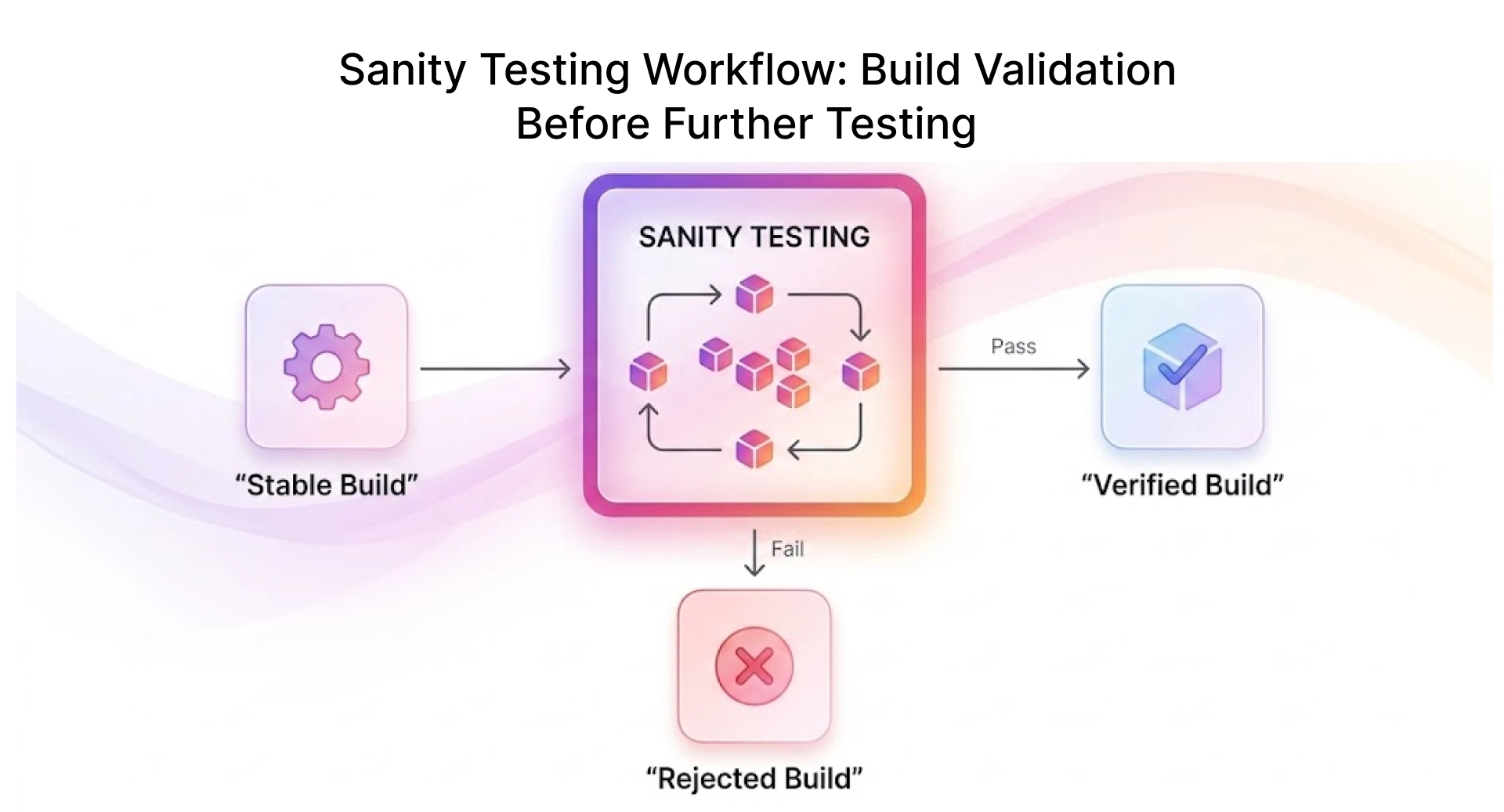
Unlike detailed validation, sanity testing works on a limited scope. The QA team selects a few critical test areas based on recent updates like UI modifications, database connections, or core application platforms' behavior and verifies them in the existing test environment. This approach helps keep things stable without slowing down delivery.
Sanity Testing vs Regression Testing vs Smoke Testing
The table below compares sanity, regression, and smoke testing across purpose, scope, and timing:
When Sanity Testing Adds the Most Value in Release Cycles
Sanity testing adds the most value in fast-changing environments where frequent updates make full regression cycles impractical.
After UI changes or login fixes, teams usually run a quick check before moving to deeper testing, like user acceptance testing.
Where Sanity Testing Fits in the Quality Assurance Process
In a real-world quality assurance process, supported by structured workflows and software testing tools, sanity testing sits right between initial build checks and deeper validation. It’s often triggered after build verification testing, giving the QA Engineer a quick signal on whether the application is ready for broader testing.
Positioning Sanity Testing in Agile and CI/CD Workflows
In modern setups, sanity testing is tightly connected to fast delivery cycles:
- Runs after every build in the software development lifecycle
- Supports quick validation before expanding test coverage
- Fits naturally within a testing framework used by Agile teams
- Works alongside automated tests to speed up feedback
Typical flow:
Code Commit → Build → Build Verification Testing → Sanity Testing → Regression Suite
Impact on Release Cycles and Testing Efficiency
Sanity testing plays a quiet but important role in improving release velocity. Instead of running everything, teams validate only what matters most, reducing unnecessary delays.
- Helps identify showstopper defects early
- Improves system stability before deeper testing
- Reduces dependency on heavy test cycles
- Supports smoother handoff to UAT sanity testing
This focused approach keeps testing lean while maintaining consistent delivery speed.
How to Implement Sanity Testing in Your QA Workflow
Identifying High-Impact Test Scenarios Using Change Analysis
Start with what actually changed. Review recent commits, code updates, or technical specifications to identify areas most likely to break.
A simple way to identify effective sanity test scenarios:
- Review recent commits and release notes
- Identify impacted modules and related user flows
- Check adjacent integrations such as APIs, database connections, and third-party services
- Include flows with a history of breakage after similar changes
- Exclude scenarios already covered in the regression suite
Designing Lightweight, Maintainable Sanity Test Cases
Sanity tests don’t need to be complex a small set of focused checks on critical paths is enough. Instead of detailed flows, keep each scenario to a few practical steps that quickly confirm whether core functionality is working.
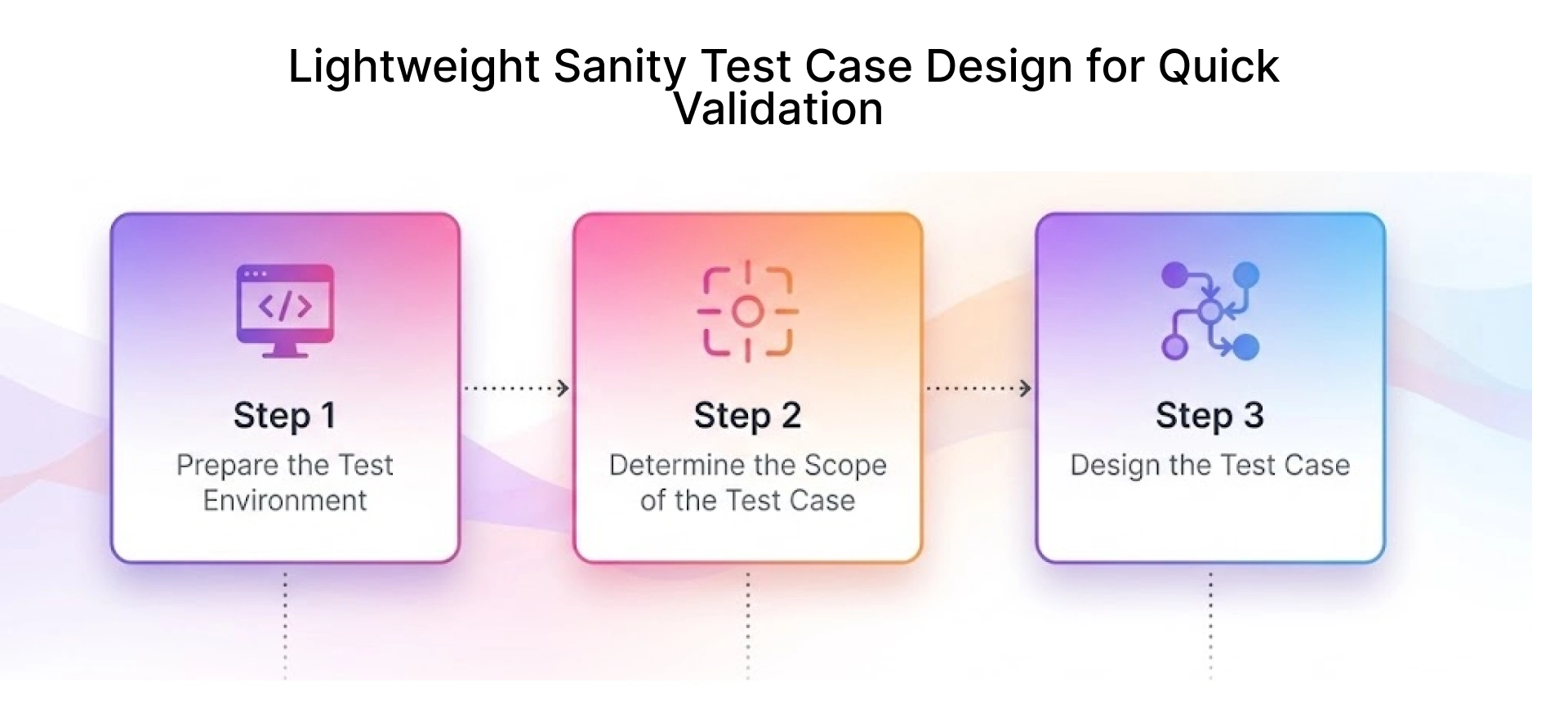
In most setups, teams rely on a few focused steps to quickly confirm that key flows still behave as expected.
Defining Entry and Exit Criteria for Sanity Testing
It helps to keep things clear, but not overly rigid:
- Entry: build is up, environment is usable, changes are known
- Exit: nothing obviously broken, and the build feels stable enough to move ahead
Integrating Sanity Testing into CI/CD Pipelines
In practice, teams don’t really run sanity testing separately. It usually becomes part of the pipeline itself, running automatically once a new build is ready. Once a build is ready, these checks run quietly in the background and give a quick signal if something’s off.
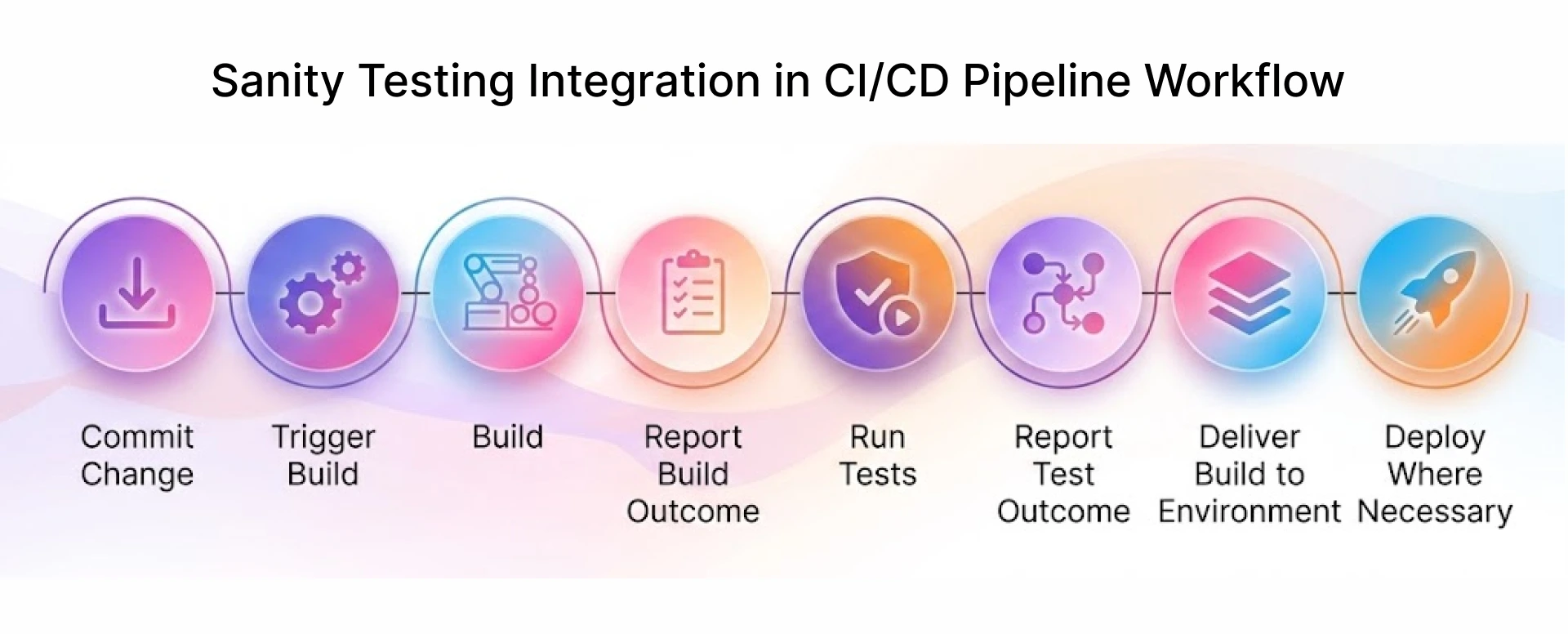
Aligning Sanity Testing with Test Automation Frameworks and Regression Strategy
Sanity testing works best when it’s not isolated. It should fit naturally alongside your regression suite, so you’re not repeating the same checks. The idea is to keep things moving without adding extra effort.
Tools and Frameworks for Scalable Sanity Testing
Most teams run sanity testing using tools already in their stack such as Selenium, Cypress, or existing test automation frameworks. The goal is to configure a lightweight sanity suite within the current setup, not to introduce new tooling.
Selecting QA Testing Tools for Targeted Sanity Validation
Most teams already have the tools needed for sanity testing whether it's Selenium, Cypress, or other qa testing tools within their existing setup. The focus isn’t on adding new tools, but on using current ones to run a small, fast, and reliable sanity suite.
When selecting tools for sanity testing, the focus should be on speed and clarity of results. Teams usually prefer tools that make it easy to run a small set of test cases, highlight failures quickly, and integrate smoothly with existing workflows like CI/CD pipelines and defect tracking systems. The goal is simple get fast feedback without adding overhead to the QA process.
Leveraging Automation Frameworks (Selenium, Cypress) for Sanity Suites
Automation is useful for sanity checks, but most teams limit it to a few high-risk flows that tend to break frequently, rather than automating everything.
A quick example:
Integrating Sanity Testing into Test Management and CI Tools
In practice, sanity testing just becomes part of the pipeline. Once a build is ready, these checks run along with everything else, and the test results give a quick idea of whether things are okay to move forward.
Many teams that offer QA testing services to enterprises follow this approach simply because it keeps things moving without adding extra steps.
Best Practices to Optimize Sanity Testing at Scale
In real-world QA environments, sanity testing becomes more effective when its scope is tightly controlled.
In Frugal Testing’s QA engagements with SaaS and e-commerce teams, keeping sanity suites under 10–15 scenarios has consistently helped maintain feedback cycles within 20–30 minutes, compared to over an hour when the scope starts overlapping with regression.
This approach keeps validation fast while ensuring that critical functionality is always verified before deeper testing begins.
Prioritizing Business-Critical Test Cases Based on Risk
Teams don’t try to test everything they prioritize flows that directly impact users and revenue. If a release touches areas like checkout, authentication, or search, those paths take priority in sanity testing. The goal isn’t to increase coverage, but to ensure that high-risk functionality is validated first, where failures would have the greatest impact.
Maintaining Test Stability Across Frequent Builds and Releases
With frequent updates, even small style changes or UI tweaks can cause unexpected failures. Over time, teams start noticing that certain areas break more often than others. Keeping sanity tests simple helps avoid confusion when something fails.
Even with automation in place, manual spot-checks are worth keeping for visual or layout regressions the kind of issues that may pass in test results but are clearly wrong when reviewed on the screen.
Using Defect Trends and Test Metrics for Continuous Optimization
After a few cycles, patterns start to show. Teams often rely on their defect tracking tool to understand where issues are coming from. If certain areas keep failing, those naturally stay in focus.
At the same time, some tests stop being useful. Removing or adjusting them keeps the test coverage relevant without making sanity testing heavier than it needs to be. It’s more of an ongoing adjustment than a fixed process.
Example: A Simple Sanity Testing Plan for a Busy Online Store Launch
For a high-traffic online store, sanity testing stays focused on a few core flows. Teams validate critical paths, such as login, product search, and checkout, to confirm that the build is stable after changes. If these flows work as expected, the build is typically ready for deeper testing.
Common Challenges in Sanity Testing and How to Overcome Them
When teams rely on sanity testing to quickly validate a build, a few practical challenges tend to surface. Instead of making things smoother, poorly scoped sanity checks can sometimes slow the process down. In most cases, the issue isn’t with the tools being used it comes from how testing is planned and maintained over time.
Avoiding Overlapping Test Coverage with Regression Suites
A common mistake is letting sanity testing turn into a smaller version of regression testing. If a scenario is already covered in your regression suite, remove it from sanity keeping that boundary clear prevents unnecessary duplication and keeps execution fast.
Keeping Sanity Tests Relevant Amid Rapid Feature Changes
With frequent updates, some tests stop making sense. A flow that worked earlier might change due to new features or UI updates, especially in a growing software program.
Instead of letting outdated checks pile up, teams often review their sanity tests alongside feature updates. This keeps the validation aligned with what users actually experience.
Balancing Speed vs Coverage in Fast-Paced QA Environments
There’s always a trade-off. Adding too many sanity checks increases execution time and defeats the purpose. Running too few means critical issues can slip through. Most teams settle on a small set of high-risk test cases just enough to confirm stability without turning it into a second regression cycle.
In practice, teams treat sanity testing as a quick filter for build stability. Deeper validation can always follow, but this step helps decide whether the build is worth moving forward.
Real-World Quality Assurance Examples of Sanity Testing
In delivery environments, sanity testing is more about quick checks than following a process. Teams use it to see if a build is stable enough to move, especially when time is short and releases are frequent.
Sanity Testing in Agile Development Teams (Sprint-Based Validation)
In cycles, sanity testing usually happens right after a new build is shared. The QA Engineer only checks the areas that were recently updated, which keeps the testing short and to the point.
When a sprint adds updates to parts, like login or navigation, teams only check those specific parts instead of doing a full test. This helps teams get quick feedback and move forward without delays.
Sanity Testing in High-Frequency Release Environments (CI/CD Pipelines)
In fast-moving pipelines, sanity testing becomes part of the software delivery workflow. Every software build goes through a quick validation step to confirm build stability before deeper testing begins.
Teams processing 50+ deployments per week typically limit sanity checks to 8–12 critical user actions enough to catch regressions without creating a bottleneck before deeper testing.
How Functional Testing Supports and Strengthens Sanity Testing in QA Workflows
Sanity testing becomes more effective when paired with functional testing. While sanity checks confirm recent updates, functional validation ensures the overall system still behaves correctly.
Over time, teams adjust what they check based on what actually breaks. It keeps things practical without slowing down delivery.
Conclusion
Sanity testing is about checking if a build still works before spending time on it. It is not meant to cover everything. Most teams use it to see if things are stable enough to continue after small updates or fixes.
Teams figure out what works best for them over time. Some teams use test automation more while others do a mix of checks. What matters is keeping the process simple and aligned with the quality assurance approach. When done right, it helps keep quality in check without getting in the way.
If your release cycle is generating more fixes than feedback, Frugal Testing can help you redesign your sanity and regression strategy for faster, more stable delivery. Their team works with QA and engineering leaders to streamline test workflows, reduce redundant coverage, and improve release confidence.
People Also Ask (FAQs)
Q1.How do you define clear entry and exit criteria for sanity testing?
Ans: Sanity testing entry criteria typically require a stable build and a clear understanding of recent changes before validation begins. Exit criteria are simple if no critical issues are detected, the build is ready for further testing.
Q2.How can sanity testing be aligned with regression testing without duplication?
Ans: Sanity testing and regression testing can be aligned without duplication by scoping sanity checks only to recent changes. Any scenario already covered in regression does not need to be repeated.
Q3.What role does sanity testing play in reducing defect leakage?
Ans: Sanity testing reduces defect leakage by catching critical issues early, especially after minor updates or bug fixes, preventing unstable builds from progressing to later stages.
Q4.How can teams optimize sanity testing for faster release cycles?
Ans: Sanity testing can be optimized for faster release cycles by limiting coverage to high-risk functionality and avoiding unnecessary checks. A small, focused set of scenarios helps maintain speed without compromising stability.
Q5.How do you ensure sanity tests remain effective as the application scales?
Ans: Sanity tests remain effective as applications scale when teams regularly review and update them based on feature changes and defect patterns, removing outdated or low-value checks.