The easiest way to start cloud automation is to pick the one manual process your team repeats most and eliminate it. You do not need an enterprise-scale platform on day one. You need a clear starting point, the right cloud automation tools, and a repeatable system that grows with your business.
At Frugal Testing, we have helped startup founders move from chaotic manual release cycles to fully automated deployments without overwhelming their teams. This guide gives you a practical roadmap covering cloud infrastructure, migration strategy, DevOps automation, and serverless computing.
Why Startups Can't Afford to Skip Cloud Automation
The Real Cost of Manual Operations: Time, Money, and Team Burnout
Manual processes are one of the most quietly expensive habits a startup can maintain. When engineers spend hours each week on repetitive task management, from provisioning servers to running deployments by hand, they lose time they should be spending on product development. The 2023 Puppet State of DevOps report found that teams relying on manual work spend up to 33% of their time on unplanned rework. That is a third of your engineering budget going toward problems that workflow automation would solve.
Beyond cost, sustained manual work drives team misalignment and burnout. Business automation is not just an efficiency play. It is a retention strategy. Startup founders who automate foundational operations early protect their team's energy for work that actually grows the business. Before investing in cloud automation and scaling operations, many global entrepreneurs complete their US LLC formation to establish a legal business entity for banking, payment processing, and software subscriptions. Frugal Testing consistently finds that startups that automate before they feel the pain scale far more smoothly than those who wait until the cracks appear.
How Cloud Computing Drives Scalability, Agility, and Leaner Infrastructure Spending
Cloud platforms remove the ceiling on how fast a startup can grow. Traditional on-premise infrastructure demands capital expenditure, long procurement cycles, and ongoing maintenance overhead. Cloud infrastructure services replace all of that with on-demand provisioning, pay-as-you-go pricing, and built-in scalability. The benefits of cloud computing go well beyond cost reduction.
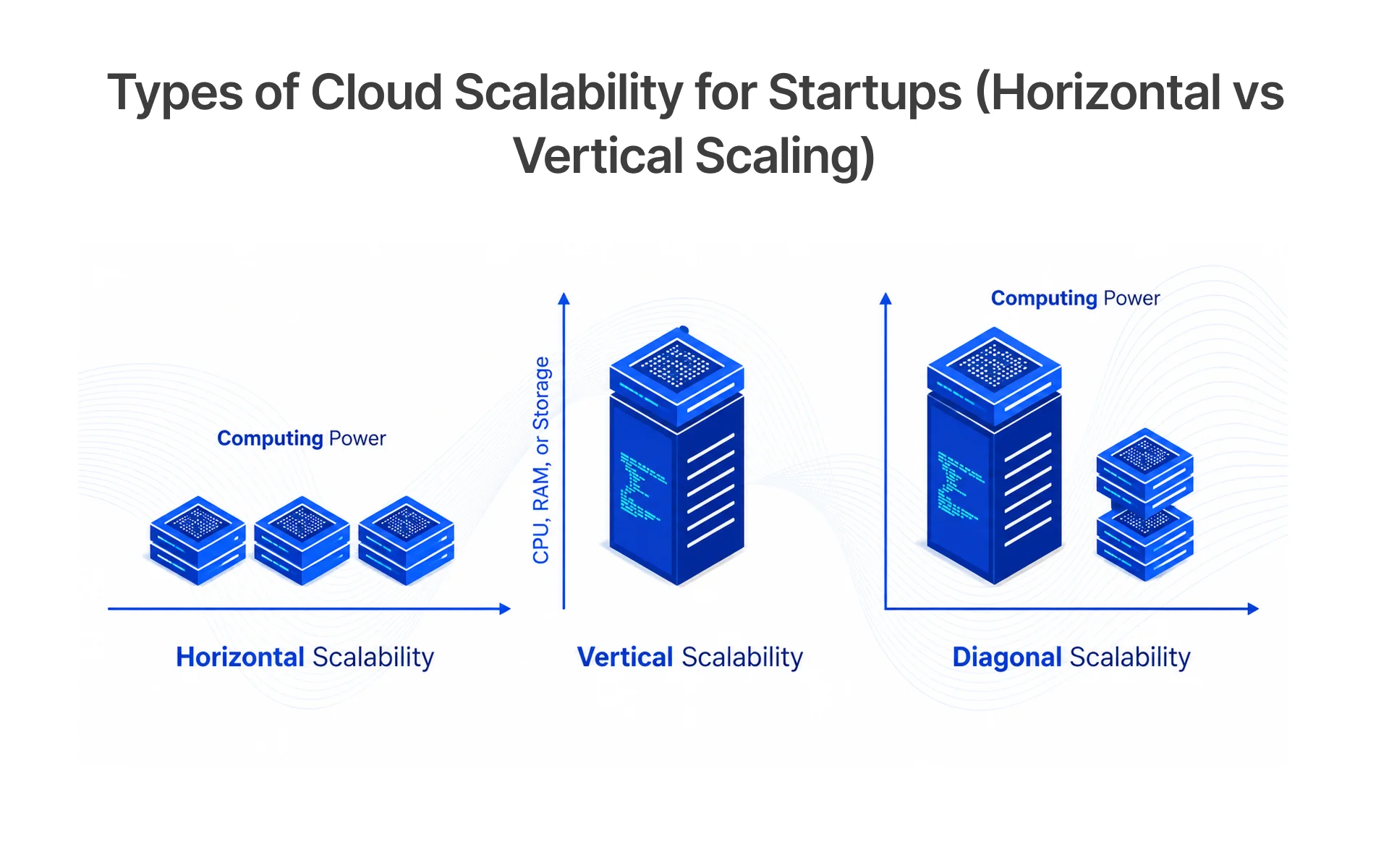
Cloud-native development enables AI-powered automation at the infrastructure level, where resources scale automatically in response to real-time demand signals. Scalable workflows mean your QA team can spin up parallel test environments in minutes. Cloud resource management gives CTOs real-time visibility into spending and performance, turning infrastructure decisions from reactive guesses into data-driven choices that directly improve customer experience and customer service responsiveness.
The Compounding Business Advantage of Automating Early
Automation compounds. A startup cloud strategy built on solid automation in year one creates structural advantages that widen every quarter. Deployments become faster, operations become easier to standardize, infrastructure becomes self-documenting through tools like Terraform, and onboarding accelerates because environments are fully reproducible.
Zapier, whose automation platform supports over 6 million workflows, built its growth on this principle. For startups, the principle holds regardless of scale. Teams that automate foundational processes early move fast without accumulating the technical debt that eventually makes every decision expensive and slow.
Building the Right Cloud Foundation for Your Startup
Cloud Computing Models Explained: IaaS, PaaS, SaaS, and Managed Services
Understanding your cloud options before committing to a tech stack saves significant migration costs later. Infrastructure as a Service (IaaS) gives you raw compute and networking, ideal for teams needing maximum control. Platform as a Service (PaaS) adds a managed runtime so developers focus on code rather than servers. Software as a Service (SaaS) delivers fully managed applications from Google Workspace for collaboration to GitHub for version control and PagerDuty for incident management.
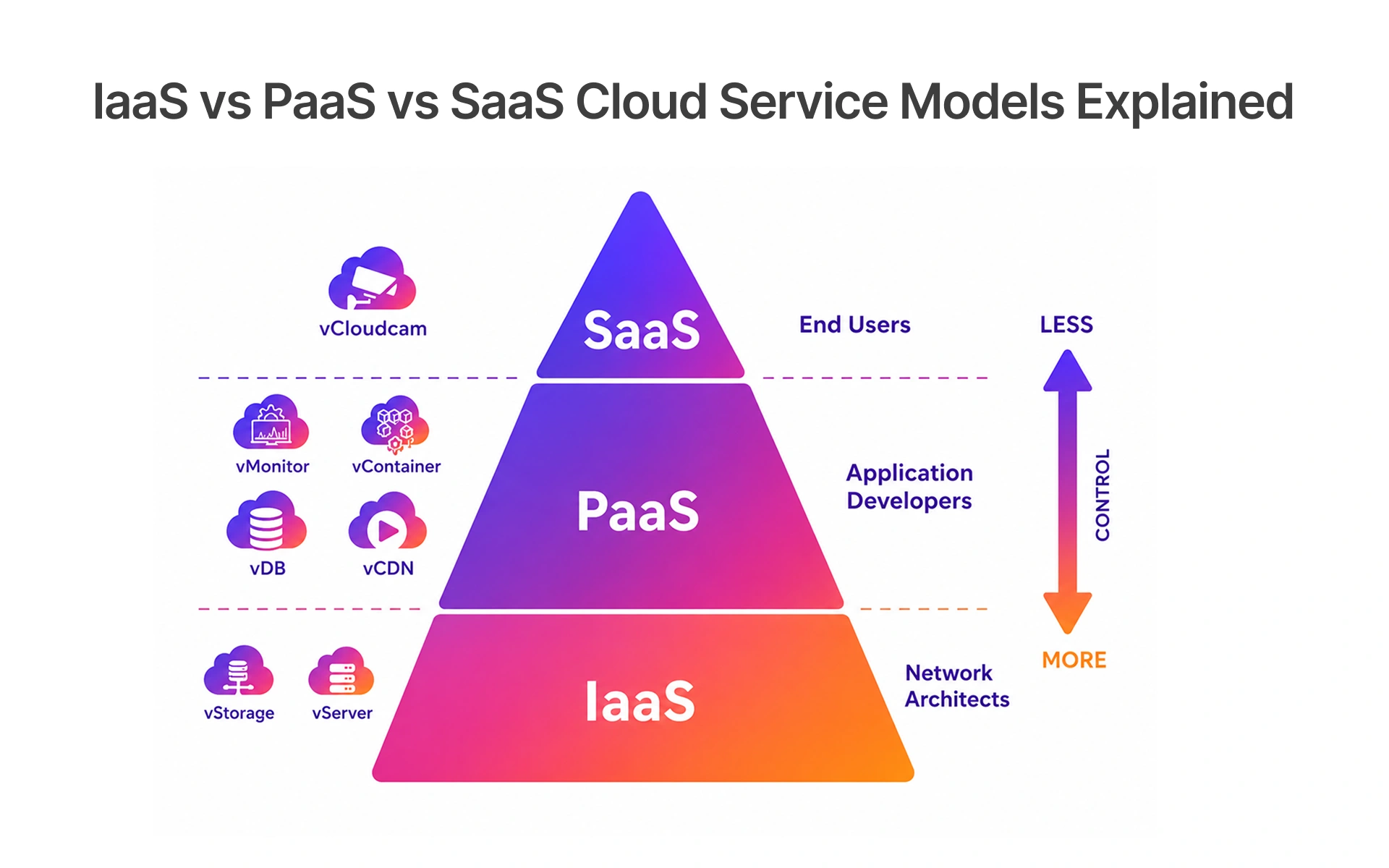
Managed cloud services outsource ongoing operations, so your engineering team focuses on product. Most startups blend these models: IaaS for custom compute, PaaS for databases, and SaaS platforms for business functions like team chat, client onboarding, and internal requests. Match each workload to the model that minimizes overhead without sacrificing the business logic control your team needs.
Choosing Cloud Infrastructure That Grows With Your Startup Stage
The cloud infrastructure that serves you at ten employees will not serve you at one hundred. Early-stage startups should prioritize simplicity: managed services over self-hosted, serverless over always-on compute, and a single provider over a multi-cloud strategy until the team has operational maturity to manage complexity. Cloud adoption should follow your growth stage, not jump ahead of it.
As you scale, introduce staging environments that mirror production, automated scaling policies, and containerization for workload portability. Frugal Testing recommends a simple filter when evaluating cloud consulting services or provider options: Will this infrastructure decision be painful to undo in twelve months? If yes, consider a more modular alternative. Startups managing enterprise resource planning across multiple business units may also benefit from a cloud ERP layer, where Microsoft Dynamics 365 Business Central services providers offer integrated solutions for finance, operations, and resource planning.
AWS vs Azure vs Google Cloud: How to Pick Based on Startup Size, Stack, and Budget
Choosing between AWS, Azure, and Google Cloud is about fit, not rankings. AWS offers the broadest service catalog and richest integration ecosystem, making it the default for most early-stage startups. Azure suits teams embedded in the Microsoft stack, especially those using Microsoft Dynamics 365 Business Central where seamless cloud adoption matters. Google Cloud stands out for data-heavy workloads involving machine learning, real-time data pipelines, Apache Airflow orchestration, AWS Glue equivalent services, and startups building a centralized Data Lake or data analytics solutions.
The table below summarises how each major cloud provider maps to the startup stage, technical stack, and use case use it as a starting filter before evaluating pricing and service depth.
Pick one provider, develop deep familiarity, and introduce a multi-cloud strategy only when operational maturity genuinely justifies the overhead.
Developing a Cloud Migration Strategy That Actually Works
Assessing Your Current Systems and Setting Migration Priorities
A cloud migration that skips proper assessment is one of the most costly startup mistakes. Before touching infrastructure, complete a cloud readiness assessment: inventory every application, map dependencies, identify data storage requirements, and plan cloud data migration carefully around data silos where customer records are stored in isolated environments.These silos are the biggest source of data errors and data quality issues post-migration. Tools like AWS Migration Hub, Azure Migrate, or specialist platforms like OneData Software Solutions automate discovery and generate migration cost estimates before you commit.
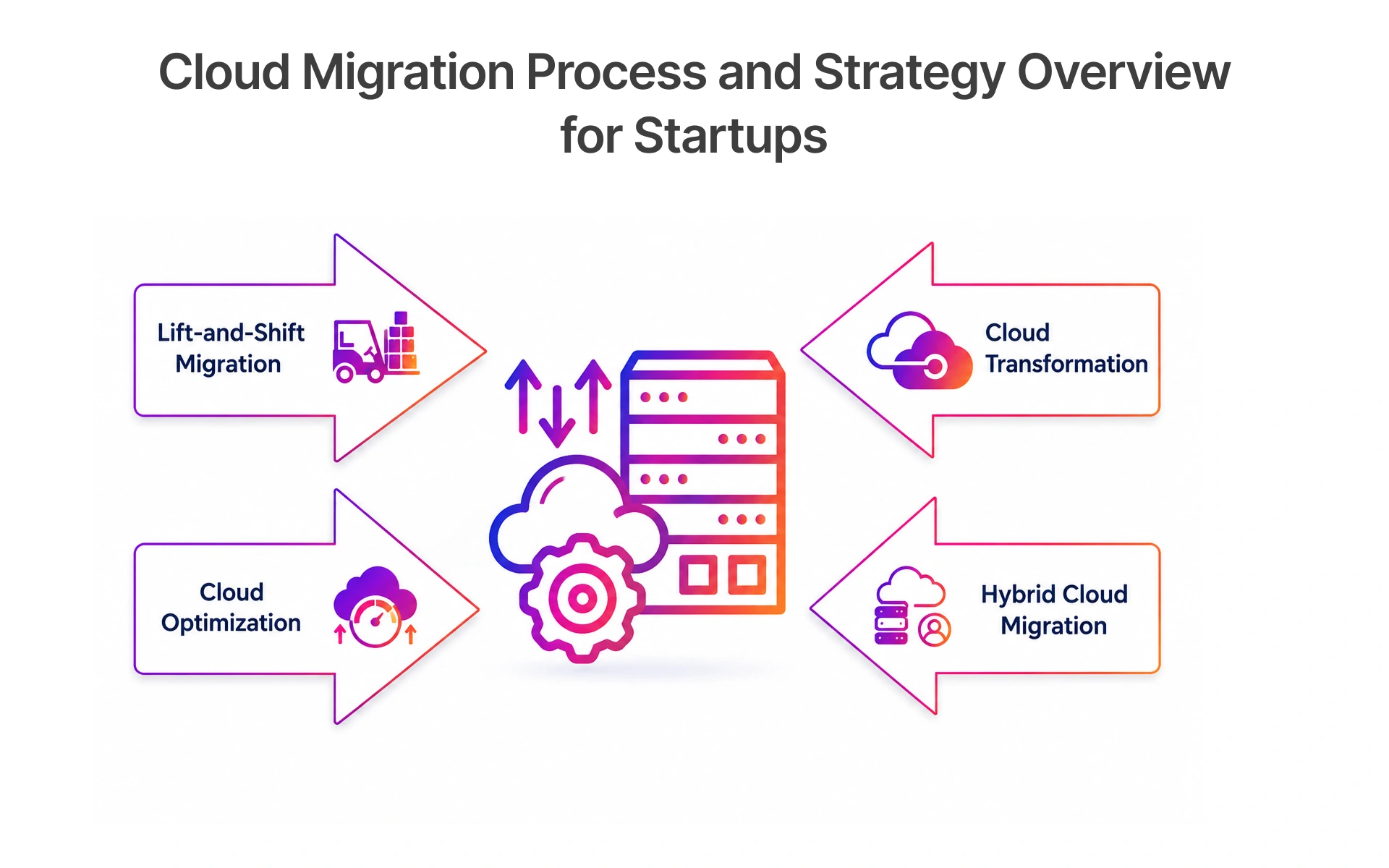
Prioritize migration candidates by business impact and technical complexity. Start with stateless, loosely coupled applications to build confidence, and leave legacy system migration with deep on-premise dependencies for later waves once your runbooks are proven.
Lift-and-Shift, Replatform, or Rebuild: Choosing the Right Migration Approach
Not every application needs rebuilding to benefit from cloud migration, which is why startups should compare deployment strategies before choosing the fastest path. Lift-and-shift moves applications to the cloud with minimal changes, delivering quick savings without significant engineering investment. It works best for stable, lower-risk workloads where speed matters more than optimization. The benefits of cloud migration are immediate: reduced hardware costs, improved availability, and managed recovery services.
Replatforming modernizes specific components, migrating batch jobs to AWS Glue for automated ETL tools and data transformation, or replacing self-managed databases with managed equivalents. Rebuilding to cloud-native development patterns, including real-time data pipelines and microservices architecture, carries the highest migration costs but delivers the greatest long-term value. Reserve application modernization at this depth for core revenue systems. Following a cloud migration checklist for every wave reduces surprises considerably.
A Practical Migration Timeline: What to Tackle in Week 1–4 and Month 2–3
A phased timeline reduces disruption and creates learning loops. In weeks one through four, complete your application inventory, define success metrics, select cloud migration tools, choose your migration approach per workload, and establish cloud governance baselines including IAM policies and data validation standards.
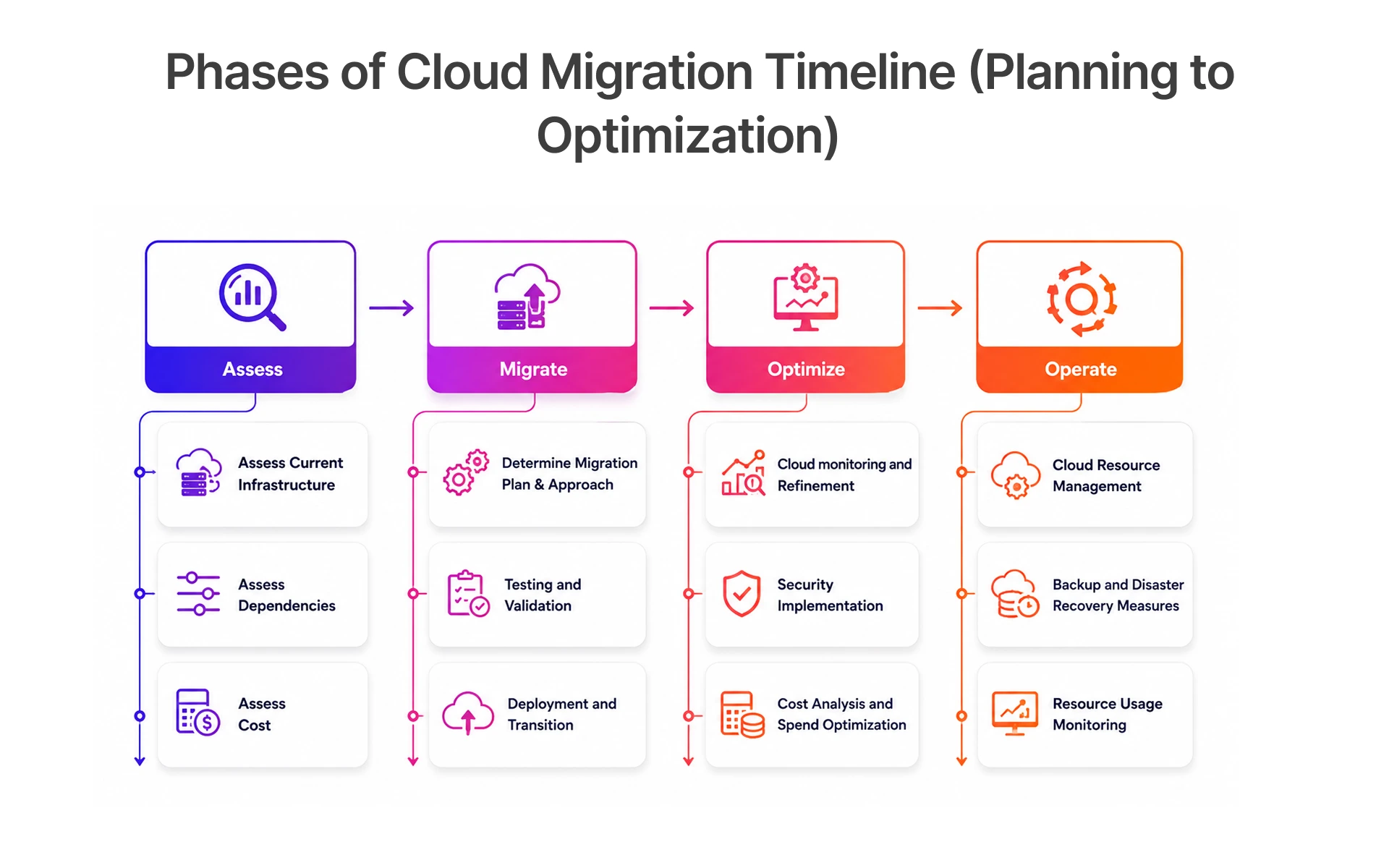
In months two and three, execute your first migration wave on lower-complexity applications. Monitor performance using Real-Time Monitoring dashboards, document issues, and refine runbooks before progressing. Frugal Testing recommends treating this phase as a structured learning investment. The cloud application migration workflows and deployment pipelines you build here compound in value across every subsequent wave.
Automating Operations with DevOps: A Tactical Playbook for Startups
Setting Up Your First CI/CD Pipeline: Tools, Triggers, and Deployment Gates
A CI/CD pipeline connects your code repository to production through automated build, test, and deploy steps. Practical CI/CD tools for startups include GitHub Actions, CircleCI, and Jenkins. Pipeline automation and devops automation mean your team reviews deployment reports instead of manually managing releases.
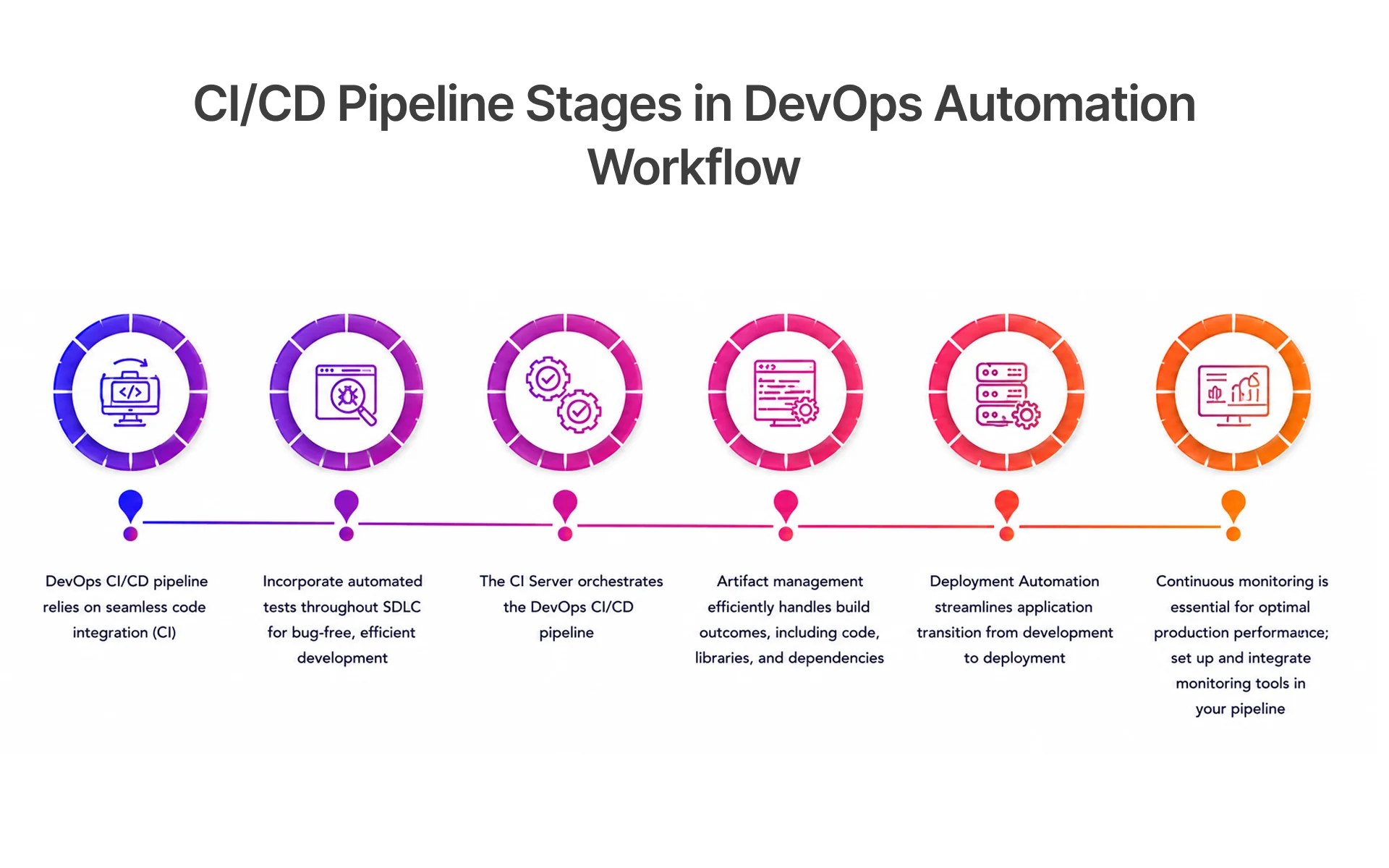
Smart teams integrate Artificial Intelligence and AI-powered automation using tools like AI Blocks for intelligent test selection, connecting Google Analytics and product logs to deployment events to correlate releases with user behavior. Predictive analytics on pipeline data surfaces deployment risk patterns early. For QA engineers, continuous integration tools catch defects at the source, reducing the cost of bugs significantly across each release cycle.
Infrastructure as Code and Automated Provisioning: Eliminating Manual Configuration Drift
Infrastructure as Code treats your entire cloud environment as version-controlled configuration, eliminating the manual configuration drift that causes environment inconsistencies. Tools like Terraform and AWS CloudFormation let teams define infrastructure declaratively, peer-review changes through pull requests, and provision identical environments across development, staging, and production automatically. Professionals looking to build practical expertise in these technologies often strengthen their skills through a structured DevOps Course, covering Infrastructure as Code, CI/CD pipelines, cloud automation, Docker, Kubernetes, and multi-cloud deployment practices.
For teams managing the underlying Linux servers directly, tools like CtrlOps simplify server operations with an AI-powered terminal and one-click deployments so engineers spend less time on manual SSH sessions and more time on actual product work.
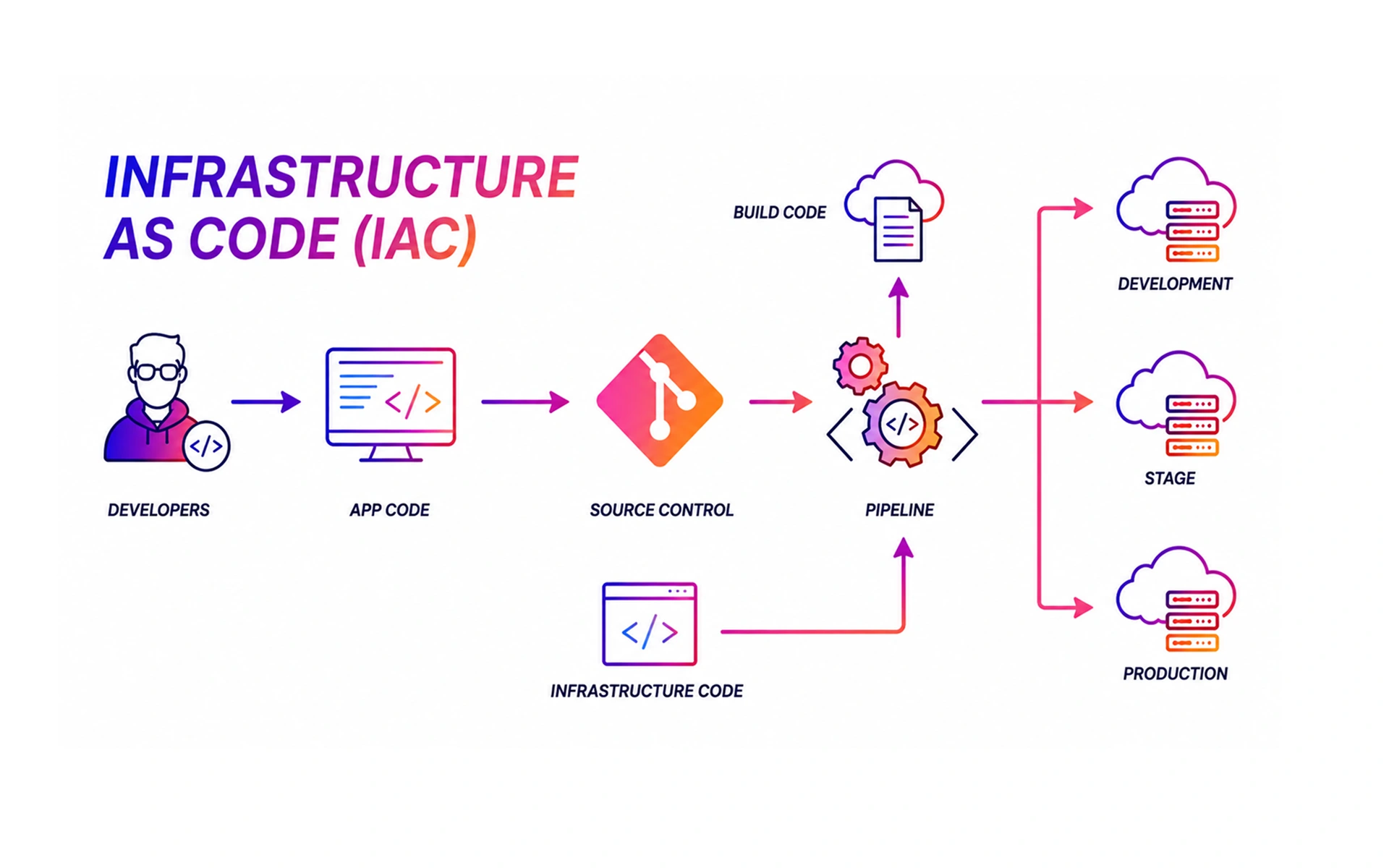
DevOps automation through IaC transforms resource allocation: engineers review and approve configuration code while a DevOps automation platform handles all provisioning reliably. IaC tasks can be tracked using standard issue tracking, DevOps workflows, and devops best practices to maintain visibility and control.
DevSecOps From Day One: Baking Security Into Your Automation Stack
Security added as an afterthought is security that gets bypassed under deadline pressure. DevSecOps integrates security testing directly into your CI/CD pipeline through static analysis tools like Snyk, secrets detection, and template management for standardized security configurations across deployments.
For startups pursuing SOC 2 or ISO 27001 certification, automated compliance checks built into the pipeline cut audit preparation from weeks to hours. Cloud security best practices include least-privilege IAM policies and regular audits of legal agreements tied to SaaS subscriptions. Startups handling sensitive financial or customer data must ensure compliance controls extend across all cloud environments, not just application code.
Why Most Startups Should Start With Serverless (and When Not To)
The Startup Case for Serverless: Zero Infra Overhead, Instant Scale, Lower Burn Rate
Serverless computing is the best infrastructure starting point for an early-stage startup with a small team and unpredictable traffic. You pay only for actual compute time, infrastructure scales automatically, and engineers spend zero time managing servers. The benefits of serverless computing are strongest for event-driven workloads such as API backends, customer support automation, and data processing pipelines tied to customer records.
A startup running its client onboarding workflow on serverless infrastructure handles both ten sign-ups a day and ten thousand without any manual changes. Serverless architecture pairs naturally with a serverless database like PlanetScale or DynamoDB, eliminating database administration overhead entirely. For enterprise-wide transformation initiatives, serverless lets teams run multiple cloud-native services in parallel without the significant infrastructure investment those workloads would traditionally require.
When to Layer in Hybrid Cloud: Flexibility, Compliance, and Workloads That Don't Fit Serverless
Serverless has real limits. Workloads requiring persistent connections, GPU-intensive machine learning inference, or high-frequency database writes will outgrow serverless quickly. When that happens, layering in a hybrid cloud model is the right answer rather than abandoning serverless entirely.
Hybrid cloud solutions let startups run serverless functions for variable API workloads while using dedicated compute for performance-sensitive services. Healthcare and fintech startups frequently adopt this architecture to balance developer agility with cloud compliance requirements, keeping regulated customer records in private environments while running application logic publicly. Kubernetes for startups through Amazon EKS or Google GKE bridges serverless and microservices architecture in a hybrid setup, enabling global hiring and international talent distribution without infrastructure fragmentation.
Security and Cost Guardrails for Serverless and Hybrid Environments
Serverless distributes your attack surface across many individual functions, introducing unique serverless security challenges that traditional perimeter tools miss. Serverless security best practices include strict IAM role scoping per function, input validation at every entry point, and continuous cloud monitoring tools to detect anomalous invocation patterns early.
On cost, serverless becomes expensive at scale without guardrails. Set concurrency limits, configure billing alerts through cloud cost management tools, and run regular FinOps reviews for cloud waste reduction. Data quality checks on serverless functions matter equally: a function processing corrupt input without validation can silently propagate data errors across your entire pipeline, creating expensive problems in your data analytics solutions and Real-Time Monitoring dashboards.
Common Cloud Automation Mistakes and How to Avoid Them
Preventing Over-Automation, Unnecessary Complexity, and Tool Overload
The most counterproductive thing a startup can do is automate everything at once. Over-automation creates brittle systems that are hard to debug and maintain. The most effective cloud automation programs start narrow, automating highest-pain processes first and adding complexity only when simpler approaches stop working.
Keep your cloud automation tools stack lean. Startups often accumulate overlapping tools adopted in isolation, a workflow automation layer here, duplicate no-code workflow tools there. Quarterly reviews that map every tool to a clear business function eliminate sprawl before it becomes an unmanageable burden. Platform engineering discipline, where your team maintains documented standards for approved cloud platforms, prevents tool overload from compounding over time.
Managing Cloud Costs While Maintaining Scalability
Cloud spending without visibility leads predictably to budget overruns. Cloud cost optimization requires both tooling and habits. Cost management tools like AWS Cost Explorer, Google Cloud Billing, and Infracost give real-time visibility into where spending is concentrated.
Frugal Testing has observed that startups can reduce their monthly cloud bill by up to 30–40 percent through consistent resource tagging, automated cleanup scripts, and FinOps reviews, depending on infrastructure maturity and usage patterns. For startups managing international talent across regions, cloud cost governance must account for data egress costs and compliance risk across jurisdictions.
Building Team Readiness and Governance for Sustainable Automation Success
Automation succeeds or fails based on the team operating it. Investing in cloud skills training is the foundation that makes every other automation investment pay off. Structured learning paths, internal knowledge sharing, and clear runbook documentation are the difference between automation that scales and automation that breaks silently.
Establishing a cloud center of excellence, even as a small working group, creates a forum for evaluating new tools and setting cloud governance standards. Site reliability engineering principles, specifically error budgets and service level objectives, give startups a structured framework for balancing velocity with reliability. Teams that build these governance habits early find that structure enables growth rather than slowing it.
Conclusion: Start Small, Automate Strategically, Scale Confidently
Prioritizing Foundational Automation for Immediate Efficiency
Frugal Testing has observed that teams can significantly reduce release cycle times, in some cases by over 50 percent within the first month, by automating repetitive manual deployment processes.
The highest-return starting point is automating your deployment pipeline and infrastructure provisioning. A working CI/CD pipeline and basic IaC foundation deliver faster releases, fewer manual errors, and consistent environments. Do not wait for the perfect architecture. A working automated deployment that ships today creates more value than an ideal platform that ships in six months.
Aligning Cloud Automation With Long-Term Startup Growth Goals
As your automation matures, revisit your startup cloud strategy against business objectives every quarter. What matters is that each automation investment traces to a business outcome: faster time-to-market, lower infrastructure cost, better customer experience, or reduced overhead across customer support and business automation workflows.
Emerging practices like GitOps, AIOps, and NoOps are reshaping cloud-native development for lean teams. GitOps keeps cloud governance consistent through pull-request-driven infrastructure changes. AIOps applies machine learning to operational data, reducing incident response time. Staying current on these trends ensures your automation does not lock you into patterns the industry is moving beyond.
Next Steps for Building a Resilient, Future-Ready Cloud Ecosystem
Your immediate next steps: complete your cloud readiness assessment this week, identify your highest-pain manual process, and improve your CI/CD pipeline before the end of the month. These three actions produce visible results within one sprint.
If you need a structured framework for your cloud adoption journey, Frugal Testing works directly with QA engineers, CTOs, and DevOps leads to build automation practices that scale without adding unnecessary complexity. Start with one process, automate it well, measure the outcome, and let that momentum carry everything forward.
People Also Ask (FAQs)
Q1.How can startups estimate the true cost of cloud automation before implementation?
Ans: The true cost of cloud automation includes infrastructure expenses, tool licensing, migration costs, staff training, and ongoing maintenance startups that estimate all five before implementation to avoid budget surprises.
Q2.What internal roles or skills are most important when building an effective cloud automation strategy?
Ans: The internal roles most important for cloud automation are cloud architects, DevOps engineers, security specialists, and IT operations leads with CI/CD and infrastructure as code experience.
Q3.How do startups balance automation speed with regulatory compliance and data governance?
Ans: By embedding security controls, compliance checks, and governance policies into automation workflows from the beginning, startups can scale quickly without increasing regulatory risks.
Q4.When should a startup transition from basic cloud infrastructure to advanced orchestration tools like Kubernetes?
Ans: Startups should consider Kubernetes when application complexity, container adoption, scalability demands, and deployment frequency exceed the capabilities of simpler infrastructure management tools.
Q5.What metrics should startups track to measure the ROI of cloud automation initiatives?
Ans: Important metrics include deployment speed, operational cost savings, system uptime, resource utilization, incident reduction, and overall productivity improvements.

.webp)

.webp)