

Most software failures in production are not caused by broken code. They happen because the application does not match how users actually work.
Unit tests pass. Integration tests pass. System testing completes without critical defects. Then the system goes live and the first real user cannot complete a basic workflow.
That is exactly the problem UAT testing is designed to prevent.
User Acceptance Testing is the stage where business users, client stakeholders, and operations teams validate whether the software supports real workflows before it reaches production. It is not a QA formality. It is the point where the business decides if the product is ready to be used.
This guide covers everything engineering teams, QA leads, and product owners need to run a structured UAT process: what UAT testing is, why it matters, how the process works step by step, how to write UAT test cases and scenarios, what a UAT checklist looks like, and how to reach formal UAT sign-off.
What Is UAT Testing?
UAT testing, also known as User Acceptance Testing, is the final validation stage where real users, business teams, or client-side stakeholders test whether a software application works as expected in real business conditions.
The purpose of UAT is not just to find bugs. It is to confirm whether the application is ready for actual use.
A system may pass functional testing, integration testing, regression testing, and performance checks and still fail UAT if users cannot complete their day-to-day workflows. That is why UAT testing is one of the most important stages before a product, feature, website, mobile app, enterprise platform, or business system goes live.
In simple terms, UAT answers one important question:
Can the intended users accept this software for real-world use?
If yes, the product is ready for release consideration. If no, the team needs to fix usability gaps, business process issues, workflow failures, missing requirements, or acceptance criteria gaps before production deployment.
What Is User Acceptance Testing?
User Acceptance Testing is a software testing process where end users validate whether the system meets business requirements, user needs, and acceptance criteria before it is released.
Unlike other testing phases performed by QA teams or developers, UAT involves actual users: business analysts, product owners, operations teams, customers, or subject matter experts.
If a banking application is being tested, UAT may involve branch users, loan officers, compliance teams, and finance stakeholders. If an eCommerce application is being tested, UAT may include store managers, order processing teams, customer support teams, and business users.
The goal is to validate the full business flow, not just isolated features.
A UAT test may check whether:
- A user can register successfully
- A customer can place an order
- A payment can be completed
- The invoice is generated correctly
- The order appears in the admin dashboard
- The shipment status updates properly
- The refund process works as expected
- Reports match business expectations
This is what makes UAT testing different from normal functional testing. Functional testing checks whether features work according to specifications. UAT testing checks whether the software works for the people who will actually use it.
Why Is UAT Testing Important?
UAT testing reduces the risk of releasing software that is technically correct but practically unusable.
Many software failures happen not because the code is broken, but because the application does not support the real workflow of users. Requirements may be incomplete, assumptions may be wrong, or the development team may not fully understand how users perform tasks in real life.
UAT catches these issues before the software reaches production.
1. It validates real business workflows
2. It confirms user acceptance
3. It catches requirement gaps
4. It reduces production risk
5. It improves release confidence
UAT Testing in the Software Testing Life Cycle
UAT usually happens near the end of the Software Testing Life Cycle, after major QA activities are completed.
A typical testing flow looks like this:
- Unit testing
- Integration testing
- System testing
- Regression testing
- Performance or security testing (if required)
- User Acceptance Testing
- Production release
In Agile and DevOps environments, UAT does not always happen only at the end. Many teams now involve users earlier through sprint reviews, acceptance criteria validation, product demos, beta testing, and continuous feedback loops.
Still, the formal UAT cycle is usually performed before a major release, migration, feature launch, or enterprise implementation.
UAT Testing vs System Testing
UAT testing and system testing are often confused, but they serve different purposes.
- System testing asks: Did we build the system correctly?
- UAT testing asks: Did we build the correct system for the user?
Both matter. A product should not enter UAT if it is unstable, and a product should not go live if it fails UAT.
UAT Testing vs Functional Testing
Functional testing checks whether a feature works according to the requirement. UAT testing checks whether the feature solves the user's actual problem.
Example: Travel booking application
A functional test case may check:
- User can select source and destination
- User can choose a travel date
- User can apply a coupon
- User can make payment
A UAT test scenario may check:
- A business traveler searches for a route, compares prices, applies a corporate discount, completes payment, receives booking confirmation, and downloads the invoice for reimbursement.
The second is more realistic because it follows the full user journey.
Who Performs UAT Testing?
UAT testing should be performed by people who understand the business process and real user expectations.
Common UAT participants include:
- End users
- Product owners
- Business analysts
- Client-side stakeholders
- Operations teams
- Customer support teams
- Compliance teams
- Finance teams
- Domain experts
- Selected customers or beta users
QA teams usually support the UAT process but should not be the only people performing it. The value of UAT comes from business and user involvement.
The QA team helps prepare test cases, manage defects, set up the test environment, coordinate execution, and track sign-off. But the actual acceptance decision should come from the business or user side.
When Should UAT Testing Be Performed?
UAT testing is usually performed after system testing is complete and before production release.
Perform UAT when:
- A new application is ready for release
- A major feature is being launched
- A business workflow has changed
- A system migration is planned
- A third-party integration is added
- A compliance-critical process is updated
- A new customer-facing portal is being released
- An ERP, CRM, HRMS, banking, healthcare, or enterprise platform is being implemented
For small changes, UAT can be lightweight. For large enterprise projects, UAT should be planned carefully with defined scope, roles, test data, environment, timelines, defect process, and sign-off criteria.
Types of UAT Testing
Different projects may require different types of UAT testing depending on business goals, users, and risk.
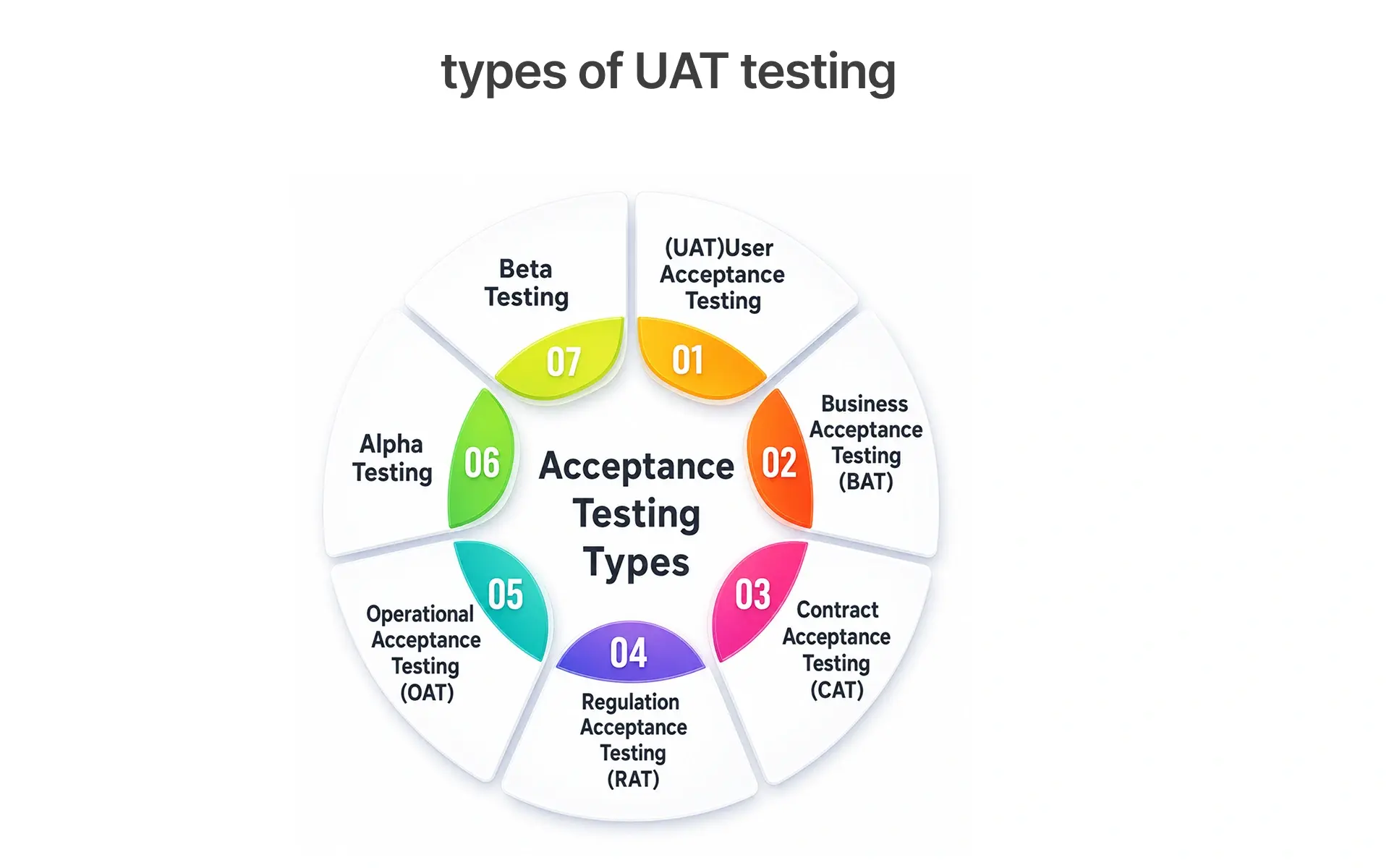
1. Alpha Testing
Alpha testing is performed internally before the product is released to external users. It helps identify early usability and functionality issues.
2. Beta Testing
Beta testing is performed by a limited group of real users in a real or near-real environment. It helps collect feedback before full release.
3. Contract Acceptance Testing
Contract acceptance testing checks whether the delivered software meets contractual requirements. Common in outsourced development and vendor-led projects.
4. Regulatory Acceptance Testing
Regulatory acceptance testing ensures that the system meets compliance, legal, industry, or government requirements.
5. Operational Acceptance Testing
Operational acceptance testing checks whether the system is ready for production operations. It may include backup, recovery, monitoring, access control, deployment readiness, and support processes.
6. Business Acceptance Testing
Business acceptance testing validates whether the system supports business objectives, user journeys, approval flows, reporting needs, and operational processes.
UAT Process: Step-by-Step Guide
A structured UAT process should be traceable and business-focused. Below is a practical UAT process for most software projects.
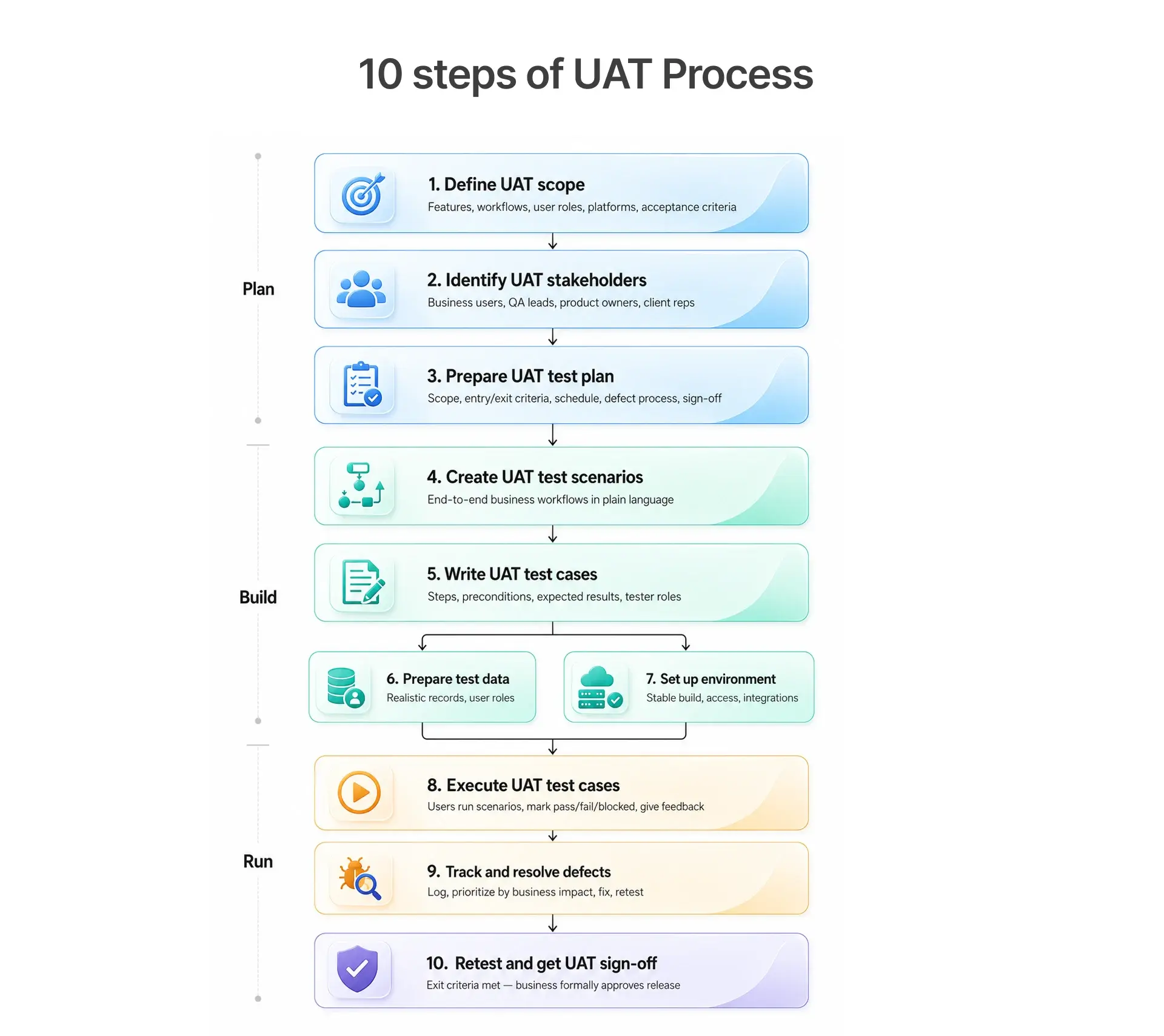
• Step 1 : Define UAT Scope : Establish testing parameters including features, business workflows, user roles, platforms, device integrations, and acceptance criteria to maintain focus
• Step 2: Identify UAT Stakeholders : Determine participants such as business users, product owners, QA leads, and client representatives, ensuring clear roles to avoid coordination issues.
• Step 3: Prepare UAT Test Plan : Create a comprehensive plan covering objectives, scope, criteria, environmental details, data needs, roles, schedules, defect management, and communication strategies.
• Step 4 : Create UAT Test Scenarios: Develop scenarios representing complete business processes, ensuring clarity for non-technical users to execute them without assistance.
• Step 5 : Write UAT Test Cases : Break down scenarios into clear test cases with defined structures (ID, role, preconditions, instructions, expected results).
• Step 6 : Prepare UAT Test Data : Use realistic, masked data to validate workflows and avoid reliance on production data to prevent incomplete results.
• Step 7 : Set Up UAT Environment : Ensure the UAT environment mirrors production with proper configurations to avoid false defects caused by misconfiguration.
• Step 8 : Execute UAT Test Cases : Run scenarios and record outcomes, noting qualitative feedback alongside quantitative results.
• Step 9 : Track and Resolve Defects : Log issues found with detailed information, distinguishing between true defects and change requests to manage scope.
• Step 10 : Retest and Get UAT Sign-Off : Confirm fixes through retesting and secure formal sign-off from stakeholders, signaling readiness for production.
UAT Entry Criteria
Before starting UAT, make sure the application is ready.
Common UAT entry criteria include:
- [ ] System testing is completed
- [ ] Critical and high-severity defects are fixed
- [ ] UAT environment is ready
- [ ] Test data is available
- [ ] User roles and access are configured
- [ ] UAT test plan is approved
- [ ] UAT test cases are prepared
- [ ] Business users are available
- [ ] Build is stable
- [ ] Known limitations are documented
Starting UAT too early wastes user time and reduces confidence in the release.
UAT Exit Criteria
UAT should end only when defined exit criteria are met.
Common UAT exit criteria include:
- [ ] All planned UAT test cases are executed
- [ ] Critical business workflows are passed
- [ ] No open blocker or critical defects remain
- [ ] High-priority defects are fixed or accepted with approval
- [ ] Business users approve the release
- [ ] UAT report is prepared
- [ ] UAT sign-off is received
Exit criteria help teams make a clear release decision.
UAT Test Plan Template
UAT Test Case Example
Here is a sample UAT test case for an eCommerce checkout flow.
This type of UAT test case validates a complete business journey rather than a single function.
UAT Test Scenario Examples
Here are practical UAT test scenarios for different domains.
eCommerce UAT Scenario
A new customer registers, searches for a product, adds it to cart, applies a discount code, completes payment, receives confirmation, and tracks the order.
Banking UAT Scenario
A customer applies for a personal loan, uploads documents, receives eligibility results, gets approval, and views repayment details.
Healthcare UAT Scenario
A patient books an appointment, receives confirmation, checks in online, completes consultation, and downloads the invoice.
SaaS UAT Scenario
An admin creates a new workspace, invites users, assigns roles, configures billing, and reviews usage reports.
HRMS UAT Scenario
An HR manager creates an employee profile, assigns department, initiates onboarding, approves documents, and triggers payroll setup.
CRM UAT Scenario
A sales user creates a lead, updates opportunity stage, adds notes, generates a quote, and converts the opportunity into a customer.
UAT Testing Tools
UAT testing is often manual because it requires human judgment, business validation, and usability feedback. However, tools make the process more organized and traceable.
Test Management Tools
Defect Tracking Tools
Common UAT Challenges
- UAT (User Acceptance Testing) can fail if not planned effectively, leading to several common issues:
- Users may be involved too late, discovering major workflow gaps at the end.
- Test cases might be overly technical, resembling QA scripts rather than user workflows.
- The test data used could be unrealistic, failing to reflect actual business usage.
- An unstable UAT environment can produce false defects and diminish user confidence.
- Acceptance criteria that are unclear can lead to disagreements on feature pass or fail status.
- Defects may not be prioritized based on business impact, despite their operational importance.
- A lack of a clear sign-off process can result in ambiguous and prolonged UAT closure.
UAT Metrics to Track
These metrics help stakeholders make better release decisions.
UAT Testing for Agile Teams
In Agile teams, UAT should not be treated as a last-minute activity. It should connect with user stories, acceptance criteria, sprint reviews, and product demos.
A practical Agile UAT approach:
- Clear acceptance criteria for every user story
- Product owner review during the sprint
- Business user feedback during demos
- Sprint-level acceptance testing
- Regression checks before release
- Formal UAT for major releases
This approach reduces late surprises and improves collaboration between business and technical teams.
Conclusion
UAT testing is not just another testing phase. It is the point where business users confirm whether the software is ready for real-world use.
A strong User Acceptance Testing process helps teams validate workflows, reduce production risk, improve stakeholder confidence, and release software that supports actual business needs.
To make UAT successful: define clear acceptance criteria, involve users early, create realistic test scenarios, prepare proper test data, track defects by business impact, and get formal sign-off before release. When done properly, UAT testing becomes more than a release checkpoint. It becomes a business confidence checkpoint.
Your UAT process is only as strong as the team and tools behind it. If your engineering team is spending weeks on manual acceptance cycles that still result in production defects, it is time to rethink the approach.
Frugal Testing helps QA teams and engineering organizations build structured, scalable testing processes from UAT planning and test case management to automation frameworks and release readiness reporting.
Explore Frugal Testing's QA Services or get in touch with our team to discuss how we can support your next release cycle.
People Also Ask (FAQs) on UAT Testing
Q1.What is UAT testing?
Ans: UAT testing, or User Acceptance Testing, is the process where real users or business stakeholders test software to confirm whether it meets business needs and is ready for production use.
Q2.What is the purpose of UAT?
Ans: The purpose of UAT is to validate whether the software supports real user workflows, business requirements, and acceptance criteria before it is released.
Q3.Who performs UAT testing?
Ans: UAT is usually performed by end users, business users, product owners, clients, subject matter experts, or stakeholders. QA teams support the process but should not be the only participants.
Q4.When is UAT testing done?
Ans: UAT testing is usually done after system testing and before production release. In Agile teams, UAT can also happen in smaller cycles during sprints.
Q5.What is the difference between UAT and system testing?
Ans: System testing verifies whether the software works according to technical and functional requirements. UAT validates whether the software works for real users and business workflows.


.webp)